

Closed (won't fix)
Project:
Drupal.org security advisory coverage applications
Component:
module
Priority:
Normal
Category:
Task
Assigned:
Unassigned
Reporter:
Created:
31 Jan 2014 at 07:56 UTC
Updated:
4 May 2014 at 10:26 UTC
Jump to comment: Most recent, Most recent file



Comments
Comment #1
mehul.shah commentedComment #2
mehul.shah commentedComment #3
nitesh pawar commentedchanged git url
Comment #4
nitesh pawar commentedComment #5
alinouman commented1-I believe its completely useless module since you are just kind of uploading files one can use ftp for it.
2- Images are not extracting on my ubuntu(although message is showing it has done it).
3-Removing pareview bonus tag you haven't done a manual review.
Comment #6
mehul.shah commentedHi Alinouman,
Thanks for your attention.
1. Fixed the zip extraction issue
2. Yes file upload can be done through ftp, but incase if anyone wants to allow clients / customer upload multiple files at the same time (consider market place in eCommerce) it will be very useful module in that case(instead of providing ftp access).
Comment #7
mehul.shah commentedComment #8
mehul.shah commentedComment #9
th_tushar commentedManual Review:
When I installed the module,
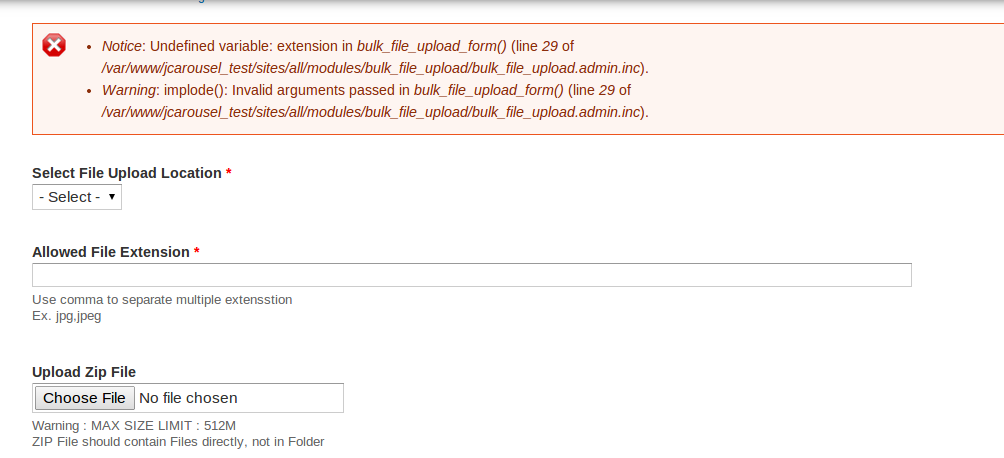
1) I found couple of warnings and notices on the module configuration page.
2) As you have mentioned in Comment #6 - Point #2, This module is not allowing the user to enter the new destination. It is displaying the already created destinations in dropdown.
3) Its not checking the write permissions of the destination and no error is displayed for the same.
4) The files are not being uploaded to the selected destination.
You can refer the screenshots for the code and upload errors. Please fix these issues.
Comment #10
mehul.shah commentedHi th_tushar,
Thanks for attention.
The above mentioned issues are fixed.
1. Warnings and notices are fixed.
2. New functionality is added as create new directory
3. Permission issue is fixed
4. Upload issue fixed
Comment #11
PA robot commentedClosing due to lack of activity. Feel free to reopen if you are still working on this application (see also the project application workflow).
I'm a robot and this is an automated message from Project Applications Scraper.