Problem/Motivation

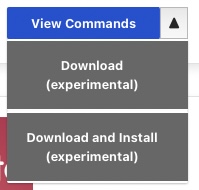
Currently the drop button for a project not installed yet has the default action View commands, which opens the instructional modal how to add and install a module with composer and drush, and the options download (experimental) and download and install (experimental).

expanded drop button with default view commands and the options download and enable

that entails two main problems:

  • the available default action shows how you manually install a project, the options how to install it directly, conveniently via the project browser ui are hidden from the user and require one extra click.
  • having view commands as the default action makes it impossible to assess in which state a module is in. is it already in the codebase or has it already been added. the only state which is clear is the grey Installed button

Steps to reproduce

Proposed resolution

  • I would recommend to remove View commands as the default option. It could be debated if as soon as the svelt ui patch is merged the instructional modal should completely removed and only be available when package manager is not installed or if the instruction should be still be available that users are able to access it somehow (but not sure if it would make sense as a regular option in the drop button)
  • with view commands removed the question is if it should be a step wise process. for modules not added yet have Add as the default option and add and install as an option. question is would users prefer to have add and install as the default and add as on option instead? for modules already added (either in project browser or with composer) the default option would be install.

Remaining tasks

  • ✅ File an issue about this project
  • ☐ Manual Testing
  • ☐ Code Review
  • ☐ Accessibility Review
  • ☐ Automated tests needed/written?
CommentFileSizeAuthor
drop_button.jpg14.1 KBrkoller

Comments

rkoller created an issue. See original summary.

narendrar’s picture

@rkoller, I think this issue can be closed now as the buttons are changed in #3312289: Svelte UI for install controllers

narendrar’s picture

Status: Active » Needs review
rkoller’s picture

hmmm in general the issue was covered in the parent issue.

but one downside i notice is that now the only option available is add and install. there is no way in the interface to just add a module first. you have to manually require it in composer to get a plain install button showing up. out of the box there is only add and install. haven't seen any discussion in regards of removing the drop button in the issue.

and the other detail the state if a module is installed is clear now. but if you have a search results page in project browser with modules not added yet, added, and installed you have to read/scan the add and install and install buttons. both are blue. the only clue might be the different width of the buttons that a user could memorize to distinguish and remove the need to read on future usage of project browser.

benjifisher’s picture

I think this issue can be Closed (outdated). We (meaning @rkoller) can open a new issue based on the comments in #4.

tim.plunkett’s picture

Issue tags: +core-post-mvp
chrisfromredfin’s picture

Status: Needs review » Closed (outdated)

The UI has changed significantly here depending on if the site is "install-capable" and that functionality is enabled, so this is now outdated.