

Closed (cannot reproduce)
Project:
Drupal core
Version:
8.9.x-dev
Component:
system.module
Priority:
Normal
Category:
Bug report
Assigned:
Unassigned
Issue tags:
Reporter:
Created:
29 Dec 2010 at 20:48 UTC
Updated:
6 Jul 2021 at 12:24 UTC
Jump to comment: Most recent, Most recent file


Comments
Comment #1
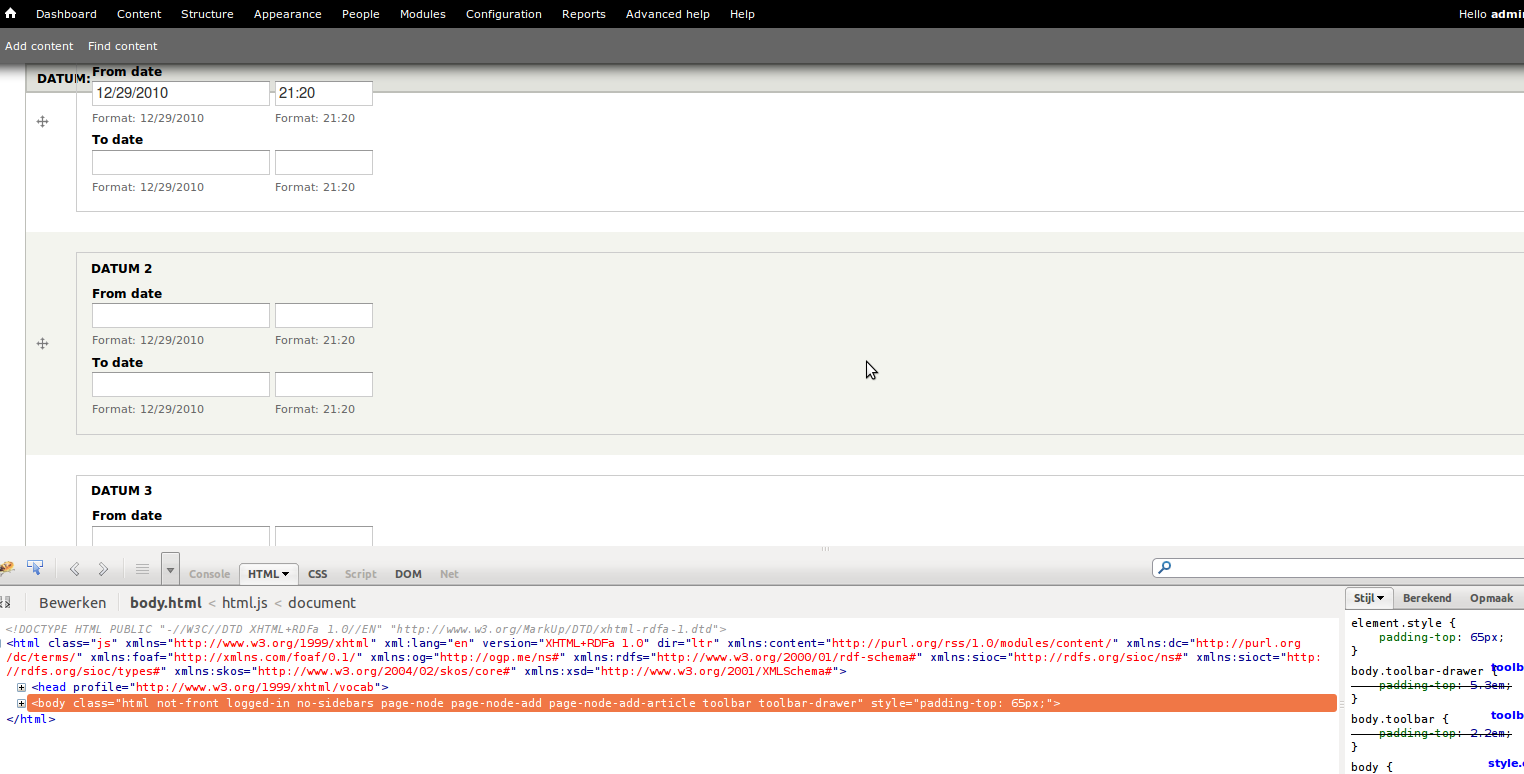
kiphaas7 commentedDoh, forgot the patch... Still needs testing, and if this might be fixed in some other way. Steps to reproduce the above use case: install date module, add date field, see the problem (tested both in firefox 3.6 and opera 11).
I didn find any funky styling for the input elements made by the date module:
Comment #3
kiphaas7 commentedpatch without funky prefixes, still getting used to git.
Comment #4
james.elliott commentedThis occurs because the date module wraps each section in a fieldset and the Seven theme adds position: relative; to the fieldsets. This means that anything inside a sticky enabled table with position: relative; is going to have a z-index issue with the table header. This patch is non-dangerous and fixes this potentially rampant z-indexing issue. RTBC.
Comment #5
kiphaas7 commentedIf that is true... Then the fix shouldn't be in the system.base.css, but in the according template css. Investigating.
Comment #6
kiphaas7 commentedOnly Bartik and Seven exhibit this behavior, Stark and Garland do not have this problem. This is probably because (as james.elliott pointed out) only Bartik and Seven fieldsets use position: relative.
So, added the necessary css change in their own css files. Also added some comments explaining the z-index.
Comment #7
Jeff Burnz commentedActually no, many themes and modules may add position relative to fieldsets or whatever else (some of my D7 themes do this also), so my thinking is this should go into system.base.css.
This is a fairly innocuous change (adding z-index to table.sticky-header), so my thinking is this could basically go strait into D7 and I would also support the patch in #3.
Leaving as needs review because it should have broader testing (I seriously doubt anything is going to break because of this but best to play it really safe at this stage).
Comment #8
kiphaas7 commentedI'll leave it up to higher powers to decide what is the better approach.
I think it is the responsibility of the theme to fix positioning if they introduce a position: relative for fieldsets. On the other hand, position: relative for fieldsets is pretty common.
Attached are #3 (a) and #6 (b), #3 (a) now also has comments.
Comment #10
kiphaas7 commented#8: 1010080_8b.patch queued for re-testing.
Comment #12
kiphaas7 commentedRogue testbot? Last attempt...
Comment #13
kiphaas7 commented#8: 1010080_8b.patch queued for re-testing.
Comment #15
kiphaas7 commentedrerolled, don know what went wrong...
Comment #17
mooffie commented+1
The addition of "z-index" also fixes a problem in the Flag module, whose links are by default "position: relative" and thus overlap the sticky table header.
Comment #18
mooffie commented(The comment in the CSS says "However, fieldsets using position: relative still overlap sticky headers." I suggest it be changed to "However, elements that use 'position: relative' (most notably fieldsets) still overlap sticky headers" because the problem isn't specific to fieldsets.)
Comment #19
kiphaas7 commentedGood one! Will reroll & change as soon as I have some time. Or, if someone else has some time, they could reroll it ;).
Comment #20
kiphaas7 commentedJust the 'a' version with comments improvements per #18.
Comment #21
aspilicious commentedThis is good to go :).
As a few people mentioned we have to fix this in core to overcome problems with position:relative with fieldsets in core and with other elements in contrib.
Comment #22
kiphaas7 commented#20: 1010080_20a.patch queued for re-testing.
Comment #23
rfayD8 first. Let's get these fixed on D8 and into D7.
Comment #24
kiphaas7 commentedOk, but that does not changes the status, right?
Comment #25
rfayI don't see how something can be RTBC for D8 if it hasn't been tested by the testbot and tried out there....
Comment #26
kiphaas7 commentedOk, so now it's a D8 issue, just re-testing the patch should show if the testbot is happy or not for D8, right?
Comment #27
kiphaas7 commented#20: 1010080_20a.patch queued for re-testing.
Comment #28
kiphaas7 commentedAdded tag.
Comment #29
kiphaas7 commentedPatch was tested against D8 and came back green. Since it was previously tested against D7 and set to RTBC per #21, I'm taking the liberty of setting it back to RTBC....
Comment #30
sunThe code should explain in a comment why z-index 1 and not higher or lower. Table headers do use a higher z-index normally, right? Also, if this quirk applies to certain browsers/versions only, then mentioning those wouldn't hurt either. Place that comment right above the z-index line.
Comment #31
kiphaas7 commentedMy pc currently has firefox 4.01, opera 11.10, Chromium 11.0.697.0 and IE 8. I tried all of them with the situation shown in the screenshots of #1, and all of them (IE 8 also in compat mode) exhibit this behavior. So it's probably not a quirk, but expected behavior.
What do you mean by table headers, sticky table headers or regular table headers? In any case, I quickly grepped an entire D7 folder for z-index to be sure, and couldn't find a z-index declaration for any (relevant) table property.
As far as the code comment, would the following suffice?
...headers. To make sticky headers overlap these elements again, a z-index of at least 1 is needed.Or would you expect a more lengthy explanation? I'm hesitant to do so, since z-index is a nasty subject containing stacking order, default values and IE quirks. Which is, to me, out of scope for a simple code comment.
Comment #32
kiphaas7 commentedpatch with proposed comment addition.
Comment #33
kiphaas7 commentedOr a much more extensive code comment...
Comment #34
sunThanks! Though now you slightly went overboard with those comments.
Attached patch hopefully clarifies why it's extremely helpful and necessary to properly document the non-obvious.
Please do not complain about the syntax of the comment. We don't have a coding standard for CSS comments yet, and it's particularly hard to draw a conclusion, because there are no solid examples, and CSS syntax doesn't make it easy either. If you want to help, see you over in #748810: CSS Coding Standards: Comments. Until that issue is resolved, this comment style made most sense for me in this particular situation.
Comment #35
kiphaas7 commentedLooks great, although it's not really clear to me why you upped the z-index from 1 to 100?
Comment #36
sunDrupal is a modular system, but it doesn't have any defined rules for modular element positioning in the viewport.
The default is obviously 0 and regular stacking depends on the markup order in the DOM. A module may add a form element with an advanced layout that should still be rendered below sticky table headers. A theme's layout/design may be based on absolute or relative positioned elements, but sticky table headers should still appear on top. Yet another module may add an absolute or fixed positioned element to the viewport, which always be on top. Some arbitrary examples:
Toolbar uses 600, Overlay uses 500, Contextual links use 999, Administration Menu uses 999, Views UI contextual/admin links use just 50, Autocomplete uses 100.
Using 1 would mean that other potentially positioned elements may still be rendered above sticky table headers when scrolling. Using 100 gives modules and themes sufficient room to position other elements. It's possible that the added comment doesn't sufficiently clarify this, so feel free to re-word it.
It's badly time for designers and themers to have a discussion on setting up formal rules for dividing the viewport into z-axis layers. Otherwise, the only viable solution in a modular system would be usage of JavaScript to apply appropriate z-indexes for all elements, but requiring JS for CSS layout is obviously a bad idea. We should have this discussion as soon as possible (in a separate issue).
Comment #37
kscheirer#34: drupal.system-sticky-tableheaders.34.patch queued for re-testing.
Comment #47
pameeela commentedI don't think the sticky header is there anymore, at least, not in the example from the initial screenshot. Tested in Seven and Claro but the field label is not sticky:
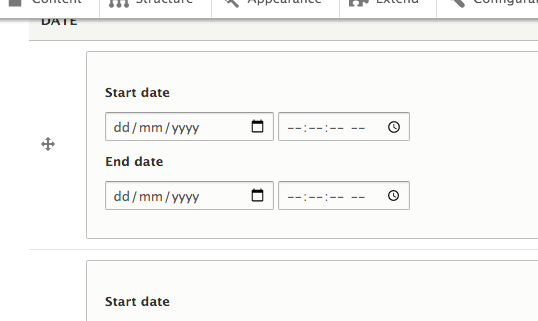
If anyone knows how to get a sticky label, please update the issue with steps to reproduce and set it back to Active.