On my site I've activated the Profile module and added new user fields (phone and city) under a category called "Contact Info."
If I'm using the Garland theme (or others) and I go to edit a user, I see tabs that correspond to the categories--the default category of "Account" and the "Contact Info" category that I created. So far so good.
If I switch to Bluemasters and edit a user, I see all the "Account" fields, but I no longer have access to the fields in the category "Contact Info." The tab that should take me to "Contact Info" isn't there.
Suggestions?




Comments
Comment #1
skounis commentedHi surlyrobot, can you please attach any screen shot to help us figure out your issue?
Comment #2
skounis commentedComment #3
surlyrobot commentedHi skounis,
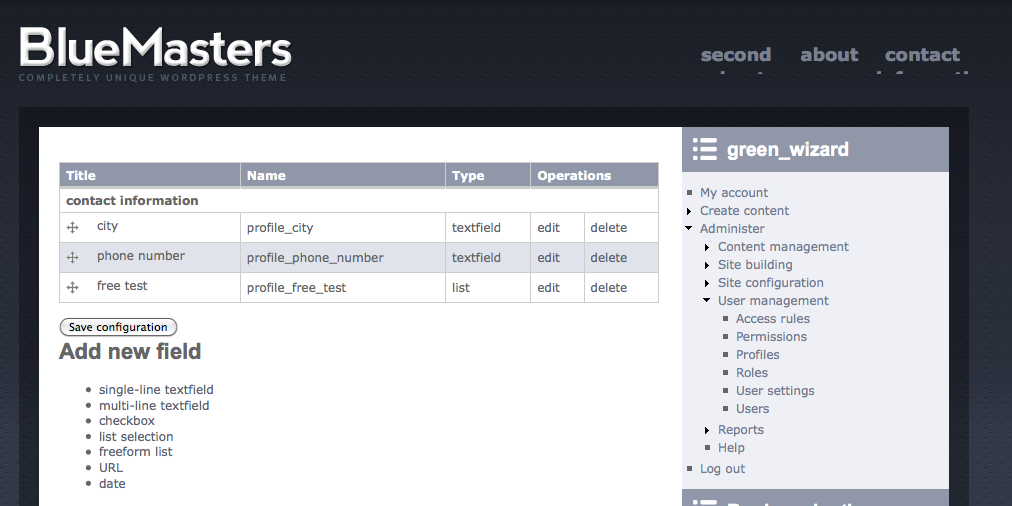
I've attached three screen shots. "Contact info.png" shows the profile fields I set up--you can see that, using the Profile module, I've added a tab called "Contact Info" to each user. The new tab has three fields: city, phone number, and free test.
When I am using the Garland theme, I see the "Contact Info" tab when I edit a user ("in garland CONTACT INFO tab is present.png"). However, when I use BlueMaster, I don't see the "Contact Info" tab when editing a user, and therefore can't change the data in those fields or enter data in those fields ("in blue masters CONTACT INFO tab is missing.png").
Let me know if that helps explain the problem. Thanks!
-Surly R.
P.S. I have the same problem when using Magazeen Lite
Comment #4
comodo1980 commentedI have the same problem, any solution?
Thanks.
Comment #5
stebro commentedComment #6
stebro commentedI've also that problem. Has anyone an idea or workaround?
Comment #7
stebro commentedfound it. Simply add
in template.php at "function phptemplate_menu_local_tasks". (Line 82)
It should look like this: