Summary:
Thumbnails and images styles are not being created - I'm missing something.
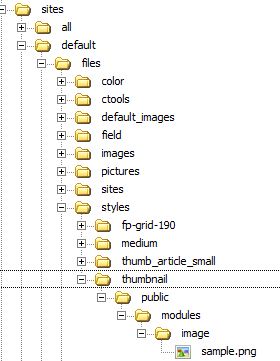
One suspicious thing is that the directories being created for the styles take the form (use default thumbnail style as an example):
"/sites/default/files/styles/thumbnail/public/modules/image/absentfile.png"
When Drupal tries to display a missing thumbnail, it references this directory, which I assume is where the thumbnails should be stored:
"/sites/default/files/styles/thumbnail/public/default_images/absentfile.png"
In those erroneous-looking directories, there are no image files created.
There are no error codes in the log.
Background:
- File system Writable (public download method): OK
- GD library PNG support bundled (2.0.34 compatible): OK
- GD library rotate and desaturate effects bundled (2.0.34 compatible): OK
- Checking: Home » Administration » Configuration » Media Public file system path: "sites/default/files"
- All modules up to date, which include: Drupal core 7.0, Administration menu 7.x-3.0-rc1, Advanced help 7.x-1.0-beta1, Backup and Migrate 7.x-2.1, Chaos tool suite 7.x-1.0-alpha4, Color Theme 7.x-1.0, Devel 7.x-1.0, DraggableViews 7.x-1.x-dev (2011-Feb-25), Nice Menus 7.x-2.0-beta2, Panels 7.x-3.0-alpha3, Pathauto 7.x-1.0-beta1, References 7.x-2.x-dev (2011-Mar-27), Taxonomy Manager 7.x-1.0-beta1, Theme developer 7.x-1.x-dev (2011-Feb-25), Token 7.x-1.0-beta1, Views 7.x-3.0-beta3, Webform 7.x-3.9, Sky 7.x-1.6,
Posts so far un-helpful:
http://drupal.org/node/1053114
http://drupal.org/node/888574
http://drupal.org/node/873838
http://drupal.org/node/830492
http://drupal.org/node/979382


Comments
Comment #1
itaces commentedthe .htaccess file was corrupted.
One way of checking was turn off Clean URL's, and then it started working.
I replaced with the original Drupal one and everything worked.
Hurray!
I hope this helps someone else.
Comment #2
harrybw commentedI am having this issue. What was the issue with the .htaccess? With what did you replace it?
I have spent a lot of time on this problem and this is the only place I have heard mention of it. I would be very appreciative of assistance.
Thanks,
Harry
Comment #3
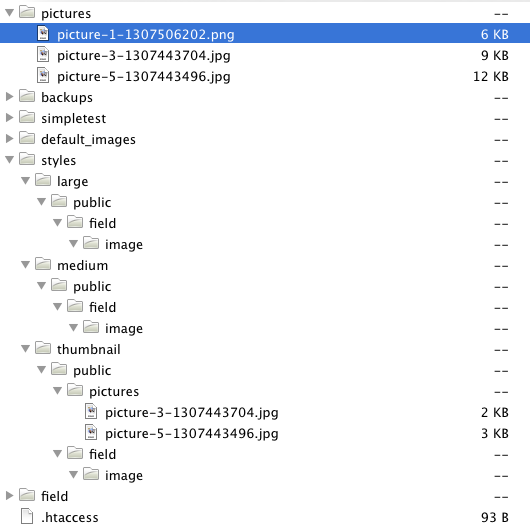
herojig commentedAlso looking at this problem as well, although in my case the expected styles dir structure is there, but thumbnail is not created, but the pic is uploaded to the /default/files/pictures dir. Confused...as it was working...see attached screencap and not the ...202.png
Comment #4
dquark3 commentedI had the same problem, with no apparent reason. After much work I have discovered an incompatibility with module "Fast 404", which I have now disabled. I tested all Fast 404 settings and could not resolve this issue short of disabling it.
Suspected reason: image styles (like a thumbnail) are created on the fly, and truly don't exist at the time Fast 404 catches it.
Comment #5
gebjohn commentedDoes anybody have any insights into configuring lighttpd with mod_rewrite and making this work??
I have a similar sounding problem to #1. The images are not created in the different styles if clean-urls are switched on. Switching it off temporarily fixes the problem, but I do want them on...
I'm using mod_rewrite on lighttpd to go with clean urls with the following configuration:
url.rewrite-final = (
"^[^/]?/phpmyadmin/.$" => "$0",
"^/system/test/(.*)$" => "/index.php?q=system/test/$1",
"^/([^.?]*)\?(.*)$" => "/index.php?q=$1&$2",
"^/([^.?]*)$" => "/index.php?q=$1",
"^/rss.xml" => "/index.php?q=rss.xml"
)
Any suggestions??
Comment #6
Anonymous (not verified) commentedI would suggest asking this on http://drupal.stackexchange.com, you're more likely to get an answer there.
Comment #7
kytom commentedI'm on Apache and have the same problem, however replacing .htaccess didn't help.
I tried pretty much any advice I found on web, including:
- trying public and private download methods
- checking permissions (files/ and all its subdirectories are writable (775))
- modyfying .htaccess, setting RewriteBase in root, deleting them altogether (both with .htaccess in root and in files/)
- all related modules are in their latest dev versions
Turning Clean URLs off magically makes everything work.
No errors in the log ever.
itaces, could you say what was wrong with your .htaccess?
My Drupal installation is in a subdirectory, which could be an issue (Clean URLs do work though). One last thing I'll try is setting up a subdomain and trying uploading through there.
I will be grateful for any ideas.
Comment #9
SupaDucta commentedSame here, Drupal 7.10, PHP 5.3.8 FCGI, vanilla Drupal standard install, no file/folder permission issues in the filesystem as it's a FCGI setup so all is created and used with 755/644.
Sites/default/files/styles/thumbnail/public/modules/image is created by Drupal when for ex. user profile image is uploaded, but the thumb is actually not created. User picture in sites/default/files/pictures/ is created though.
I can't figure this out, no errors logged anywhere. Same happens with Article module - image is displayed in full view, no thumbnail in teaser.
Comment #10
SupaDucta commentedFollowing the old fix for 6.x here:
"If there's some reason for that, at least list it on the instructions page under "Known / possible problems" - if no thumbs and no images appear, edit image.php: use drupal_bootstrap(DRUPAL_BOOTSTRAP_FULL); instead of drupal_bootstrap(DRUPAL_BOOTSTRAP_DATABASE); inside the function drupalize() of image.php."
and adjusting the line
drupal_bootstrap(DRUPAL_BOOTSTRAP_DATABASE);
$themes = list_themes();
to
drupal_bootstrap(DRUPAL_BOOTSTRAP_FULL);
$themes = list_themes();
in file
includes/theme.inc
fixed it right off, thumbnail appeared right after.
Comment #11
cjwest commentedsubscribe
Comment #12
mortona2k commentedI'm having the same problem, the image styles are not putting the image in the directory. It works on my local machine, just not my server. Haven't tried the .htaccess stuff yet, but I never changed it to begin with.
EDIT: After playing with it a bit, I think my shared hosting server crashes before resizing the file, because it does work with smaller images.
Comment #13
sphankin commentedI have the same problems... I've tried doing #10 but that doesn't seem to work for me.
I have noticed that:
Thumbnails don't work when created WITH clean urls.
Thumbnails work when created WITHOUT clean urls.
Thumbnails created with clean urls work when clean urls are disabled and enabled again.
Don't know whether this helps?
Comment #14
bmango commentedHi there,
I was having the same problem. I fixed it by changing the server php version I was using to 5.2. I had been using a beta version of 5.3.
Ben
Comment #15
predde commentedSame issue. File is created in sites/default/files but not in sites/default/files/styles/[customstyle]/public
EDIT: Sorry, folks. It was an owner/group thing. Even though my sites/default/files had the correct owner/group, the styles folder (and all subfolders in there) did not. Should made sure of that before posting, sorry.
For what it's worth, I didn't see any error messages in the log, and my file directories were all public and writeable. But I'm on shared hosting, and had to set owner/group to 99/99 on all subfolders that I wanted to be writeable.
Comment #16
enrikito commentedsubscribe
fixes if change in:
admin/config/media/file-system
Path:
sites/example.com/files
for:
sites/other/files
Comment #17
sirkitree commentedAlso having this problem through fcgi, php52 or 53, and clean urls doesn't seem to matter. Original image shows, and original image style is generated through the styles UI, but no other styles is generated. suggested fix in #10 was a no-go.
Comment #18
phryll93 commentedI do also have the same problem...
on the homeserver (mowes) no problems, online malfunction.. :(
Comment #19
pauloamgomes commentedSame problem here, it happens on parallels plesk system (without ssh access). Local dev ok, but on production, any images generated by image style not working.
Checked permissions and they are ok, .htaccess file inside default/files also ok.
After some trial/error, fixed with the following repro:
Maybe missed something but now things are ok..
This kind of error should be detected on status report.
Comment #20
apophis.ch commentedSame issue here, and issues like that are very difficult to debug, thats why I want to describe the solution entierly:
I used the setting from http://drupal.org/node/43782 on the top of the page, but obviously this is not enough.
I tried several of the suggested improvements, the following does solve the problem, and I didnt find any new problems. It is very elegant, clean and simple!
So if u use a recent lighty - go with this!
Comment #21
angelg33k commentedI'm having this problem, but with a twist. The original images are all created fine, and the thumbnails images are also created unless I upload a jpg image. Gif works, png works, but not jpg. It also works fine for all images on my local environment and on the demo server, but not on the live site.
The jpg originals are all uploaded, so it can't be that jpg's are not allowed to be uploaded or anything like that. I've tried images of different sizes and created in different ways, but I can't see any other pattern than just jpg images.
Any ideas?
EDIT: I found this: http://drupal.org/node/1163300. Gonna try it.
Comment #22
angelg33k commentedI'm sorry, I didn't mean to change the version of the whole issue. I am using Drupal 7.0, but I'm changing it back to 7.12.
Sorry for asking, but should I create a new issues for 7.0?
Comment #23
wrd commentedI'm having this problem with only a single image style.
sites/default/files/styles/medium/public/DSC00085.jpg - default style, works
sites/default/files/styles/page_park_img/public/DSC00085.jpg - custom style, works
sites/default/files/styles/page_park_foot_img/public/DSC00085.jpg - custom style, produces 404 error
Ownership and privileges are identical on all three directories (and the public subdirectory).
Both custom styles use a single filter (scale and crop), only difference is the sizes (the footer one is smaller).
Creating a new style with a new name and the same settings worked fine, so I have a workaround, but this seems very odd.
Comment #24
nguyentran commentedHello
As comment #13 i fix the problem, but i don't understand, any help?
Comment #25
stuhannaford commented#19 fixed perfectly. I had a multi site setup for one domain, all working fine. Had to change the domain name, so renamed folder in sites from old domain to new. Everything working perfectly apart from I couldn't get the image styles to load. Files physically uploaded to sites/domain.com/files but didn't then create any of the subsequent image styles. Just to confirm, tried clean urls on and off, .htaccess replace, permissions all checked - none worked.
Filesystem path temporary to a new folder and then back worked perfectly. Cheers
Comment #26
stensiggaard commentedI removed the .htaccess in sites/default/files folder and it fixed it. But guess the .htaccess-files had a purpose, but what?
Comment #27
danny englanderI just ran into this bug and the one thing I am noticing is that folders within
/sites/default/files/styles/*that have a group and owner permission ofmy userwork fine. The files that do not work are within a folder that has a group and owner with permission ofapache. The weird part is that this entire folder structure has all been generated by Drupal, you never touch or create folders within/sites/default/files/styles/yourself.In addition, I have not changed any individual folders within that path so it seems like Drupal is confused somehow. I also suspect that the difference could be that the folders that work fine were created under Drupal 7.12 and when I upgraded to Drupal 7.14, that's when it started assigning the apache user and group to some newer styles folders created only under Drupal 7.14. This seems like a very nasty bug and unfortunately I only noticed it today wheired site is supposed to go live.
I have tried some of the fixes above, notably on #26 above:
That's a no-no and does not work anyway as Drupal simply replaces it. See: SA-2006-006 - Drupal Core - Execution of arbitrary files in certain Apache configurations
Comment #28
danny englanderI found a temporary workaround for this but I don't think it's an ideal fix and may not work for everyone. I suspect that whatever underlying issue is causing this is still present.
Warning: rmdir(/home/webhost/public_html/sites/default/files/styles/services_thumb): Directory not empty in drupal_rmdir() (line 2371 of /home/webhost/public_html/includes/file.inc)./sites/default/files/styles/Note, this is in a sense a variation of #19 above but a bit less drastic to say the least.
Comment #29
star-szrI triple checked permissions, but still couldn't get things working. So I looked at the .htaccess in the files directory.
In Drupal 7 the default .htaccess file for public files contains:
Removing all but the first line fixed things for me, and the first line should be kept as mentioned in #27. This may not fix things for you, but in my case Apache did not like the second and third lines.
Possibly related (but
Options Nonewas problematic for me as well): #1269780: Remove symlinks option from .htaccessComment #30
FVANtom commentedI had the same issue. The thumb on the style settings page generated correctly, but not when I loaded a style url.
I have debugged this and noticed that in the image.admin.inc the method:
image_style_create_derivative
is called with an url that doesn't contain the schema ('public://') in front.
(line 777)
And in the image.module (line 817) it is called with the variable $image_uri as source which is concatinated with the schema on line 778.
If I replace line 778 from:
- $image_uri = $scheme . '://' . $target;
+ $image_uri = $target;
My images get generated correctly..
I think this is a core module bug.
I'm not sure how to submit a patch for this. Any help? My time is very limited atm since I'm on a strict deadline. If someone could point me to a quick tutorial on how to submit a patch it would be much appreciated.
Comment #31
FVANtom commentedWill tests run automatically on my patch if I put it in needs review status?
Comment #33
star-szr@FVANtom - If you think you've found a bug, please post a new issue with the steps to reproduce the bug from a fresh install. You would need to submit your patch against 8.x first per the backport policy, but testbot decidedly does not like the patch so it's probably not correct.
Comment #34
elitenano commented#31: patch_commit_f1d0d2eea760.patch queued for re-testing.
Comment #36
DanielJohnston commentedI'm finding it difficult to believe this isn't being treated more seriously. Is there some weird reason why not many people are running into it?
Comment #37
indigovelvet commentedFirst, I'm using a shared server (Bluehost) and had to modify and rename the .htaccess file in order to enable clean URLs (see http://drupal.org/node/215608). The image style problem seems to definitely be tied to clean URLs in my case, so perhaps it is related to this?
I'm experiencing the same problem using four different custom image styles.
First, when clean URLs are disabled, all the images appear properly and write to the appropriate style folder so long as they were created while clean URLs are disabled.
Images created when clean URLs is enabled do not write to the other styles folders.
But it also appears that when I then enable clean URLS, those that were created when clean URLs were disabled work correctly. This remains the case when they are give a URL alias.
Content created with clean URLs enabled do not display image styles correctly even if the alias is removed.
So, in short, I can turn off clean URLs, add articles with images, and everything works correctly even once clean URLs are enabled again--so this appears to be the case.
A workaround while clean URLs is enabled is that I can upload the same image (same filename) directly into the different styles folders, eg /styles/[style name]/public/field/image/[file name]--but who wants to upload five different images for each article.
I am using IMCE 7.x-1.5 but whether this is enabled or not, the problem remains. I thought it could be some conflict here.
It is important to me to be able to use clean URLs, so I suppose when adding content it will have to be disabled and then enabled afterwards. Any help though in resolving this issue without this work around would be appreciated.
Comment #38
marco van bemmel commentedHi everyone,
I just found out:
- If you work in the maintenance mode
- with clean urls
- and Image styles create the right directories, but not the images?
Just put the site (just for a few seconds) online and all the images will be created!
This took me hours to find out! I hope this will solve the problem for a lot of Drupal users.
Good luck,
Marco
Comment #39
swamiman commentedSo I'm still having issues with thumbnails and custom photos not being created upon upload while clean urls are enabled. The images are created when clean urls is turned off and then back on. Has this bug been fixed? I've looked everywhere and haven't found the solution.
Comment #40
adamf321 commentedThanks #26... that fixed it! Good question though, what is that htaccess file doing there?
Comment #41
danny englander@adamf321, see SA-2006-006 - Drupal Core - Execution of arbitrary files in certain Apache configurations as I mention in #27 above.
Comment #42
sheldonkreger commentedI fixed this on shared BlueHost by switching /sites/default to 755 perms.
Comment #43
adamf321 commentedI've deleted the htaccess file, which clears the issue. However, drupal keeps re-writing it! How do I stop it doing this?
Comment #44
Max_Headroom commented#38 worked for me (thanks Marco). What I would like to know is why doesn't it work when site is in maintenance mode
Comment #45
liquidcms commentedwas having this problem as well.. and odd associated issue that views slideshow wasn't switching to the slides which didn't have imgs.. didn't think it was smart enough to care..
anyway, finally went to the image styles admin and resaved the style (with no changes) that was not creating images.. then everything started working... worked better in D6.. lol
Comment #46
Bertjuh commentedHi Marco,
If I ever meet you in some Drupal conference, be prepared for a massive big kiss for posting this solution. I had my site in maintenance mode.
Thanks!!
Comment #47
KLicheR commentedI just found that if I change the "filename" of a file for a more friendly name and delete the extension of it, which is easy to do with the "Media" module, the "styles" are not recreate anymore.
I've just add a ".jpg" at the end and BOOM, "styles" are recreate.
Comment #48
KLicheR commented...ok, the "BOOM" was not so "magic". It worked not because of the "filename" but because I resave the media.
I saved all my medias in an environment with no image files on disk so all the "filesize" has been set to 0 in the "file_managed" DB table. When I reimported the DB in the environment with the images, the styles were not created because the "filesize" of the images was at 0.
Comment #49
yesct commentedComment #50
archvan commentedI was having the same issue, the thumbnails were not created. #15 solved my problem, I changed the file permissions and it worked.
Thanks!!
Comment #51
bhny commentedAs per #38, I switched my site into maintenance mode and back and it started working fine. No idea why.
Comment #52
jsinbc commentedImage styles were working properly in 7.19. They stopped working when the 7.20 upgrade was applied - no styles are generated.
Getting the system to generate the image styles required using the override in the settings file described in the 7.20 readme which negates the potential value of the security update.
Comment #53
David_Rothstein commentedImage styles did not stop working in general in Drupal 7.20, only in some cases. See the "known issues" section of http://drupal.org/drupal-7.20-release-notes for details on which modules are known to have problems or need updates to work with the security fix.
If anyone has found other scenarios where they don't work, please report them... thanks!
Comment #54
jsinbc commentedThe situation I described does not use any of the modules identified in the "known issues" section of the release notes.
The gallery on the site uses a very basic content type (title & image field) and is displayed using a view that selects based on content type.
Thumbnails are not created.
Comment #55
star-szrComment #56
David_Rothstein commentedThanks, @jsinbc. I just tried to reproduce this but could not. I started with Drupal 7.19 and created a custom content type called "Photo" with an image field. Then created a View that showed Photos, configured it to display Fields, then added the image field to the view and configured the view settings so that it displayed the "thumbnail" image style.
After upgrading to Drupal 7.20 everything still worked fine. New photos that I added after the upgrade still had their thumbnails correctly displayed in the view.
Any chance you can find a minimal set of steps to reproduce this, starting with a fresh installation of Drupal 7.19 core (and then upgrading)? And if it involves Views, maybe post it in the Views issue queue instead (and link to it from here)... thanks!
Or anyone else of course - please chime in if you can reproduce this :)
Comment #57
jsinbc commentedI was not able to reproduce this. I followed David's steps (didn't bother with Views but just watched the thumbnail directory) and everything worked fine with 7.19 and after the upgrade to 7.20.
My statement in #52 and subsequent comments in #54 are incorrect. There's something else going on.
Comment #58
doitDave commentedI can confirm this issue for several environments, among them is a Linux host running Drupal on a mounted Windows FS (thus unlikely to be a file permission issue) as well as different standard LAMP server setups. Fast 404 was enabled in some cases, in others not and toggling did not help.
* Upgrade 7.19 > 7.20
* Image field
* Multisite environment
* i18n module active
* Standard paths (sites/$site/files/styles/...)
* file permissions set to 777 (if necessary, see above)
The source image gets uploaded and saved as usual but no derived styles are displayed or even locatable on the server. No log messages or PHP notices. And now the oddest thing: Installing imagemagick and switching the image toolkit to it did the trick.
HTH!
Comment #59
doitDave commentedComment #60
siefca commentedIn case of Drupal 7.20 and using image styles:
The IMCE is probably (at least on my system) not generating proper security tokens (
itokURL parameter) when returning URL-s of images.That causes Drupal image module to refuse handling any request when browser tries to download image in order to display it. The result is access denied.
In order to fix that IMCE should be aware of image's style and ask Drupal to generate URL with proper
itokattached by calling the API functionimage_style_url().Comment #61
jsinbc commentedI was not able to reproduce this on my local machine running under MAMP.
On my shared server a new drupal 7.20 install with only admin_menu & mollom installed directories and files are not created for thumbnails in the default/files/styles directory. Permissions are 775 for all directories. Owner/group is the same for all directories on the site. The original image is uploaded properly to the default/files directory.
The post is a custom content type which includes an image field (that's the only difference).
If I upload the image by clicking the "Upload" button on the input form an "Access denied" message is displayed in the log for user "Anonymous" even though I'm logged in and creating the post as the primary admin user. The path to the thumbnail (sites/default/files/styles/public/thumbnails/...) appears correct. The directories in the styles directory (and the file), however, do not exist. Exactly the same thing happens if I do not click the "Upload" button but just click the "Submit" button.
Comment #62
siefca commented@jsinbc
> The path to the thumbnail (sites/default/files/styles/public/thumbnails/...) appears correct.
In Drupal 7.20 such path (to image variant from styles path) is only correct if it has
itok=[key]attached after image filename. Does your image links have it attached? If not then something is not compatible with new Drupal release, because it's not using proper function to generate security tokens. Your image links should look like:http://example.com/sites/default/files/styles/public/thumbnails/image.jpg?itok=2aC5813Comment #63
David_Rothstein commented@siefca, is your issue with IMCE the same as #1930698: Drupal 7.20 update broke IMCE's feature for generating previews via image styles? (If not, please create an issue in the IMCE issue queue with steps to reproduce and link back to it here. Thanks!)
@jsinbc, so just to make sure, if you follow the exact same set of steps on the exact same server but with Drupal 7.19, the thumbnails do get created?
@doitDave, that is very interesting that switching to imagemagick solved your issue. I'm not sure what to make of that... Can anyone else reproduce or dig into it?
Comment #64
jsinbc commented@siefca
The paths as reported in the "Recent log messages" do not include the itok= parameter.
The path on the web page where the thumbnail would be displayed includes the itok = parameter.
Comment #65
jsinbc commented@David
I installed Drupal 7.19 on the same server, installed the same 2 modules (didn't register keys for mollom), created the same content type and then uploaded an image. The necessary directories and the thumbnail were created.
Comment #66
summit commentedHi, This is stopping me from upgrading image-focussed sites. Would love to see how to move further.
Greetings, Martijn
Comment #67
catchDuplicate of #1923814: Existing hardcoded images can break after updating from Drupal 7 earlier than 7.20 if image styles have been re-saved see you over there.
Comment #68
David_Rothstein commentedNope, that's a different issue with different symptoms.
Well, there are a lot of reports here actually. But @jsinbc's issue is definitely different, and since that seems to be reliably reproducible (on that one server) and specifically caused by Drupal 7.20 maybe we can come up a with a debugging patch to add some extra watchdog() calls and then run it on that server to see what's going on...
Comment #69
David_Rothstein commentedI was going to try to write a debugging patch, but then this caught my eye:
On my server, when I force an incorrect token such that the image derivative doesn't work, the "access denied" message in the logs appears for the logged-in admin user, and it does display the token. So this must have something to do with it.
This could be related to the following note in http://drupal.org/drupal-7.20-release-notes :
The fact that on your server, the "access denied" message is for anonymous in the first place suggests an HTTP cache is in use (I believe it's a common Varnish configuration to strip cookies from image requests so that they can always be served from the cache even for authenticated users). That in itself shouldn't cause an issue here that I know of. However...
What if Varnish is also configured to strip query parameters from image/file requests? This is more rare, but I think I've heard of setups where people do this. That would definitely cause this problem.
So... for people experiencing this issue, is the server using an HTTP cache, such as Varnish? And is there any chance Varnish is configured to handle either images (or items in Drupal's files directory) with special caching rules as described above?
Comment #70
jsinbc commentedGood deductive work David.
The server uses Varnish and it is configured to strip query parameters.
Not exactly sure where I go from here but I'm pleased that the issue has been resolved.
Comment #71
David_Rothstein commentedAnyone experiencing this issue might want to try out #1934568: Allow sites using the 'image_allow_insecure_derivatives' variable to have partial protection from the Drupal 7.20 security issue, which if possible I am hoping to release today (Wednesday). It won't fix the issue directly, but it makes the 'image_allow_insecure_derivatives' variable safer to use (although still not completely safe) as a temporary workaround.
@jsinbc, good to hear. Probably you should talk to whoever set up the Varnish configuration? It could be changed to avoid stripping query parameters on any files inside the 'styles' subdirectory (which makes sense since those requests are not necessarily static files and - by design - can sometimes hit Drupal), or to specifically avoid stripping out the 'itok' query parameter.
Comment #72
doitDave commented@David
- I had the imagemagick thing on two totally different servers, not connected in any way and with totally different projects and structures. However, they were both Linux servers.
- In neither case was any front side caching involved, only Drupal core standard cache (where clearing did not help and neither did creating totally new entities).
HTH
David
Comment #73
fehin commentedI have the same problem. No error message in my log entries. I was able to upload images and use styles without any problem before the upgrade. I use Debian with Nginx. I doubt it's my server settings since everything was working fine until I upgraded to 7.20.
Comment #74
sozkara commentedI have the same problem with #73. Subscribing.
Comment #75
whisperstilled commentedAlso having the same problem as #73 and the first poster in this thread. Upgrading to 7.21 has not solved the problem - in fact, I didn't notice it until after I upgraded, so while I don't think the incompatibility with Insert is the issue, it does seem to have been caused by the update. Like the other posters, my images appear just fine in default, but any kind of formatting whatsoever breaks my images and no derivative image is created.
I've tried all the solutions I could find for the problem - deleting or commenting out lines in the htaccess files, re-upping the images, saving new image styles. Nothing seems to work. Only images with the new 'itok' parameter won't appear, but I am only seeing that parameter get attached to images I try to apply styles to when I inspect the code. Images without styling keep their old urls and work just fine. Seems to indicate itok is the problem somehow.
One caveat - I'm running Dev Desktop with an Apache server, and I did get an error when I updated my drupal install. It hasn't caused me any issues with running the site or my dev desktop client, however, and I felt my issue was similar enough to everyone else's that an install error seemed an unlikely cause.
Comment #76
NitraM commentedI have the same problem as #74 with version 7.21. How can I check if HTTP caching(Varnish) is enabled? I can't find any thing about that in my phpinfo().
Comment #77
mrosati commentedsame as #73 here...
Comment #78
Snowflake6 commentedI'm in the same boat as whisperstilled in #75. Perfectly good Drupal site brought to a standstill because we can't upload images anymore... And now i've tried so many workarounds and fixes that i'm not 100% sure that I have a "clean" 7.21 install anymore. F*ck this is annoying.
It wouldn't be half as bad if someone could code up a way to roll back to a "last known good" state that didn't require you to be an uber hacker to accomplish the feat. Maybe that capability should be first and foremost over any new coding on drupal 8...
Comment #79
jsinbc commentedI had image posting problems when first upgrading to 7.20 which were not fixed by upgrading to 7.21. This:
worked in both cases.
The host on which the site runs uses Varnish with very aggressive caching and the addition of the line to settings.php was sufficient to get the site working.
Comment #80
doitDave commentedWhat I don't really get is: Why did it have to be image tokens and why for every call?
The basic security issue was about
a) people not creating derivatives they are not permitted to create
b) not doing this over and over again.
I wrote a similar solution for a phpthumb based wordpress plugin just this year, targeting on the site owner to explicitely whitelist which image styles are allowed. I simply restricted access to these image styles, while the source images are hidden, but there is no more access restriction. And why should it be at all? Why care if someone is allowed to trigger the first and only generation of a white-listed image style unless the very image in this very style is considered public at all? The security issue was about not triggering endless image generation, and this was impossible even in Drupal even before 7.20. Because once an image was generated, its cached copy was served and that was that.
Dealing with any more DOS related stuff than that is definitely not supposed to be done on the image processing side at all but at the front end (load balancers, whatever). I personally feel that this has been a classic case of "killing with kindness". I vote for a complete rollback of that patch or setting the defaults to explicitely opt-into the current "solution" while thinking about a second attempt.
My proposal is just that. If an image style is allowed and generation has not yet been done, display and, if necessary, create the image derivative. Otherwise simply die or fast 403 or whatever. If we really do want to care about too much consumption at this point, then we should try out some semaphore thing (fck yeah, we all celebrate semaphores ever since they went into cron, didn't we) or similar.
But the current approach, sorry to say so, as a failure by design. Just my two bucks of course.
Comment #81
farrington commentedI had the same problem on my localhost MAMP, and the solution was to alter the memory_limit (MAMP default was only 32M).
Comment #82
danny englanderThis issue in regard to Drupal 7.20 / 7.21 (and all the other related issues) has been frustrating to say the least. I tried
$conf['image_allow_insecure_derivatives'] = TRUE;in settings.php, cleared cache a few times but still no joy.However, just now, I found the Image Allow Insecure Derivatives module and boom, issue fixed as soon as I activated the module. I don't know what the difference is between the module and simply putting the code in settings.php but I'm a happy camper. This may not be the solution for everyone though because of the obvious known security risks but it might be an option for some.
Comment #83
kolier commentedI would like to share my issue and solution.
I'm new to Nginx and have this image styles generate problem.
Finally I notice a script that generate a location directive may cause this issue.
I think this directive lack of concerning try_files and cause 404. If you found you have 404 on Nginx and not redirect to your Drupal not found page, it's some error caused by your 'location' directive.
Only have.
Comment #84
mikiciuk commentedi found even though the default says something like "could not be saved, because it exceeds 2 MB, the maximum allowed size for uploads." ... images still have to be under 1 MB to display the image style types properly, incl thumbnails.
..and increasing "Maximum upload size" in the image field type didn't change any of this.
Comment #85
jhm commented#79 fixes it (as documented in image.module and https://drupal.org/drupal-7.20-release-notes)
Comment #86
paulap commentedHi!
I have copied the original .htaccess file (8kb) from the Drupal 7.21 Release over the existing file on the server.
BUT NO CHANGE!
No idea why this failiure occured.
Wr
Comment #87
jebbushell commented#82 "Image Allow Insecure Derivatives" worked for me. I'm using a new 7.21 on Ubuntu 12.04LTS. The module suggests you to "know what you're doing" and I'm sure I don't qualify, but I was totally dead in the water so no choice but to go for it. This is really bad "feature" and it's also quite hard to search for: It took me ages to find this page.
Comment #88
Countzero commentedI'm in the same boat as jebbushel in #87 : almost half a day to stumble on this page and find the
$conf['image_allow_insecure_derivatives'] = TRUE;trick to insecurely have my site behave correctly.For the record, the original symptom was systematic 403 errors on any style path on a fresh 7.22 upgrade from 6.xx. Neither Varnish involved in my case nor any other complicated cache system.
The trick immediately made the site work as usual.
I respectfully update the title to help poor souls like me around find this easier.
Comment #89
fehin commented@Countzero, I don't think the title should be changed since the above solution doesn't work for everyone. It didn't work for me.
Comment #90
Countzero commentedThe changed title is not related to the solution, but to a symptom, so I do think it's relevant, to lead people who encounter the problem in that form to this page.
I guess moderators will revert it back if they think otherwise anyways, which is fine for me.
Comment #91
multiplextor commentedAlmost the same trouble, but log says:
---cut---
access denied
http://www.site.com/vi/sites/default/files/styles/gallery-show/public/ho...
sites/default/files/styles/gallery-show/public/ho/sim.jpg
warning
---cut---
After deleting all thumbnails everything works until they are generated again. In sites/default/files/styles/ all folders have permission 755 and files have 644.
Installed: Drupal 7.22, Token 7.x-1.5, Image_cache modules updated to last release.
.htaccess in folder "sites/default/files" is empty.
PS. Before that i had a problem "file not found" with the same links, but solved it turning off\on "clean URLs" option.
On localhost Denwer (under win7) everything works fine - no errors observed. After uploading to hosting it's begun. I'd like to try $conf['image_allow_insecure_derivatives'] = TRUE , but(!) in Denwer everything works without that. What am I doing wrong
Comment #92
havran commentedThanks for this solution. I had similar problems. I have web with files directory in drupal root - then default nginx Drupal configuration is not sufficient for me. I need add this lines to configuration:
Comment #93
zerogravity commentedFWIW solution 71 or 82 (install the Image Allow Insecure Derivatives module) worked for me.
Comment #94
PMatwyuk commentedRunning latest version of Drupal 7 and have tried all of the above still no luck.
*Edit*
I just want to add that it has actually worked for the first image in the gallery(view) but not the rest.
Comment #95
mrtoner commentedYup, I'm going to revert the title: I myself was receiving 404 errors because I didn't know about the security token and Countzero was the only person reporting a 403 error.
In addition, I'm dropping this back to a normal support request: no one has identified a bug in core at the moment. See #33 for additional information.
Comment #96
mrtoner commentedComment #97
doitDave commentedAgreed, as everything seems back to normal so far. However, the "itoken" thing should at least be considered a good example on how not to breakfix things that work.
If it weren't for the time to spend, I would clone my "phpthumb firewall" construct as an alternative for Drupal. As it only hooks in on image creation and not, like Drupal, on literally every image request (which is an incredible and unnecessary waste of server resources IMHO and besides takes most sense out of the name "image cache").
Comment #98
mrtoner commentedDave, I'm pretty sure you're mistaken. Drupal doesn't get involved in any image request unless:
1. The image is being served by Drupal through the private file system
2. The image doesn't exist
In the case of #2, if the path is to "system/files/styles/%image_style" or "/styles/%image_style" Drupal will create an image derivative (barring any other issues), else it will display a 404.
Comment #99
maine_inventor commentedFinally got it to work - I updated to the latest version of Pathauto! The server log was complaining about a language function that was missing. Anyway - insta-fix.
Comment #100
jbulcher commentedWe had this issue (404 while attempting to access image styles that hadn't been generated yet) on our site after upgrade from Drupal 7.19 - 7.22. After setting
image_allow_insecure_derivativesto true, the problem persisted until we made a change to the image module's implementation of hook_menu(). Specifically, we deleted the forward slash after the directory path from the first menu item:from:
to this:
On a related note, our site is hosted on Bluehost.
Comment #101
siliconmind commentedMake sure that directories created by drupal have correct permissions. After upgrading to D7 suddenly my drupal started to create directories with 744 permissions. This resulted in lots of access denied (403s) issues. I had to manually change all directories to 755 including whole subtree of sites/default/files/styles which holds resized images created by Image module.
I'm not sure who is to blame for this issue but it would be nice if drupal was making sure that the directories it creates have permissions set to values that actually allow access.
[edit]
If your problem is caused by directory permissions and it still reoccurs you may want to try this: http://stackoverflow.com/questions/11198413/drupal-7-file-permissions
Comment #102
doitDave commentedmrtoner,
maybe you are right, maybe not. I have not digged that deep into the image system, but what I get from evidence is, that for every image request (i. e. whenever I have an image field rendered) an ?itok parameter is being generated. This means to me that, even if the derivative exists, it is not just been passed through as a path but an additional "protection mechanism" is invoked. (Where should the 'itok' parameter come from otherwise?!)
This, if I do not overlook something, is actually nonsense. A harsh expression, I know, but "protecting" from server load by invoking any additional function is "fighting fire with oil" (if there is such a saying in english). IMHO.
If I'm wrong, however, I'll be glad to learn why. Seriously. :)
Comment #103
andres_de commentedI had an old .htaccess in sites/default to protect files in drupal 6 which caused the issue (image styles / derivates were not created) on a website.
In drupal 6 I (sometimes) protected files via .htaccess in sites/default
I forgot this file and after upgrading to a former Drupal 7 version there where no problems. But after updating now to 7.23 I ran into this issue.
First I helped myself with $conf['image_allow_insecure_derivatives'] = TRUE; but I was quite unhappy.
After testing a lot I checked the file system again and found that old .htaccess. I deleted it, uncommented $conf['image_allow_insecure_derivatives'] = TRUE; and tada the thumbnails were generated.
I checked the file system again, because I had no problems in origin D7 installations.
Hope this helps...
Comment #104
velvetpixel commentedThis seems like a Drupal Core issue.
Here are the steps I took to troubleshoot:
Fresh Base install of Drupal 7.23
Add image to basic page content type.
In Manage Display click on teaser and edit image to use medium image style.
Create a basic page.
Add the image. Thumbnail for added image on the edit page can't be shown.
Save page.
View front page.
Teaser there with no image.
Look in filesystem and no sites/default/files/styles/medium directory.
Disable Clean URLs.
Refresh front page.
Medium image is displayed in teaser and medium directory is made with contents.
Go back to edit the page and thumnail is shown.
Re-enable Clean URLs and existing thumbnails and medium images display but no new can be created.
What is up with Drupal core??!!!
This is on Ubuntu 12.04 with nginx 1.1.19 and PHP 5.3.10-1ubuntu3.7 (fpm-fcgi)
Comment #105
velvetpixel commentedAnd here are my nginx location entries:
location @rewrite {
rewrite ^ /index.php;
}
location ~ ^/sites/.*/files/imagecache/ {
try_files $uri @rewrite;
}
location ~ ^/sites/.*/files/styles/ {
try_files $uri @rewrite;
}
Comment #106
PedroMiguel commentedI also have problems with images...
PHP 5.5.3
Drupal 7.23
Correct permissions
Nginx
None of the proposed solutions on this thread works for me. Files are corrected uploaded and are on server but image module don't place any generated image on sites/default/files/styles/*preset*
No PHP error's are generated even on error_logs.
I have this problem on all sites on the server (almost 50 sites with different modules)
Changing this as critical...
Comment #107
PedroMiguel commentedComment #108
PedroMiguel commentedReverting back to normal and support request.
After reconfiguring my nginx server with perusio's configs ( https://github.com/perusio/drupal-with-nginx ) all working fine.
Comment #109
acbramley commentedI have this issue suddenly too. It seems to coincide with updating to the latest core. The initial bug report was reported on a staging site of ours which was a new environment, it was working on my dev copy though. I then deleted the styles directory from my local copy and ran into the bug. No matter how many times I clear cache, make sure permissions are correct etc, it will not create the styles directory again.
I am using the media module with the media file selector widget and the url is:
www.mysite.com/sites/default/files/styles/media_thumbnail/public?itok=75...
I can upload files fine to other directories in sites/default/files and it will create directories for me. Changing back to bug report.
Note: I'm not using nginx.
Comment #110
rvallejo commentedDitto on #104. No derivatives or directories created in the file system, and no images displaying in content (on both edit and view). Toggling Clean URLs off and back on got my existing images working, but back to broken for new content/images after that.
Drupal 7.23
Apache 2.2.24
PHP 5.2.17
PHP Memory Limit, Max Upload and Max Execution time are all set pretty high
CentOS 5.9 server at Arvixe Hosting
I don't see any signs of Varnish, or any other front-end cache, serving the page.
I tried clearing the cache, removing/re-uploading the file, changing the file name, changing directory permissions, checking Drupal permissions, edit/saving image style, creating new image style, toggling maintenance mode on and off again, changing file directory, checking root .htaccess file, removing options lines from files directory .htaccess.
I hadn't noticed when exactly the issue started for me, but looking at files in my styles directory the most recent modified date was July 1. Since then, the site has gone live, upgraded from 7.22 to 7.23 (and upgraded all contributed modules when a new release came out), and I don't remember exactly when but I'm pretty positive I installed the Media/File entity modules during that time. Other possibly relevant modules include Entity API, Pathauto, on AdaptiveTheme theme.
I'll post anything more I find out when I get back to dealing with the issue.
Comment #111
acbramley commented@rvallejo looks like our issues are very similar. I wonder if media module is the culprit here?
Comment #112
acbramley commentedThis only seems to occur on file fields, not image fields. I have 2 fields on the same content type both using media browser and thumbnails are generated for the images but not the documents (e.g pdf).
The path for these thumbnails seems to be incomplete http://mysite.com/sites/default/files/styles/media_thumbnail/public/?ito... should there not be something after /public/
Comment #113
acbramley commentedI found the root of the issue I believe:
Debugging into theme_media_thumbnail() I can see that the image field icons are using a different theme function to the other files. $variables['element']['#theme'] is "image_formatter" for the image files, and "media_formatter_large_icon" for the document. The easiest way to see this is to look at the admin/content/file/thumbnails page.
Moving on to the theme_media_formatter_large_icon() function, the path that it uses for the icon is returned by file_icon_path() which is currently returning an empty string for me.
Curiously, the path that it returned in the $icon_dir variable is "public://media-icons//default" which is not what I expected at all considering the path error I showed above.
From this I believe it's the file_entity module that is causing this bug. I have a site that has these thumbnails working and the paths it uses look like this:
/sites/all/modules/contrib/media/images/icons/default/application-octet-stream.png
Comment #114
acbramley commentedStrangely enough I just managed to get it working in a vanilla instance and I noticed the update hook media_update_7216() was copying icon files. I reran this on my site and it seems to have fixed everything :/
Comment #115
acbramley commentedFurther debugging brings me to the image module and the menu callback image_style_deliver. Somehow for the media icons I get different tokens returned from these two calls every page load:
where debug to file writes the output to a file.
This causes the $valid to be set to FALSE on line 821 of image.module and returns MENU_ACCESS_DENIED
Comment #116
kjurisson commentedFor me, the case was that while drupal was trying to generate the image image.gd.inc script exchausted memory given to php - this only happened with larger images though 2mb+
Inreasing memory limit for php fixed it, but increasing to 256m? seems to much...
Comment #117
acbramley commentedI split my issue off into a separate Media issue as I think it's something different. #2076499: Double trailing slash in theme_media_formatter_large_icon() causes invalid image style tokens in some environments
Comment #118
himura_2la commentedHad the same problem. Switching to online mode and editing settings.php doesn't helps, but turning off clean URL does! Not a huge problem for me to use unclean URLs
Comment #119
velvetpixel commentedAnybody from Drupal core images have any insight as to why this issue is occurring on a base install?
Comment #120
halthTry it out guys http://drupal.stackexchange.com/questions/4220/image-styles-not-generate...
Comment #121
halthGuys,
In my case, it stopped working after a server migration.
After trying every alternative to fix this error (and still not fixing it), it turned out to be that the image style was not created.
I don't know why, but somehow this particular image style wasn't created on server migration.
THE SIMPLE SOLUTION WAS TO RECREATE IT (Since it does not existed in the list of available image styles).
Hope it can help some folks out there!
Cheers.
Comment #122
velvetpixel commentedI have two Ubuntu 12.04 LTS servers with nginx.
One has this image style image generation issue when clean urls are enabled the other does not.
Both have matching builds.
nginx version: nginx/1.1.19
TLS SNI support enabled
configure arguments:
--prefix=/etc/nginx
--conf-path=/etc/nginx/nginx.conf
--error-log-path=/var/log/nginx/error.log
--http-client-body-temp-path=/var/lib/nginx/body
--http-fastcgi-temp-path=/var/lib/nginx/fastcgi
--http-log-path=/var/log/nginx/access.log
--http-proxy-temp-path=/var/lib/nginx/proxy
--lock-path=/var/lock/nginx.lock
--pid-path=/var/run/nginx.pid
--with-http_gzip_static_module
--with-http_ssl_module
--with-ipv6
--without-http_browser_module
--without-http_geo_module
--without-http_limit_req_module
--without-http_limit_zone_module
--without-http_memcached_module
--without-http_referer_module
--without-http_scgi_module
--without-http_split_clients_module
--with-http_stub_status_module
--without-http_ssi_module
--without-http_userid_module
--without-http_uwsgi_module
--add-module=/build/buildd/nginx-1.1.19/debian/modules/nginx-echo
# dpkg -l |grep nginx
ii nginx 1.1.19-1ubuntu0.2 small, but very powerful and efficient web server and mail proxy
ii nginx-common 1.1.19-1ubuntu0.2 small, but very powerful and efficient web server (common files)
ii nginx-light 1.1.19-1ubuntu0.2 nginx web server with minimal set of core modules
Both have identical /etc/php5/cli/php.ini files
Both have matching directory permissions and ownership.
Both have matching conf and site files for nginx.
Both have matching drupal settings.php files
I have tried everything in this thread and nothing is fixing the issue.
Why is Drupal able to create the image style images when clean urls is off but not able to create them when clean urls is on?
I have created vanila base drupal installs on both servers. One works and creates the image style images with clean urls enabled the other does not. I am starting to go a little bonkers over this!
This site is supposed to go live tomorrow and this issue means the site is essentially broken.
Comment #123
bigodee commentedaccess: admin/config/media/file-system
I solved the problem by changing the url "\" to "/"
Comment #124
velvetpixel commentedA commented out password protected login entry in the nginx site config file caused this issue for me. Removing that allowed image styles to work as expected.
Comment #125
summit commented@velvetpixel, do you mean that say; using feeds for importing images when the site is in maintenance can get this behavior? I have some nodes/products which have images, and some which have not..very strange..may be connected to your issue.
Greetings, Martijn
Comment #126
velvetpixel commented@Summit
Hi Martijn,
No nothing I mentioned pertained to feeds or maintenance mode.
My issue was image styles could not be generated in the filesystem when clen urls was enabled.
My fix was removing a commented out password protection line from my site's nginx file.
I have no idea how or why that caused it but it did. Confirmed on live site and on vanila drupal install.
If you do not use nginx then these are not the droids you are looking for.
Comment #127
summit commented@velvetpixel thanks for your update.
greetings, Martijn
Comment #128
ooooooooooooooooooo commentedHI,
I fix this problem in adding this:
location ~ ^/sites/.*/files/styles/ {
try_files $uri @rewrite;
}
Into your nginx vhost.
Comment #129
henrikakselsen commentedIf anyone else has this issue still:
If you have used file_redirect module in the past, that may mess up things a bit. Thing didn't get solved for me until I disabled that module and went back to the original drupal7 .htaccess file
Comment #130
stevendeleus commentedAfter much research in Drupal core, I solved this problem by using the following in settings.php:
Comment #131
David_Rothstein commented@vectorbross, setting a variable on every single page request will destroy your site's performance.
If you want to bypass the security fix, put this in settings.php instead (as documented in the release notes):
Comment #132
kappaluppa commentedI have added
to my settings file and still have the itok on images. Maybe it keeps new images from getting it, but does not remove it from images that have had it added already. In any case, a whole bunch of my images are broken.
Comment #133
charles.jimtown commentedI ran into this issue after moving to using a NFS for files and files_private.
Images would upload but no image styles were generated. There were no clear errors.
In my case the issues was Fast_404. If you have Fast 404 module, turn it OFF and test. If you get image thumbnails etc, then you know you must configure fast 404 to ignore the paths involved.
Comment #134
oliver.schonrock commented#20 did it, thanks
Comment #135
selinav commentedHello
$conf['image_allow_insecure_derivatives'] = TRUE;in settings with the module does not work for me.The problem is arrived suddently...
I need to find a solution quickly.
Comment #136
scottsawyer$confi['image_allow_insecure_derivatives'] = TRUE; in settings.php + drush cc all worked for me. Thank you for all the help!
Comment #137
giorgoskAnother problem might involve CDN module which was fixed with drupal 7.26
#1926884: CDN module is not compatible with security fix in Drupal core update 7.20
Comment #138
alexsaab commentedSame problem
Drupal 7.28
and i set in settings.php
$conf['image_allow_insecure_derivatives'] = TRUE;
Comment #139
vvvi commented@alexsaab if you use nginx, add the following to your nginx configuration file
Comment #140
mfuller526 commentedThis worked for me. No settings.php changes/workarounds necessary in my Drupal7.28
Configuration > Media
Public file system path
sites/default/files
Private file system path
../private
Temporary directory
../tmp
NOTE: both my private and temporary directories are outside the Drupal site root.
Also, check permissions and be sure your folders are writable.
sites 755
sites > default 755
sites > default > files 755
sites > default > files > settings.php 444
../private 755
../tmp 755
Comment #141
aaronmeister commentedI tried almost all the options everyone has provided above. What worked for me? I reduced the size of the original image. It was originally 3.5MB with a 300DPI. I reduced that to 72DPI and replace the image. Worked like a charm.
I wish I tried that first before I attempted to all the other more technical things.
Comment #142
balawang commentedJust to give an idea of my case..
When this problem happened, clean url test was also failed. With having the idea from #37, I checked my apache virtualhost configuration, which was changed after we upgrade php from 5.3 to 5.5 php-fpm enable. To resolve the issue for me is to add AllowOrverride All directive to the section which containing php-fpm binary.
An example:
Comment #143
theodorosploumisFor me the error was because of a trailing slash on the public image directory settings at admin/config/media/file-system.
It was "sites/default/files/" while it should be "sites/default/files"!
Comment #144
aliweng commentedhad the same problem, solved it by changing the permissions of sites/default/files/styles and all sub-directories to 777
Comment #145
oivanov commentedhad the same problem - if the CleanURLs were "on", the image styles couldn't create any files. No permission changes helped, nor other options on this thread.
Turned out - the external Varnish cashing was the root cause; I'm on the shared hosting ( OLM.net - whose support is great!), and they had Varnish turned on for my account - but not properly 'connected' to my Drupal website. So, when uploading images, Varnish somehow screwed up my URLs/ports - for the Drupal authenticated user/admin. After I asked them to turn it off for my domain, everything started working.
hope this will save somebody some grief
:-)
Comment #146
SuperEngineer 64 commentedaaronmeister, THANKS! #141 worked.
Iam sitting here the whole day. And also my solution was to reduce the DPI from 300 to 72.
I guess thats a bug. I will report that later.
Comment #147
simonkohli commentedMy Solution
If you are trying to add the image in code from the filename, via entity_load() for example:
<img src="/sites/default/files/<?php print $node->field_image['und'][0]['filename']; ?>">and you are having the problem of the style images not appearing it is complex.
1. the images aren't created until the user accesses them, so when you add an image to the node they don't immediately appear in the filesystem.
2. If you just list the path
<img src="/sites/default/files/styles/mobile_version/public/<?php print $node->field_image['und'][0]['filename']; ?>for example Drupal will just say it can't find it.
3. In my case I just needed to use the drupal function image_style_url("thumbnail", $img_url). This then magically creates the image and path if necessary from the original image the first time you access the page. Note you need the uri (with public:// at the beginning).
Function: https://api.drupal.org/api/drupal/modules%21image%21image.module/functio...
Comment #148
goback136 commentedAfter creating the sites/*subsite_name*/files/styles folder and giving it 755 permissions the problem was solved for my subsite
Comment #149
ttom commentedthe GD toolkit installed and working properly.
I had mine missing on the remote Server.
once I installed it - the problem has gone.
Comment #150
mattys commentedRE:image styles not creating files (no thumbnails or custom styles) on some servers
I had the main root .htaccess file in /sites/default/files for some reason, as soon as I changed that to the proper .htaccess file i could then, again, upload images with clean URLs on...
Comment #151
albertski commentedYou can update settings.php with your base url.
$base_url = 'http://localhost:8888'; // NO trailing slash!
Comment #152
albertski commentedYou can update settings.php with your base url.
$base_url = 'http://localhost:8888'; // NO trailing slash!
Comment #153
emmonsaz commentedUpdate: see my #170 comment
I almost resist posting this because I'm not exactly sure why it worked, but in our case the image was part of a field collection so I viewed the image field of the field collection (in our case: admin/structure/field-collections/field-slide/fields/field_image) and clicked save (without making any changes to the settings) and the thumbnails started appearing again.Again, it probably won't help anyone but I thought I'd throw out a bit of voodoo magic in case it does.Comment #154
alauddin commentedThis is what worked for me...
no changes to .htaccess or settings.php
visit your image styles page > admin/config/media/image-styles
edit each style and re-save
styles such as thumbnail, medium and large - I had to do 'override' in order for the new Image API to effect, and then you can revert if needed.
http://drupal.stackexchange.com/questions/63226/drupal-7-20-image-styles...
Comment #155
alauddin commentedJust and FYI....the issue with cache files not getting generated can also be attributed to CDN useage such as cloudflare
use of this module will help mitigate that issue
https://www.drupal.org/project/imageinfo_cache
Comment #158
aniket.mohite88 commented#79 worked for me.
Thanks.
Im using Drupal-7.34
Comment #159
mahpari commented#132 worked for me!
Thanks!
Comment #160
m.bdwey commentedthis issuse will change from one to another based on each situation
on my situation it was
just comment option @ .htaccess file inside files folder
if you face this issuse don't forget to check Apache errors logs
Comment #161
jim005 commented#79 worked for me.
Thanks.
Im using Drupal-7.35
Comment #162
Anonymous (not verified) commentedAfter flushing image styles with drush command, the old images are not regenerated.
No problem if upload a new image, this is well generated also after flush its style.
I tried almost all suggestions above but nothing.
This on local XAMPP and Drupal 7.36.
Comment #163
memoday commentedFor those who uses nginx, the following settings in the vhost file 'config file' the reason for the not showing the thumbnails. I removed all image formats from it, left js and css files only, drush clear cache and then restart nginx and it worked fine.
simply, remove png, jpg, jepg, gif and ico and do as mentioned above. This was the only thing that worked for me for some reason.
Comment #164
roball commentedAs reported by many others, this bug only occurs when clean URLs are enabled. No solution proposed so far worked for me to have the image derivatives created with clean URLs having enabled. There is no need to change the default
settings.phpor.htaccessfiles.A workaround to get the cache images created was to enable the Imageinfo Cache module. The missing images were created upon re-saving the node.
Comment #165
joshuarowley42 commentedMy lighttpd rewrite rules look like this which fixed the problem:
url.rewrite-final = (
"^/system/test/(.*)$" => "/index.php?q=system/test/$1",
"^/([^.?]*)\?(.*)$" => "/index.php?q=$1&$2",
"^/([^.?]*)$" => "/index.php?q=$1",
"^/rss.xml" => "/index.php?q=rss.xml",
"^/(.+/files/styles/.+\.+.+)\?(.*)$" => "/index.php?q=$1&$2"
)
Comment #166
blur702So the issue I had with this wasn't expected, but understandable...
If you are running an ad blocker, turn it off. Seriously. For some reason it was blocking the thumbnail that was being created.
Apparently "ad_images" for a style name was triggering the blocker. Who knows what else does as well. *facepalm*
Carry on.
Comment #167
web226 commentedThe fix in #1 helped me.
I deleted the existing .htaccess file in the files folder
Then re-created a new .htaccess containing:
# Turn off all options we don't need.
Options None
Options +FollowSymLinks
# Set the catch-all handler to prevent scripts from being executed.
SetHandler Drupal_Security_Do_Not_Remove_See_SA_2006_006
# Override the handler again if we're run later in the evaluation list.
SetHandler Drupal_Security_Do_Not_Remove_See_SA_2013_003
# If we know how to do it safely, disable the PHP engine entirely.
php_flag engine off
(then cleared the cache and refreshed the web page)
Comment #168
pawel_r commentedNginx 'issue':
#83 #92 #105 #128 #139 are "the same" - it's misconfiguration of nginx.
Proper config details: http://wiki.nginx.org/Drupal
Comment #169
Jorgee commented#163 wordked with my Nginx
Comment #170
emmonsaz commented@Alauddin / @roball You are my heroes! https://www.drupal.org/project/imageinfo_cache worked for me (#155 / #164).
P.S. we're using Apache and my images were missing even with Clean URLs turned off. The issue was likely compounded by our use of the https://www.drupal.org/project/media_responsive module.
Comment #171
Martin-Soap commentedHello,
When I try to add an styled image on a content (in a image field) with the Clean-URL option enabled, the original one is uploaded on the server but the derivated one is not generated.
If I do the same with the Clean-URL option disabled, it works but I have regressions on my website (i.e. : broken downloadable pdf URL).
I checked the folders permissions, all is OK.
I tried to configure the .htaccess file, it doesn't fix the error.
I tried to create a new destination folder, it doesn't fix the error.
I checked php and apache configuration, all is OK.
So, I found a solution : when drupal generate the image URL, I check if the image exist.
If not, I check if the original one exist, I apply the image style on it and create the derivatived image in the correct folder.
This solution need to modify the image_style_url function in the modules/image/image.module file.
To do this, I replaced the function return by these lines :
Comment #172
emi_bcn commentedHi all,
I have 2 versions (2 sites) of the same web. When I copy (files and DB) from one to another, the images are not created, until I go to reconfigure public/private directories. This is because the original site has files at sites/originalsite.domain.com/files and the destination has files on sites/destsite.domain.com/files. Both sites dirs are symlinks to 'default' site, like sites/originalsite.domain.com => sites/default.
So I deduce that Drupal has its public directory path saved into DB, and cannot create the images until it's updated to the real one. No need to resave the styles, neither any other change. I don't think the module nor the core has to deal with it, but there could be an advice for those who have more than one version of the same web (lots of us, I suppose).
Hope it helps.
Comment #173
emmonsaz commentedThe https://www.drupal.org/project/imageinfo_cache fix no longer worked after we moved the site to Acquia. We used the #171 fix as a last resort and added a patches.make file so the Acquia patching process wouldn't overwrite the fix with the next core update:
Thanks @Martin-Soap
Comment #174
daniel92 commentedAs far as I can tell, this is also an issue in Drupal 8 RC4 as of today. Same issue is observed, the directories are created but transformed images and thumbnails are not placed in those locations. Permissions are setup correctly. My understanding is that clean urls cannot be disabled in Drupal 8 to test if that's the issue.
Comment #175
la_gnf_1 commentedI have custom image styles that were working fine on a local installation of Drupal 8. They stopped working after I’d made some simple style changes to the site and cleared the cache (via drush cache-rebuild). Images stopped being saved to styles folders. I couldn’t find any pertinent errors in logs. I tried many of the suggestions above with no luck. Finally I tried the workaround at http://drupal.stackexchange.com/questions/54746/image-style-imagecache-images-are-not-being-created. I switched my default theme from my Adaptive subtheme to Bartik. All image styles started working again. They continued working when I switched back to my subtheme. When I tried clearing the cache again, I ended up with the same issues of the images not being created in the styles folders. Obviously, not clearing the cache is not a solution, but the theme switching workaround may help some people temporarily.
Comment #176
David_Rothstein commentedDoes it happen when you clear the cache via the administrative interface also, or only via Drush?
If it only happens via Drush, one possibility that comes to mind is that the Drush cache clear (being run from the command line rather than by the web server user) results in image style directories being created with the wrong file ownership, that the web server doesn't have permission to write to. Just a possibility to consider.
Comment #177
Unitoch commentedI had this problem as well with Apache and Drupal 7.41. Tried all of the solutions in this thread, including modifying permissions, .htaccess, and switching into and out of maintenance mode. Only workaround that helped was the one mentioned in #164, installing Imageinfo Cache module and using that to generate images on node save. I had to use the drush command included with that module to generate the already present images. It's still not a great solution, as image previews in the media module still show up as broken when you upload them prior to node save, but it's better than turning clean URLs off for my purposes.
Comment #178
knalstaaf commentedHaving the same issue on 7.41 (with image styles having sizes of +1900px of width and height), and when the Imageinfo Cache module is enabled, I'm getting a WSOD everytime I save a node. Could solve it with adjusting the PHP settings of my hosting (max_exec_time etc).
Comment #179
la_gnf_1 commentedDavid, Thanks for the information. I was using Acquia Developer Desktop and clearing cache primarily with Drush. Since then I've switched to xampp and have been clearing cache via the UI. I've had no problems with image styles since I switched, though I can't be sure what the fix was (I removed Drush from my machine before I had a chance to test your suggestion).
Comment #180
ShevaHMC commentedI had same problem at drupal 7.22. On my local server everything works perfect, but on hosting thumbnail files creates only WITHOUT clean url. Here is solution which works for me. At my main .htaccess file - i had
and .htaccess at sites/default/files looked like this
so i just (after few hours of searching) changed my .htaccess at sites/default/files like this
Now everything works.
Comment #181
roball commented@180: Changing
Options +FollowSymLinkstoOptions +SymLinksIfOwnerMatchdoes not make any difference because (usually) there are no symlinks within the site'sfilesdirectory.Comment #182
sharif.elshobkshy commented#163 wordked with my Nginx
The app was trying to pull the presets from
"sites/default/files/styles/medium/public/modules/image/[image-file]"
After removing all image formats from the vhost config file, the app is trying to pull the presets from
"sites/default/files/styles/medium/public/[image-file]" (were the images are generated).
Comment #183
roball commentedThe solution for Apache webservers is to modify the
.htaccessfile residing within each site'sfilesdirectory, adding a RewriteRule that disables clean URLs on requests to non-existing files below thestylesdirectory.Comment #184
nicocean commentedMy problem was the following: after the transfer of my development drupal 8 site to the production server (copying database and files) i was not able to upload images via drupal cms.
The folders' permissions were set correctly, so the web server was able to write into sites/default/files folder and subfolders, but when i tried to upload images it was non able to upload the thumbnail into sites/default/files/styles/large/public nor the image into sites/default/files/styles/thumnail/public.
This is the way i solved: i repeated the installation steps of drupal into the production server, creating a new folder for a new drupal site and a new database, just to verify that all the system requirements were satisfied, so I followed the steps in https://www.drupal.org/documentation/install till step 3 and tried the install:
I found that there was a problem with clean urls so i followed step 6 configuring clean URLs checking that the server configuration for clean urls was correct.
I prompted on my linux debian server:
apache2ctl -M
and found that rewrite_module was non enabled.
then i prompted
a2enmod rewrite
service apache2 restart
and everything on my site then worked!
I did not continue with the drupal installation of the new site. I just tried to upload an image in my production site and it worked!
So the problem was with clean URLS and the lack of apache rewrite_module enabled.
hope this will be helpful.
Comment #185
drozasHello @roball!
Could you please give an example of how to implement the solution you proposed in #183 ?
I have been struggling with this issue in a D7 site running on a Mac server for months. The current version of the .htaccess file is https://github.com/CRESS-Surrey/cress_website_code/blob/master/.htaccess
Thank you very much!
David
Comment #186
roball commented@drozas, sure! Add this code to the
.htaccessfile residing in thefilesdirectory of the sites directoryexample.com(assuming you serve for a domainwww.example.comwithin a multisite environment):Comment #188
drozasThanks a lot @roball!
Comment #189
Imaaxa-Cory commentedI had the same issue.
What I did to fix it was to change the ownership of the files folder and all of the files in the files folder so that the server was the owner all the folders, and they are of the same group.
chown www-data:www-data -R {files}Ran a cron and cleared all the caches, and the images showed up.
Comment #190
Imaaxa-Cory commentedI hope this helps.
Comment #191
nexg commentedpatch #173 works for me (nginx 1.9.15, php-fpm 5.6.20, MariaDB 10.1). Thank you.
Comment #192
tmek commented@roball's solution in #186 worked for my main domain, but I've been unable to get it to work on a second installation at a subdomain. I'm sure I'm missing something stupid-obvious here trying:
Comment #193
roball commented@tmek, line 4 in your code snippet must be
Comment #194
qqboy commented#1 @itaces answer remind me. i use nginx with .htaccess file modified and clean url enabled, now i copy some original .htaccess file to my server and turn off clean url, then it works. how strange, but not sure, go and see. thanks.
Comment #195
hugronaphor commentedIf you're using domain_locale module try this patch: https://www.drupal.org/node/2573879#comment-11137829
Comment #196
tknospdr commentedTook me a long time to read through all these comments. Tried everything, nothing works except adding the directive to settings.php to remove the security fix or turning off clean URLs.
Neither solution is really acceptable so I'm still looking for a credible solution.
Running on OS X Server v10.11.5 with all updates applied.
Installed Drupal via Commerce Kickstart installer package.
The only thing I found different from a standard Drupal install was that the .htaccess file from /sites/default/files is missing from a new clean installation.
I don't know if maybe anything else is not right either.
Also not sure if maybe a 3rd party module is causing the issue as I /believe/ way back before I came across this page I tried a clean install of CK and the issue was NOT there.
Any help appreciated.
Comment #197
thmohd commentedBe sure you have the following modules installed on your server:
- php5-gd ( sudo apt-get install php5-gd )
- php5-imagick ( sudo apt-get install php5-imagick )
Comment #198
zmonteca commentedYES @nexg that patch also worked for us. What a freaking pain in the @#$
This snippet / patch seems like it should be worked into the core module asap. I can't imagine how the logic here could harm a single Atom.
We were on:
Comment #199
memoday commented@Alauddin #155 worked for me
Thanks Alauddin. I installed imageinfo_cache module, used the following drush command:
drush image-generateand this issue was fixed :-)
Comment #200
lauriiiUpdated the latest patch so that it applies
Comment #202
travelvc commentedThanks @laurii for the updated patch. This works for me on 7.50.
Can anyone explain the root cause of this issue? I could regenerate image derivates after a drush image-flush just fine until 7.50 was released.
Comment #203
tomrogI've tried switching themes, maintenance mode, even rewrite rules in files's .htaccess file.
@laurii patch was the one thing that worked. I'm still not sure when generating images stopped working on my site, but I have drupal 7.44 there. This is pretty weird error anyway.
edit: I have no idea why those files attached themselves to my comment ;(
Comment #204
lias commentedExperiencing this same issue after updating to core 7x-50.
Image styles are no longer being created in the styles directory.
Permissions are correct. I'd rather not patch core module and would like to know if D7 maintainers will include a fix as it seems to be occurring to a number of users.
**Edit
This worked - added to settings.php
https://www.drupal.org/node/1934498#comment-11679983
Comment #205
tengokufor those (like me) who don't want to expose the site with unsecure_image_derivatives, #200 works. thanks @laurii
Comment #206
Roland Brand commentedI've encountered the same problem on a D8 instance served by nginx. The problem was that the nginx config got altered, reverting it to the official config from https://www.nginx.com/resources/wiki/start/topics/recipes/drupal resolved the issue.
So here's an attempt to explain the root cause of this (should apply for nginx as well as Apache):
Image styles and thumbnails are generated on the fly when requested the first time. The web server config is the entry point for that logic, calling /index.php?$query_string for files not found. This endpoint will then create the image style or thumbnail and return the location of the newly created file. This will also be likely served by local cache in follow-up requests.
If the webserver doesn't rewrite to index.php, Drupal will never get requests at all for the (styled) image, therefore it is never even written to the file system.
So basically this is a webserver configuration issue.
Comment #207
ngal commentedI have spent more than 48 hours looking for a solution for a Drupal 8 site and I have finally SOLVED it.
I have tried any possible nginx config suggested everywhere, including Roland's and the one found here. Also checked any possible permissions issues on files and folders on the whole project to no avail...
What I found is that when uploading an image the system never got to write it to the image style folder... I discovered this when I created a new image style I realised the folders for that image style created correctly and the demo image was placed correctly as well.
Hinted by another user I turned my efforts to the temporary folder which drupal passes images through to generate image styles. I found that I have accidentally set a temporary folder within drupal filesystem, the setting was:
tempin Configuration > File system > Temporary directory. This folder probably had wrong permissions and maybe it was the linux t permission also known as sticky bit that drupal needed for this.When I changed the temp folder location to
/tmp(I'm on centos) image styles worked like a charm again immediately!!Hope this helps someone...
Comment #208
esolitosPatch from #200 (and ancestors) are NOT SAFE, they simply bypass the
itoksafety, it's basically exactly the same as having$conf['image_allow_insecure_derivatives'] = TRUE;, just worse. :)Comment #209
esolitosI'll do something bold, this issue has been going on for years now, however this is a variegated mix of (not in this order) bad suggestions, custom/odd solutions, nginx configs, apache 2.2, apache 2.4 solutions and so on...
I think it's clear that most of the people who posted in here didn't had the same root issue and most of them were just apache/nginx configuration, so I will close this issue and mark it as outdated.
Please do not re-open this 210-long thread if you have derivatives generation issues please read it carefully and if you still don't find a solution open another issue, with details about your setup and steps to reproduce, posting here will most likely not help anyone anymore.
Comment #210
nofue commentedAfter MONTHS of scratching my head, and trying pretty much every hint given above (and anywhere in the web, ftm), I got image-creation going by enabling statistics in Drupal 7.
Weird? I guess so, and that's why I share my "solution" -- no matter what god-alike admin may think about its quality.
Comment #211
marwen.blel commented#186 worked file for me.