

Needs review
Project:
fancyBox
Version:
7.x-1.x-dev
Component:
Code
Priority:
Major
Category:
Support request
Assigned:
Reporter:
Created:
3 May 2011 at 10:10 UTC
Updated:
1 Oct 2014 at 06:28 UTC
Jump to comment: Most recent, Most recent file


Comments
Comment #1
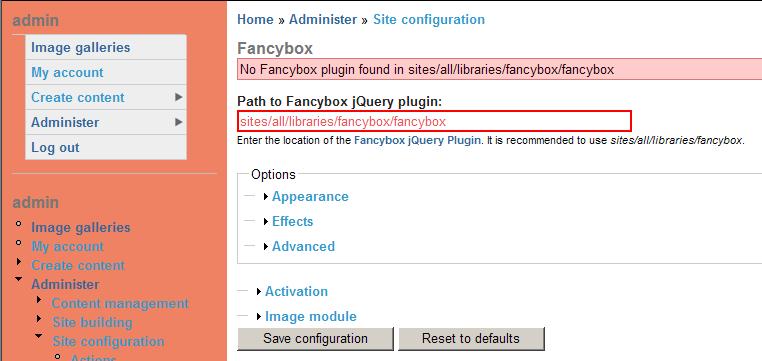
dqdDamien: please check if the fancybox folder is the root of the plugin folder. usually the plugins lies in another folder inside of the top fancybox folder. The documentation is a little bit confusing on this sadly. Inside of the fancybox folder should be another folder named "fancybox". So go to the fancybox settings and change the path from
sites/all/libraries/fancyboxto
sites/all/libraries/fancybox/fancyboxBTW: Do you run D7 with standart image field? If so, let me know how it works with it.
Best regards from Berlin
Comment #2
ssarkarhyd commentedHi Digidog,
I was experiencing the same problem as Damien on D6. Followed your instructions to the letter. Error now says "No Fancybox plugin found in sites/all/libraries/fancybox/fancybox". Please help.
Soumya
Comment #3
ssarkarhyd commentedComment #4
silurius commentedThis issue is preventing me from installing fancybox-7.x-1.x-dev (2011-Nov-18).
Comment #5
silurius commentedComment #6
bi89 commentedDownload http://drupal.org/project/libraries
Comment #7
silurius commentedIs anything required after downloading and enabling the Libraries module? That seemed to help (I can now enable FancyBox on the Modules page - thank you) but FancyBox still can't see the plugin file which is currently sitting in sites/all/libraries/fancybox/fancybox.
Notice: Undefined variable: path in _set_fancybox_files() (line 621 of /usr/share/drupal7/sites/all/modules/fancybox/fancybox.module).Note: I'm using Drupal 7.
Comment #8
lm_omar commentedhi.
you should edit the fancybox.module
in line 604
we have in default installation:
should be like this:
Comment #9
rrmariani commentedThe 'css' directory is missing and the line 621 of the fancybox.module fails.
function _set_fancybox_files() {
$files = _detect_fancybox_files();
if (empty($files['js']) || empty($files['css'])) {
drupal_set_message(t('No Fancybox plugin found in @path, install the Fancybox plugin and go to the Fancybox settings page for the files to be found', array('@path' => $path)), 'warning');
}
....
Comment #10
droath commentedHere is a patch that fixes the "No Fancybox plugin found" in fancybox settings. This patch is based off D7 7.x-1.x version.
Comment #11
chi commentedThe patch works for me.
Comment #12
marcvangendThe patch can be improved, it should at least use DIRECTORY_SEPARATOR like elsewhere in the module.
More importantly, instead of patching the module, IMHO a cleaner solution is to move the directory that is now libraries/fancybox/fancybox up one level so it becomes libraries/fancybox. All the stuff that is currently in libaries./fancybox doesn't seem to be needed anyway. This would only require some changes in the documentation.
PS. If the solutions above (either patching the module or moving the directory) still does not solve your "No Fancybox plugin found" problem, check the directory permissions and make sure they're readable by your web server.
Comment #13
bas.hr commentedOn Windows, PHP's DIRECTORY_SEPARATOR constant returns "\" which is not suitable for URLs.
Comment #14
marcvangend@bas.hr: The code is not building a URL in the first place. The
glob()function needs a file path and file paths use directory separators.PS. Please do not change the version number unless there is a good reason to do so.
Comment #15
IamOnStage commentedI am experiencing the same problem and seam to have found a solution (but I am not an experienced coder!)
When the module checks the fancybox version, this works fine when in the libraries/fancybox directory
It is just trying to find the javascript files in libraries/fancybox/fancybox, which is where it is not!
This is what I did:
1. I have kept the fancybox library in the directory:
libraries/fancybox
(NOT libraries/fancybox/fancybox)
2. I edited the line 95 in the fancybox.module file from:
// Add Fancybox files.
$path = libraries_get_path('fancybox') . '/' . 'fancybox' . '/';
TO:
// Add Fancybox files.
$path = libraries_get_path('fancybox') . '/';
This stops the module from looking in libraries/fancybox/fancybox.
As this is actually the first time i have ever modified a module file, please review what i have done.
Thank you,
Comment #16
admiral21 commented@ Damien,
There are 2 steps to getting fancybox running on D7
1. Install the relevant and latest versions of libraries and fancybox modules in the regular way. These modules should sit in sites/all/modules/ by default.
2. Create a new folder called "libraries" at location 'sites/all/'. Go to http://code.google.com/p/fancybox/downloads/list , download the recommended plugin version (1.3.1 and not the latest one.. see fancybox page on drupal.org). Unzip the file and copy all (and only) contents into the newly created folder at sites/all/libraries. This should put the necessary plugin files at sites/all/libraries/fancybox
No need to mess up with code in any of the files. Hope this solves your problem.
Comment #17
Anonymous (not verified) commented@#16 this does not solve the issue. There is real problem: the fancybox module looks in two different locations. According to instructions:
sites/all/libraries/fancybox/fancybox/jquery.fancybox-[version].jsBut it also looks at the following location
sites/all/libraries/fancybox/jquery.fancybox-[version].jsThat's the problem, and a patch is needed.
Attached a slightly improved patch based on #10! (It works on my windows box, so the DIRECTORY_SEPARATOR is correct)
Comment #18
silurius commented#17 did the trick here. Plugin is now detected. Thanks, morningtime.
Comment #19
olgaidn commentedI have "just landed" to Drupal, could someone please explain how to install the @17 patch? Step by step? Thank you so much.....
Comment #20
drupalLearner commentedYou have to have your drupal site setup on a git repo or at least the module set up in a git repo to git apply the patch.
Comment #21
bourne777 commented@IamOnStage That is the right way to solve this problem.
Comment #22
DropInTheOcean commentedI had similar problem (Drupal 7.23, Libraries 7.x-2.1, Fancybox 7.x-2.0-beta2, Jquery 1.7)
I discovered the following...
You need the correct version of the Fancybox plugin for the corresponding Fancybox module
"7.x-2.x of this module supports fancyBox version 2.1.0 and higher. "
If you unzip the plugin in /sites/all/libraries
and rename 'fancyapps-fancyBox-18d1712' to 'fancybox'
it should work... you get these files:
sites/all/libraries/fancybox/source/jquery.fancybox.pack.js
sites/all/libraries/fancybox/source/jquery.fancybox.css
Personally I missed this the first time around and downloaded plugin version 1.3.1 - which is recommended for version 7.x-1.x (and Drupal 6)
Comment #23
stred commentedpatch #17 did it!
thanks morningtime
Comment #24
dariogcode commentedTe dev version expect the follow location
sites\all\libraries\fancybox\fancybox\jquery.fancybox-{version}.js
But the downloaded files doesnt have the version
The beta module expect
sites\all\libraries\fancybox\source\jquery.fancybox.pack.js