

 The 2026 Drupal Business Survey is open. Your response will help shape the future of the Drupal business ecosystem.
I in frequently get this as in the $messages output on my Drupal site. A quick google shows other sites getting the same error message in production also.
warning: include_once() [function.include-once]: Unable to allocate memory for pool. in /Library/WebServer/Documents/mickeymouse/sites/all/modules/contrib/ctools/includes/plugins.inc on line 341.
warning: include_once() [function.include-once]: Unable to allocate memory for pool. in /Library/WebServer/Documents/mickeymouse/sites/all/modules/contrib/ctools/includes/plugins.inc on line 341.
warning: require_once() [function.require-once]: Unable to allocate memory for pool. in /Library/WebServer/Documents/mickeymouse/sites/all/modules/contrib/ctools/includes/plugins.inc on line 757.
warning: require_once() [function.require-once]: Unable to allocate memory for pool. in /Library/WebServer/Documents/mickeymouse/sites/all/modules/contrib/ctools/includes/plugins.inc on line 757.
warning: require_once() [function.require-once]: Unable to allocate memory for pool. in /Library/WebServer/Documents/mickeymouse/includes/module.inc on line 274.
This particular error was whilst loading the views admin front page using Garland. It has also happened within my app on many front pages. It does not happen on every page load. Perhaps every time cache is cleared or something? Although I've tried running drush cc all then reloading a page and clearing the cache through the GUI.
| Comment | File | Size | Author |
|---|---|---|---|
| #12 | ctools_tests.jpg | 265.26 KB | joshua.boltz |

Comments
Comment #1
merlinofchaos commentedHave you tried upping the memory limit on your server?
Comment #2
marcdecaluwe commentedI have exactly the same error in some of my pages. No idea what makes them different from the many others where I do not have this error.
I had already 256 memorylimit; putting it higher doesn't help (I tried that).
Anyone an idea what could be causing this?
Comment #3
marcdecaluwe commentedSorry, I made a mistake. I have a resembling error:
warning: require_once() [function.require-once]: Unable to allocate memory for pool. in .../includes/module.inc on line 274.
I don't see a direct link with ctools, so maybe I should put it somewhere else?
Comment #4
stewsnoozeThis is an APC bug
http://pecl.php.net/bugs/bug.php?id=16966
I'll close this issue.
Comment #5
greg.harveyHey Stew, did you ever find a workaround?
Comment #6
greg.harveyfugget it - shm_size too small.
Comment #8
salientknight commentedI'm having this same problem, but not running apc
Comment #9
modstore commentedI am also still getting this problem after uninstalling apc.
Comment #10
Anonymous (not verified) commentedI logged onto my other slimmed down shell, xfce, for debugging those catching errors and the unusual website access errors or lockups. All the CMS systems that i am running are miraculously fixed whenever the apache server is restarted. I guess the APC catch(s) are not being flushed correctly or something
Anyhow I removed everything on my system that has anything to do with APC;
After APC was wiped clean from my system everything is back to normal, working great, and 100x faster to boot!
These problems occured on my test server witch has 4gigs of ram. I used top, htop and other tools during this error and all report that i have at least one gig of free memory. I figured There must be some kind of configuration error somewhere. Either that or im running some seriously badly coded php app. To find out systems cache settings via terminal you type: sysctl -a | grep -E "shmall|shmmax" . I got kernel.shmall = 2097152 and kernel.shmmax = 33554432. Not knowing what to do, i just herp and derp increased all of my mem and cache settings in both http.conf and set my prefork to lowest possible values. ....then i played around with SELinux to block some apache modules because i had them all unblocked under SELinux. I never ran into this problem before. Finally I edited my php.ini file and set output_buffering = Off . But none of this herp and derp helped or even remotely worked. The only definitive solution is to remove APC.
I think APC got installed on my test system automatically when i was updating my linux distro. In conclusion APC has given me a lot of grief. It has wasted an entire days worth of my time. In my opinion APC is no better than a virus.
Comment #11
murzI got the same problem on Debian 6.0 with APC 3.1.9 & php 5.3.
ante_bk, did you remove totally all APC or only cleanup and reinstall it?
If you remove it, why you got 100x faster to boot? Is your server works quicker without opcode cache??
Comment #12
joshua.boltz commentedI am having the same issue using APC 3.1.9. PHP 5.3.28. Drupal 7.26.
Everything I've searched always comes back as APC as the issue. But the server has all of the recommended settings:
apc.gc_ttl 1800
apc.max_file_size 10M
apc.shm_size 256M
apc.ttl 1800
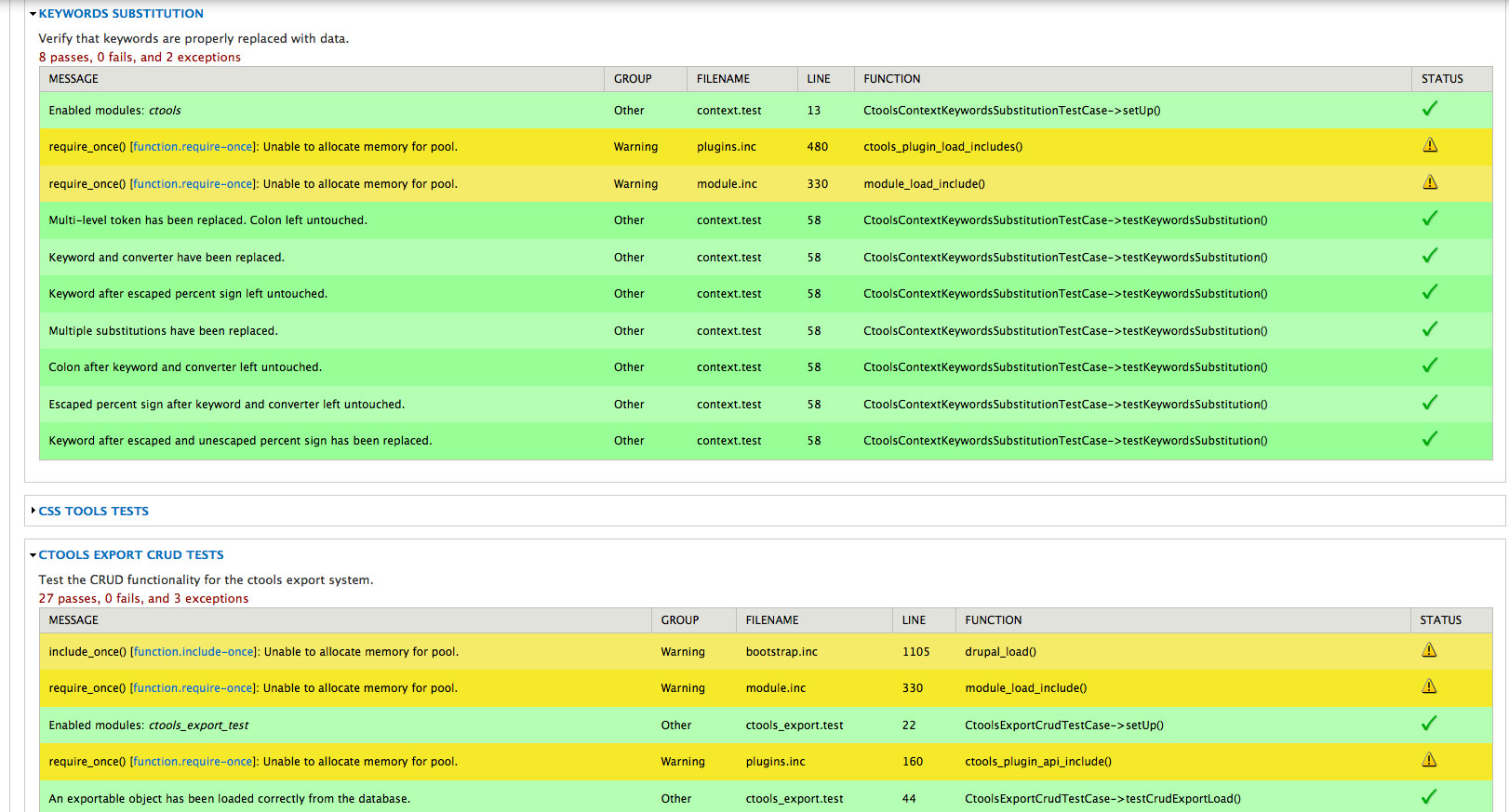
When I run tests on Ctools (currently using 7.x-1.4) using the "Testing" core module, I get 100% success, no fail, and the debug output, as I do when testing any other module. But, I also get back some exceptions, which correlate to the PHP Warnings I've been getting about "Unable to allocate memory for pool".
The warnings are very intermittent.
Ideas?
Comment #13
benjifisherPossibly there is some other problem that causes similar error messages, but every time I have seen it, it comes from APC. I do not think it has anything to do with ctools. I found this comment on StackOverflow very helpful.
No recommended settings will work for everyone. I have a small server with a few low-traffic sites on it, and I found that 256M was too small for apc.shm_size. I set it to 384M earlier today, and I will see if that is enough.
The best way to figure out what you need is to put apc.php somewhere accessible to the web and tweak your settings until you get a good hit/miss ratio (ideally 100% to 0%) and few or no cache clears. See where your system installed it (
dpkg -S apc.phpon Ubuntu) or grab a fresh copy.Now I have set up Munin to generate graphs of the APC status so I can tell at a glance whether it needs attention.
Comment #14
edmund518 commentedMake sure your php memory allocation in its .ini (php.ini) needs to be greater than 128mb. And follow the above comments.
Comment #15
fegade_ravindra commentedjust write the below line in your .htaccess file.
php_flag apc.cache_by_default Off
Comment #16
benjifisher@fegade_ravindra: Doesn't that have the effect of disabling APC? What files will be cached if you use this setting?
I do not want to disable APC. It does a pretty good job of speeding up my site.
As I said in #13 above,
Comment #17
ressaFiring off a
apache2ctl gracefulfixed it for now.Comment #18
hanskuiters commented#15 works for me. Thanks.
Comment #19
gaurishankar#15 working fine.
Comment #20
bjlewis2 commentedI often get this when working locally. I've seen it using both Acquia Dev Desktop and Kalabox. Simply shutting down the server (app) and starting it back up fixes it for me. I think it's a memory issue.
Comment #21
kehogo commentedFor me, I had disabled a module (the entity module) and the system started generating these messages (not sure if it was related or not). The solution that worked for me was restarting apache.
Comment #22
amardhumal commented#15 working fine. Thanks.
Comment #23
satishsaner commentedYes, #15 is working fine
Comment #24
omzo commented#15 Great! it's working fine now. Thx
Comment #25
Justincletus commented#15 is working fine but tell me where do I place this line exactly inside .htaccess
Comment #26
scottalan commentedFor me increasing
apc.shm_size 256Mto at leastapc.shm_size 384Mworked for now.Comment #27
benjifisherI think that @scottalan has the right idea. I am surprised at how many people are simply disabling APC as suggested in #15. See my comment #13 for a link to StackOverflow with a more complete description.
Comment #28
pxljedi commented#15 Worked me too! Thank YOU! :)
Comment #29
millenniumtreeYeah, #26, please not #15 unless you want your server to run very much slower.
Increasing memory is a simple fix.
Disabling opcode caching entirely is an ugly hack.
Comment #30
featherbellyJust set your APC settings in php.ini.
E.g.