Hi there,

I've searched the forums but nothing seems to quite explain the errors i'm getting after i upgraded views. I'm using all the latest versions of ctools/entity etc. I use panels on various pages of my site and within each panel i use a paged view to show 'teasers' of various content. After I upgraded I went into the view admin and noticed that there was the following error on all but one of the separate views (weirdly the 1 view that is working is identical to the rest) -

The error is : 'Exception: SQLSTATE[42000]: Syntax error or access violation: 1064 You have an error in your SQL syntax; check the manual that corresponds to your MySQL server version for the right syntax to use near \'LIKE \'example\' ESCAPE \'\\\\\') AND (node.type IN (\'example\')) AND (n\' at line 3' in views_plugin_query_default->execute() (line 1386 of /home/content/all/modules/views/plugins/views_plugin_query_default.inc).

After checking the logs there is also another error that seems to accompany the one above :

'Exception: SQLSTATE[23000]: Integrity constraint violation: 1052 Column \'uid\' in on clause is ambiguous'
in views_plugin_query_default->execute() (line 1386 of /home/content/sites/all/modules/views/plugins/views_plugin_query_default.inc).

The view doesn't produce any results no matter how i change it.

Again apologies if one of the other issues relates to this,

Thanks,

Comments

dawehner’s picture

If you create an issue in the views issue queue you will see this text

Before submitting an issue to Views, you are responsible for reading and understanding the Views issue submission guidelines. Failure to read and understand this page will result in your issue being marked "won't fix".

So can you please give us more informations, because even this is cleary a bug, it's impossible to reproduce.

dawehner’s picture

Status: Active » Postponed (maintainer needs more info)

Update

gc11’s picture

Status: Postponed (maintainer needs more info) » Active

Ok, so i've done some more research and I believe that this relates to something to do with the taxonomy changes talked about in this post - http://drupal.org/node/1117258.

As requested here is some more information : After upgrade of views all views which used taxonomy terms stopped working, the relationship "Content: Taxonomy terms on node" had been added automatically however there were no results being produced and the above errors were being shown. For a test I then took out all filters and the view still did not produce results, it came up with errors saying "no values found" - even though this should have produced a view of all content on the site, on the preview it tells me that it is 'unable to preview due to validation errors'. And it won't let me save the changes. I've included an export of the view with one of the displays both for the original view with the filters and relationship added automatically and for the display after i had taken off all filters and relationsips where it still returned no results and there was a validation error.

original view after update

$view = new view;
$view->name = 'features_page';
$view->description = 'A view for the features page';
$view->tag = '';
$view->base_table = 'node';
$view->human_name = 'Any page (not panel page)';
$view->core = 7;
$view->api_version = '3.0-alpha1';
$view->disabled = FALSE; /* Edit this to true to make a default view disabled initially */

/* Display: Defaults */
$handler = $view->new_display('default', 'Defaults', 'default');
$handler->display->display_options['title'] = 'Features';
$handler->display->display_options['access']['type'] = 'none';
$handler->display->display_options['cache']['type'] = 'none';
$handler->display->display_options['query']['type'] = 'views_query';
$handler->display->display_options['query']['options']['query_comment'] = FALSE;
$handler->display->display_options['exposed_form']['type'] = 'basic';
$handler->display->display_options['pager']['type'] = 'full';
$handler->display->display_options['style_plugin'] = 'default';
$handler->display->display_options['row_plugin'] = 'node';
$handler->display->display_options['row_options']['links'] = 1;
$handler->display->display_options['row_options']['comments'] = 0;
/* Header: Global: Text area */
$handler->display->display_options['header']['area']['id'] = 'area';
$handler->display->display_options['header']['area']['table'] = 'views';
$handler->display->display_options['header']['area']['field'] = 'area';
$handler->display->display_options['header']['area']['empty'] = FALSE;
/* Field: Content: headline */
$handler->display->display_options['fields']['entity_id']['id'] = 'entity_id';
$handler->display->display_options['fields']['entity_id']['table'] = 'field_data_field_news_headline';
$handler->display->display_options['fields']['entity_id']['field'] = 'field_news_headline';
/* Sort criterion: Content: Post date */
$handler->display->display_options['sorts']['created']['id'] = 'created';
$handler->display->display_options['sorts']['created']['table'] = 'node';
$handler->display->display_options['sorts']['created']['field'] = 'created';
$handler->display->display_options['filter_groups']['groups'] = array(
  0 => 'OR',
);
/* Filter criterion: Content: Published */
$handler->display->display_options['filters']['status']['id'] = 'status';
$handler->display->display_options['filters']['status']['table'] = 'node';
$handler->display->display_options['filters']['status']['field'] = 'status';

/* Display: art features */
$handler = $view->new_display('page', 'art features', 'page_1');
$handler->display->display_options['defaults']['title'] = FALSE;
$handler->display->display_options['title'] = 'Features | Art';
$handler->display->display_options['defaults']['sorts'] = FALSE;
/* Sort criterion: Content: Post date */
$handler->display->display_options['sorts']['created']['id'] = 'created';
$handler->display->display_options['sorts']['created']['table'] = 'node';
$handler->display->display_options['sorts']['created']['field'] = 'created';
$handler->display->display_options['sorts']['created']['order'] = 'DESC';
$handler->display->display_options['defaults']['filters'] = FALSE;
/* Filter criterion: Content: Published */
$handler->display->display_options['filters']['status']['id'] = 'status';
$handler->display->display_options['filters']['status']['table'] = 'node';
$handler->display->display_options['filters']['status']['field'] = 'status';
$handler->display->display_options['filters']['status']['value'] = '1';
/* Filter criterion: Content: Type */
$handler->display->display_options['filters']['type']['id'] = 'type';
$handler->display->display_options['filters']['type']['table'] = 'node';
$handler->display->display_options['filters']['type']['field'] = 'type';
$handler->display->display_options['filters']['type']['value'] = array(
  'feature' => 'feature',
);
/* Filter criterion: Content: Has taxonomy term */
$handler->display->display_options['filters']['tid']['id'] = 'tid';
$handler->display->display_options['filters']['tid']['table'] = 'taxonomy_index';
$handler->display->display_options['filters']['tid']['field'] = 'tid';
$handler->display->display_options['filters']['tid']['value'] = array(
  44 => '44',
);
$handler->display->display_options['filters']['tid']['reduce_duplicates'] = 0;
$handler->display->display_options['filters']['tid']['type'] = 'select';
$handler->display->display_options['filters']['tid']['vocabulary'] = 'active_page';
$handler->display->display_options['path'] = 'art/features';

view with no filters which still does not show content

$view = new view;
$view->name = 'features_page';
$view->description = 'A view for the features page';
$view->tag = '';
$view->base_table = 'node';
$view->human_name = 'Any page (not panel page)';
$view->core = 7;
$view->api_version = '3.0-alpha1';
$view->disabled = FALSE; /* Edit this to true to make a default view disabled initially */

/* Display: Defaults */
$handler = $view->new_display('default', 'Defaults', 'default');
$handler->display->display_options['title'] = 'Features';
$handler->display->display_options['access']['type'] = 'perm';
$handler->display->display_options['cache']['type'] = 'none';
$handler->display->display_options['query']['type'] = 'views_query';
$handler->display->display_options['query']['options']['query_comment'] = FALSE;
$handler->display->display_options['exposed_form']['type'] = 'basic';
$handler->display->display_options['pager']['type'] = 'full';
$handler->display->display_options['style_plugin'] = 'default';
$handler->display->display_options['row_plugin'] = 'node';
$handler->display->display_options['row_options']['links'] = 1;
$handler->display->display_options['row_options']['comments'] = 0;
/* Header: Global: Text area */
$handler->display->display_options['header']['area']['id'] = 'area';
$handler->display->display_options['header']['area']['table'] = 'views';
$handler->display->display_options['header']['area']['field'] = 'area';
$handler->display->display_options['header']['area']['empty'] = FALSE;
/* Field: Content: headline */
$handler->display->display_options['fields']['entity_id']['id'] = 'entity_id';
$handler->display->display_options['fields']['entity_id']['table'] = 'field_data_field_news_headline';
$handler->display->display_options['fields']['entity_id']['field'] = 'field_news_headline';
/* Sort criterion: Content: Post date */
$handler->display->display_options['sorts']['created']['id'] = 'created';
$handler->display->display_options['sorts']['created']['table'] = 'node';
$handler->display->display_options['sorts']['created']['field'] = 'created';
$handler->display->display_options['filter_groups']['groups'] = array(
  0 => 'OR',
);
/* Filter criterion: Content: Published */
$handler->display->display_options['filters']['status']['id'] = 'status';
$handler->display->display_options['filters']['status']['table'] = 'node';
$handler->display->display_options['filters']['status']['field'] = 'status';

/* Display: art features */
$handler = $view->new_display('page', 'art features', 'page_1');
$handler->display->display_options['defaults']['title'] = FALSE;
$handler->display->display_options['title'] = 'Features | Art';
$handler->display->display_options['defaults']['sorts'] = FALSE;
/* Sort criterion: Content: Post date */
$handler->display->display_options['sorts']['created']['id'] = 'created';
$handler->display->display_options['sorts']['created']['table'] = 'node';
$handler->display->display_options['sorts']['created']['field'] = 'created';
$handler->display->display_options['sorts']['created']['order'] = 'DESC';
$handler->display->display_options['defaults']['filters'] = FALSE;
$handler->display->display_options['path'] = 'art/features';

After this I thought that maybe this view and all of its displays may have become corrupt somehow so I set up a new view, with a one page display, added the relationship "Content: Taxonomy terms on node" and also a filter as "published=yes and (term) Taxonomy term: Name" There is also the normal descending sort criteria. After saving this display results do appear but when viewing the page I am still shown the debug notice "'Exception: SQLSTATE[23000]: Integrity constraint violation: 1052 Column \'uid\' in on clause is ambiguous' in views_plugin_query_default->execute() (line 1386 of /home/views/plugins/views_plugin_query_default.inc)."

I've included an export of this new view also.

$view = new view;
$view->name = 'testing2';
$view->description = '';
$view->tag = 'default';
$view->base_table = 'node';
$view->human_name = 'testing2';
$view->core = 7;
$view->api_version = '3.0-alpha1';
$view->disabled = FALSE; /* Edit this to true to make a default view disabled initially */

/* Display: Master */
$handler = $view->new_display('default', 'Master', 'default');
$handler->display->display_options['title'] = 'testing2';
$handler->display->display_options['access']['type'] = 'perm';
$handler->display->display_options['cache']['type'] = 'none';
$handler->display->display_options['query']['type'] = 'views_query';
$handler->display->display_options['query']['options']['query_comment'] = FALSE;
$handler->display->display_options['exposed_form']['type'] = 'basic';
$handler->display->display_options['pager']['type'] = 'full';
$handler->display->display_options['pager']['options']['items_per_page'] = '10';
$handler->display->display_options['style_plugin'] = 'default';
$handler->display->display_options['row_plugin'] = 'node';
/* Relationship: Content: Taxonomy terms on node */
$handler->display->display_options['relationships']['term_node_tid']['id'] = 'term_node_tid';
$handler->display->display_options['relationships']['term_node_tid']['table'] = 'node';
$handler->display->display_options['relationships']['term_node_tid']['field'] = 'term_node_tid';
$handler->display->display_options['relationships']['term_node_tid']['required'] = 0;
$handler->display->display_options['relationships']['term_node_tid']['vocabularies'] = array(
  'forums' => 'forums',
  'active_page' => 'active_page',
  'active_panel_position' => 'active_panel_position',
  'blog' => 'blog',
  'contributors' => 'contributors',
  'metro_stops' => 'metro_stops',
  'midi' => 'midi',
  'opt_outs' => 'opt_outs',
  'opt_outs_partners' => 'opt_outs_partners',
  'profile_locations' => 'profile_locations',
  'slider_page' => 'slider_page',
  'tags' => 'tags',
  'type_of_event' => 'type_of_event',
);
/* Field: Content: Title */
$handler->display->display_options['fields']['title']['id'] = 'title';
$handler->display->display_options['fields']['title']['table'] = 'node';
$handler->display->display_options['fields']['title']['field'] = 'title';
$handler->display->display_options['fields']['title']['label'] = '';
$handler->display->display_options['fields']['title']['alter']['alter_text'] = 0;
$handler->display->display_options['fields']['title']['alter']['make_link'] = 0;
$handler->display->display_options['fields']['title']['alter']['absolute'] = 0;
$handler->display->display_options['fields']['title']['alter']['word_boundary'] = 0;
$handler->display->display_options['fields']['title']['alter']['ellipsis'] = 0;
$handler->display->display_options['fields']['title']['alter']['strip_tags'] = 0;
$handler->display->display_options['fields']['title']['alter']['trim'] = 0;
$handler->display->display_options['fields']['title']['alter']['html'] = 0;
$handler->display->display_options['fields']['title']['hide_empty'] = 0;
$handler->display->display_options['fields']['title']['empty_zero'] = 0;
$handler->display->display_options['fields']['title']['link_to_node'] = 1;
/* Sort criterion: Content: Post date */
$handler->display->display_options['sorts']['created']['id'] = 'created';
$handler->display->display_options['sorts']['created']['table'] = 'node';
$handler->display->display_options['sorts']['created']['field'] = 'created';
$handler->display->display_options['sorts']['created']['order'] = 'DESC';
/* Filter criterion: Content: Published */
$handler->display->display_options['filters']['status']['id'] = 'status';
$handler->display->display_options['filters']['status']['table'] = 'node';
$handler->display->display_options['filters']['status']['field'] = 'status';
$handler->display->display_options['filters']['status']['value'] = 1;
$handler->display->display_options['filters']['status']['group'] = 0;
$handler->display->display_options['filters']['status']['expose']['operator'] = FALSE;
/* Filter criterion: Taxonomy term: Name */
$handler->display->display_options['filters']['name']['id'] = 'name';
$handler->display->display_options['filters']['name']['table'] = 'taxonomy_term_data';
$handler->display->display_options['filters']['name']['field'] = 'name';
$handler->display->display_options['filters']['name']['relationship'] = 'term_node_tid';

/* Display: Page */
$handler = $view->new_display('page', 'Page', 'page');
$handler->display->display_options['defaults']['filters'] = FALSE;
/* Filter criterion: Content: Published */
$handler->display->display_options['filters']['status']['id'] = 'status';
$handler->display->display_options['filters']['status']['table'] = 'node';
$handler->display->display_options['filters']['status']['field'] = 'status';
$handler->display->display_options['filters']['status']['value'] = 1;
$handler->display->display_options['filters']['status']['group'] = 0;
$handler->display->display_options['filters']['status']['expose']['operator'] = FALSE;
/* Filter criterion: Taxonomy term: Name */
$handler->display->display_options['filters']['name']['id'] = 'name';
$handler->display->display_options['filters']['name']['table'] = 'taxonomy_term_data';
$handler->display->display_options['filters']['name']['field'] = 'name';
$handler->display->display_options['filters']['name']['relationship'] = 'term_node_tid';
$handler->display->display_options['filters']['name']['value'] = 'art events';
$handler->display->display_options['path'] = 'testing2';
$translatables['testing2'] = array(
  t('Master'),
  t('testing2'),
  t('more'),
  t('Apply'),
  t('Reset'),
  t('Sort by'),
  t('Asc'),
  t('Desc'),
  t('Items per page'),
  t('- All -'),
  t('Offset'),
  t('term'),
  t('Page'),
);

I don't know if this is helpful at all,

Views version is 7.x-3.x-dev
Core : 7.4

Thanks for your help,

yan’s picture

I'm getting this error in Views 7.x-3.x-dev in a date browser view:

SQLSTATE[42000]: Syntax error or access violation: 1064 You have an error in your SQL syntax; check the manual that corresponds to your MySQL server version for the right syntax to use near 'FROM node node WHERE (( (node.type IN ('termin')) )AND( (DATE_FORMAT(ADDTIME(F' at line 1

Additionally a number (like a timestamp) is displayed in a green box on every page load in the views admin.

merlinofchaos’s picture

yan: I believe your issue is a date.module bug.

moonray’s picture

same issue...
This happened after an update to a more recent version of views from 2011-06-09 to 2011-08-02.

Error message:

'Exception: SQLSTATE[42000]: Syntax error or access violation: 1064 You have an error in your SQL syntax; check the manual that corresponds to your MySQL server version for the right syntax to use near \'= \'96\' ) ))
GROUP BY tid) subquery\' at line 6'
in views_plugin_query_default->execute() (line 1346 of views/plugins/views_plugin_query_default.inc).

EDIT:
Additional info...
SQLSTATE[42000]: Syntax error or access violation: 1064 You have an error in your SQL syntax; check the manual that corresponds to your MySQL server version for the right syntax to use near '= '96' ) ))) subquery' at line 2

SELECT node.created AS node_created, node.nid AS nid
FROM 
{node} node
LEFT JOIN {users} users_node ON node.uid = users_node.uid
WHERE (( (node.status = '1') AND (node.type IN  ('recipe')) AND (.uid = '96' ) ))
ORDER BY node_created DESC

EDIT 2:
This is what the SQL statement looked like before the upgrade:

SELECT node.created AS node_created, node.nid AS nid
FROM 
{node} node
LEFT JOIN {users} users_node ON node.uid = users_node.uid
INNER JOIN {users} users ON node.uid = users.uid
WHERE (( (node.status = '1') AND (node.type IN  ('recipe')) AND (users.uid = '96' ) ))
ORDER BY node_created DESC
LIMIT 10 OFFSET 0
moonray’s picture

And I've got a second error on a different view. Looks like it might have to do with table prefixes not being applied to the query properly anymore?

SQLSTATE[23000]: Integrity constraint violation: 1052 Column 'uid' in field list is ambiguous

SELECT node.nid AS nid, node.created AS node_created, flag_content_node.timestamp AS flag_content_node_timestamp, 'node' AS field_data_field_image_node_entity_type, name AS name, uid AS uid
FROM 
{node} node
INNER JOIN {flag_content} flag_content_node ON node.nid = flag_content_node.content_id AND flag_content_node.fid = '6'
LEFT JOIN {users} users_flag_content ON flag_content_node.uid = users_flag_content.uid
WHERE (( (node.status = '1') AND (node.type IN  ('photo')) AND (users_flag_content.uid = '96' ) ))
ORDER BY flag_content_node_timestamp ASC
LIMIT 10 OFFSET 0
moonray’s picture

Following up... my view has the following:

• CONTEXTUAL FILTERS: User: Uid
• RELATIONSHIPS: Content: Author

However, User: Uid was set to not use the relationship with Content: Author. After the update that option is no longer available... the relationship HAS to be set. As soon as you do that, the errors go away.

moonray’s picture

It seems RELATIONSHIPS: Content: Author now needs to be added to views (it's no longer implied), where before it didn't. This seems to be the main problem with every view I encounter having these errors.

dawehner’s picture


It seems  RELATIONSHIPS: Content: Author  now needs to be added to views (it's no longer implied), where before it didn't. This seems to be the main problem with every view I encounter having these errors.

That's true, that's a design change which was intended.

Additional there is some update code involved to automatically add a relationship for the author, which works for the most people.

@moonray
Can you try to reproduce this issue so we can reproduce it?
It would require a view export without the relationship. Once it reproducable it's a high chance that it can be fixed.

merlinofchaos’s picture

Do you have an export of the view that was failing? The relationship update code was supposed to fix that, but apparently did not. I'm curious why not.

matmasr’s picture

I have a similar issue with views, date and calendar module. I can't tell if it is a Views issue or a Date module issue. I recently upgraded my site from D5 to D6 to D7. I am using Views-7.x-3.0-rc1 and Date module 7.x-2.0-alpha3 and Calendar module 7.x-2.0-alpha1

I have a custom content type that includes a DATE CCK field called "Family event". When I modify the standard Calendar View to replace the argument (Contextual Filter) to my custom field

Contextual filters
Date: Date (node) (Content: Event Date and Time (field_family_event_date)).

instead of

Contextual filters
Date: Date (node) (Content: Updated date)

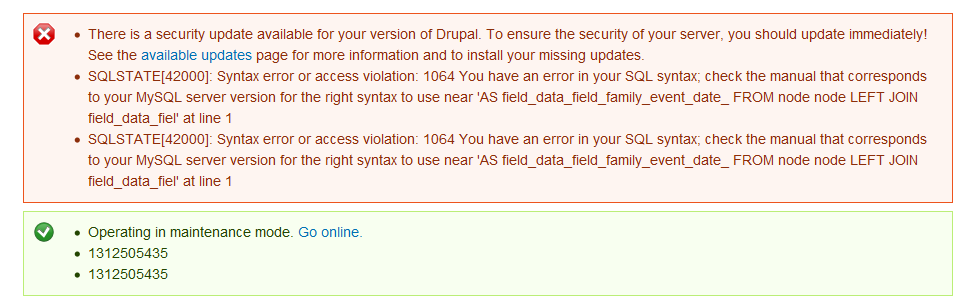
I get this error attached below in the txt and image files.

I assumed it was a Views bug since the error message states that

Exception: SQLSTATE[42000]: Syntax error or access violation: 1064 You have an error in your SQL syntax; check the manual that corresponds to your MySQL server version for the right syntax to use near \'AS field_data_field_family_event_date_
FROM 
node node
LEFT JOIN field_data_fiel\' at line 1'

in views_plugin_query_default->execute() (line 1380 of C:\Users\Mahmoud\Sites\peoriaparent5live\sites\all\modules\views-7.x-3.0-rc1\views\plugins\views_plugin_query_default.inc).
xiarnousx’s picture

Version: 7.x-3.x-dev » 7.x-3.0-rc1
StatusFileSize
new386.17 KB

I had sql error issue under 7.x-3.0 rc1
I think this bug relates to how strings are being processed when building up the query.
I only ,so far, had this issue when using string comparison operators such is is equal , is not equal, contains... and input filed labeled value. for your convenience i added snap shot of the error.

Thanks

DeNelo’s picture

I get it too.
Error:

SQLSTATE[42000]: Syntax error or access violation: 1064 You have an error in your SQL syntax; check the manual that corresponds to your MySQL server version for the right syntax to use near 'AS taxonomy_term_data_, field_type_taxonomy_term_data__field_data_field_docmapgr' at line 1

The view is restricted to show content of one content type. Exported view:

$view = new view;
$view->name = 'docmap';
$view->description = '';
$view->tag = 'default';
$view->base_table = 'taxonomy_term_data';
$view->human_name = 'Docmap';
$view->core = 7;
$view->api_version = '3.0';
$view->disabled = FALSE; /* Edit this to true to make a default view disabled initially */

/* Display: Master */
$handler = $view->new_display('default', 'Master', 'default');
$handler->display->display_options['title'] = 'Docmap';
$handler->display->display_options['access']['type'] = 'perm';
$handler->display->display_options['cache']['type'] = 'none';
$handler->display->display_options['query']['type'] = 'views_query';
$handler->display->display_options['query']['options']['query_comment'] = FALSE;
$handler->display->display_options['exposed_form']['type'] = 'basic';
$handler->display->display_options['pager']['type'] = 'full';
$handler->display->display_options['pager']['options']['items_per_page'] = '20';
$handler->display->display_options['style_plugin'] = 'table';
/* Relationship: Taxonomy term: Content using Type */
$handler->display->display_options['relationships']['reverse_field_type_node']['id'] = 'reverse_field_type_node';
$handler->display->display_options['relationships']['reverse_field_type_node']['table'] = 'taxonomy_term_data';
$handler->display->display_options['relationships']['reverse_field_type_node']['field'] = 'reverse_field_type_node';
$handler->display->display_options['relationships']['reverse_field_type_node']['required'] = 1;
/* Field: Taxonomy term: Name */
$handler->display->display_options['fields']['name']['id'] = 'name';
$handler->display->display_options['fields']['name']['table'] = 'taxonomy_term_data';
$handler->display->display_options['fields']['name']['field'] = 'name';
$handler->display->display_options['fields']['name']['label'] = '';
$handler->display->display_options['fields']['name']['alter']['alter_text'] = 0;
$handler->display->display_options['fields']['name']['alter']['make_link'] = 0;
$handler->display->display_options['fields']['name']['alter']['absolute'] = 0;
$handler->display->display_options['fields']['name']['alter']['word_boundary'] = 0;
$handler->display->display_options['fields']['name']['alter']['ellipsis'] = 0;
$handler->display->display_options['fields']['name']['alter']['strip_tags'] = 0;
$handler->display->display_options['fields']['name']['alter']['trim'] = 0;
$handler->display->display_options['fields']['name']['alter']['html'] = 0;
$handler->display->display_options['fields']['name']['hide_empty'] = 0;
$handler->display->display_options['fields']['name']['empty_zero'] = 0;
$handler->display->display_options['fields']['name']['link_to_taxonomy'] = 1;
/* Field: Content: Body */
$handler->display->display_options['fields']['body']['id'] = 'body';
$handler->display->display_options['fields']['body']['table'] = 'field_data_body';
$handler->display->display_options['fields']['body']['field'] = 'body';
$handler->display->display_options['fields']['body']['relationship'] = 'reverse_field_type_node';
/* Field: Content: Group */
$handler->display->display_options['fields']['field_docmapgroup']['id'] = 'field_docmapgroup';
$handler->display->display_options['fields']['field_docmapgroup']['table'] = 'field_data_field_docmapgroup';
$handler->display->display_options['fields']['field_docmapgroup']['field'] = 'field_docmapgroup';
$handler->display->display_options['fields']['field_docmapgroup']['relationship'] = 'reverse_field_type_node';
$handler->display->display_options['fields']['field_docmapgroup']['label'] = '';
$handler->display->display_options['fields']['field_docmapgroup']['exclude'] = TRUE;
$handler->display->display_options['fields']['field_docmapgroup']['alter']['alter_text'] = 0;
$handler->display->display_options['fields']['field_docmapgroup']['alter']['make_link'] = 0;
$handler->display->display_options['fields']['field_docmapgroup']['alter']['absolute'] = 0;
$handler->display->display_options['fields']['field_docmapgroup']['alter']['external'] = 0;
$handler->display->display_options['fields']['field_docmapgroup']['alter']['replace_spaces'] = 0;
$handler->display->display_options['fields']['field_docmapgroup']['alter']['trim_whitespace'] = 0;
$handler->display->display_options['fields']['field_docmapgroup']['alter']['nl2br'] = 0;
$handler->display->display_options['fields']['field_docmapgroup']['alter']['word_boundary'] = 1;
$handler->display->display_options['fields']['field_docmapgroup']['alter']['ellipsis'] = 1;
$handler->display->display_options['fields']['field_docmapgroup']['alter']['strip_tags'] = 0;
$handler->display->display_options['fields']['field_docmapgroup']['alter']['trim'] = 0;
$handler->display->display_options['fields']['field_docmapgroup']['alter']['html'] = 0;
$handler->display->display_options['fields']['field_docmapgroup']['element_label_colon'] = FALSE;
$handler->display->display_options['fields']['field_docmapgroup']['element_default_classes'] = 1;
$handler->display->display_options['fields']['field_docmapgroup']['hide_empty'] = 0;
$handler->display->display_options['fields']['field_docmapgroup']['empty_zero'] = 0;
$handler->display->display_options['fields']['field_docmapgroup']['hide_alter_empty'] = 0;
$handler->display->display_options['fields']['field_docmapgroup']['settings'] = array(
  'thousand_separator' => ' ',
  'prefix_suffix' => 1,
);
$handler->display->display_options['fields']['field_docmapgroup']['field_api_classes'] = 0;
/* Field: Content: HTML reference */
$handler->display->display_options['fields']['field_htmldoc']['id'] = 'field_htmldoc';
$handler->display->display_options['fields']['field_htmldoc']['table'] = 'field_data_field_htmldoc';
$handler->display->display_options['fields']['field_htmldoc']['field'] = 'field_htmldoc';
/* Field: Content: PDF reference */
$handler->display->display_options['fields']['field_file']['id'] = 'field_file';
$handler->display->display_options['fields']['field_file']['table'] = 'field_data_field_file';
$handler->display->display_options['fields']['field_file']['field'] = 'field_file';
/* Field: Content: Title */
$handler->display->display_options['fields']['title']['id'] = 'title';
$handler->display->display_options['fields']['title']['table'] = 'node';
$handler->display->display_options['fields']['title']['field'] = 'title';
/* Sort criterion: Content: Group (field_docmapgroup) */
$handler->display->display_options['sorts']['field_docmapgroup_value']['id'] = 'field_docmapgroup_value';
$handler->display->display_options['sorts']['field_docmapgroup_value']['table'] = 'field_data_field_docmapgroup';
$handler->display->display_options['sorts']['field_docmapgroup_value']['field'] = 'field_docmapgroup_value';
$handler->display->display_options['sorts']['field_docmapgroup_value']['relationship'] = 'reverse_field_type_node';
/* Filter criterion: Taxonomy vocabulary: Machine name */
$handler->display->display_options['filters']['machine_name']['id'] = 'machine_name';
$handler->display->display_options['filters']['machine_name']['table'] = 'taxonomy_vocabulary';
$handler->display->display_options['filters']['machine_name']['field'] = 'machine_name';
$handler->display->display_options['filters']['machine_name']['value'] = array(
  'docmap' => 'docmap',
);
/* Filter criterion: Content: Type */
$handler->display->display_options['filters']['type']['id'] = 'type';
$handler->display->display_options['filters']['type']['table'] = 'node';
$handler->display->display_options['filters']['type']['field'] = 'type';
$handler->display->display_options['filters']['type']['relationship'] = 'reverse_field_type_node';
$handler->display->display_options['filters']['type']['value'] = array(
  'docmap' => 'docmap',
);

/* Display: Page */
$handler = $view->new_display('page', 'Page', 'page');
$handler->display->display_options['path'] = 'docs/docmap';

My taxonomy is multi-level; I use Content Taxonomy for tagging content with multi-level taxonomies.

dawehner’s picture

Status: Active » Postponed (maintainer needs more info)

@all
Did you tryed to add a certain relationship? For example if you have user: uid use the node: author relationsip, or if you have something with taxonomy terms use content: taxonomy terms.

max.ricketts’s picture

Priority: Normal » Major
Status: Postponed (maintainer needs more info) » Active

This error is easy to reproduce on a clean Drupal 7.8 installation with only ctools and views installed. Trying to add various filter criteria will trigger the error.

For example, with the latest (dev or recommended) releases of ctools and views, trying to add a filter criteria for "User posted or commented" will produce the following:

"SQLSTATE[42000]: Syntax error or access violation: 1064 You have an error in your SQL syntax; check the manual that corresponds to your MySQL server version for the right syntax to use near 'Array) AND (nid = node.nid) ) subquery)) OR (0 < SELECT COUNT(*) AS expression F' at line 1"

I am a Drupal/Views novice; I'm simply trying to add a view to filter by article author (while working through Chapter 3 of The Definitive Guide to Drupal 7) and am unable to due to this error. I do not have the date/calendar modules installed.

tboornaz’s picture

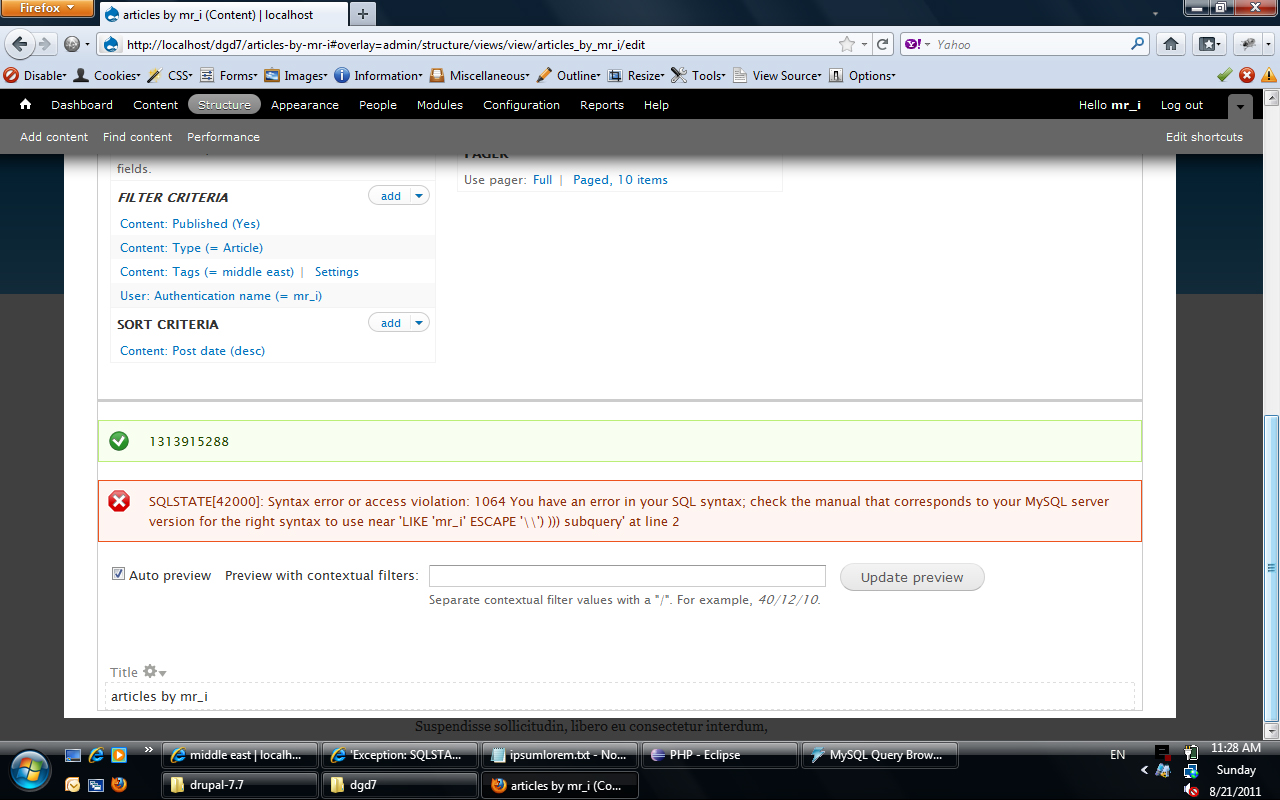
I seem to get the error when I filter based on User: Authentication name and I use an operator and value to filter to a specific user. I have used the filter criteria with an operator and value for NID and taxonomy term and I do not seem to get the error then.

dawehner’s picture


I seem to get the error when I filter based on User: Authentication name and I use an operator and value to filter to a specific user. I have used the filter criteria with an operator and value for NID and taxonomy term and I do not seem to get the error then.

You should just use the node: author relationathip. User: authentication name shouldn't be there.

@max.ricketts

This error is easy to reproduce on a clean Drupal 7.8 installation with only ctools and views installed. Trying to add various filter criteria will trigger the error.

If it's that easy then describe which ones. I use views on daily base and this error didn't appeared yet. Perhaps you should also update to the latest dev version.

rctipton21’s picture

@max.ricketts: I had the same issue when reading the book. Check this suggestion posted on the book's website: http://definitivedrupal.org/suggestions/problem-adding-username-view-filter

Morn’s picture

After examining the content types involved in the error Views (mainly with date module fields) I saw that the error came as a result of the content type migration (d6-d7), except in one case, where the node statistics caused the error.

So I simply corrected the afflicted content types (minor corrections, there was no loss of data) and deleted an created again the View pages with errors (not all pages of the erroneous Views had this error) my problems disappeared.

moonray’s picture

@Morn: don't 'subscribe'... use the new follow button at the top of the page!

alcroito’s picture

I can confirm that if I add a 2 simple filters
Content: Type (= Event)
Content: Published (Yes)

The view sometimes works ok, sometimes it throws this error. For some reason it is random, and you have to refresh a couple of times to get the error.
'Exception: SQLSTATE[42000]: Syntax error or access violation: 1064 You have an error in your SQL syntax; check the manual that corresponds to your MySQL server version for the right syntax to use near \'FROM
node node
WHERE (( (node.status = \'1\') AND (node.type IN (\'event\')) ))
LI\' at line 1'

and also the following warning

Warning: Invalid argument supplied for foreach() in views_plugin_query_default->compile_fields() (line 1070 of /var/www/artinfo/sites/all/modules/contrib/views/plugins/views_plugin_query_default.inc).

While debugging the code, I saw that $this->fields is empty, and that's why compile_fields() throws a warning.
Upon investigating the full constructed query, it misses the fields part entirely.
So the query gets to look like
SELECT
FROM node
WHERE .....

with nothing in between SELECT and FROM.

What would cause such a problem?

dawehner’s picture

@ Placinta
Could it be that you updated calendar? If yes please read the frontpage of the calendar module.

kevinwalsh’s picture

I was filtering by a taxonomy term named "drawing", which was stored in a field called "field_tags".

I was able to fix this by removing filters such as "Taxonomy term: Name (= drawing)" and replacing them with filters like "Content: Tags (field_tags)"

shunting’s picture

I have the same error a #17 with RC2 with an identical error and the green number (1321245117):

SQLSTATE[42000]: Syntax error or access violation: 1064 You have an error in your SQL syntax;

Here is the generated sql:

SELECT node.title AS node_title, node.nid AS nid, node.created AS node_created
FROM 
{node} node
LEFT JOIN {users} users_node ON node.uid = users_node.uid
WHERE (( (node.status = '1') AND (node.type IN  ('article')) AND( (node.uid NOT IN  ('1')) OR (0 < (SELECT COUNT(*) AS expression
FROM 
(SELECT 1 AS expression
FROM 
{comments} c
WHERE  (uid not in Array) AND (nid = node.nid) ) subquery)) OR (0 < SELECT COUNT(*) AS expression
FROM 
(SELECT 1 AS expression
FROM 
{comments} c
WHERE  (uid not in Array) AND (nid = node.nid) ) subquery) )))
ORDER BY node_created DESC
LIMIT 4 OFFSET 1

I'd really like to be able to filter content by author.

merlinofchaos’s picture

#25: Your problem is a known bug in core with subqueries losing their arguments, I believe. There's an issue for that somewhere. Search the drupal core queue for subquery db_select and argument -- I think those 3 terms should find it.

dawehner’s picture

Status: Active » Fixed

Mark this issue as fixed as some of the problems mentioned in this issue is already fixed, some maybe not, but please create ALWAYS new issues. It's kind of easier to mark new ones as duplicates than getting multiple information out of a single issue.

Status: Fixed » Closed (fixed)

Automatically closed -- issue fixed for 2 weeks with no activity.

jaenalexander’s picture

Hey I don't know if this info is useful at this time but I resolve this issue activating ajax to 'Yes' in the view for the respectevily display, that let me use exposed filters with "Contains all words" Maybe is not a full solution but it works.

Views version 7.x-3.1