

Closed (fixed)
Project:
Views (for Drupal 7)
Version:
7.x-3.x-dev
Component:
taxonomy data
Priority:
Normal
Category:
Support request
Assigned:
Unassigned
Reporter:
Created:
9 Aug 2011 at 04:27 UTC
Updated:
24 Apr 2014 at 00:54 UTC
Jump to comment: Most recent, Most recent file



Comments
Comment #1
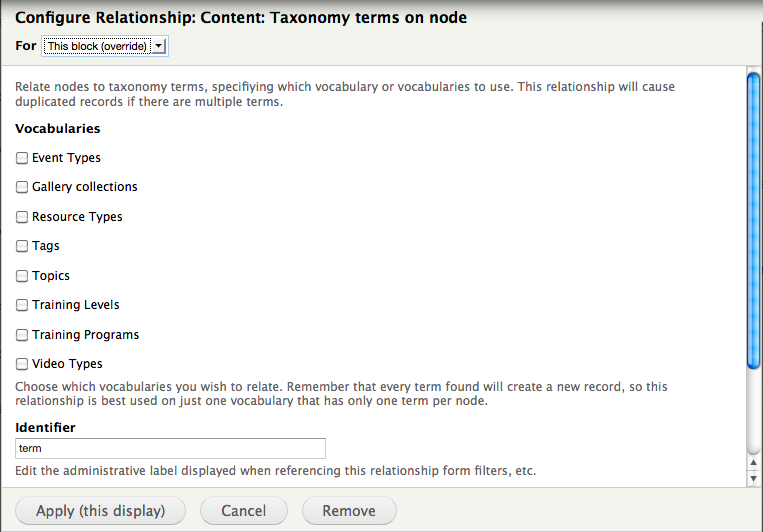
dawehnerIf you add the relationship "Content: Taxonomy terms on node" you can choose which vocabulary you want to use.
Then you can also add a "taxonomy term: vocabulay" filter.
Comment #2
germanl commentedHi,
I have spent really a lot of time trying to find a solution for my problem, and I didn't find exactly what I need, hope you can help me guys!:
I have one content type (A) with a taxonomy field (X);
I have two other content types (B,C) with the same taxonomy field (X);
So, when I am seeing one node of content type A I would like to have a panel that display nodes fields from content type B and C that have the same taxonomy term (X).
Am I clear?
Thank's a lot for your help
Comment #3
jackalope commenteddereine: thank you so much for the help! That did it, though in a way I didn't quite expect. It took some experimentation to sort it out, but I finally got the view to display a summary for only one vocabulary. I created a "Content: Taxonomy terms on node" relationship but did not select any vocabulary when configuring the relationship; I then created a "Taxonomy term: Vocabulary" filter and selected the desired vocabulary (Topics) there. I found that if I selected the Topics vocabulary when configuring the relationship, that made all terms regardless of vocabulary show up in the summary. That confused me! Screenshots attached for the configuration that did work.
Posting this just in case that's not the expected behavior; if it is expected, then hopefully this will help someone else!
Comment #4
jcamfield commentedThis is a lifesaver. I was used to that filter just Being There in D6's Views. Also, not overdoing any reduce-duplicates or Distincts can help out once you take the above steps. This almost sent me crying back to the familiar safety that is 6.22
Comment #5
andes1 commentedHi, i am using view version 7.x-3.x-dev. I have two vocabulary and want to display with different pagination. Taxonomy A should have pager and taxonomy B without pager. in my taxonomy view i have created 2 page with different filters. I have added contextual filter "Content: Has taxonomy term ID" and add taxonomy relation "Content: Taxonomy terms on node" in my view. I try with Filter : " Taxonomy Term : Vocabulary" and for one view page Filter : " Taxonomy Term : Vocabulary - A" and gave pager, For 2nd view page Filter : " Taxonomy Term : Vocabulary - B" and All listing. but everytime it takes default taxonomy view "taxonomy/term/%". its not taking my view pages.
I have follow the way jackalope has defined. anybody face this type of issue?
Comment #6
kars-t commentedHi
I am closing this issue to clean up the issue queue. Feel free to reopen the issue if there is new information and the problem still resides. If not please make sure you close your issues that you don't need any more.
Maybe you can get support from the local user group. Please take a look at this list at groups.drupal.org.
Comment #8
bharata commentedSounds like the answer I am looking for, but what does it mean if the "Content: Taxonomy terms on node" relationship doesn't exist as a choice?
Comment #9
gtlitc commentedSame as #8. I cant add the relationship "Content: Taxonomy terms on node" because its not an option. Any ideas?
Comment #10
alar commentedI definitely have the option under Relationships: "Content: Taxonomy terms on node" while editing a specific view for a specific content type.
Maybe you haven't created a taxonomy vocabulary?
admin/structure/taxonomy
HTH
Comment #11
alar commentedOh, and assigning a Taxonomy type to a Content Type has changed since D6.
See: https://drupal.org/node/1107028 for details