Hi,
I have spent a good few hours been trying all different kinds of css to get rid of an annoying blank space under my footer zone at the bottom of my page viewed on a mobile. The page is long enough for the bottom of the page to hit the bottom of the screen.
This does not happen on a desktop (normal and narrow responsive), only on mobile. I have read the source code over and over and can't see why this space is being added. I set body to margin:0px, footer zone to 0px, footer-zone-wrapper to 0px. In fact, I went over my entire stylesheet and changed every margin and padding to 0px still with no luck.
I have a background image in the footer zone so that image should extend to the bottom. However, there is 10px or so under that which shows the body background color.
I'm not sure why this is but I noticed the same behaviour on the Omega development geeks website when viewed on my mobile, the very bottom margin is bigger than the left and right around the dark grey 'DOWNLOAD' div/block even though on a desktop all margin are the same (about 20px by the looks of it).
Using HTC Desire to test. I thought it was possibly the contextual.css stylesheet causing it, will keep checking.
Sam.



Comments
Comment #1
samwillc commentedWas not contextual.css.
Still not got to the bottom of it but I can recreate when using opera browser on my desktop, I get the blank bit at the bottom. Doesn't happen with IE9 or FF3.
Sam.
Comment #2
samwillc commentedGetting closer, disabling alpha-alpha.css enables to recreate the issue in all browsers on desktop.
Removing this code makes the spacing appear even in FF3 and IE9.
Sam.
Comment #3
samwillc commentedSolved.
I think the following should be added to alpha-alpha.css to avoid this happening to others. I added this to my global.css which loads after alpha-alpha.css:
And bingo. No more page bottom space in Opera, or on my mobile.
Sam.
Comment #4
cellar door commentedGreat work samwillc! changing to fixed.
Comment #5
cellar door commentedmore accurately describes what the issue is at now.... Himerus can you add this to core on the next update?
Comment #6
samwillc commentedGlad to help.
Sam.
Comment #7
steviebr commentedI added Sam's code to global.css but my page background image still stops short and the annoying blank space appears below the footer. It never happened in the prior Omega release. I must be missing something simple.
Comment #8
samwillc commentedHi Steviebr,
Is this in on Opera browser or on all? Mobile?
Maybe a bottom margin in the footer-zone/footer-zone-wrapper? Or a block not being cleared properly that's in the footer zone? Although unlikely to be that, clearfix gets added to the blocks (see my modified code above).
Or a margin on the body?
You say page background image, is that image set on #page or on body or somewhere else? Maybe the #page is ending short. The body should be fine and hitting the bottom. Could try changing the body background colour to try and locate the problem, the body background colour should stetch right to the bottom.
Sam.
Comment #9
steviebr commentedHi Sam,
Thanks for replying. This occurs in FF and Safari-- haven't tested others yet. I've added very little CSS beyond the background image. Same thing happens with background color-- it does not stretch to the bottom. The image is set in #page (on global.css).
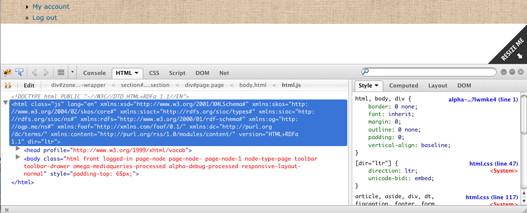
I've included images of the page and the FB inspector result. I suspect this is a rookie error since there's little in the issue queue about it. Appreciate your help.
Stephen
Comment #10
samwillc commentedHi,
Off the top of my head I believe the stripped out html for a page in Omega is:
If you have set the background image on #page I think it's quite likely that's why it's short as your page isn't actually as long as the browser window. There's not much on your page right now.
I believe the white 'space' is the body background. Set the image on the body instead. I am presuming this is a repeating background and it's not the image itself that's to short.
Give it a shot.
Sam.
Comment #11
steviebr commentedHello Sam,
That's it. I bow to your lotus feet, Master. Thanks so much. (I won't even wonder why it worked in a previous Omega release.)
Stephen
Comment #12
samwillc commentedlol, no probs, glad you got it working!
For the record, I don't use #page at all for any styling. I don't actually use body either as my pages are long enough. What I do is set images on the handy section tags like so:
This is the easiest way I have found to make three big horizontal bars with an image streching full width. Then, the best bit, you can style out the region or zone within the section with a transparent image so you get layered images easily. It's a great theme and very well thought out for designers. You can theme just about anything, and it's so simple!
You have a mass of possible css theming options:
Loads to theme!
Sam.
Comment #13
westis commentedI'd suggest adding this clearfix instead of the current one: http://nicolasgallagher.com/micro-clearfix-hack/ That also solves the problem of the white space at the bottom on mobile layout. I'll add this as a separate feature request.