Hello,
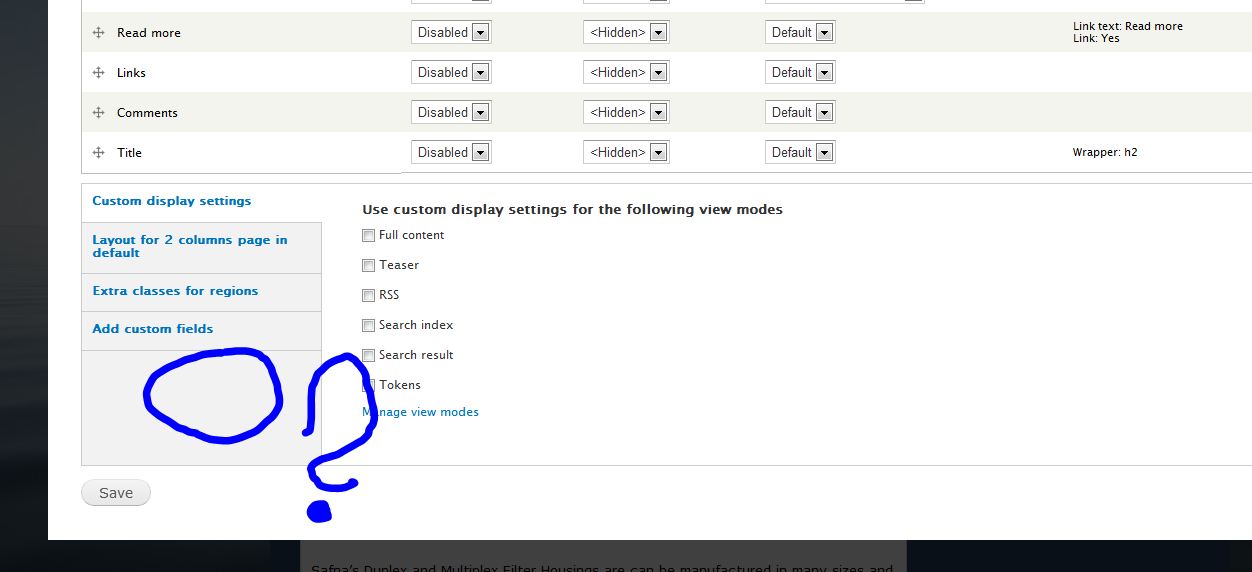
I have 'Region to Block' enabled at /admin/structure/ds/extras , however the 'Block Regions' option is missing on the Display Suite > Layouts screen at eg: /admin/structure/types/manage/page/display
Please see my screenshots attached for clarification of configuration and missing output. I am expecting something similar to what is shown at 1m22sec of this screencast 'Display Suite for Drupal 7 - Part 7: region to block' http://www.youtube.com/watch?v=y4wyjxyhbNA
I have tried this using Drupal 7.8 with ds-7.x-1.4 and Drupal 7.10 with ds-7.x-1.4 and ds-7.x-1.x-dev with the same outcome. Uninstalling and reinstalling ds (properly), clearing cache, running cron, to no avail unfortunately. The ctools version I have is 7.x-1.0-rc1.
Any other information you may need or ideas you have to point in the right direction for useful debugging would be greatly appreciated. I'm quite stumped and couldn't find any related info on this issue.
Thanks,
Paul.



Comments
Comment #1
swentel commentedYou need to choose a layout first, than that fieldset will pop up.
Comment #2
mccrodp commentedOooops! :)
Yes, that all works perfectly now!
I got confused as I somehow expected this 'Region to Block' to be a 'Layout' in itself, along with it being pre-selected in your video (which I would have tried selecting one had I not thought it was a Layout - displaying block regions in the Manage display screen).
This is a great feature and exactly what I needed!
Thanks again for the quick response,
Paul.
Comment #3
mjRocks commentedhey same problem i m facing out .. pls help .. i hope ur problem have been solved out..
Comment #4
mccrodp commentedHi,
I had enabled the 'full content' display from the default config page : admin/structure/types/manage/page/display
Then went to /admin/structure/types/manage/page/display/full 'Layout for page in full' > 'Select a layout' and chose 'two column stacked' from the Display Suite layouts and clicked Save.
When you've done this maybe try clearing cache and running cron, not sure if that'd help, but 'Block Regions' should definitely have shown by then on the left.
Good luck,
Paul.
Comment #5
thaistore commentedsame problem here
block regiones does not show up, i am running site on local host.....
cleared cache and run cron, nothing
i can only add block field, but that is not same
i need to create field that will be shown in left block
how to do that?
Comment #6
gboggs commentedThe region to block feature is not working for me either. An alternative until this is fixed is block_cck.
Comment #7
AmyKosh commentedThe region to block feature is not working for me either. Have tried every suggestion in this list above. To no avail.
Comment #8
swentel commentedHave you enabled the 'Full' view mode, it only works there.
Comment #9
AmyKosh commentedFor all us Newbies (me included)!
The key seems to be following these steps in order:
1. Go to Structure>Display Suite
2. Look in the upper right corner for the "Extras" tab. Click the tab.
3. At the bottom of the list on the right-side, open the "Other (region to block)" section.
4. Check "Region to Block" and then" Save".
5. Go Back to Structure>Display Suite
6. In the list, choose what you want to manage the display in, and click on "Manage Display" on the right.
7. In the upper right, select "Full Content". <>
8. At the bottom of the page select a layout for the content form in full. (You'll do this first).Then "Save".
9. Go back to that same page, making certain to select "Full Content". Look at the bottom of the page and you should see the "Block Regions" option at the bottom of the left-side list.
10. Click on "Block Regions". Now you can enter the name of your new region, for instance " region for my new slideshow". (This is also where you can remove previously added regions).
Continuing onwards:
Now that you have this new region you can put it to use in Structure> Blocks the same way you use the other regions present there.
Hope this has helped clear up any confusion.
Comment #10
Bernsch commentedI have the same problem.
I have enabled the "extras/Region to block" AND in my Contentype the 'Full' view mode and it doesn't works.
I use Drupal 7.20.
Comment #11
Bernsch commentedi flush the cash and it works! Thanks!
Comment #12
decipheredJust in case anyone comes across this and still gets no help, you currently need the Block module enabled to use this functionality, even this this functionality works fine without the Block module enabled.
There's an issue I opened a year back at #1635906: Remove 'block' module requirement for related functionality. that I forgot about, but will be writing a patch for promptly.