I have a node which has url alias "how-to" (with no leading slash), so it is available under this address: http://mysite.com/how-to
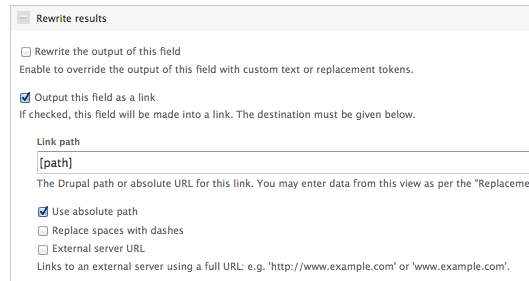
I have created a view and added the Path field and a custom field, which is *not* a title. For this field, I checked the "Output this field as a link" box.
If I put [path] into the "Link path" box, the field is rendered as:
<a href="//how-to" class="views-ajax-processed-processed">Something</a> <- note the double slash at the beginning. Clicking of such url leads nowhere.
If on the other hand I additionally check the "Use absolute path" box, then the field is rendered as:
<a href="http://mysite.com//how-to" class="views-ajax-processed-processed">Something</a> <- again, note the double slash after the domain name. Well, clicking on this link leads to the node, but there should be single slash afaik for the url after domain name.
Is there a method to have it behave correctly?



Comments
Comment #1
mikkopaltamaa commentedI had the same problem, but I found a workaround.
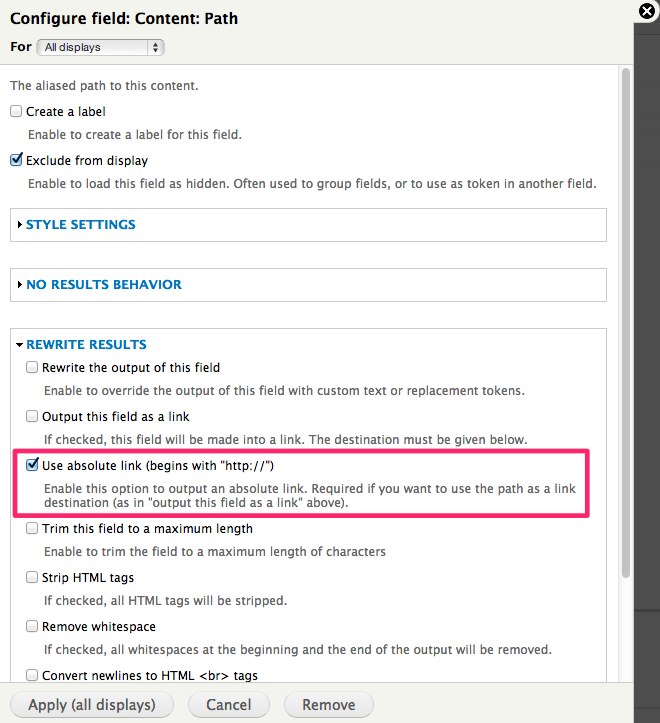
There is an additional option for the path field, under section "rewrite results":
If you check this option and then use "[path]" as a replacement token, but without the "use absolute path" option checked, it will print the whole absolute url as link href. It's a bit more than what would be required, but it prevents the duplicate SEO content problems.
However, a bug fix would be nice. Or even better, there should be a simple option for each field to make it a link to the content item, without requiring any additional hidden fields and replacement patterns.
Comment #2
raincloud commentedI can't find this option, where is it? Maybe it was added to the newest dev version? (I have 3.3)
This is what I currently have:
http://drupal.org/files/printscreen_0.png
Comment #3
loopy1492 commentedThis is what I had to do....
We have our Drupal installation in a subdirectory called /pages/. So here's an example of a url of one of our pages:
http://oursite.com/pages/thispage
So a view that links to one of these pages that uses the [path] for Rewrite Results > Link was rendering as this:
http://oursite.com/pages//pages/thispage
In order to stop this from happening, I had to make my Rewrite Results > Link settings thusly:
[x] Output this field as a link
Link path: [ http://oursite.com[path] ]
[ ] Use absolute path
[ ] Replace spaces with dashes
[x] External server URL
I'm pretty sure this is going to make Google Analytics angry.
Comment #4
dawehnerThis seems to be a duplicate: #1475230: Allow "Output this field as link" to link to the Content Item
Comment #5
johnpitcairn commentedI'm not sure #1475230: Allow "Output this field as link" to link to the Content Item will specifically address this path-token problem? It's just intended to make it easier to link a field to the content item.
In my case, I am not linking to the content item, [path] references a different item via a relationship. The same problem occurs:
A - it is not possible to rewrite as an absolute URL, /[path] without a hostname, or
B - double slashes are output after the hostname if you rewrite as relative [path] and check the "absolute" option.
Note that the problem also arises if you don't check "output as a link" and just rewrite as
That will incorrectly output as href="http://path" instead of just href="/path".
Comment #6
johnpitcairn commentedWeird. I have the path field absolute rewrite option mentioned in #1 available in one view, but not in another view on the same site...
Comment #7
dkingofpa commentedThis is very confusing behavior for the "Output this field as a link" functionality. For it to work, you have to configure the Content: Path field that is previously included. On the Content: Path field, check Use absolute link (begins with "http://"). The description for that functionality states:
That allows you to use the [path] replacement pattern in "Output this field as link" without the initial double-slashes. That also means the link will contain the protocol and fqdn before the content's path. See attached image.
If that doesn't work in your case, you'll have to use the "Rewrite the output of this field" functionality instead and manually output the anchor tags.
If you want this specific functionality to improve so it isn't as confusing, I encourage you to open a feature request with a specific proposal.
Comment #9
SchwebDesign commentedTHANKS dkingofpa for your solution, that worked perfectly for me. Previously i had to use a Views PHP field to correctly construct the URL for output as a token.
Comment #10
jeevaan commentedWonderful. Thanks dkingofpa. It worked fine for me too.
Comment #11
cabita commentedThanks dkingofpa. Your solution works fine for me. It's good.
Comment #12
er_d0s commentedThanks dkingofpa,
I would have been scratching my head for a lot longer if I didn't see this.
Comment #13
criscomNot sure whether this is the same problem but it sounds familiar:
I have a content type with a link field: [field_promo_link_extern]. In my view I would pass that link to my title field. I my view, I set the external link field as "hidden from display" and the formatter is set to URL, as link. (I tried all other options as well to no avail.)
In my view, I would like the title field to have this link. The settings for the title field: [x] Rewrite the output of this field (Text ==> empty - because I want the original title still to show, just with a new link) and [x] Output this field as a link and in the link path field I use the available token from the external link field which is: [field_promo_link_extern], then I checked the checkbox [x] external server URL.
The title receives the link but outputs it like this: http://%0a%20%20%0a%20%20%20%20http//www.linktoexternalsite.com
Is this the same issue, is it related to the fact that I am testing the site in a subdirectory or is this a new bug?
Comment #14
criscomI'll open a new issue for this.
Comment #15
baltazarz3 commentedThese steps worked for me ( If you are using the Link Field):
- Add the link field to your view
- Edit it and set it up as "URL as Plain Text"
- Scroll down and on the "Rewrite results" tab, open it and check the "Remove whitespace"
After this steps if you make the rewrite on the [Title] set up the URL token on the "Output this field as a link " option (not "Use absolute path" needed for me)
Hope it helps
Regards!
Comment #16
spidersilk commentedThe fix in #7 worked for me, but the double-slash thing is still an annoying bug. I can't see any valid reason for it to do that, and you shouldn't be forced to use absolute URLs for internal links. Hopefully this will be fixed in a future release so that the Path token can actually work the way you'd expect it to.
Comment #17
jschoen commented#15 Worked like a charm! I had an image that I was rewriting as a link and excluded the link URL from display. Didn't even think of checking the whitespace for the link. Thanks, you saved me a lot of pain!
In addition if you have Fences installed you need to make sure that it is set to no markup on the Link field
Comment #18
dr.user commentedNot fixed, after #7 workaround double slash is still inserted.
Comment #19
dr.user commentedComment #20
wellingtonwong commentedMy solution for this when using [path], is to check 'Use absolute link (begins with "http://")' on the field's 'REWRITE RESULTS' itself.
Then when i use this as a replacement pattern, the link is properly formatted. No more double forward slashes.
Hope it helps.
Comment #21
jazzitup commentedI confirm that #7 works as a workaround for this issue, even though I find it confusing and not user-friendly, so it may be a bug - not a feature request!
Comment #22
seanrIn views_handler_field_node_path.inc, the render function passes the path through url(). In render_as_link in views_handler_field.inc, it gets sent through l() which in turn calls url() again. Could that be the cause of our woes? Seems to me maybe we shouldn't be calling url() in views_handler_field_node_path or is there some reason we need to?
Comment #23
andersiversen commented#1 and #7 (they are the same I think?) worked for me.
One additional thing that this does, which is really awesome for me, is that it doesn't escape the special characters in the url path alias. I'm from Denmark, and our special characters æ, ø and å is perfectly allowed in url's, but In views those characters gets to be something like %25c3%25a5, which doesn't work, and even if it did it would be very SEO-unfriendly. I couldn't figure out how to solve this. But tadaa - this does the trick, and keeps the danish letters in url's as they should be.
Thanks! :)
Comment #24
pog21 commented#7 did not work for me, unfortunately. Also, for me the 'Use absolute path' option is in a different place (see pic).
With the following selected:
- Output this field as a link.
- Use absolute path.
- [path] inserted in the link path field.
The result has the double slash.
The only way I can get it to work is by selecting:
- Rewrite the output of this field.
- Enter:
<a href="[path]">Anchor Text</a>in the Text field.All other permutations resulted in either the link not working at all or double slash.
Comment #25
Pascal.s commentedIn my view, on the link field (the field in your content type you want to use), check "remove HTML tags" and "remove white spaces"
Then on the image field or the field you want to be used as a link, in rewrite results, check "output this field as a link" and insert your link token, [field_link] in my case.
Don't forget that your link field must come first
Hope it helps someone.