

Closed (fixed)
Project:
Media: YouTube
Version:
7.x-3.x-dev
Component:
Code
Priority:
Major
Category:
Bug report
Assigned:
Unassigned
Reporter:
Created:
11 May 2012 at 16:26 UTC
Updated:
16 Feb 2021 at 15:24 UTC
Jump to comment: Most recent, Most recent file

Comments
Comment #1
maartenstorm commentedTo get things working again i fixed it for myself this way. I'm not sure if this is the way to solve it, but for me it works.
Comment #2
dddave commentedComment #3
syp commentedDo you have Open SSL extension enabled in php.ini?
Validation of youtube video ids is done with an https url (MEDIA_YOUTUBE_REST_API, not the typed url).
The same notice appeared to me.
Debuging the code I found $response was returning code -5 (error: ssl transport unavaliable).
So, caching is working the right way.
May be media_youtube_valid_id should print $response->error if $response->code < 0.
Comment #4
RobW commentedI'm getting this as well, on ~50% of the videos I try to embed. Doesn't seem to be any rhyme or reason to which work and which don't.
Comment #5
robcarrI'm seeing this too - tried long and short URLs and Embed code. Issue was reported as fixed at #1446944: Cannot embed youtube videos but not working with latest DEV release (25 April 2012)
Comment #6
robcarrThe patch at #1 grabs the video BTW. If someone else could review the patch (a bit more thoroughly than me perhaps), please change status to RTBC.
Comment #7
RobW commentedChecked on 10+ videos, all seemed good.
Before we RTBC, does anyone (@maartenstorm?) know where are $id and $ids array set? It would be nice if we could add checks and normalize there so every function that may need to use ids can use the $ids array.
Comment #8
RobW commentedBeen using the patch in #1 for a while, fixes the problem and no errors so far. Upping the priority and adding the stable release blocker since about 50% of the videos I try to use without the patch fail incorrectly as "invalid or deleted". I think this one is necessary for a working install.
Comment #9
RobW commentedTo my chagrin I forgot I applied this patch while working on the theming issue. This fix snuck into dev with http://drupalcode.org/project/media_youtube.git/commit/a1381d5. Would have gotten there eventually I suppose.
Comment #11
crissanis commentedWhen uploading a new youtube movie an error occurs:
i work actually in local
Comment #12
doors commentedI am getting this same error and no one seems to be looking into this error.
Comment #13
joneldesouza commentedHello,
Someone managed to fix this error?
I've tried several other issues patch and nothing worked.
Comment #14
delisov commentedI have fixed this error by pasting youtube embed code in a field of "long text and summary" type with FULL HTML.
Now I only wonder why should I need a separate module with this simple functionality which does not work
Comment #15
dddave commentedI've a very hard time recreating this issue (on various installs). Unless someone can do some deeper digging on his install to narrow this down there is hardly anything the maintainer (disclosure: not me) could do.
Comment #16
wlftn commentedI'm getting this error too with
Media: YouTube
7.x-2.0-rc3
Media
7.x-2.0-alpha2
Media Internet Sources
7.x-2.0-alpha2
It wasn't there one day, and then it was.
Comment #17
beskid commentedPlease help
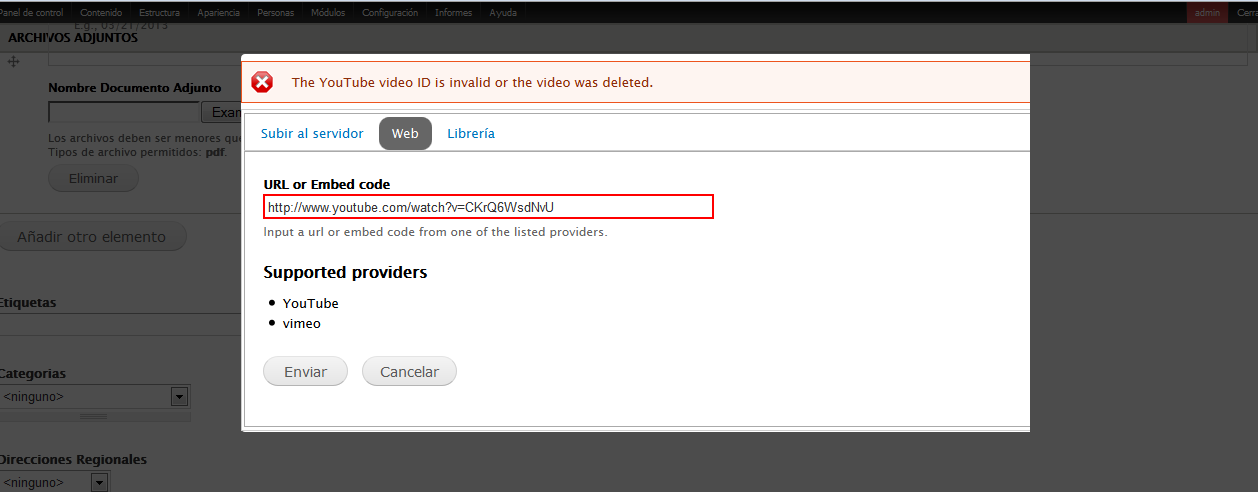
Hi. I see that you are the experts in Drupal. I have a small web tv. Recently I can not add my videos to the site. The message "The YouTube video ID is invalid or the video was deleted." How to fix it. Please help me. Regards Luke
file to change
www.mhv.pl/MediaInternetYouTubeHandler.inc
www.beskid.tv
Comment #18
Rahul Tiwari1 commentedreplace this file sites/all/modules/media_youtube/includes/MediaInternetYouTubeHandler.inc
from this
This Should be work...
Comment #19
vlooivlerke commentedThanks, @Rahul Tiwari1 patch #18 works.
Comment #20
marthinal commentedThe module works as expected I think. Probably the problem is that the youtube user doesn't agree to share the video. In my case, I can add perfectly other videos and I have this error only when the video is hidden.
Go to the video (youtube website) and verify the Share option.
Comment #21
Rahul Tiwari1 commented@vlooivlerke my pleasure
Comment #22
vlooivlerke commentedI encountered this problem mainly when importing a media field with a mixture of images, files,and embed links. The patch fix the import of embed media via feeds module. Embedding a single youtube movie directly into a media field works without the patch - BUT NOT ALL THE TIME. I reckon this patch needs to be committed as I have extensively imported media in a single field, via a csv file using the tamper module to explode the list of media. Without this patch I will not import media if there is a youtube movie in the list, no matter what its "share" status is. Thanks again for the patch
Comment #23
john mark maina commentedThanks Rahul Tiwari1 it worked
Comment #24
aklouie commentedStill having issues. I replaced the .inc file with the one from Rahul, refreshed (dumped cache) and no change.
Essentially it times out on the screen but the log message gives me an error
The following YouYube video is invalid: xxxxxx where xxxx is the proper ID of the youtube video i'm linking (and the mispelling of YouYube is intentional, it's as it is on the log message)
Is there anything I can do to provide more data? I have tried multiple videos, even ones posted recently on my website. This was working fine till 7 Jan 2014, tried linking in a video today with no avail, nothing changed except the theme.
Thanks,
Alan
Comment #25
john mark maina commentedNoticed also that it takes very long to load the video from YouTube almost 3 mins per vid.. I'm even contemplating just creating an embed field and use the
embed code if this persists and no help s forthcoming.Comment #26
aklouie commentedSwitched to embedded media and it works now.
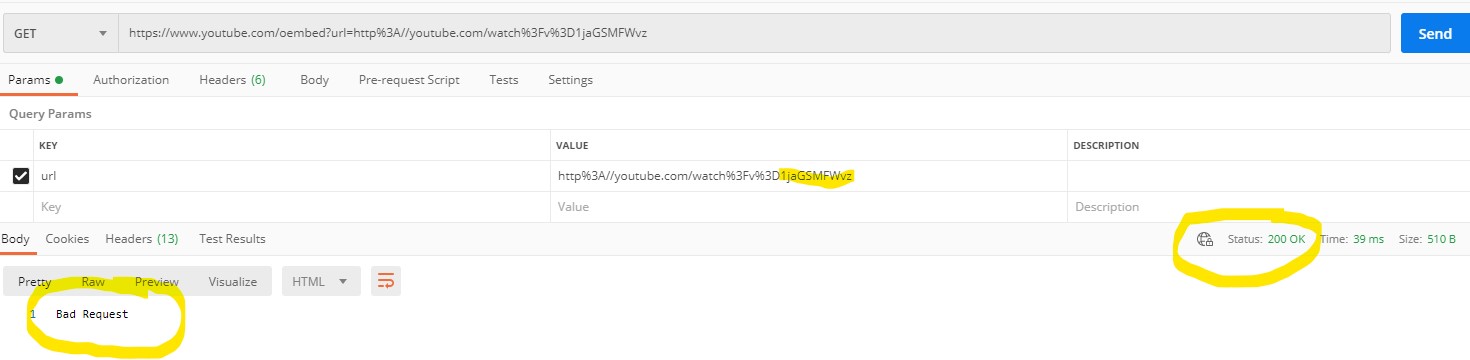
Comment #27
willowdigit commentedI can confirm that patch #18 works. It just takes a loooong time to upoad.
Comment #28
ethiel88 commentedGuys, before applying any patch, please check this, after debugging I figured out that the problem was in the server, outgoing (external) connections are limited by a firewall or disabled by default (SELinux)
I experienced this problem with Media: Youtube, and Media: Vimeo modules.
Hope this helps to other users, when you got this problem with drupal_http_request or others like curl, the problem is the server, in case of SELinux the solution is execute as superuser:
setsebool httpd_can_network_connect=1
but when you dont have access to shell / super user credentials don't hesitate to contact with hosting support and tell them, that you need outgoing connections to the ip addresses or domains you want to connect, they should add those entries in the firewall, or in case of SELinux enable the external connections.
For getting ip address to vimeo I simply hit in a console
host vimeo.com
the ip address I've added to the ip address accepted list and it worked like a charm.
Regards to everybody, especially those who implemented these modules.
Comment #29
brightboldSame problem here, on a site upgraded from D6 (but a new field as I couldn't get the old emfield_video field to upgrade), and on my local machine. When I push the site to Pantheon I will see if I can reproduce the error which if I can should rule out #28. I have confirmed that the video is available for sharing which rules out #20. Regarding #25, it also seems to take a long time without the patch (but less than 3 minutes).
Moving this back from postponed since the code in #18 might help people figure out what's going on. Or if #18 has the correct solution, then it can be converted to a real patch and marked for review.
Comment #30
willowdigit commentedI can confirm @ethiel88 advice (#28) to work. Thanks for that one. I now get the video to load in 2 - 3 seconds.
Comment #31
kiova commentedHi
We have the same error...
Our setup was working in our test server but when we migrated to our new dedicated we stared to get this error. We think it is a connection problem but we could not find out...
how can we debug the errors?
we tried #28 but noting changed...
Any other advice for us?
Comment #32
willowdigit commentedI forked the issue to drupal_http_request fails or extremely slow as it seems to be a server setup issue and not a module bug.
Let's see if it can be solved over there.
Comment #33
evanmwillhite commentedAre we sure this is a server bug? When you comment out the validId() function below and the check on line 40 for it (
&& self::validId($matches[1])), it works fine and there is no delay.Obviously, this isn't a long-term solution as a check for a valid ID is necessary, but I wondered if that code could be altered somehow.
Comment #34
irgnet commentedI have the same problem,
Vimeo works , but Youtube not.
I try pach, but it not works for me.
I try put off firewall on host, but same s**t
Comment #35
drcelus commentedPlease note that this message can also come from the fact that Youtube is blocking your request. If you are developing from the localhost it is enough to input this URL on a web browser (change [VIDEO_ID] with your own) :
http://www.youtube.com/oembed?url=http%3A//youtube.com/watch%3Fv%3D[VIDEO_ID]If a captcha appears, it means Youtube has blocked the request as a result of a violation of their TOS from your IP or an IP inside your network.
This has just happened to me while I was using a VPS for development, turned out that all the IP addresses from my provider where blocked.
Maybe showing more details from the http status response code could help people debug this error.
The HTTP status code returned by Google (Youtube) in this case was 503 Service Unavailable.
Comment #36
Anonymous (not verified) commentedI've now the same problem with my setup...
When analyzing the error I get an http 503 error from here:
==> looking at it on google, I arrived to the conclusion that it was using IPV6 and not IPV4 and this was not supported...
However, I'm not reaching the point of solving this issue, as I tried with drupal_http_request without any success.
I tried also with curl (http://stackoverflow.com/questions/26089067/youtube-oembed-api-302-then-...) but couldn't get it to work neither..
a small help would be really much appreciated.
Comment #37
gaëlgThese 503/302 errors are very frustating. I figured out that Scald manage to get video info from YouTube, when Media can't. It actually uses the gdata API instead of the oEmbed one.
It was the same for Media: YouTube before this commit.
I managed to get something working by changing the $url in validId() to
$url = 'http://gdata.youtube.com/feeds/api/videos/'. $id;and adding a fallback in the getOEmbed() method, like this:Comment #38
learnbydrop commentedModule: Media_youtube 7.x-3.0
Showing error: The YouTube video ID is invalid or the video was deleted.
None of the above patches are not working with 3.0 version.
Comment #39
learnbydrop commentedSolution to resolve::
Change the line 93:
Previous Line:
$oembed_url = url('http://www.youtube.com/oembed', array('query' => array('url' => $external_url, 'format' => 'json')));
New Line:
$oembed_url = url('http://www.youtube.com/embed', array('query' => array('url' => $external_url, 'format' => 'json')));
The youtube Embed URL shoule be
http://www.youtube.com/embed
The issue is resolved.
Comment #40
eeyorr#39 doesn't resolve the issue for me.
Comment #41
hongpong commentedThat URL definitely has to change to http://www.youtube.com/embed tho for sure. oembed is 404 now.
Comment #42
c2webdev commentedI'm having the same issue with Vimeo, has anyone else?
Comment #43
jon.girard commented#39 resolved the issue for me on 7.x-3.0
Comment #44
jon.girard commented7.x-3.0 patch attached per details in #39
Comment #45
vlooivlerke commentedHi
is the url not https ?
currently: url('http://www.youtube.com/embed'
I have loads of 404 pages that state www.youtube.com/embed/Lp4MWK0Kjsg can not be found, but https://www.youtube.com/embed/Lp4MWK0Kjsg can be found
Comment #46
ZalemCitizen commentedIn case some of you still encounter the problem.
We tried some of the patches indicated here without success.
The problem is youtube service refuses IPv6 when server is resolving address under drupal_http_request().
We modified
/etc/gai.confto give precedence to IPv4 over IPv6 and this solves the issue.More info about this
Comment #47
erwangel commentedeither #39/44 nor #46 worked for me. It worked before Not sure but I think it worked even with latest 7.x-3.0+9-dev (2015-aoû-17) I don't see what could me changed. Getting 503 error not available in $response and message "The YouTube video ID is invalid or the video was deleted".
Comment #48
erwangel commentedI tried to investigate a little further:
calling something like
returns this string "HTTP/1.0 503 Service Unavailable" which doesn't help.
calling the url directly from my browser (so with a different ip) I get correctly the json data. So I can see that the service is available
by calling a youtube url by curl
The response on my browser is a google message:
So it seems that youtube either blocked my server's ip or it doesn't like the curl request. I can't see a reason for why server ip is blocked, I'm not doing anything special with their videos, my site calls just some videos embedded with media module in a very classic way with a moderate traffic (some hundreds/day, so some dozens/day on pages containing videos). Anyway, I don't think that traffic is the cause as the display of videos loaded before the problem appears to be okay ; the problem is that I can't "download" embed videos anymore with media youtube module in File Library. Has there been any change in youtube/google policy about the way to call their videos ?
Perhaps other people encounter the 503 error and message "The YouTube video ID is invalid or the video was deleted", but maybe the problem is not coming from media_youtube module but by the way Drupal calls the url (drupal_http_request), which youtube/google may not like and leads to some kind of banning.
(edit)
After 3 days without using the module (so no calls to youtube service), it works nicely as before. Automatically unbanned or just a temporary problem with youtube ? Never mind, it works !
Comment #49
dorficus commentedI have to disagree with #39. Oembed is not dead and the results from embed v. oembed are very different. I copied the majority of what #48 did, but I still did not get the unusual traffic error.
I am still getting the "YouTube video ID is invalid or the video was deleted." error despite the same URL coming back with good JSON on cURL and and
file_get_contents()This is failing silently, as I am unable to find anything in the logs regarding the error.
Comment #50
R.Sungatov commentedModule 7.x-3.0
After re-saving of node, Error occur:
The YouTube video ID is invalid or the video was deleted.
I noticed that after re-saving video, address in the field change by himself: protocol https to http.
Problem is in the MediaYouTubeStreamWrapper.inc
I change it on
$oembed_url = url('https://www.youtube.com/oembed', array('query' => array('url' => $external_url, 'format' => 'json')));Also in MediaInternetYouTubeHandler.inc, I change all "http" on "https". And all work fine for me.
Comment #51
vvs commented#50 Please make the patch.
Comment #52
hongpong commentedHere is a patch and I switched the $base_url to secure http which I'm pretty sure is a good idea, but people should test.
protected $base_url = 'https://www.youtube.com/watch';Comment #53
hongpong commentedComment #54
Phantom_63rus commentedAnd again...
Drupal 7.56, media 7.x-2.11 and 2.10, php 7.0.16(CGI) and 5.4.16(Apache module), centos 7.
Openssl, curl, json, etc is enabled
#52,50 - is already https
selinux is disable
access.log, error.log - none interesting
Any ideas?
Comment #55
calvez commentedthis problem is back with my
php 7.3,
drupal 7.69,
media 7.x-2.24
media_youtube 7.x-3.9
module worked as it should be before, it could be some youtube modification but there are no errors or warnings just the message above:
The YouTube video ID is invalid or the video was deleted.
Any kind of solution would be good urgently, right now i just don't have an idea what is wrong.
Thanks!
Comment #56
joseph.olstadpatch no longer applies to head.
If you have a new patch, please upload it and set to needs review
Comment #57
avpadernoComment #58
wasid commentedToday I faced the same problem and could not find out the solution and then figured out the problem was created due to the web hosting server's firewall or access controller error it was not the problem created by dupal or module itself.
Comment #59
naurisr commentedHere is the patch that fixed the problem for me.
Comment #60
Nightwalker3000 commentedI've the same issue. For me it was enough to change the request Method from HEAD to GET to solve the issue.
/includes/MediaInternetYouTubeHandler.inc
changed to
Comment #61
avpadernoComment #62
joseph.olstad@Nightwalker3000 can you please provide a patch or comment upon patch 59?
Is patch 59 going to work for 'everyone'?
what web server are you using, nginx / apache ?
iis?
will this change work on all web servers
Comment #63
joseph.olstadok looking at this patch it seems like a needed improvement.
suggested change:
FROM:
TO:
Comment #64
joseph.olstadand to be safer and catch all exceptions,
should also have an else without if
so maybe also add this:
Comment #65
joseph.olstadif someone can review my suggestions that'd be great, I could push in the patch as-is but I suspect we need to improve the patch slightly.
Comment #66
Nightwalker3000 commentedPatch #59 works for me on Apache 2 - PHP 7.3.22 .
It is also better than my suggestion. Better only check the headers instead of Downloading the whole JSON file as suggested by me.
Comment #67
caesius commented@joseph.olstad I've implemented your suggestions as well as added a bit more info to the error messages to help with future debugging. Your comment in #64 threw me for a loop though since an unqualified `else` causes the code to always throw an error :)
Anyway, I was having a lot of trouble on a production site with this error (maybe because YT was down earlier today?) and the patch definitely helps.
Comment #68
tyler.frankenstein commentedLooks like @caesius and I were working in tandem. Here's my (very similar) patch based off of #59 and suggestions from #63. I don't think we should add debug info to the error message because it'd likely scare end users even more. Also, there is/was a huge Google/Gmail/YouTube outage today, right? Maybe that has something to do with it.
Comment #69
joseph.olstadlol for comment 64, sorry about that
Comment #70
jeffmattsonUsing patch #68 I get this warning:
Warning: get_headers(): This function may only be used against URLs in MediaInternetYouTubeHandler->validId() (line 115 of /var/www/dartmydart/docroot/sites/all/modules/contrib/media_youtube/includes/MediaInternetYouTubeHandler.inc).
Comment #71
joseph.olstadjeffrysmattson, what is your web server type? apache2 , nginx, iis, something else?
looks like we maybe need an extra validation for line 115 or else what?
Comment #72
jeffmattsonWe are using apache2. Not sure what the solution is yet. The patch seems to work just fine. Just throws those warnings. I am still looking into it.
Comment #73
joseph.olstadseems like all the patches are for 3.x not 2.x
Comment #74
inteldesk commentedProblem persisting, using 7.x-3.9
MediaInternetValidationException: The YouTube video ID is invalid or the video was deleted. in MediaInternetYouTubeHandler->validId() (line 120 of /~media_youtube/includes/MediaInternetYouTubeHandler.inc).
Comment #75
stefan.korn@jeffreysmattson:
I am seeing the warning from get_headers() too. There is one more warning on my site, telling:
Warning: get_headers(): https:// wrapper is disabled in the server configuration by allow_url_fopen=0So seems this is something about the server setting.
That said, on a server that puts out this warning you can insert an invalid Youtube ID and it will get thru with embedding showing the Youtube error icon.
So I suppose get_headers() is not usable for some environments. Or is a Drupal installation expected to have allow_url_fopen in any case?
Comment #76
stefan.kornProposing a patch that does not use get_headers()
Comment #77
jeffmattsonApplying patch #76, works without warnings for me. I removed the "return" statements after the "throw" statements as they where unreachable. Thanks for the fix @stefan.korn
Comment #78
kris77 commentedPatch in #76 works for me too.
Thank you so much @stefan.korn
Comment #79
loze commentedConfirming #76 Works
Comment #80
tyler.frankenstein commented@joseph.olstad, that's what I thought while tinkering with patches yesterday.
@stefan.korn and @jeffreysmattson, are you both on 2.x?
FYI, #68 is for 3.x.
Regarding #76, is that patch for 2.x or 3.x? Also, is it wise to get rid of the "HEAD" method there?
This issue itself is very old and seemed to be inactive for about 4-5 years until about 2 days ago. If folks are still using 2.x, then it seems OK to leave this issue as 2.x and then we probably need to track a separate issue for the 3.x branch, right? Or perhaps this issue should be marked as 3.x since that's the recommended version of the module.
I'll move this back to "Needs review" for now.
Comment #81
loze commentedI applied the patch to media_youtube 7.x-3.9
I believe this error is because of a recent change on you tubes end. This stopped working a day or two ago for me on a handful of D7 sites where I had been using this module without any issues for a while.
Comment #82
stefan.korn@tyler.frankenstein: Patch is for the 3.x version, 2.x version is not really existing anymore I suppose. If you do a update of a 2.x version you will get to 3.x as well.
getting rid of the "HEAD" method is crucial for #76 to work. I suppose the "HEAD" method does not work the way is has done before, probably because YT changed something.
The way checking for headers in #68
if (isset($headers[0])) { ...is not taking care for general problems with get_headers(), which can return FALSE. If FALSE is returned #68 sees this as a valid ID, which can actually lead to letting invalid IDs pass.
Since get_headers() does not seem as reliable as drupal_http_request(), I opted for keeping drupal_http_request.
It seems Youtube is delivering a pure string to drupal_http_request as $response->data if something is wrong (like "Unauthorized" oder "Bad request") and if this is put thru drupal_json_encode the result will be empty. This allows to catch an error by checking for empty drupal_json_encode output and then using the plain string as error message.
We tested #76 somewhat intensive today and seems to be working fine.
Comment #83
tyler.frankenstein commentedGreat, thank you! #76 works fine for me too.
Comment #84
dystopianblue commented#76 works for me as well. Thanks!
Comment #85
javiereduardo commented#76 works on media_youtube-7.x-3.9
+1
Thanks
Comment #86
rbomhof commentedConfirming that #76 worked for us as well. Thank you so much!
Comment #87
marcelschmitz commented#76 did remove the error message for me but now the embeded videos are not showing up on the frontend. Any idea how to fix that?
Comment #88
stefan.korn@marcelschmitz: Are only new videos not showing up in the frontend or also older ones? Do you get the thumbnail for the video?
Comment #89
jvdkolk commented#76 works for me (7.x-3.9).
Only Netbeans whines about the (unreachable) 'return;' statements after the 'throw' statements in line 126 and 132 of the patched code.
Comment #90
maskedjellybean#76 works for me. Thank you!!
Comment #91
jpoesen commented#76 works for me (debian, nginx, 7.x-3.9).
Thanks!
Comment #92
eloivaque#76 forks for me
Comment #93
Sam_Rad commentedHello,
I get the same error and it seems that it comes from the way the Youtube URL are called.
The URL must be changed from http:// to https:// and be called via the GET HTTP method.
Here is the patch for the version 2.x i have used:
A better patch would make adding a constant for the URL https://www.youtube.com/oembed and using the existing constant MEDIA_YOUTUBE_REST_API in media_youtube.module instead of using the URL "https://gdata.youtube.com/feeds/api/videos"
Best regards
Sam
EDIT: adding the version
Comment #94
wstocker commented#76 works for me as well. Drupal 7.77
Comment #95
stefan.korn@Sam_Rad: I suppose your patch is targeting 2.x version of the module and also not the recent 2.x version, because there is code in your patch that neither is in the 3.x nor the last 2.x version.
Be warned that just changing from HEAD to GET will probably let more or less anything pass through the valid id check, because the response code will then usually be 200 except there is something completely broken with the connection. So you might not spot invalid video IDs or videos that are not allowed to embed.
Comment #96
kpolychr commentedThis seems to be a youtube issue actually with oembed, maybe a few servers have issues. an example bellow, video is public - no restrictions - no copyrights. GET requests works perfectly though. Bellow 3 consecutive HEAD requests.
curl -I https://www.youtube.com/oembed?url=https://www.youtube.com/watch?v=xxx&f...
HTTP/1.1 200 OK
Content-Type: application/json
Cache-Control: no-cache
Expires: Tue, 27 Apr 1971 19:44:06 GMT
P3P: CP="This is not a P3P policy! See http://support.google.com/accounts/answer/151657?hl=de for more info."
X-Content-Type-Options: nosniff
Strict-Transport-Security: max-age=31536000
Date: Mon, 14 Dec 2020 09:44:50 GMT
Server: YouTube Frontend Proxy
X-XSS-Protection: 0
Transfer-Encoding: chunked
Alt-Svc: h3-29=":443"; ma=2592000,h3-T051=":443"; ma=2592000,h3-Q050=":443"; ma=2592000,h3-Q046=":443"; ma=2592000,h3-Q043=":443"; ma=2592000,quic=":443"; ma=2592000; v="46,43"
Accept-Ranges: none
Vary: Accept-Encoding
curl -I https://www.youtube.com/oembed?url=https://www.youtube.com/watch?v=xxx&f...
HTTP/1.1 404 Not Found
Content-Type: text/html
Date: Mon, 14 Dec 2020 09:45:05 GMT
Server: scaffolding on HTTPServer2
X-XSS-Protection: 0
X-Frame-Options: SAMEORIGIN
X-Content-Type-Options: nosniff
Transfer-Encoding: chunked
Alt-Svc: h3-29=":443"; ma=2592000,h3-T051=":443"; ma=2592000,h3-Q050=":443"; ma=2592000,h3-Q046=":443"; ma=2592000,h3-Q043=":443"; ma=2592000,quic=":443"; ma=2592000; v="46,43"
curl -I https://www.youtube.com/oembed?url=https://www.youtube.com/watch?v=xxx&f...
HTTP/1.1 200 OK
Strict-Transport-Security: max-age=31536000
Expires: Tue, 27 Apr 1971 19:44:06 GMT
X-Content-Type-Options: nosniff
Cache-Control: no-cache
P3P: CP="This is not a P3P policy! See http://support.google.com/accounts/answer/151657?hl=de for more info."
Content-Type: application/json
Date: Mon, 14 Dec 2020 09:45:24 GMT
Server: YouTube Frontend Proxy
X-XSS-Protection: 0
Transfer-Encoding: chunked
Alt-Svc: h3-29=":443"; ma=2592000,h3-T051=":443"; ma=2592000,h3-Q050=":443"; ma=2592000,h3-Q046=":443"; ma=2592000,h3-Q043=":443"; ma=2592000,quic=":443"; ma=2592000; v="46,43"
Accept-Ranges: none
Vary: Accept-Encoding
Comment #97
Sam_Rad commented@setfan.korn: yes this is for the version 2.x.
The patch does not only change HEAD to GET but also replaces http:// to https:// in the URL of the Youtube API.
It must be done because using HEAD and http does not work anymore.
It can be easily tested with cURL: a HTTP request with HEAD returns a 404 even with the use of https whereas a HTTP GET request with http returns an error 403 "SSL is required to perform this operation."
The right combination is GET with https.
So this patch does not remove the check of the video ID, it is just updating the way to do it.
Best regards,
Sam
Comment #98
stefan.korn@Sam_Rad: Yes, https is necessary, but this has been already changed in 3.x version.
But the way you do it, makes the valid id check rather useless. Try for example an invalid youtube ID. It will pass as valid ID, because the response code will be 200 anyway. The head method was used to get information about the validity, but HEAD method does (currently?) not work reliable anymore on YT.
Take this example from Postman, this is query for an invalid ID. The response code is 200 (will pass valid ID), though the data response is "Bad request" (invalid ID):
Comment #99
Sam_Rad commentedThank you @stefan.korn.
I now get the point.
So what about adding the following test ($response->data==='Bad Request') into the method validId() :
Local tests seem to validate the right video IDs and trigger an error for the wrong ones.
Best regards,
Sam
Comment #100
stefan.korn@Sam_Rad: Yes you could do it like this. Or take a look how it is solved in patch from#76, there are more possible "invalid" response data (like "Unauthorized" for a YT video that does not allow embedding). Patch from #76 is for 3.x, though you might take the response checking part for 2.x as well.
Comment #101
Sam_Rad commentedThank you again @stefan.korn.
For those who still use the version 2.x, here is the patch :
Best regards,
Sam
Comment #102
anthonyroundtree commented@sam_rad, Shouldn't the 2.x fix be a separate issue as well as a separate patch file?
Comment #103
joseph.olstadok so looks like a lot of positive feedback on patch 76
I will try to review it tonight, if good then I'll push a new release with this patch
Comment #104
griff phillips commentedHit this issue today, patch #76 fixed for me.
Comment #105
hossein425 commentedPatch #76 fixed for me too.
Comment #106
drupalvikingMy client was experiencing the same problems as listed before. When I applied patch #76, everything worked again. My customer is super happy. I can confirm that the patch works as described and is Reviewed and approved by me (as one of the community ;) )
Comment #107
joseph.olstadOk I will push this soon and cut a new release.
If this is not done within 2 weeks, ping or private message me or leave a wake up call here.
Comment #108
surendrasingh1 commentedI have applied patch #76 and everything is working again.
Comment #110
joseph.olstadTagged new release with this fix, 3.10
Thanks everyone.
Comment #111
joseph.olstadplease try the new release:
https://www.drupal.org/project/media_youtube/releases/7.x-3.10
Comment #112
joseph.olstadfor those that haven'T upgraded to 7.x-3.x either do so or please work on this issue:
#3190134: 7.x-2.x backport The YouTube video ID is invalid or the video was deleted.
Comment #113
luksakWorks, thank you!
Comment #114
creatile commentedPatch #76 works for me, Thanks
Comment #115
solideogloria commentedThe
returnstatements after thethrowlines should have been removed before committing.Comment #116
joseph.olstadRE: 115
If someone writes a patch for this I'll quickly review it and throw it in.
Comment #117
solideogloria commentedRemoved extraneous
returnlines. Applies on dev.Comment #118
duntuk commentedThanks! Latest patch works media_youtube-1572550-117.patch on latest version 7.x-3.10
Comment #119
solideogloria commentedMarking RTBC so that #117 can be committed.
Comment #120
joseph.olstadNew maintainer solideogloria added and permissions updated.
Comment #122
solideogloria commentedComment #123
solideogloria commentedComment #124
axle_foley00 commentedI still seem to be having an issue, despite updating to 7.x-3.10. Whenever I try to add a video, I'm getting a 502 Bad Gateway error. When I print out the response, I'm getting the following:
I should note that I am behind a Proxy Server being run on Squid. However, when I try to use "curl" at the command line on my server to retrieve the same YouTube link, it returns the JSON output. But once I use the Drupal UI to try to add that video I get the 502 Bad Gateway error. The curl request also goes through the same Squid Proxy Server so I'm really not sure why it doesn't work in the Drupal UI. Any ideas?
Comment #125
stefan.kornDrupal 7 and Proxy never really got best friends ...
You can maybe give this module a try: https://www.drupal.org/project/chr
Comment #126
axle_foley00 commented@stefan.korn:
That works! Thank you!
Comment #127
solideogloria commentedThen it must be a header or some setting that was wrong.
If you decide you want to figure out why it didn't work, look at common.inc at the source code of
drupal_http_request(), and try stepping through with debug messages to see if everything was as you expected.Comment #128
amitajgaonkar commentedPatch for 7.x.3.0
Comment #129
solideogloria commentedThis issue has already been fixed in dev. See the commits above.