

Needs work
Project:
Commerce coupon fixed amount
Version:
7.x-1.x-dev
Component:
Miscellaneous
Priority:
Normal
Category:
Feature request
Assigned:
Unassigned
Reporter:
Created:
1 Jun 2012 at 13:03 UTC
Updated:
24 Jan 2017 at 08:39 UTC
Jump to comment: Most recent, Most recent file





Comments
Comment #1
pcambraI see the problem, you'd want to apply taxes after the coupon is applied, let's say:
Item costs $10
Discount is $1
Taxes are 20%
As it is now, it will add the taxes: $12 and discount $1, total $11.
And you want to apply the discount to the item, $9 and then add the taxes, which would be $1.8, total $10.8
I'd say that this has to do with the taxes module applying taxes just to product line item types, need to check how commerce shipping is solving this (if it is at all)
Comment #2
kensae commentedJust in case my solution would be helpfull for anyone else:
In my situation, users can order only one product at a time. So I've created a rule "Apply fixed amount coupon to product line item", based on the one to apply percentage coupons on a product line item. This way, coupon discounts and taxes are calculated in the same event.
Comment #3
poniesShould there be an option to choose whether to apply the discount before or after tax is calculated?
Comment #4
kensae commentedFor me personally, I don't need the option to choose.
Comment #5
rtdean93 commentedKensea - Can you post the exported rule here?
Comment #6
Griso81 commentedHi, any updates on this topic? Would be good to have this working also for http://drupal.org/project/commerce_coupon_pct
Comment #7
Darren Shelley commentedI have created a sandbox for my proposed solution: "Commerce coupon fixed distributed".
http://drupal.org/sandbox/darrens/1743616
Ultimately it aims to address the issue that some organisations need coupons to be calculated prior to Tax.
Testing is highly appreciated.
Comment #8
Griso81 commentedHello Darren,
I gave your sandbox project a go, but when entering the coupon code in the checkout page I get the following error:
EntityMetadataWrapperException: Unknown data property commerce_coupon_fixed_dist_amount. in EntityStructureWrapper->getPropertyInfo() (line 339 of \commerce\sites\all\modules\entity\includes\entity.wrapper.inc).
Comment #9
Darren Shelley commented@Grisor81 apologies i had to change the fieldname due to a hard limit in drupal and missed off the reference.
I have now fixed this in the sandbox. If you have it checked out from git it should be a simple case of running
git pull origin masterComment #10
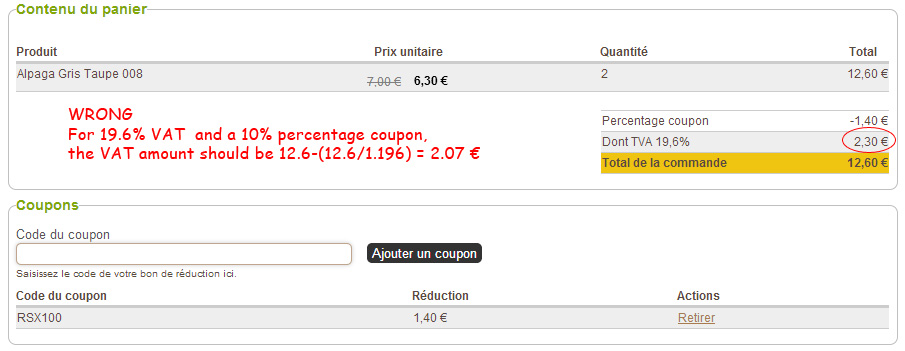
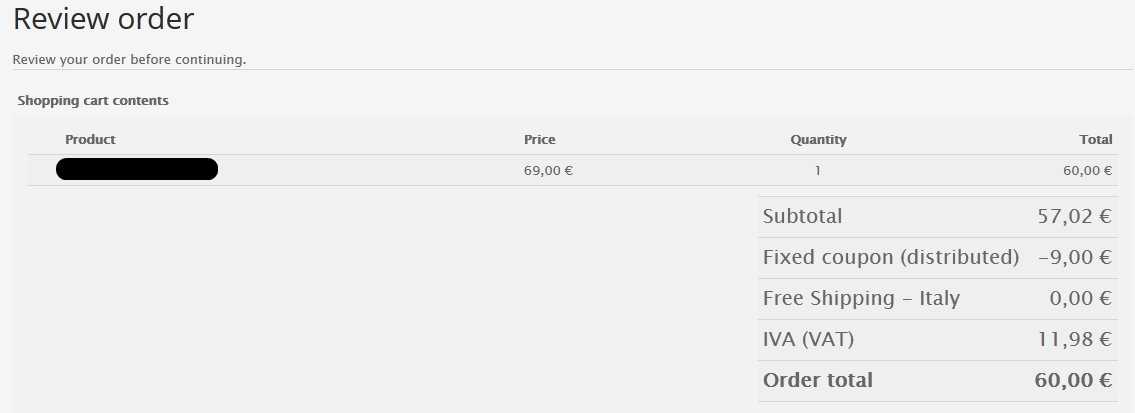
Griso81 commentedThank you Darren, it's working without any error now but I still don't get the proper result. Look at the attached picture of the checkout page. Price is 69€ including VAT, coupon is 9€ so total works out fine at 60€. Problem is with subtotal, 57.02€ is still referred to the price of 69€.
Comment #11
Darren Shelley commented@Grisor81.
I'm glad that the fatal error has now resolved for you.
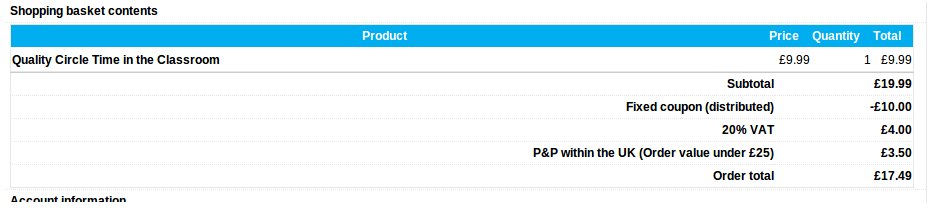
Please find attached an image of the module working for me.
I think what you're seeing is an oddity as to how subtotal is calculated.
The value 57,02 appears to be 'Order total' minus 'IVA (VAT)' plus 'Fixed coupon (distributed)' rather than the total of the line item totals.
How is VAT getting applied? it appears as if your item might not have a VAT component and that VAT is just being applied to the order instead?
Certainly from the picture i would suggest that your VAT implementation may be the issue, rather than how coupons (fixed distributed or pct) work.
My picture is not perfect, i probably should alter my view to show the base price so customers can get a better idea of where the discount was applied, however i do believe the calculations work.
Comment #12
Griso81 commentedDarren, I think your behavior is like mine. You have VAT applied to 19.99 (20% = £4.00). VAT should be calculated on the (base price excluding VAT) - (coupon value). In your case VAT should be calculated on 19.99-10.00=9.99 and VAT should be roughly £2.00. Am I missing something?
Comment #13
Darren Shelley commentedAhh yes, you are correct. If you alter the weight of the rule "Apply fixed (distributed) coupons to product line item" to -1, you should experience the correct behaviour.
I will look at having the module set this to -1 by default
Comment #14
Darren Shelley commented@Grisor81.
I've committed in the fix to make the rule weight -1. I believe rules requires a reinstall of the rule to affect its weight so recommend on existing installations you just change the weight manually.
Please retest and see if you get the behaviour you'd expect.
When I retested i got the £2.00 you suggested I should have as a value
Comment #15
pcambra@Darren would you submit your changes as a patch in here? not sure what are the differences in the code.
Answering #6 this is already feasible with pct coupons as you can just set the rules weight to be whatever you'd like to (before taxes, after taxes, in the module of two discounts, etc)
Comment #16
Darren Shelley commented@pcambra it's not a patch but a distinctly separate module dependant on commerce_coupon, much like commerce_coupon_fixed is.
This is with the mindset of there being 3 options available:
commerce_coupon_fixed_dist (provides a fixed amount, distributed over products pre-vat)
commerce_coupon_fixed (provides a fixed amount, applied to the total)
commerce_coupon_pct (provides a percentage amount, distributed over the products)
As per http://drupal.org/node/1274280#comment-5624746
the existing commerce_coupon_fixed handles the 'gift certificate style senario
the commerce_coupon_fixed_dist handles the 'promotional style scenario
It didnt make sense to patch it into this module as it's potentially feasible you'd want both 'gift certificate style' and 'promotional style' scenario'. and we already have the type delimiter on the commerce_coupon module itself
The rules also hook onto completely different event types commerce_coupon_fixed_dist hooks onto calculating the product price in a similar fashion to how the percent coupon works
Personally I think the best approach would be to do the following
commerce_coupon_fixed works by taking the amount specified and adding a discount line item. commerce_coupon_fixed_dist, takes that amount and divides it over the pre-tax prices of all products in the basket, based on the proportion of the basket that they are. Top financial systems such as SAP use this method
Please let me know what you think
Comment #17
pcambraLooking at the code of the module, it seems most of it duplicates what we already have in commerce_fixed_amount, I see your points, but wouldn't it be better to have a setting at coupon type level that might be overriden by one at coupon by coupon of that type level to select if the fixed amount is discounted before or after taxes.
I'm not sure what would happen with the fixed amount in your approach if you've multiple price rules (such as normal discounts).
We've got to find better naming, btw.
Comment #18
Darren Shelley commentedI understand the need for better naming, hence not ascending the project.
And we're agreed that there are multiple ways that a fixed amount could manifest itself. (pre-tax, against order)
Agree that the fixed coupon module could have a flag which indicates how the fixed amount is to be applied with conditions against a 'calculation method' field determining whether or not to influence the price of the product at 'commerce_product_calculate_sell_price'
Comment #19
Griso81 commentedThank you pcambra in regards to #6
Comment #20
pcambraHonestly I'm going to focus the efforts on this module to integrate the 2.x branch of coupons into Commerce Discounts, if someone wants to put a patch for this I'll be happy to assist, but these is one of the things we should fix in general in the discounts module.
Comment #21
jasondecamp commentedI am in favor of #17, setting for before/after taxes at the coupon type level. Subscribing for updates.
Comment #22
bensti commentedMe too, a setting for before/after taxes ! Any solution ?
Comment #23
shaneonabike commentedSame here duplicating code aint nice :/
Comment #24
agileadamHas anyone done any work on this (#17 approach)?
I need this functionality on a current project. I'm going to start working on it right now, so please let me know if it's already underway somewhere.
Thanks!
Comment #25
agileadamI finally found the time to look into this, as I said I would. I've made some significant changes to the Commerce Coupon Fixed Amount module to allow fixed coupons to be set to apply "before taxes", or "after taxes", per coupon. The code introduces a new field to the fixed coupon coupon type. To accommodate the "before taxes" option I integrated the work of Darren Shelley from his "fixed distributed" module.
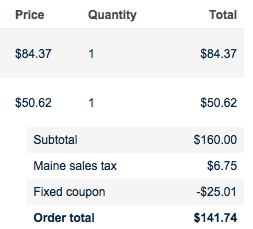
The only obstacle right now that I haven't had time to deal with is writing a hook_update_N() to update all of the existing coupons and create the extra field/rules/etc. For testing I kept disabling and enabling the module. So, if you were going to use this new code as it is, you'd have to disable the module, update the code, re-enable the module, then update all of your fixed coupons to be "active" and choose "before" or "after" setting.
After making the two play nicely I ended up with just what we need. I've tested it with "before" and "after" settings as well as with multiple products in the cart, updates to the cart contents, etc. It seems pretty solid. If "before taxes" it will apply a discount to each of the products evenly. If the coupon is set to apply "after taxes" it will behave as the module did originally (creating a line item).
I was going to supply as a patch here, but it seems like a lot to supply as a patch. Maybe this should be an entirely separate branch?
@pcambra - how would you like me to provide the changes?
Comment #26
agileadamOkay I asked some people in #drupal-contribute and they suggested I publish a patch to at least get some people testing it. So, here you'll find the patch with some screenshots of the admin changes and some of my testing results. In the screenshots "before" means the coupon was set to apply before taxes (after is opposite).
I did end up writing a hook_update_N() to make sure the extra field is created, so you should be able to apply the patch against 7.x-1.x and run update.php (or drush updb). I haven't had a clean install to try this on, so let me know if anything is messed up... I've tested as best I can given my time constraints.
Also, I tested with coupons that were created BEFORE I ran my 'drush updb' and they work fine as originally intended. You can edit them and check the box to change them to apply before taxes if you want.
Enjoy! Also, @pcambra, let me know if you need anything from me on this. And thanks again @pcambra and @Darren Shelley.
Comment #27
pcambraThanks guys A LOT for this, here are some comments regarding coding standards, the important remark is below that
why "pt" maybe "bt" for before taxes? or "mode" or...
weight 0?
Remove "No" and "Yes" for clarifying the options, maybe "machine" values should be "before" and "after"
"Decide whether a coupon is applied before or after taxes" ?
what does the "li" stand for? line item?
Use wrapper here please
extra space
what's this change?
So, my main concern here is to create a new action for this, we're currently using "commerce_coupon_action_create_coupon_line_item" that comes from commerce coupon itself, do we want to add some changes there too to accommodate the setting better and save the new action?
Comment #28
agileadamThanks for reviewing pcambra! I was hoping that patch didn't fall on deaf ears. I'm going to tackle each comment below.
I'd be happy to rework most of these changes in a new patch, or I can wait until you read my comments. Regarding creating a new action, I remember thinking "this would be easier if..." but I don't recall the circumstances. Can you further explain what you'd want to change about that action that would warrant a creating a new action?
Thanks for reviewing the code. It's taught (or better, reinforced) some concepts for me.
Comment #29
pcambraBasically you're adding a brand new action for coupons leaving
commerce_coupon_action_create_coupon_line_itemkinda orphan as it's basically used for this, my comment was on the direction of make any necessary changes on there to fit this setting.Comment #30
agileadamSo as I understand it, by creating a new action you're looking to make commerce_coupon_fixed_amount more independent? I was not thinking "bigger picture" with regards to coupons in general.
Comment #31
maciej.zgadzaj commentedGiving it a quick test ride. Essentially, great job, and seems to be working pretty well!
With one small glitch though I'm afraid...
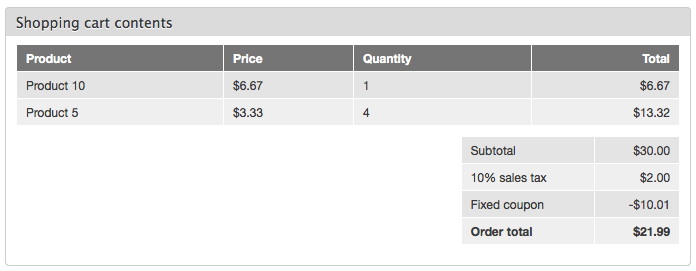
In my cart:
- 1 product worth $10
- 4 products $5 each
Total: $30
Sales tax 10%.
Fixed $10 coupon to be applied before taxes.
I would expect to see $22 in Order total, but the shopping cart tells me $21.99 instead... ouch, 1c is missing! (See attached screenshot)
Also, if a coupon is to be applied before the tax, would be cool to see it above the tax in Order total view footer.
And finally, personally I don't really like seeing product prices in Shopping cart contents with coupon already applied, not sure though if we could do something about it...
Comment #32
lima2x commentedI have the VAT issue (#6) on the Commerce coupon by product reference and I can't fix it by changing the rule weight to -1.
Did I miss something ?
Comment #33
Anonymous (not verified) commentedIt seems very odd to be trying to distribute a fixed discount amongst cart items. Would it not be easy to create a product pricing rule that applies a discount to the order total, which would allow admin's to rearrange the weight ABOVE the tax weight, in turn allowing proper pricing calculation?
It's not legal to charge tax on an "original amount" if the customer is paying a discount amount. As it stands, with the 1c issue, and the awkwardness this method creates in UI and display, this is not a usable direction.
Comment #34
Anonymous (not verified) commentedWould there be anyway to get this module to apply the amount off to the order subtotal, before tax, but without dividing it amongst the products in the cart?
I'm looking for coupon functionality similar to Ubercart or Magento, my clients are killing me for this, and I can't solve the issue with this system.
Is this even possible? Is this a planned feature of this module?
Any help on this front would be great.
Comment #35
Horroshow commentedI have a similar situation as drewbolles (#34). I need to apply taxes after a coupon has been applied. The ability to apply tax to the subtotal (not on each line item) is one solution but I can't use the right data selector in the tax component. It only allows commerce-line-item as data selector.
The other solution is to modify the coupon module? Any help would be appreciated.
Comment #36
pcambraJust relating #1825886: Add rules actions for applying discounts to prices with VAT included here, in case someone wants to give it a spin
Comment #37
Horroshow commented#36 I think this solution is working with Discount module only no?
Comment #38
pcambrait's not an out of the box solution for coupons, but could be adapted to be so if we replace the apply coupon actions.
Comment #39
a.hjelm commented#31 may not be optimal, but it has worked quite well for me.
I've simply edited the "Apply fixed (distributed; before taxes) coupons to product line item" rule to not round the price up in order to remove the .99c problem.
Has anyone come up with a way to stop distributing the discount over all products though? It has worked for me so far (My client was even happy to see the discount applied over all the products) but now I have a case where I want the distribution of the discount to skip certain products based on a boolean saying that a product is part of a sale. (In order to avoid double discounts items on sale are not credible for coupons.)
I've edited the "Apply fixed (distributed; before taxes) coupons to product line item" rule to ignore setting a discount on these products, but the amount is still distributed over the number of products. Meaning that a coupon worth $100 might end up only giving like $66 actual worth of discount, somehow I need the rule to ignore the fields that are marked as part of a sale.
Or has anyone been able to figure out a neater way to do this yet?
Comment #40
strings6 commentedTracking post #31 backwards, are you using the patch in #26 that agileadam submitted, or something else that takes pcambra's suggestions from #27 into consideration?
I'm looking for a solid patch that will allow me to subtract the fixed discount before charging tax.
Thanks.
Comment #41
strings6 commentedHi all,
I waited a couple days to see if anyone would submit a clean patch, or say if #26 was the patch to use, but no response has come yet. Since no answer came, I am just pondering my options, and here are my thoughts on the matter:
The module applies tax first, and then subtracts a fixed amount discount from the grand total. This is fundamentally wrong in my opinion. We can't charge tax on something the user doesn't spend, I'm not even sure that is legitimate, though admittedly I am no tax expert.
So what do we have here, in this post? I think we have a potential patch, that with some tweaking to one rule, can do the following: Subtract the discount before tax is applied by removing equal portions of the discount from all the products in the order, and then apply the tax after each product amount has been reduced. I guess that's one way to look at things, but isn't that a bit weird?
What we need is to keep it simple. Show the discount as a single negative value line item, and then charge tax on the resulting reduced subtotal.
I think #33-35 are right on target. Count me in as one more person who's clients are "killing me for this".
What I would appreciate at this point is a response to this line of thinking from the module maintainer. What are our chances of getting the module to work that way, and if you agree, what kind of time frame would we be looking at to get a patch? And if that isn't an option, that is good to know too, because then we can respond accordingly.
Thanks!
Comment #42
William Aubert commentedHi all,
I also have the VAT issue on the Commerce coupon. Changing the rule weight doesn't fix it.
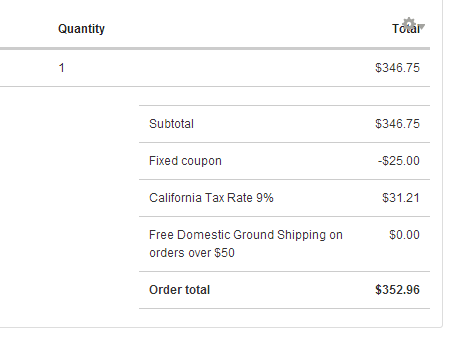
As you can see on the screenshots, the VAT rule applies to the total before the discount coupon is subtracted.
Is it possible to fix this issue?
Thanks
Comment #43
krisgraham commentedI created a quick-and-dirty patch to make #26 to work with a coupon reference field (only apply the weighted coupon discount to products affected by the coupon). This patch is very messy and needs work, but I thought I would throw it up here for anyone interested in that functionality. Feel free to clean this up and make better use of wrappers.
Comment #44
krisgraham commentedActual patch attached.
Comment #45
danadana commentedHi All,
I'm still having trouble with this issue. I applied the latest patch (thanks Krisgraham!) but unfortunately it's not working for me.
I'm using:
Commerce Coupon 7.x-1.0-beta7+9-dev
Commerce Coupon Fixed Amount 7.x-1.0-beta7+0-dev
Drupal 7.22
I'm wondering if other people are still having trouble or if it's just me.
Thanks for all the help so far!
Comment #46
agileadamHey all, I'm just catching up on this issue as it's back on my radar. It sounds like some ideas have circulated and the consensus seems to be that spreading the discount across all products is a pretty strange way to "solve" the problem. I agree completely. I'm going to head back to the drawing board and see what I can come up with.
Comment #47
strings6 commented@agileadam: Thanks for taking a look at it again, we'll be excited to see what you come up with. I had given up on this issue, because I heard whispers of a shiny new Commerce Coupon in the works (https://drupal.org/project/commerce_coupon), but that update hasn't hit yet either.
From what I hear though, the coming update for Commerce Coupon will function very similar to the Discounts module, only instead of being auto-applied discounts if certain criteria are met, it is supposed to be triggered by coupon codes entered by the user. Maybe someone from the Commerce Guys team can confirm this, and shed some light on when this will be available?
Comment #48
babruix commentedWe have same issue for both fixed and percentage coupons.
Percentage I was able to fix by setting Weight to -10 for rule "Apply percentage coupons to product line item" in /admin/commerce/config/product-pricing
For fixed type coupon I have wrote this magic hook implementation:
(please, note that we allowing only ONE coupon per order - so if you need many coupons to work at the same time in one order, this code will not work)
Comment #49
meecect commentedre: #48
Yes, changing the weighting solved this for percentage coupons. I attempted to use your code solution for fixed coupons but unfortunately it did not work for me.
It did work if there was only one line item in my cart, but failed if there were two line items. With two line items, the result I got back suggested that my $10 off coupon was applied to each line item to re-calculate the tax, so the resulting tax total was discounted as if the coupon was applied twice, but the total showed that the coupon was applied only once.
Reading the code, it seems like this may be by design in your case. The hook is called for each line item, so it will be called multiple times. Each invocation causes the the coupon to be applied each time to recalculate tax.
I'm really very desperate for a solution here. It seems like the root issue is that tax are calculated on each line item, by design of the commerce tax module.
Is there some way to add the coupon as a line-item, as it is doing now, but just calculate a tax on the coupon amount?
That way, each product line item would have full price, and a tax component, and the coupon would have a negative amount and a negative tax component? and then the total tax will be the sum of all those line-items, including the negative tax on the coupon?
Comment #50
babruix commentedOh yeah, now I understood that code may not work for others, because we had coupons that can be applied to some specific products only.
That why it seems it changes all line items, but in reality coupon will be applied to only products that are enable to this coupon (this is custom functionality also).
Sorry, I do not know if it is easy or not to change fixed coupon to work as percentage, maybe you can reach module authors on irc.
Comment #51
meecect commentedI don't think it is fundamentally possible to do what we are trying to achieve here with the way the commerce tax module works without either:
1) distributing the fixed coupon across all products equally
2) applying the fixed coupon to the most expensive item in the cart
3) applying negative tax to the coupon itself.
The reason is that the tax is calculated on each individual item, as part of the item pricing. The only way to get the coupon applied before this taxing is to alter the base price of the item before the tax is applied or adjust the tax applied to each item. The approach in #48 would work, but you would need to alter the price calculation of each item in the basket by a percentage share of the coupon in proportion to the items share of the subtotal. This is not actually any different than the approach of distributing the coupon discount across all items like proposed earlier.
I think, actually, the cleanest way would be to accept a negative tax on the coupon. It might seem illogical, but I think compared to the other approaches it is the cleanest option.
The other way to do it, and the one I have just implemented is to basically scrap the tax module. It is more radical but the easiest to do. Essentially:
-disable the rule that calculates tax.
-make sure you have commerce fees installed
-create rule that apply a fee to an order, called 'add sales tax', or whatever. Create as many as you need for the various tax situations. In my case, I have to add sales tax for orders shipping to Illinois and Iowa
- You probably will need two versions of rules for each tax situation. One where you apply a tax on orders without coupons, and one with coupons.
- add calculation actions to these rules that calculate the sales tax on the sum of products minus fixed coupons.
Here is an example rule to add IL tax for orders with coupons:
Note: I am running some patched commerce code. Here is the issue in the queue to read up on it:
https://drupal.org/node/1245928
basically, the patch allows you to get totals of different line-item types, like product total, coupon total, shipping total, etc.
Comment #52
strings6 commentedMy 10 cents is I would sooner forget the fixed rate coupons long before I would turn off the standard tax module for Drupal Commerce. That is only going to create some other issue for me elsewhere, like whack-a-mole.
If we can re-focus on the task of achieving a more usable fixed rate coupon module that works with the standard tax module, that would be preferable.
I still do not like the idea of evenly distributing the coupon among all the products in the cart. The cart should show all the product prices, then the subtotal, then subtract the discount, then any shipping costs, and finally, apply the tax to the discounted subtotal (and the shipping, but only if you tax shipping). Any other way, just doesn't make any sense to me.
Comment #53
meecect commentedwell I agree with you that I'd like it to work that way, but after banging my head against it for a little more than a week, my conclusion is that it's not really possible. Taxes aren't calculated on subtotals, full stop. They are price components of line items. So if you want your coupon to affect subtotals before taxes are applied, you can either adjust the base price of the line item before taxes are calculated, or you can just adjust the tax calculation for each line item to reflect the coupon, or you add a negative tax for the coupon, or you can implement taxes using Commerce Fees. I'm pretty sure those are the only four options.
Also, keep in mind that how the calculation happens in the back end and what is displayed to the users are two separate things. There is the commerce price by component module which lets you have fine control of how the line items view and order total views are displayed. I already use that module to solve the similar issue with commerce coupon pct. That module also distributes it's discount to line-items, but it's easier because it's a straight percent off each item.
As it pertains to this issue, that would allow you , for example, to distribute the amount of the fixed coupon to all cart items, but still show an unadjusted base price in the line item cart review and summary. So, essentially, the user would still see unadjusted prices for each line item, and an unadjusted subtotal, then taxes and shipping and coupon amount. The tax, however would be still an aggregate of the line-items discounted price, not base price, and the order total would be the sum of all adjusted prices, so it is still correct. In that case it would look the way you want it to look, but the tax would also be calculated correctly.
It really just comes down to this: Commerce tax applies a tax to each item. If you want to discount before taxes (ie, discount the 'subtotal before taxes are applied'), you have to adjust the line item price or the tax per line item. Either of those require 'distributing' the discount across line items, either in the discounted base price or the specific tax calculation, or both.
There appears to be no way to 'tax the subtotal' because that's not the way taxes work in Drupal Commerce, as far as I can tell. The subtotal is a calculated item, not an entity or field value, and the total tax is an aggregate of price components.
I would also just say, screw it, no coupons like this then, if it wasn't a key business requirement.
Ditching Commerce Tax may seem like whack a Mole, but it allows me to do exactly what you are talking about. Each item has a price, the subtotal is calculated, a coupon is applied, then tax is calcualted as a percentage of the sub-total.
It just means that instead of setting up taxing rules, you create a rule called 'Add sales Tax' and you can weight it wherever you want it. Not ideal, but I'm failing to see any perfect approaches here.
Comment #54
strings6 commentedWhat happens if the coupon was simply a negative value line item? Would it receive a "negative tax value" and thus the total tax would appear as if it did not calculate tax until after the coupon was removed? If that is the case, I think the discount could be a normal line item with the discount classification, and that'd take care of it, right?
I'm hearing what you are saying meecect, and I appreciate all the time you've spent on this.
Comment #55
meecect commentedstrings6, yes that is what I was suggesting in option 3 in comment #51 above, and actually, is an approach suggested in the issue report itself. We would basically allow a coupon to have a negative tax. I'm not sure if the solution involves the coupon being a line item, or we just intercept one of the tax calculation hooks and override it to make sure it also looks at coupons attached.
Either way, I think doing this, although a little strange, will still make all the info presented to the end user appear to make sense, and accomplish our calculation goals, as the total tax sums are listed on one line only, and its absolute value would be correct.
I think we would run into the issue that in some cases taxes on individual line items can have multiple tax rates, which would make our math not appropriate or correct anymore, and I think it would also largely fail in the case of VAT, but I'm not entirely sure how VAT works in Commerce, nor do I really know how VAT is supposed to work in the real world in terms of calculating subtotals, taxes, coupons, etc.
Comment #56
strings6 commentedmeecect, sorry I missed that you suggested it already above. I agree that option #3 in comment #51 seems like the best approach:
3) applying negative tax to the coupon itself.
So now the question is, who is going to take a stab at it, and what would the timeline for delivery look like?
Comment #57
meecect commentedwell, i probably will attempt it at some point but it may take a few weeks for me to start. My problem is that I have some tight deadlines, so if my testing continues to show my hacky workaround actually is sufficient I may end up leaving it as is. I just won't be able to justify the re-work time if my site is passing all its functional tests. BUT, I did discover (not fully verified yet) that my percentage coupons seem to be giving me a '1 cent off rounding error' in some cases and I still have to implement another coupon type that is like a fixed coupon but applies after tax and shipping. If I run into a problem in those two areas with my taxes=fees approach, then I'll probably re-visit this topic and see if I can get all 3 scenarios working with a cleaner solution.
Comment #58
xmacinfoAny development on this issue? I am trying to get negative taxed for a fixed amount coupon, since I need to charge the taxes when buying the coupon, I want to be able to subtract taxes when remitting the coupon.
Comment #59
xmacinfoI implemented successfully the solution in #48, although I had to wrap a few lines in a foreach loop to catch all the taxes.
Comment #60
flocondetoileI succeed to apply taxe (negative) on commerce coupon simply by adding an action on the rule Redeem a coupon.
The action I added is : apply a tax on a commerce line item, and then the Tax applied is well negative and the total amount tax is relevant to the total amount.
Comment #61
xmacinfoSalut Flocon,
Can you export that rule and paste it here? I'd like to see the output.
Comment #62
flocondetoileHi,
Below the rules "Redeem a coupon" where I added two actions : for apply the VAT on the line item added (coupon) and for refresh the cart.
I have too somme custom conditions (for the website logic) you should remove.
Comment #63
agileadamOkay folks, bear with me here. I took another stab at this and have come up with another solution.
It seems that assigning a negative tax amount to the coupon itself is what we're gravitating towards.
Without reworking coupon handling I've come up with a method of applying a negative tax amount to the order.
Using Commerce Fee, a simple rule, and some PHP (which could be reworked as a Rules condition/action set if so desired) I'm able to apply a negative amount to the order based on how much tax would be charged for the coupon. I only add the "fee" (which is a negative amount I'm calling "Coupon tax adjustment") if there is a fixed coupon in the order, and if there is any tax being charged for any products in the cart.
First you'd need to setup Commerce Fees and create a new fee. I called mine "coupon_tax_adjustment" (Coupon tax adjustment). After your fee is setup, you can configure the rule.
Here's the rule:
Again, the PHP code that follows could be converted to rules conditions/actions, but I don't know which project people would want them under, and if this approach is even desirable, so they're staying as functions for now. You could paste the PHP directly in to your rule, but I'd advise against that. You will need PHP support in rules for this (of course).
First, the condition, which checks if there's a fixed coupon in the order:
Understand that you could have other conditions as well, so that the tax adjustment only happens in certain circumstances.
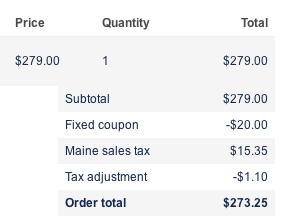
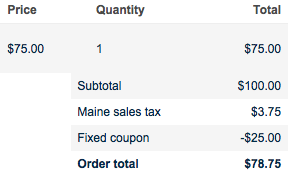
Second, the action, looks for the first product with a tax rate and uses that rate to calculate how much the tax would be on a coupon. The value is returned as a negative number. I realize this may not work for everyone. For the site I'm working on there is only one tax type (state of Maine; 0.055) and it applies to only orders within the state of Maine. I'll never have a case where there's a coupon that needs a tax rate different than any product's in the order. Also, orders placed in other states wouldn't have taxes to adjust in the first place. Make sense?
That's it. See the screenshot for the result.
Does this approach work for people? I haven't gone live with it because I want to clean up a few things and see what you all think. This could have some glaring issues, but I'm not seeing them so far. I've done minimal testing, so we'll see what more testing brings.
Note: If you're using Commerce Entity Cache - Commerce Entity Cache conflicts with Commerce Fees (seems to happen when trying to delete line items from the order). I wanted to kill two birds with one stone, so I wrote a patch #1591662: Provide method of selectively enabling controllers to Commerce Fees that allows you to choose which entities to cache. If you do NOT cache Commerce Line Item entities the two will play nice. Alternatively, you could just scrap Commerce Entity Cache if it's not that critical for you.
Comment #64
cogent commentedThe methodology described in #63 seems to be working for me. I'll post again after it goes through some testing.
Good work!
Comment #65
agileadamThanks cogent! Anyone else have the opportunity to test this?
Comment #66
Scott Robertson commentedIn my testing, it seems that this issue can be resolved by the creation of a new rule to calculate tax on the discount line item. I set it up like so:
Events:
- Before saving a commerce line item
Conditions:
- Entity has field: commerce_coupon_reference
- Entity is of bundle: fixed coupon
Actions:
- rule: Calculate [tax name here]
With this rule in place, a negative tax amount is calculated for the coupon and added to the tax total, resulting in the correct amount of tax being charged and displayed.
Here's an export of my rule:
Comment #67
strings6 commentedI implemented Scott's technique and it worked!
The export of the rule didn't work for me though so I had to create it myself. He's an export of my rule:
Comment #68
Scott Robertson commentedGlad it's working for you, strings6. My rule export is a bit specific to my setup as it includes the action to calculate Canadian GST, so it likely won't work as-is for everyone.
Comment #69
Frays commentedHi, thank for all that stuff. I try your rule Scott Robertson but my kickstart v2 is saying drupal can't find the selector entity : [ "commerce-line-item:commerce-coupon-reference" ]. Do you have any idea were I can find that ? The link where I modifiy the product reference is admin/commerce/config/line-items/product-discount/fields/commerce_product
Comment #70
Scott Robertson commentedHi Frays,
I believe commerce_coupon_reference should be a field that's automatically populated by the Commerce Coupon module when the coupon's line item is created. Perhaps on your installation, the field is named something different. Are you using the 1.x version of the Coupon module? If not, perhaps the field is named something else in 2.x?
Comment #71
slewazimuth commentedScott Roberson's #66 added rule WORKED PERFECTLY for me and just saved me a ton of time today as I just came across this issue.
Comment #72
crabsoul commentedAbove rule works fine only when you add shipping/billing info first and then apply coupon code.
So assume you have coupon code, shipping/billing field set on same page, and then you first apply coupon code and after it, you enter shipping/billing info ( for tax module to generate tax based on state/province) and click on order review button. In that case, Tax doesn't include discounted amount and work only for subtotal, So problem remain same
Comment #73
Ante890 commentedWhat is the way to go for coupons that use Coupon by product reference field module?
Comment #74
stephenevans commentedAny fix yet? Seems like a simple needed function for a commerce site that accepts coupons... I'm in NY, USA and taxes should be calculated after the discount. If not, this leads to over taxing and unhappy customers.
I'm using Drupal Commerce Kickstart 2... I notice that the default tax rule calculates at the event "calculating the sell price of a product" and the action is "commerce-line-item". If we can change that to calculate on the "sub-total" (plus shipping cost in NY) I think we would be good. Since there seems to be no way of fixing the coupon module would we be able to fix the way taxes are calculated on Kickstart 2 instead?
Comment #75
stephenevans commentedBTW, #67 by strings6 imported correctly for me... and it works good!! Thanks Scott and strings6!
Can this be a default option in the Coupon module? Would have saved me many hours!
Comment #76
caw67 commented#67 works. we have to rewrite it for discounts, but a little rounding error
Comment #77
capfive commented#67 worked for me also, But i had to change the weight of the rule to make sure it ran BEFORE the standard tax rule, make sure you check this!
In my opinion this should be a default rule included with commerce coupon
Comment #78
IckZ commentedsubscribe
Comment #79
tj99ay commented#67 worked for me - great work :-)
I just had to change "tax_type_name" : "sales_tax" to "tax_type_name" : "gst" in my case, as that is what I called my TAX.
Comment #80
tj99ay commentedActually I should note that this worked great for the Fixed Price coupon. But for a Percentage coupon, not so lucky, even I chose "Percentage coupon" in the "Entity Bundle" setting. Any ideas anyone to get it working for Percentage Coupon's too?