After 20 issues about doing this on a case by case instance (via code, node clone or other), I gave up searching the queues, but I'm sure that it is a duplicate.
What are your thoughts about trying this? The E-mail page would be something like:
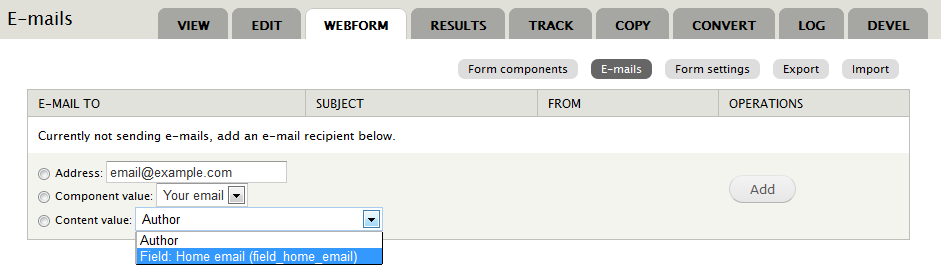
Either this should be limited to fields that have valid emails (authors email, Email modules email field) or post-submission validation of emails before sending these and relax the restrictions to include Text fields too. I can attempt this tonight if you are interested.
A natural extension would be to allow tokens, but that would require validation of the field prior to sending the email.




Comments
Comment #1
alan d. commentedOr simply to update the documentation:
Zero new code, and it appears to work in theory. I run some live tests to see if it works.
Comment #2
quicksketchYep exactly. As you said in #1, I'm fairly sure you can simply use tokens as the default value in a hidden field. Now that we have true token support, you could even (in theory) get the fields from *other* nodes, which is actually more common I think. A lot of users seem to use a single webform as a block and want to e-mail the author of the node that the block is displayed next to.
Comment #3
alan d. commentedI''ll confirm tonight, and if issues report back, otherwise I'll write up some notes and run them past you before posting on to the documentation pages. Maybe it would be worth a section on contrib modules that assist automatic creation of webforms, there were so many issues in the queue about that :)
I'll see how my time goes....
Comment #4
alan d. commentedOK, mixed results. Testing on a production site with the following relevant modules:
Entity API
Entity tokens (Entity API)
Token
When using a Text field, both available tokens worked without issue.
[node:field-staff-contact] - from Entity Token module (I think. It had a str_replace('_', '-', $name) while Token didn't)
[node:field_staff_contact] - from Token module
Using an Email field from the Email module, the underscore version of the field token did not work. The hyphened version did work.
[node:field-staff-contact] - worked
[node:field_staff_contact] - failed
With that in mind, maybe doco would be:
Using node and field data in 4.x with tokens
With the introduction of token support in Webform 4.x, it is now possible to integrate content from the node with the webform without any programming.
The first thing to note is that not all tokens are the same and they may return different values. There are three main providers of tokens in most installations:
Adding a new e-mail recipient to webform submissions from a field
When you have webforms being automatically generated via code, or the contrib modules; Node Clone, Webform Share or Webform Default Fields, it is possible to set an email recipient from a node field. This means that the website administrator or content author does not need to edit the webform section.
These are the steps required to achieve this:
Edit the content type that the node is attached to and add a new Text or Email field. Note: If you are using the Email module, you will require the Entity Tokens module.
Since most users will not want to display the field, update the content types display settings to set this field as hidden.
[node:field_YOUR_FIELD_NAME] (Token module) and / or [node:field-YOUR-FIELD-NAME] (Entity Tokens).
If you are using a Text field, use either tokens provided by either Token or Entity Tokens module.
Initial tests using the Email module showed that the Token modules field token failed. So you would need to install the Entity Tokens module and use it's tokens (the hyphened token).
After saving the new component, visit the emails tab. Select the newly created component from the "Component value" select list and select add.
Comment #5
quicksketchHm, IMO Entity Tokens is an absolute disaster of a module. It floods the token registry with thousands of redundant (and recursive) tokens. In my testing on my localhost site, enabling Entity Token generated about 8000 rows in the Webform token help. Considering the token help is printed multiple times on the page when configuring an e-mail or component, this had rather devastating effects on front-end performance. Not to mention the end-users have to contend with the same tokens being accessible in 3-6 different places.
So in short I'd shy away from mentioning Entity Tokens and just fix the bug in Token module.
Comment #6
alan d. commentedFrom memory reading the relevant threads from 6 months back, Token uses the default formatter so that would be a "Won't fix" in relation to the Token display.
But I shall play with this and update according, or maybe not mention Email module integration.
The token tree that is generated on this site was over 5MB last time I checked, but sadly we needed the chained entity tokens. :(
We have actually written a custom page callback that displays the token tree and have themed the token tree display to show a link to this page instead.
Comment #7
alan d. commentedExcludes Entity Tokens (well just a brief mention). As before, you mentioned a common use case is to use a global webform and the current node. AKAIK, this is not available yet, e.g. #919760: Add a [current-page:object:?] dynamic token
Revised doco with images :)
Using node and field data in 4.x with tokens
With the introduction of token support in Webform 4.x, it is now possible to integrate content from the node with the webform without any programming.
Drupal provides many basic tokens, but you will need the Token module to provide an UI and basic field tokens.
The field tokens provided by the Token module are rendered by a special view mode called "Token". By default this new view mode this is not enabled and the rendered token is generated using the settings from the main default full view mode. To change this behavior, edit the content type that the webform is attached to and edit the default view mode. Under Additional view modes, ensure that Tokens is checked and save. After saving this page, a new tab will appear and this will define how the tokens are rendered. The image below shows what the page will look like after enabling the Token view mode.
Examples
Sending emails to an email address set on the webform
It is possible to set an email recipient from a node field. This means that the website administrator or content author does not need to edit the webform section to set the email recipient after the form is set up.
These are the steps required to achieve this:
Edit the content type that the node is attached to and add a new Text or Email field.
Edit the content type settings to ensure that the field is hidden when viewing the node.
The email field is normally rendered as a link. This needs to be rendered using the display formatter "Email plain text". So enable the Tokens view mode and edit this to set the formatter to "Email plain text".
[node:field_YOUR_FIELD_NAME] (Token module)
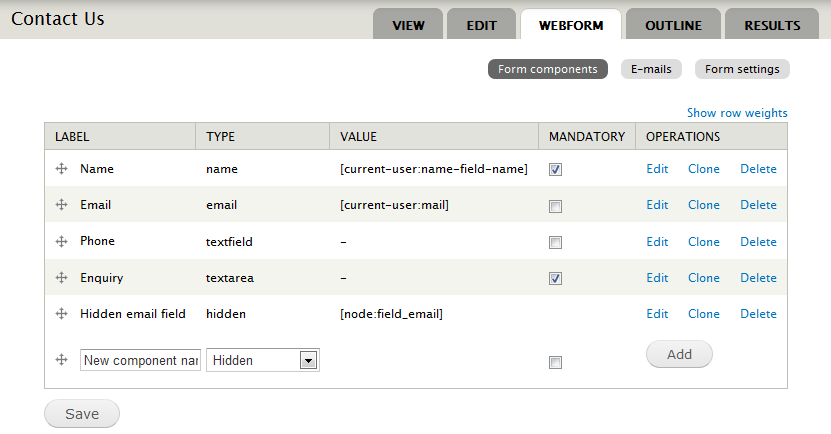
Your webform component list will look something like this once you have added the component.

After saving the new component, visit the emails tab. Select the newly created component from the "Component value" select list and select add. The final results will look similar to this.
The Entity Tokens module (included with Entity API) provides 100's of additional field tokens, but it can have a significant impact on performance and can potentially break your site as it consumes available resources. Entity Tokens differ from the Token modules tokens in that they use a hyphen rather than an underscore in the token name. i.e. [node:field-YOUR-FIELD-NAME].
Comment #8
quicksketchSo overall, sounds like Tokens are okay and the original suggestion is unnecessary. We should move all this documentation into the Webform handbook: http://drupal.org/documentation/modules/webform.
Comment #9
alan d. commentedAdded - http://drupal.org/node/1760332
Comment #12
nflowers1228 commentedI know this is closed, but I'm struggling to get something like this to work. Instead of the email field being from the node, I want to use the component token [submission:values:requestor_email:nolabel] to create contact emails for an option list with radio buttons, so if Requested is selected the notification is sent to Requestor Email component. I tried putting the component token in the option list, but that didnt' work. Here are the options in my Status component using the submission tokens rather than the node:
[submission:values:requestor_email:nolabel]|Requested
drupal@yale.edu|In approval process
[submission:values:administrator_email:nolabel]|Provisioned
yalesites@yale.edu|Live
I'm not sure if this is even possible, based on what is written above. Any direction is appreciated.
Comment #13
mariusm commentedHello,
I have a webform as a block and I want to e-mail the author of the node .
Which token can be used?
Thanks,
Marius
Comment #14
sircosta commentedSame issue mariusm... but not solved yet. I've been googling all the morning to find the solution without success.
I think we have to do as in http://drupal.org/node/1760332 is described but we need the connection between the node and the webform block. You can take the email field from the content type (using token module) but we have to say to webform which mail must take from the node viewed... something similar to Node Reference URL Widget but that works in Webform.
I'll continue thinking about it...
Comment #15
sircosta commentedComment #16
sircosta commentedAlso see http://drupal.org/node/1544044
A custom modul, "page-node" (thanks to @incaic ) may have the solution to this issue.
Nevertheless, an error appears using it: Fatal error (...) sites\all\modules\page_node\page_node_token.module on line 80
Someone solved it?
Thanks!
Comment #17
alan d. commented@sircosta I would post a critical issue report with complete error details (steps to replicate and error message in full / backtrace if available) in that modules queue if there is not one already
Comment #18
sircosta commentedOk @Alan D.
Please tell me how can I help you.
Nevertheless, my error was related with a custom module (Page Node Tokens) used to take the token mail of a node (only one node) in the same URL. See also, http://drupal.org/node/1544044
By the other hand, having a webform as a block, do you know another way that to email to the author of the node?
Thanks!
Comment #19
swfindlay commentedI'm having the same issue - have a Webform as a block, but can't access Field values from the Node its being displayed next to.
I can use tokens like [current:page...] in a hidden field to pass URL, Title etc. But for some reason the Field values aren't being passed through in the same way.
I've made sure I've taken all the steps properly: Token display type; Hidden (but not secure) etc
The token I'm using is: [node:field-my-field] (I've also tried [node:field_my_field])
Any thoughts as to what I may be doing wrong?
Thanks
Comment #20
giorgoskI am trying the same myself with
- drupal 7.17
- email 1.2
- content type Lodging with email field
- token 1.4
- webform 4.x as a block attached to Lodging content types
but email token is not passed (even when I am using entity_token module)
but other text fields are passed
@Alan D. your solution uses the node AS the actual webform plus extra fields including email (and not used as a webform block attached to a content type) right ?
Comment #21
giorgoskI ended up using http://drupal.org/project/token_custom module as I described here http://drupal.org/node/1849804 if anyone is still interested
Comment #22
ace11 commentedGiorgosK could you share how you done it?
I have setup custom token but not sure how/where to use it in webform module?
Comment #23
ace11 commented*duplicate*
Comment #24
ace11 commentedGot this working. Had to make my own PHP text format because D7 core PHP text format did not work.