

Closed (won't fix)
Project:
Commerce Product Option
Version:
7.x-1.x-dev
Component:
Code
Priority:
Major
Category:
Feature request
Assigned:
Unassigned
Reporter:
Created:
22 Jul 2012 at 12:42 UTC
Updated:
29 Mar 2018 at 16:17 UTC
Jump to comment: Most recent, Most recent file





Comments
Comment #1
pattison22 commentedWould love to know as well!!
Comment #2
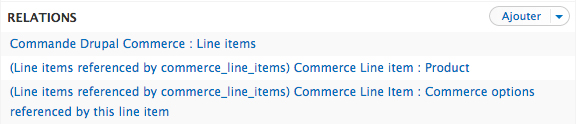
krlucas commentedThe module currently has minimal Views integration. You can create a list of option sets or option set types but that's about it. You can't add relationships to the the line items or products that reference the option sets.
So attached is a patch that allows you to add those important relationships.
My own perspective is that this module should probably be requiring and implementing entityreference module instead of trying to re-invent the wheel.
Comment #3
krlucas commentedComment #4
oadaeh commentedI applied the patch in #2, and it worked for me to fix the lack of relationships.
Other than the two very minor things below, the code seems to be okay.
Unnecessary on hook functions. See the Hook implementation subsection of Drupal API documentation standards for functions.
Unnecessary extra line. (I couldn't locate a coding standard for this, so it's up to you.)
Comment #5
oadaeh commentedI should have added that I don't think those two things I mentioned should keep this patch from being included. I was only pointing them out.
Comment #6
Rosamunda commentedHi there,
I see this is already reviewed... is this going to be commited soon? :)
Comment #7
Homotechsual commentedStill not committed by the looks of things, definitely not in a release yet. Big shame as it has taken a long time to track this issue down and locate this patch!
Comment #8
jeremyr commentedI've applied this patch and it works great. I can pull these into a view now, however, it appears that only User1 can view the options. Does that sound like there should be a permissions check box or something?
Comment #9
jeremyr commentedI take back my previous question about the permissions thing. It works as expected. My problem was related to the theme taking over the views table when not using the admin overlay.
Comment #10
brylie commentedIncreasing priority to Major, as there are several issues dependent on the requested Views support.
Comment #11
cord1 commentedI found a possible solution but it only shows up for administrators due to permissions.
http://www.drupalcommerce.org/questions/13840/how-make-view-products-price
Comment #12
mlmoseley commentedI've applied this patch but I see no way to show selected option sets on the shopping cart form -- if someone could tell me how to make views show not the option sets for a given line item, but the elements of those sets the user selected. In other words, what he/she ordered. For example, one might be able to order Nixons papers from an historical library. The product is Nixon's papers, but you can using an option set, you don't have to order all of them. In the example below 'Items' is an option set and the user has selected only three of the set.
So far I can't make something like this appear in the Drupal Commerce cart.
Help?
Comment #14
Anonymous (not verified) commented@mlmoseley To get the individual options from your set to show up, you need to first create a relation to your commerce option set. That is what this patch allows. Afterwards you can add your separate fields using this relation.
Anyhow, I've committed this to the latest dev version. Thanks to all involved for patching and reviewing.
Comment #15
josebc commentedI was checking the latest dev 7.x-1.x-dev and those are the contents of includes/views/commerce_option.views.inc
which does not work as stated above, however on the 2.x branch the hook_views_data_alter looks correct
i think this needs to be ported to the 1.x branch also
<?php
/**
* Export Drupal Commerce orders to Views.
*/
function commerce_option_views_data_alter(&$data){
foreach ($data as $table_name => &$table){
if ($table_name == 'commerce_line_item'){
/*foreach($table as $field_name => &$field) {
if($field_name == 'type') {
$field['relationship'] = array(
'base' => 'commerce_order_total_line_type',
'handler' => 'views_handler_relationship',
'label' => t('Order Total Type'),
'base field' => 'line_item_type',
'field' => 'type',
);
}
}*/
}
}
}
Comment #16
Anonymous (not verified) commentedDevelopment on the 1.x branch has stopped. Please just use the patch for the 1.x branch.
Comment #17
bisonbleu commentedFollowed @samspinoy's suggestion in #16. Applying patch in #2 works for me. I was then able to display the selected Option Set option in the checkout. Thanks @krlucas!
Comment #18
FranCarstens commentedPatch from #2 works a treat. Unfortunately, if you have multiple option set reference fields the line item is duplicated in the view.
EDIT: there are two issues with displaying unselected options. For example let's say we have a computer store and the following options set:
Let’s say I’m selling a laptop that doesn’t have the monitor or keyboard option, so we only activate Mouse and Printer in the product variation, for example:
Computer Options
[ ] Monitor
[ ] Keyboard
[-] Mouse
[-] Printer
Product display shows Mouse and Keyboard, but in cart all for options show up (even if the field is set up as “hide rewriting if empty, hide if empty, hide if contents is 0”)
Creating multiple option sets is all good and well if you need only a couple of versions, but with a large inventory and multiple complex option configurations it becomes a nightmare.
The same thing happens if the option selected is not required and is left as N/A. A lowercase version of the first option is shown, not N/A or nothing.
Comment #19
giorgosk#2 works as advertised
Comment #20
pradeepjha commentedWhenever I'm doing checkout with new option set value. In the cart view it's showing random value from product option. I think line item reference with product option set not working. Please help in fixing.
Comment #21
bisonbleu commented@pradeepjha, it's difficult to help you if you don't provide more details...
Comment #22
misterpo commentedHi there,
Didi somebody manage to have the option price displayed in the order details and/or in the cart ?
I have read many posts that loop to each other and involve Pricing Attributes and Product Attributes modules.
Cheers.
Comment #23
bisonbleu commented@misterpo, I was able to display the option price in the cart by editing the cart view: Shopping cart form (Commerce Order).
In order to add the Commerce option you require in the Fields pane of Views, you will first need to add a relationship (Advanced pane) of type Commerce options referenced by this line item.
Comment #24
misterpo commented@bisonbleu,
Thanks for your help but I can only get the option label using the "Commerce options referenced by this line item" relationship.
Cheers
Comment #25
bisonbleu commented@misterpo, you first need to apply the patch in #2. Did you? More info here on how to apply patches.
Once patch in #2 is applied, you 1) add the relationship
and then 2) add your option field
Comment #26
misterpo commentedHi @bisonbleu,
Sorry for my late answer...
I have of course applied the patch and added the mentioned relationships.
I can add the Commerce options fields in the view but they only have a "Default" and "Key" formatter and there is no way to get the price.
Please see attached sceenshots.
Thanks for your help.
Comment #27
bisonbleu commentedI also only see "Default" and "Key" formatters. But in my use case i get what I need which is to display the rental period price.
In Fields I have:
[commerce_unit_price] per [field_os_rental_period]And this is what I get in the cart.
Comment #28
misterpo commentedOK, so you don't really display the option price but the line item price.
I have many product options per line item and really need to show them in the cart and order summary - customer will.
Please help.
Comment #29
bisonbleu commentedThe prices displayed in the capture in #27 are the option prices.
In my use case (a rental store) I'm using CPO in conjunction with CPA and a bunch of other modules. The setup is rather complex.
I have an option set Rental period with the following Pricing attributes:
This translates as follows for the Tomcat (3020.5) 10 ft. truss which has a $7.79 basic price:
And this is what the product page looks like.
Comment #30
misterpo commentedOf course, you are right but it works because your option price fits the line item price which is computed according to your options !
According to me, it is not possible to show the price of each individual selected option, which is my customer's need (really makes sense in the order summary).
I hope I am wrong...
Comment #31
bisonbleu commentedIt's just as easy to add the Options to the order summary table (see capture). BTW, it's not exactly clear what you're trying to achieve. Perhaps you could provide a mockup ?
Comment #32
misterpo commentedHi,
Indeed, it's easy to add the option label to the cart/order summary.
My product is a registration to a car event.
This product has an options set composed of 3 fields (Paiement (Payment), Hébergement (Hotel booking) and Transport.
Each field is a checkbox/radio buttons list of different values and thus different pricing attributes.
I aim at showing the selected option pricing attributes in the cart and order summary.
You may try it at https://dev.rallystory.com/en/rallyes/28th-coupe-des-alpes and then click on the "Register online button".
Cheers.
Comment #33
bisonbleu commentedI went and I got "This product is not available for registration at this time". A screen capture with a short explanation would allow more folks to interact and participate.
Comment #34
misterpo commentedSorry about that, I can't reproduce the problem you've got.
The attached screenshot will show you the available options.
In my cart, insted of having :
28e Coupe des Alpes (Unlimited slots available)
Payment : Acompte
Hotel booking : Option 2 chambres singles
Transport : PARIS/EVIAN
I would like to have :
28e Coupe des Alpes (Unlimited slots available)
Payment : Acompte +1 650,00 €
Hotel booking : Option 2 chambres singles +950,00 €
Transport : PARIS/EVIAN +850,00 €
Hope this is clear enough.
Comment #35
bisonbleu commentedIt's clearer now, yes.
Unless I'm missing something, can you not just add "(+amount)" to your option set labels?
If not then I think the only option left would be creating a custom module with the appropriate hook_form_alter()
Comment #36
misterpo commentedHi bisonbleu,
Of course, I need to get these options price dynamically so I don't know what "(+amount)" is about.
Did anybody manage to get this working ?
To me, it is an essential feature.
Comment #37
misterpo commentedTo make myself clearer, product options prices are different between products.
So no way to show them statically.
Comment #38
bisonbleu commentedCan you expand how you set your product options prices? With Rules?
Comment #39
misterpo commentedHi,
I just set my option price by editing the product in admin/commerce/products.
It works like a charm except than I can't get these options prices in views :-(
Comment #40
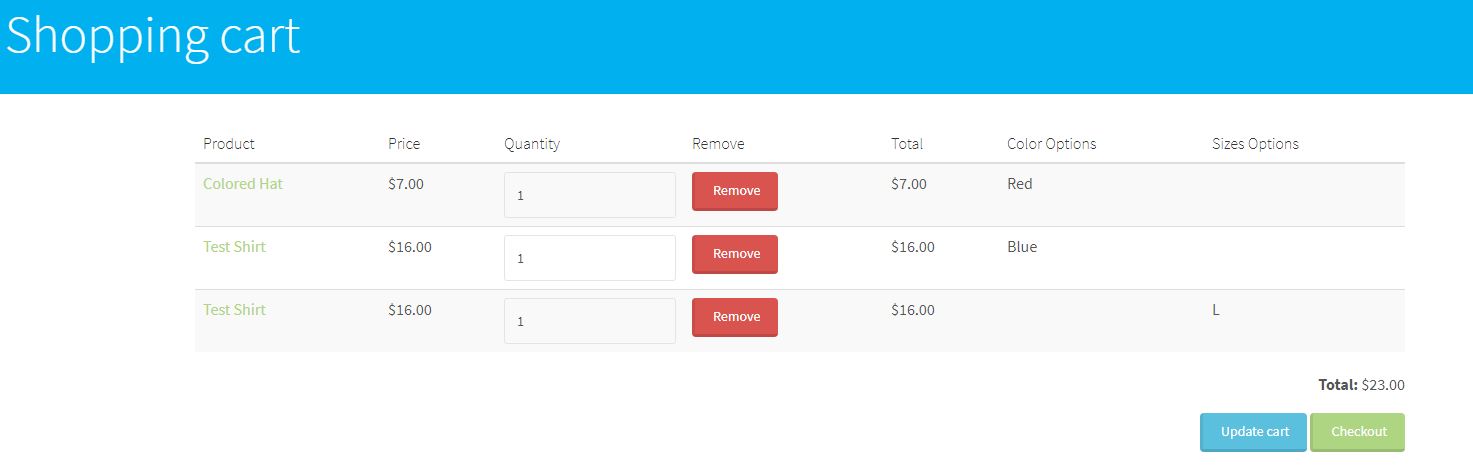
emmanvazz commentedI ran into the same issue as @FranCarstens with "Unfortunately, if you have multiple option set reference fields the line item is duplicated in the view." Say you have one option set for Colors of a shirt and another for Size on the same product your get two lines in the view. This is what I currently get in the view.
Comment #41
bisonbleu commented@misterpo
I think what you want/need is a custom Views handler.
I'm trying to solve a similar problem and after much R&D I'm moving in that direction, i.e. creating a Views handler. See #2733733: How to expose a product attribute in the bulk add-to-cart form?.
REFERENCES
- Writing Field Handlers for Views
- Custom Views Field Handler
Comment #42
lachezar.valchev commentedHi,
I needed the provided patch and it works for me, but I had to re-roll it. Here is the re-rolled one.