

Closed (fixed)
Project:
Leaflet
Version:
7.x-1.x-dev
Component:
Code
Priority:
Normal
Category:
Feature request
Assigned:
Unassigned
Reporter:
Created:
3 Aug 2012 at 08:29 UTC
Updated:
2 Dec 2013 at 18:36 UTC
Jump to comment: Most recent, Most recent file



Comments
Comment #0.0
netbek commentedIncluded custom definition as alternative.
Comment #1
rdeboerGood one!
Comment #2
pvhee commentedWe could define the zoom level first in hook_leaflet_map_info? Then both the formatters and the Views integration can pick them up, and allow the user to change them if necessary. Relates to #1711884: Dynamic zoom level.
Comment #3
dillix commentedI also need this settings in formatter, because when I use Yandex Maps, some areas has 23 levels of zoom and some areas has 10 levels of zoom, so I need to set max zoom in formatter to 10 or I will have blank areas on max zoom.
Comment #4
mbrakken commentedAfter testing this patch, I wonder if a defaultZoom can be included as an option. Min and maxZoom define the limits, and currently the displayed map is based on maxZoom unless other factors inhibit it from resolving that far down. I can set a zoom limit of 12 in order for the map that appears to show a given extent, but at that point a user cannot zoom in any further since the 12 acts as a hard limit. Is it possible to have a setting that the map defaults to but doesn't kill the controls for users?
Comment #5
rdeboerIf you use "IP Geolocation Views and Maps" and "Leaflet More Maps", then you can set initial and max zoom levels,auto-limited by what the map you've selected dictates.Also a couple of other map control options, scrollWheelZoom and drag enable. For the latter you need IP Geoloc V&M, 7.x-1.x-dev
Comment #6
balagan commentedAs far as I see Leaflet More Maps 7.x-1.4 does not let you set default zoom, although as I remember it sets its own zoom. It would be nice to incorporate it into main module.
Comment #7
rdeboer@balagan, #6
Yes, but IP Geolocation Views &Maps does. Plus it offers marker colour differentiation, various centering options, visitor marker etc.
Rik
Comment #8
cboyden commented@mbrakken, here's an updated version that adds default zoom to @netbek's patch. (If the default zoom setting is outside the bounds of your min and max, it will render with the zoom within those bounds.)
This is something I'd actually like to see in the field formatter UI - for cases where IP Geolocation is not required.
Comment #9
mbrakken commentedThanks cboyden! And netbak! Together these are perfect!
I agree that this functionality makes sense within the default field formatter UI. While IPGV&M looks super useful and positions Leaflet well against OL, it's a lot of extra code for functionality my current project (a local bookstore's site) wouldn't use.
Comment #10
mbrakken commentedChanging this to "needs review" as it works great for me.
Comment #11
mherchelPatch from #8 worked great for me (on the node)! Great work Cboyden!
That being said, we need the same zoom options on leaflet_views. Is this possible within this issue, or should we open a separate one?
Comment #12
cboyden commentedI'm having second thoughts about how I implemented the default zoom. There's no way to unset it, so while it fixes #1707896: Excessive zoom when map contains only one marker, it potentially causes problems when you have multiple results. Some results may be off the map. It should be possible to add a 'none' option to default zoom. That would allow the map to zoom and center itself as was the default behavior before.
Also if you're using Leaflet More Maps, some of those tile sets have different values for their min and max - not sure if setting them explicitly in this patch will override that.
Comment #13
rudetrue commentedI added an "Auto" option, which will use leaflets built in zoom (it is the default, so a user has to choose a display formatting->zoom level before this patch changes the display). I had to add some !empty checks to avoid notices from the leaflet_zoom_validate function. Those values/parameters seem to always come in empty, does anyone else have that issue or is it something with my setup?
Edit: here is the leaflet_zoom_validate error I was getting before adding the !empty checks:
undefined index: minZoom in leaflet_zoom_validate() (line 219 of leaflet.formatters.inc)I also am not sure of the variables I used to check if the zoom setting is "Auto". I don't know the relationship between the zoom, minZoom, and maxZoom values in the map array (leaflet.api.php), and the display format settings. Hopefully someone with more knowledge about the module can review my code.
Overall everything works correctly on my end. I agree with cboyden, there should probably be a check for the map chosen that populates the Min/Max Zoom select lists with the valid range, versus now where 0-18 are always the values. When I try some Leaflet More Maps with say 0-12 zoom, with a default zoom of 14, the tiles won't load until I zoom out to 12. The zoom button in leaflet also allows you to zoom to the Max Zoom (18).
Comment #14
cboyden commentedThis concept works for me - I couldn't apply the patch from #13 so I re-rolled it on my system (attached - let me know if you see any discrepancies).
Valid range for min/max on alternate maps will take some doing, as once you save your custom values in the UI those override the original settings in leaflet_more_maps. I'm not sure how you'd get them back in the context of the field formatter.
Comment #15
rootworkThis works great for me, and I'd love to see this feature get committed. My use case was that I actually didn't need a view of all nodes, I just needed maps on individual nodes, and even with IP Geolocation Views & Maps, there was no way to set a default zoom on the Leaflet-formatted maps on individual nodes.
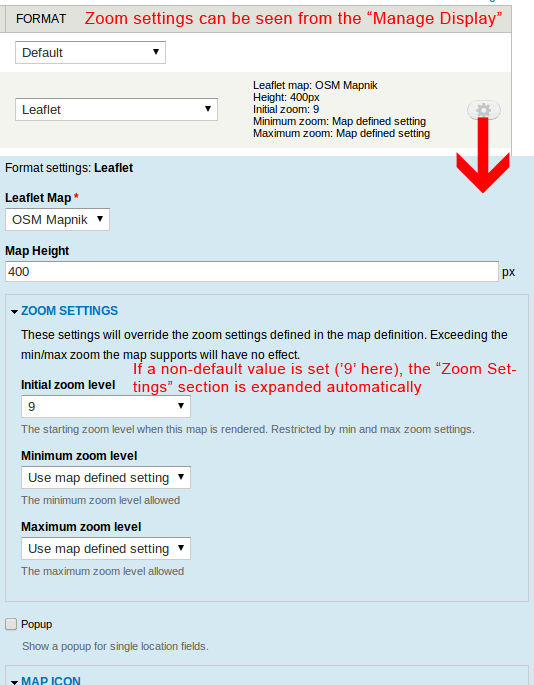
So just for clarity here's a screenshot of the new settings with the patch from #14:
I hope others can review this so it can be marked RTBC.
Comment #16
balagan commentedI took a look at the patch, and it seems to me that '#element_validate' => array('leaflet_zoom_validate'), is missing for max zoom, and maybe default zoom too.
Comment #17
zach.bimson commentedVery useful, can this be committed?
Comment #18
rudetrue commentedI made a lot of usability improvements over previous versions, along with the missing validation noted in #16. The display formatter now has a nice summary showing the zoom settings.
Using the "Map defined setting" option will use the map defined settings, and not upset existing configurations.
Installing this patch makes no changes to the displays, the user must go into the display formatter and set the zoom levels to something other than "Map defined setting" for this patch to have any effect.
Default behavior, how it looks if you don't use the display formatter:
How it looks when you set the zoom settings in the display formatter:
Tests performed:
Issues (not a big deal imo):
I would really like to see these changes committed!
Comment #19
gmclelland commented@rudetrue - just tested the patch in #18. The formatter works great as long as you aren't using Panels. I don't why it is happening, but as soon as I use Panels the formatter reverts to the default zoom level.
I would also love to see this zoom setting somehow configurable within Leaflet views.
Comment #20
rootworkThis is AWESOME. (patch in #18) Great functionality, well-tested, survived everything I threw at it.
It's too bad it doesn't work with Panels. Personally I think this is important enough that it should be committed, and then we can work on fixing the Panels integration.
Comment #21
marcoscanoGreat stuff. I can confirm also that the patch in #18 is working fine in my case (simple map with a single marker, no panels, no ip_geoloc)
+1 to commit it as is, and work on panels integration later.
From a site-building point of view, it's almost a bug that the site builder is not allowed to change the initial zoom in a single-marker map without having to code (as suggested on #1707896: Excessive zoom when map contains only one marker).
This feature is very useful to these users that don't code
Comment #22
dshields commentedThis would be even better if it worked within leaflet_views.
Anyone willing to take that on?
Comment #23
marcoscanoFirst approach to extending the patch in #18 to allow also the same functionality in views. Basically porting the modifications to the views plugin (as is), nothing new added.
Please test
Comment #24
marcoscanoNow with the correct validate functions to the zoom settings, sorry
Comment #25
dshields commentedAwesome!!
Thanks marcoscano!!
Comment #26
mgiffordSo is this marked RTBC? Would be good to get this into an upcoming release.
Comment #27
DerTobi75 commentedHi,
the settings are not saved, when you try to set the zoom in Panels :-(
Regards,
Tobi
Comment #28
gmclelland commented@DerTobi75 - Do you have the issue with the settings not saving using Panels without the patch?
I was having the same problem on one site with Panels, but I couldn't reproduce it on another fresh minimal module site.
My site is having problems with saving the settings using Panels even without the patch in this issue. After changing the settings of the pane in the Panels IPE, the preview would be correct so I would save it. After I refreshing the page, the map would be blank.
These Panels+Leaflet problems might be a whole separate issue. I'm just having a hard time coming up with a way that is reproducible so that I can file an issue for it.
Comment #29
bbujisic commented#24 applied without any problems, looks good and works great.
Agreed with @gmclelland on Panels+Leaflet, it should be a separate issue.
RTBC?
Comment #30
DerTobi75 commentedRight now, I do not have other issues with panels. It saves the map height etc. without a problem. Just saving the zoomlevels did not work.
Comment #31
osopolarNot only the zoom settings aren't saved in panels, also the icon settings. Anyway I prefer to fix it her because it affects also the code in the patch and the changes aren't that big.
The formatter settings form in
leaflet_field_formatter_settings_form()is using#fieldsets. Setting #tree to TRUE will fix this. See Common use of #tree in documentation on #tree and #parents.Please review and test again.
Comment #32
DerTobi75 commentedHi,
just tested the zooming option and it worked great, thanks!
Tobi
Comment #33
cboyden commented#31 did not apply using -p1 - the attached version has updated paths.
Comment #34
osopolarThanks for the review, I didn't recognize that it was not a -p1 patch.
Anyway, I did some additional minor changes:
'#tree' => TRUE.Comment #35
osopolarViews option_definition() works slightly different.
Comment #36
osopolarI forgot to remove some debugging values, sorry.
Comment #37
2phaPlease take a look at the patch I have added to this issue:
https://drupal.org/node/2089209
It adds the ability to set all map options, including zoom, minZoom, maxZoom.
It does so by adding a textfield where you enter json.
I think it is better than adding more options lists etc.
Comment #38
rdeboerI think I prefer 2pha's JSON-ish solution in #2089209: Ability to set map settings (zoom, minZoom, maxZoom etc.) and token support. patch attached over a UI that will become bloated over time as more and more options are added.
Comment #39
cboyden commentedPerhaps these UI additions are better put into a separate module then? See #2111701: leaflet settings as a sub module?
Comment #39.0
cboyden commentedTypo.
Comment #40
gcbThis has been rolled into Dev with some tweaks and abstraction to apply on both view modes and views. Thanks @osopolar! We may yet decide to pull this and other configuration out into a submodule.
Comment #41
gcbhttps://drupal.org/node/2148175