Meta issue to list small, subtle changes we want to do on Field UI for Drupal 8. The pie in the sky - I know a lot of people really really want the form builder approach - see #1515688: Redesign the Field UI and #1472348: Fields UI improvements using form builder pattern - is not our goal here. Not all ideas have issue created yet, but will be as soon as possible.
Committed to 8.x
I (swentel) started on that FB approach and I still have the code. However, I 100% completely support making changes on the current Field UI as getting my form builder approach ready before 1 dec is just impossible. Once we hit feature freeze, we simply need to take this up as a big community task in contrib and make sure we can hit it for D9 - although even at this point I'm still not convinced that I could live with that approach on entity level, both for forms and display.
Original summary
As maintainer of field_group and co-maintainer of display suite, I know very hard stuff needs to be done when you want to change the field UI. Lots of form altering needs to be done and worse, lots of duplicate code and behavior.
All of this is just a proposition.
What can we do
- Make the row handles generic and/or more extendible
- Change the behavior for the field instance and display settings to a popup/modal/overlay
- Add a system to nest fields in 'groups' which field_group can implement
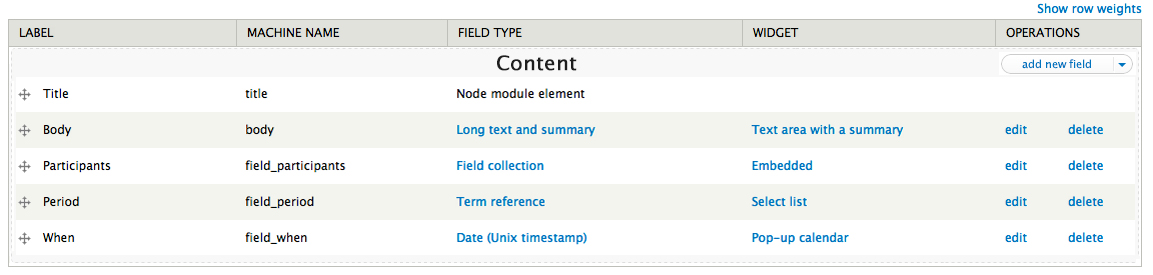
- Create a region system by default in field_ui. This will make it possible for Display Suite to pick in rather than override almost everything. By default the hidden section would be a UI-region and the visible should start as the visible or "content" region (by convention or not)
- Make an early start for a UI switch to DS layouts. This will very much need a separate issue if we try it.
- Take an attempt to try rendering the row in ajax and not the form?
I would like to check in a new branch what can be done and like to do a suggestion. Question: What is the branch I should branch from to start this intent?
Any recommendations and thoughts would be very helpful.



Comments
Comment #1
Stalski commentedI had a talk with swentel about this and there is a lot that "could" be done.
What I would like to try first, is to have regions by default. The default would be both field UI screens having a disabled and a content region.
advantages
- having them in core(form and display) will makes sure no contribs needs to introduce them
- consistency at forms and displays
- contribs can easily pick in to use them instead of doing all sorts of odd things
- use $content as default 1col display
- easier to convert the UI to using the layout display manager
We might even pull "disabled" fields out of the normal UI screen into a section beneath the form. Fieldgroups in d7 already work that way since they are exportables. The "disabled" property is different from the deleted state. We might consider this behavior for fields as well.
Thoughts?
Comment #2
yched commentedI'm not sure how "disabled" applies to the "Manage fields" screen.
"hidden" on forms is very rarely intended for *all* users, and is more typically addressed through field permissions.
Comment #3
Stalski commentedTrue. Two reasons for this:
- Let's say fields are already exportable (very much like CTools handles it in D7). disabled would mean: I don't want to use it "yet", the field will be defined but not used. Is this even possible in D8?
- There is already a hidden section in D7 as well. For the moment, we use it for add_new_field. When fieldgroup or other modules that provide an exportable field/fieldwrapper in the UI, they can define them by hook/Annotation but have them default to 'disabled'.
- Most important: consistency in the field UI screens. After 2 years of working with it, that's what bothered me the most. Also if we can get that disabled section in a separate container, it wouldn't have to load while the form is ajax-refreshing. A display object could contain only the visible fields, and that should be the only thing that is passed through by ajax requests. I know this will be handled in another issue, but a display object (linked to the entity_type/bundle/view mode) would be just great.
Comment #4
yched commentedWell, that sounds like what 'inactive fields' currently are - but right now you can't decide whether a field is inactive or not, the system decides (fields whose field type module is unknown/disabled).
Also, inactive fields are a real pain to handle, and I'm really not keen on allowing admins to disable fields themselves. What's the use case you're targeting ?
And I'm not sure whether, if such a feature existed, we'd want to make it that easy and proeminent - "disabled" region that you can simply drag your fields onto. That "hidden" region on "Manage fields" would have a *very* different effect than on "Manage display".
Well, yes, "Display Fields"has a "Hidden" region and "Manage Fields" doesn't, That's because "Hidden" does not really apply on the "Manage fields" screen...
Comment #5
Stalski commentedHmm, this is going to be a battle :-)
I'll think some more about it, but especially how I can be persuasive. Imo we can only go further and improve the current field UI if we can make some things consistent and make it usable.
My girlfriend for instance just ran away from drupal just because she does not have regions in the node form.
As I said, I 'll have some conversations with swentel and zuuperman (or you) some more and try to explain it better.
Comment #6
Stalski commentedAfter talking to some people like yched, swentel, eclipseGC the best thing to do there seems to sketch something that could be the first step.
So don't expect too much of this. For me, this is just the first step to make it easier for all other things to happen.
I've read lots of propositions, discussions and idea's about this. Then I mean page manager, spark, layout manager, panels api ... . I think what is proposed here, is just a very small improvement of field UI (and only that!) and it meets the requirements for almost every choice that could be made for the next generation fields handling.
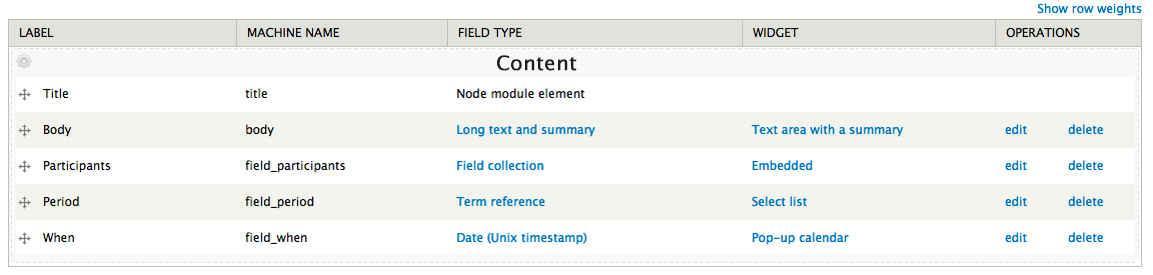
I will work on a sketch for the modal as well. This modal would then appear on the cogwheel for editing field instances or display settings and when creating a new instance.
In code, the regions would be the same for field overview and display overview. Visually the hidden/disabled/unused region would behave differently on both screens.
Shoot!
Comment #7
swentel commentedLooks great overall - maybe the grey background of 'content' looks a bit weird, but I can get used to those things.
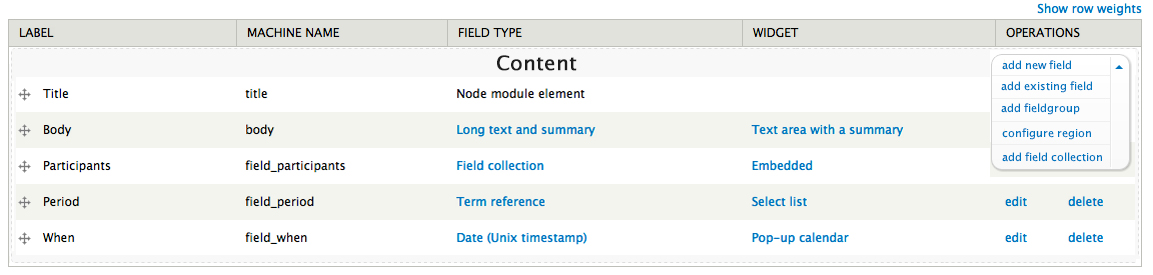
One thing already mentioned in IRC is that the cogwheel in the upper left and the operations on the right in every row should probably become the CTools dropdown button once that lands in core, see #1608878: Add CTools dropbutton to core.
- edit - added operations too
Comment #8
sunSorry friends, but this discussion belongs into the Drupal core queue, so the suggested UI changes gain some more visibility.
Comment #9
Stalski commentedNo problem, I think it's for the best.
I'll work out a next sketch with the new action dropdown links.
Comment #10
Bojhan commentedSwentel pointed me to this, I think it makes a lot of sense for fieldgroup. But makes less sense for the overall adding of things. For fieldgroup what you want to do is add a field just below it, while for overall you generally just want to add a "thing" that being fields/fieldgroups or something else (we honestly should be using local actions for this, but it doesn't scale well yet).
I imagine for fieldgroup we should seek to just go down the normal route, of adding a ctools drop button on the right in the operations column. This isn't in core yet, but I assume it will be. The styling might need some additional tweaking to allow this to happen. Any module that wishes to do this should be able to do so.
I don't think normal fields, should have a dropbutton with the "add" action. The overall add action should either remain inline (ugh :D!), or be moved to the top with a more scalable action pattern.
I don't think this should open in a model/overlay. Let's have a consistent model for adding things, the fact that views opens some of these links in modals is nice - but Views has a whole load of UX hacks (I cannot control that, the UI will go into core unmaintained and probally not reviewed by the UX-team). And I would really love for anywhere we can control to have a consistent expectation pattern, what happens if you click a link in a table.
Comment #11
Stalski commentedHi Bojhan,
Thx for sharing your thoughts on this.
About the consistency, I don't think it is very consistent to *not* open a modal, since we will do that to edit a field('s display). So that's the main reason for that change.
Another one is, that if we still have fields beneath the complete form, it's very unusable with a lot of fields and fieldgroup. You always need to drag stuff out of the viewport, and I work with fields UI on daily basis :(
So I am very much in favor of consistency, so that's why all the configurations needed to add a field/fieldgroup/fieldcollection/whatever are fit a the modal. The edit screen will do it as well, AFAICT.
About being good for fieldgroup, I did not think about that yet. The point is that there need to be actions for a region, and so that modules can hook into it. Field collection can pick on it too, as you can see in the attached images. We can now offer styling and behavior for the region wrapper as well this way.
Well, that's the point, you have to click at least 2 steps to actually create a field or something else. Also modules like display suite can easily pick in the Display overview to be able to create a "Add new codefield" field, immediately in the correct region.
Besides, the approaches I read that deal with Field UI in general are mostly with panel region links. Am I wrong about this?
Can you elaborate on how you envision this?
Attached are the changes suggested by swentel.
Comment #12
Stalski commentedChanged the title as it's now under Field.ui component.
Comment #13
Stalski commentedAfter some IRC talk with people, some things might be changed:
1) when there is only one region, as default in core, then "content" should not be there as region label
2) edit/delete on fields (or other rows) can be in a dropbutton as well, maybe even the field_type and widget settings.
3) if you can only add a new field, then this should not be a dropbutton. (consider that as soon as you have other fields, the add existing field appears)
Also in regard to
Totally agree on that. How I thought about it, it's like a javascript enabled/disabled thing. If javascript is not enabled or when fatal errors blocks execution, then the callback can still go the page where you have the add something screen. But It might not be the reason to not show the same thing in a modal, still following the same consistent convention.
I am not all that much following all those UX guidelines that make it into D8, so sorry if I say stupid things.
Also it might be best to separate this issue. I could start with the region thing and then handle the cogwheel/dropbutton and modal thing in another issue. Does that sound ok?
Comment #14
swentel commentedSounds like we might want to turn this one into a meta issue linking to different issues so we can make small gradual changes to a more flexible field ui.
The pie in the sky - I know a lot of people really really want the form builder approach (*) - see #1515688: Redesign the Field UI and #1472348: Fields UI improvements using form builder pattern - is not our goal here.
(*) I started on that and I still have the code. However, I 100% completely support making changes on the current Field UI as getting my form builder approach ready before 1 dec is just impossible. Once we hit feature freeze, we simply need to take this up as a big community task in contrib and make sure we can hit it for D9 - although even at this point I'm still not convinced that I could live with that approach on entity level, both for forms and display.
Comment #15
Stalski commentedThe first one started at #1786198: Make consistent regions in code for fields UI overview screens.
I'll list them later on.
Comment #16
swentel commentedChanging title
Comment #16.0
swentel commentedUpdate summary
Comment #16.1
swentel commentedUpdated tags
Comment #17
nod_This touches tabledrag, tag.
Also I'm seeing talks about modal. This needs to work on mobile or at least not suck more on mobile. Please keep in mind when throwing around ideas :) #1667742: Add abstracted dialog to core (resolves accessibility bug)
Comment #18
nod_forgot one, sorry.
Comment #18.0
nod_Add link to dropbutton to core issue
Comment #19
swentel commentedAs in, on iphone/android or rather tablets ? I'll be bold, I don't see myself configuring new fields or changing the display on my android - even though it could be theoretically possible ...
- Edit - typo + added link to summary
Comment #20
Stalski commented@nod_: I can easily reassure you that I won't introduce or throw idea's of any kind ;)
I only plan to use things that you guys already introduced, like the modal that goes into core, the dropbutton if it is included into core, ...
Also as swentel said, I can't imagine people to use the fields UI or views UI on their phone. A tablet should be supported, but as I mentioned above: if a modal gets included into core which is integrated for mobile applications, fine.
- Edit - Besides, the non-javascript way should work as well. So there is always something possible with the normal (read default) approach.
Comment #20.0
andypostAdd link of modal
Comment #20.1
swentel commentedRefactor issue
Comment #20.2
swentel commentedAdded ajax callback issue
Comment #20.3
swentel commentedAdded 'done' section
Comment #21
andypostSuppose a very related issue #1787634: [META] Decouple layouts from themes
EDIT: now there's a working layout_manager in issue pointed above
Comment #21.0
andypostUpdated issue summary.
Comment #22
tim.plunkettAdding #552604: Adding new fields leads to a confusing "Field settings" form to the issue summary
Comment #22.0
tim.plunkettUpdated issue summary.
Comment #22.1
tim.plunkettUpdated issue summary.
Comment #22.2
swentel commentedUpdated issue summary.
Comment #22.3
swentel commentedUpdated issue summary.
Comment #22.4
swentel commentedUpdated issue summary.
Comment #22.5
swentel commentedUpdated issue summary.
Comment #23
yoroy commentedAdded #552620: [meta-issue] Rewrite descriptions of content types UI
Comment #24
yoroy commented#1830822: Split the Views UI listing into two tables for enabled and disabled might be a useful pattern to apply to the 'Manage display' page as well.
Comment #24.0
yoroy commentedadding #552620
Comment #24.1
swentel commentedDropbutton on field ui done
Comment #24.2
swentel commentedAdding modal api issue
Comment #25
yoroy commentedI wonder if we could hide the tabs for Comment fields and Comment display if comments are off for the given content type. It would clean up the UI for the majority of use cases.
Comment #26
swentel commentedHmm, that makes sense in a way, the code for that is not that ridiculously hard.
Comment #27
yched commented@yoroy: I don't think there can be a case where "comments are off for a content type".
The "Default comment setting for *new* content of this type" can be set to 'closed', but there might still be existing nodes with existing comments displayed, and the comments can still be opened node by node.
Comment #28
yoroy commentedBah :-(
#2021353: Hide comment fields and comment display tabs if comments are off for the content type
90% of content types won't have comments enabled, nor won't have any added individually. I understand what you're saying yched. Pity that the less likely scenarios have to clutter the default state. Anyway! :-)
Comment #29
swentel commentedUgh right, makes sense.
Comment #30
andypostSuppose better to wait for #731724: Convert comment settings into a field to make them work with CMI and non-node entities so comments would be a field
And #1901110-6: Improve the UX for comment bundle pages and comment field settings needs review for settings
Comment #30.0
andypostUpdated issue summary. Also content types ui doesn't belong to field ui :)
Comment #43
smustgrave commentedLots of working currently being done over at #3346539: [Plan] Improve field creation experience