

Closed (fixed)
Project:
Commerce UPS
Version:
7.x-1.x-dev
Component:
Code
Priority:
Normal
Category:
Feature request
Assigned:
Unassigned
Reporter:
Created:
5 Nov 2012 at 15:17 UTC
Updated:
29 Jun 2020 at 16:13 UTC
Jump to comment: Most recent, Most recent file


Comments
Comment #1
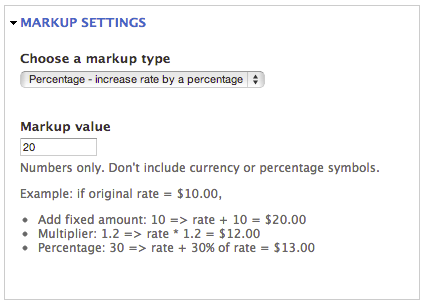
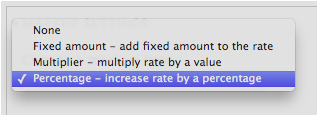
agileadamHere's a patch that adds markup options to the Commerce UPS module. I've tested all options, validations, calculations, etc.
I am human, however... so please test before using.
Enjoy!
What it looks like:
Comment #2
agileadamRealized I used the wrong patch number in my first comment... it doesn't affect the patch, but the filename of the patch should've been:
commerce_ups-adds_rate_markup_options-1832350-1.patch
Comment #3
chrisNtampa commentedWorks like a boss for me. Thanks!
Comment #4
gmaldonado commentedThis funtionality is so needed.
Just migrated an old site from Oscommerce and the option to add this markup was there, it was odd that was not in the drupal module.
Also I am using the USPS module, which does have this markup option.
Thanks for this excellent patch, I've tested it and works great.
Comment #5
waltercat commentedHas anyone gotten this to work with 2.0-dev? I just tried installing the patch and it failed:
Comment #6
jessepinho commentedWhy not just use shipping calculation rules? That provides an abstract way of dealing with markups/markdowns without the need for duplicating this functionality in a shipping method-specific module.
Comment #7
MaWebDesigns commentedAs a followup to jessepinho's comment - adding a standard markup is relativly easy using the commerce shipping rules. This video does a good job at explaining how to do it: http://www.youtube.com/watch?v=DNF4Mpy5f5w
Best part is that it can be used with any shipping module and no code changes required!
Comment #8
agileadamI was going to re-patch for the 2.x branch, but I concur with jessepinho and MaWebDesigns.
Maintainers... this issue and associated patch should probably go away in favor of using shipping calculation rules. I'd love to see this mentioned or explained in the README for this module.
If someone needs a patch against 2.x I'd be happy to provide it, but it's probably not necessary.
BTW, I noticed some strange behavior when trying to apply a markup to UPS shipping rates only (not USPS, for example).
Here are the settings I use for a 30% markup: http://goo.gl/Y3dKCj
Comment #9
agileadamAs a follow-up, I see that Commerce USPS now states the following in regards to their 2.x branch:
Comment #10
junetellain626 commentedCan anyone post an export of their rules configuration that enabled them to modify the UPS service amount? (add, substract, etc).
Tried adding as a condition:
a. Data comparison
Parameter: Data to compare: [commerce-line-item:type], Data value: Shipping
b. Data comparison
Parameter: Data to compare: [commerce-line-item..., Data value: UPS 2nd Day Air (UPS)
Then added an action "Add an amount to the unit price".
But no UPS services can be accessed. The select boxes can only access the flat rate services.
Any tips? Thanks!
Comment #11
jessepinho commented@junetellain626 Where do you expect the UPS services to be accessed? Do you mean under "Price component type"? If so, simply select "Shipping."
As far as I understand, different modules use price components differently. The Flat Rate module uses separate components for each rate, whereas the UPS module simply uses the "Shipping" component.
Comment #12
junetellain626 commented@jessepinho Thanks a lot! It worked!
Paired it up with the conditions I listed above and it limited the additional rate to only the UPS services that I specified.
Maybe I was confused since I started adding additional rates to Flat Rate services, and I could access these flat rate services directly via the "Price Component type". I thought, wrongly, that it should somehow be the same way with UPS services.
Here's the rule export of my shipping calculation. It should add $5 to the UPS services (Note: UPS services here are not complete):
Comment #13
jessepinho commentedGlad I could help!
Comment #14
ultimikeThis needs a re-roll for the 2.x branch of Commerce UPS or (possibly even better) some documentation on how to do this the Rules module (which I
Comment #16
hockey2112 commentedIs there any way to modify this code to work with Commerce on Drupal 8?