

Closed (won't fix)
Project:
Drupal.org security advisory coverage applications
Component:
theme
Priority:
Normal
Category:
Task
Assigned:
Unassigned
Reporter:
Created:
23 Jan 2013 at 09:26 UTC
Updated:
6 Jun 2013 at 22:27 UTC
Jump to comment: Most recent, Most recent file




Comments
Comment #1
Gaofengzzz commentedPlease provide your project sandbox link and also a valid GIT URL.
Until then, I'm afraid it is going to be very hard to review your application
Please refer to:
Apply for permission to create full projects and in particular:
Hope that helps.
Cheers!
Comment #2
eule commentedManual Review
if this is done, and you are working in the "master" branch in git. You should really be working in a version specific branch. The most direct documentation on this is Moving from a master branch to a version branch. For additional resources please see the documentation about release naming conventions and creating a branch in git.
Good Luck
Comment #3
themesplanet commentedHello,
I have setup my Git, and here is the URL for git repositary path : http://drupalcode.org/sandbox/themesplanet/1896370.git/commit/4237d0e .
Please check it and let me know the next procedure for it.
Thank you.
Comment #4
themestar commentedHi,
Manual review
1) when i go to inner page i m not able to click other menus.
2) main content is overlapping with RHS block
3) breaking inner page structure when i am adding lengthy content.
thanks
themestar
Comment #5
mjohnq3 commentedI haven't cloned your repository yet but here's a code review from ventral.org:
http://ventral.org/pareview/httpgitdrupalorgsandboxthemesplanet1896370git
Few errors found but it points out that, as mentioned above, you're working from the master branch.
Comment #6
manjit.singh1. There would be one info file. So you should remove tp_endurance_responsive_drupal_theme.info file. There is no need of two info. files.
2. Layout of page.tpl.php should not be as per drupal standard. There are some extra un-necessary spaces. please refer some standard structure of tpl files in Drupal7.
page.tpl.php(garland)
page.tpl.php(Seven)
3. Indentation is missing in style.css.
4. Declare CSS file in theme info.
5. It would be great if you add some comments in the starting of regions, Stylesheets, features in info file.
See standard info file here.
Comment #7
mukeysh commentedPlease put your all template files at one place. In your theme there is a folder named templates where you have 3 files page--front.tpl, node.tpl, html.tpl but your page.tpl is outside the templates folder. Put page.tpl inside the template folder as per standard.
Comment #8
mukeysh commentedYou directly call the css file in html.tpl under head tag. Which is not the drupal standard. It would be better if you add those files in info file of your theme. If you add css files to your info file then you don't need to call them in head of your html.tpl. e.g
stylesheets[all][] = style.cssPlease follow the link for more info http://drupal.org/node/171205
Comment #9
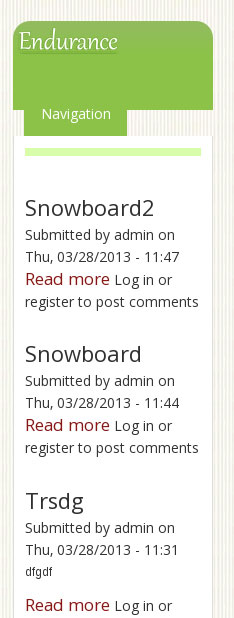
mukeysh commentedIn development and navigation block content are not showing. When you hover over it then content are showing. You add the css for .menu a like
.menu a { color: #fff}. It reflects to all the menus that have class .menu and 'a' tag. So take some unique parent class for menu. So it will not reflect to another menus.Please find the attached image below.
Comment #10
mukeysh commentedA bug in admin menu in chrome. Please find the image below.
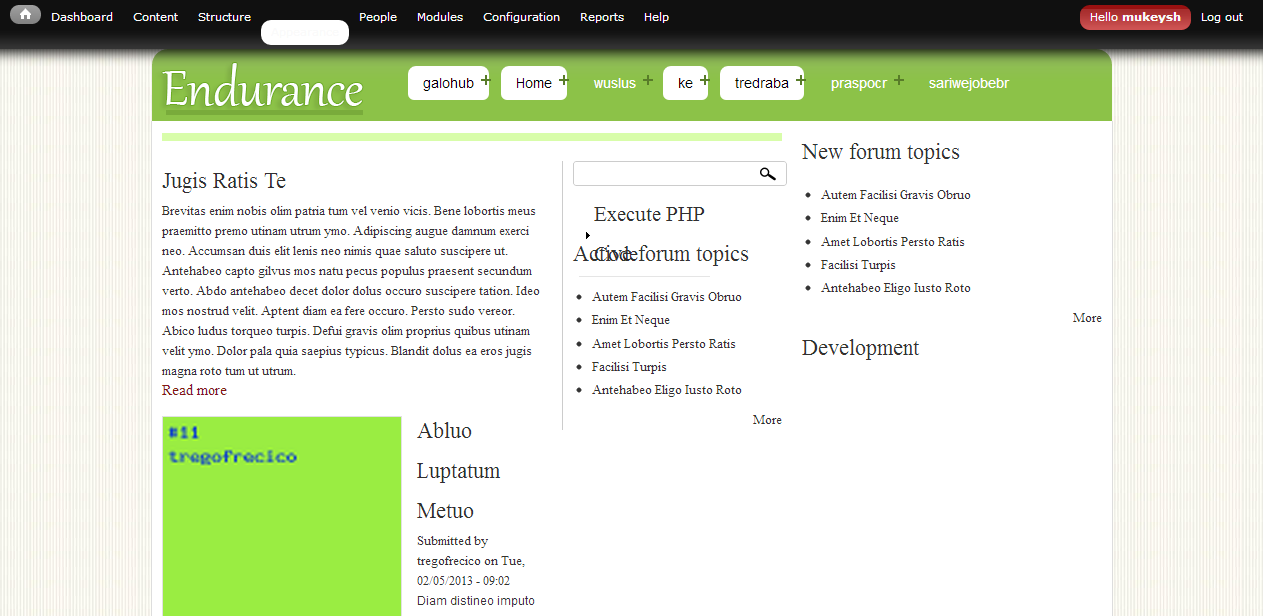
Comment #11
mukeysh commentedProblem in layout. In front page i enable left sidebar and right sidebar but layout are not showing properly. It shows the main content at left side, left sidebar at the middle and right sidebar is ok. Please find the image below.
Comment #12
Homotechsual commentedCorrecting tagging/Issue Fields
Comment #13
bandanasharma commentedFollow proper drupal standered for css ( http://drupal.org/node/302199) and romove unwanted commented CSS.
Give the proper name to the classes as you use in tpl file.
Comment #14
bandanasharma commentedHi,
I have check your theme manually and found some UI bugs in pre login page. Please refer the screenshot for the same.
Comment #15
chris.smith commentedComment #16
PA robot commentedClosing due to lack of activity. Feel free to reopen if you are still working on this application.
I'm a robot and this is an automated message from Project Applications Scraper.