Hello there
The last few days I had lots of problems with drush. On last Thursday I downloaded Devel via drush and when i tried to install it but then i got the error
PHP : Parse error: syntax error, unexpected $end on line 120 in devel.drush.inc
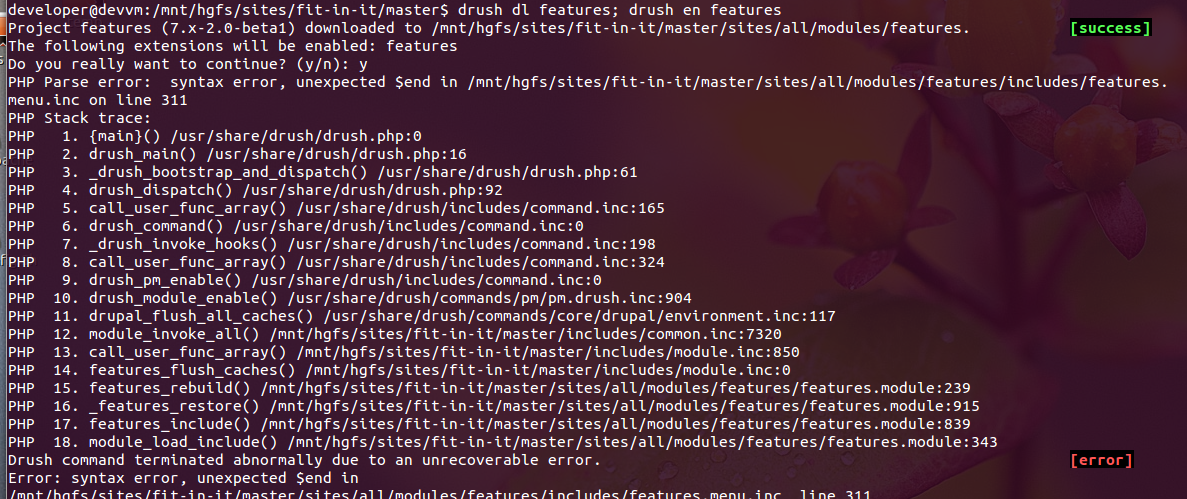
and today I tried it with the download of "features" again and the same problem:
Drush command terminated abnormally due to an unrecoverable error.
Error: syntax error, unexpected $end in
/mnt/hgfs/sites/fit-in-it/master/sites/all/modules/features/includes/features.menu.inc, line 311
(see attached image)
The thing is, there is NO syntax error around. I opened it with Netbeans and there was no problem. As soon as I saved the file UNMODIFIED again, all was fine and error disappeared.
Either my Ubuntu VM or Drush causes that extreme problem.
Does anybody have a clue what causes this problem?


Comments
Comment #1
greg.1.anderson commentedTried to reproduce from the steps above, and found everything was working for me. Perhaps the problem is related to your configuration, or is caused by something other than Drush.
Comment #2
martinpe commentedmy project files are mounted via a Samba mount. do you think that might cause the problem?
Comment #3
greg.1.anderson commentedI don't know. Maybe you could try copying them to a local disk, and see if the behavior changes.
Comment #4
richardrobinson commentedI can second this. It seems like every time I install a module, I'll get a syntax error. The syntax error is always on the last line of a file. It is usually a file associated with the newly installed file, but even that is inconsistent.
It sounds silly, but I thought I kept getting bad modules until I checked the source and found out where the errors were coming from. I figured out how to resolve the issue. I think it has something to do with encoding, because if I go to the line in the file specified in the error (it's ALWAYS the last line) and recreate the line, or make a new line and delete it, save it, and refresh, it will clear the error.
Note that sometimes it causes multiple files in the installed module to do this, so you might have to do this to every file it complains about. I'm not sure if this is the correct fix, but it works for me.
Also, I'm not 100% sure that this is Drush's fault... I usually install modules with Drush.
Comment #5
greg.1.anderson commentedIt would be helpful if someone with a reproducible case could take a diff between a "broken" file (with the syntax error) and a "fixed" file (after "recreating" the last line). If diff shows no difference, perhaps hexdump both files, and compare the last few bytes to see if, perhaps, there is a spurious NUL or CR LF where there should only be an LF. I'm not even sure either of those situations would cause a syntax error, but I think you see what I am getting at.
On my system, a working file ends something like this:
The last three characters are LF closing-curley-brace LF. Check and see if there's anything "extra" in your broken files.
Comment #6
richardrobinson commentedI think I narrowed it down to the HGFS file system. Any time I downloaded a module using Drush into a shared VM folder, I had "invisible" lines appended to my files.
http://drupal.stackexchange.com/questions/64535/syntax-error-unexpected-...
I hope that helps and that it saves you some headache. This cost me a lot, although I don't think it's a Drush issue.
--richard
Comment #7
greg.1.anderson commentedI'm going to presume, then, that this is not a Drush issue.
Comment #9
nathan573 commentedI had an issue where I was upgrading a module from D6 to D7 and, while the site worked on my local XAMPP setup (bootstrapped and rendered in a browser properly), when I tried to use Drush on it I would get the following errors:
I realized that this was because the module was using the PHP tag shorthand - short_open_tag. Once I converted all instances of
<? to <?phpand
<?= to <?php printDrush was able to complete operations once again.