Problem
CKEditor 4.1 introduced Advanced Content Filter (ACF), which essentially defines what the editor is allowed to output.
It has two active modes: automatic and custom.
Content is filtered when the editor loads it, potentially destroying existing content which wasn't created using the same editor configuration!
Automatic mode
- CKEDITOR.config.allowedContent is null.
- Plugins supply a list of tags and attributes they create/allow in the content.
- CKEDITOR.config.extraAllowedContent can extend the automatic rules provided by plugins.
- Content is stripped of any tags/attributes not defined by the rules defined provided by the plugins.
- Disabling a plugin or a button will remove content allowed only by that plugin. (Ex: Remove the Image button and any
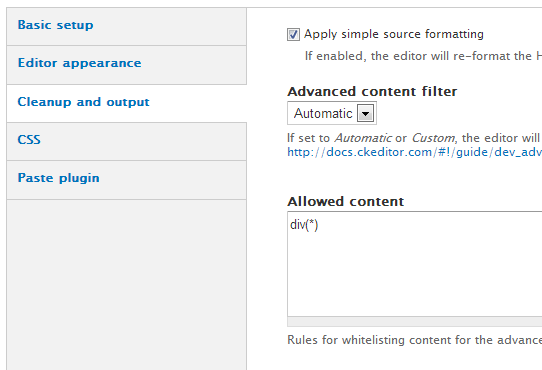
<img /> tags will also be removed.
Custom mode
- CKEDITOR.config.allowedContent is a string with tag/attribute names or an object based on CKEDITOR.filter.allowedContentRules.
- Plugins supply a list of tags and attributes they require to work and which ones they may sometimes output.
- Plugins/buttons requiring tags which aren't allowed are automatically disabled or their features are limited. (Ex if
<img> tags aren't allowed, those tags will be removed and the Image plugin will be completely disabled.
- The Styles and Format dropdown lists only contain items which have been defined in the content rules.
Disabled
- CKEDITOR.config.allowedContent is true.
- No tags/attributes (except for those considered dangerous, like
<script>, are removed.
- Enabled plugins/buttons stay enabled.
Workaround
It's possible for modules to quickly disable ACF while we work on a more permanent solution here:
/**
 * Implements hook_wysiwyg_editor_settings_alter().
 */
function MYMODULE_wysiwyg_editor_settings_alter(&$settings, $context) {
  if ($context['profile']->editor == 'ckeditor') {
    $settings['allowedContent'] = TRUE;
  }
}
Suggestion
In the CKEditor implementation's settings form callback function, create a couple of new form elements to control the behavior of ACF.
The first element would be a select box with the options "Automatic", "Custom" and "Disabled", where we make "Disabled"" the default. The reasoning being that this is - as it name implies - an advanced feature, and we don't currently have a way to let plugins (native or cross-editor) specify which tags/attributes/styles they require and which ones they are able to create.
The second element would be a textarea to hold a custom rule set defined either in the string format or the object format (JSON) representations of ACF rules, see the ACF documentation for details. There's a possibility we may need an extra element to toggle between the string format and the object format if it proves to be difficult to distinguish between the two.
When the profile form is saved we check if the contents of the textarea is a valid JSON object and set it to the allowedContent setting if that is the case. Otherwise we set the string value as is.
If the select box has been set to "Disabled", we override the allowedContent value with the boolean TRUE. If it's set to "Automatic", we move the value of allowedContent to extraAllowedContent and simply unset allowedContent.
Original post by mibfire:
ACF
The new great(really?) Ckeditor 4.x automatical remove all attributes what arent defined for editor so for example, id or class attributes will be removed and it is so annonying. To fix this we should create all atributes what we would like to use in editor.
This way it can be fixed:
function MYMODULE_wysiwyg_editor_settings_alter(&$settings, &$context) {
  if($context['profile']->editor == 'ckeditor') {
    $settings['allowedContent'] = array('p','address','pre','h2','h3','h4','h5','h6','div','script','iframe','*[*]');
  }
}
*[*] means it allows all attributes for the given html tags, but this way we lose the buttons that are set in Wysiwyg admin page. So if these arent defined and someone try to edit a content all attributes will be lost.
It should be fixed asap or we have to write our own code for evry text format. THX


Comments
Comment #1
mibfire commentedTo disable ACF: $settings['allowedContent'] = true;
Comment #2
twodThere's a new
'settings form callback'property in the editor definition which can be used to customize the profile form from within the module implementing the editor integration (Wysiwyg itself in this case). It works just likehook_form_alter()and is already in use to customize some of the CKEditor-specific things on the profile form.It should be fairly easy to extend the profile form when CKEditor 4 is detected so this setting can be cuztomized (both allowing the "TRUE" value and a list of tags/attributes), if anyone feels up to it.
Comment #3
marktheshark commentedIs there no way for the user to specify
CKEDITOR.config.allowedContent = truevia the UI, like the custom flags the ckeditor allows the admin to add?Comment #4
twod@marktheshark Currently, no. That's what I hope will come out of this issue.
Comment #5
marktheshark commentedFor the record, I followed approach #1. The module code in the original post did not prevent classes from getting stripped from my p tags, for some reason.
Comment #6
lsolesen commentedSeems to be related to #1951964: Media Button in WYSIWYG CKEditor 4.1+ broken
Comment #7
AvalancheOfLlamas commentedI have the same issue marktheshark does. CKEditor still doesn't like the classes in my
<p>tags.Comment #8
marktheshark commentedI just created a module with this code (in case it helps):
Comment #9
lotyrin commentedCritical feature request?
Comment #10
rocketeerbkw commentedMarking critical since it was stated as release blocker in #1953106: Roll 7.x-2.3 release of Wysiwyg.
Here's a patch that follows the instructions in summary. I've tested and it works to my understanding of how ACF works. I'd like feedback on the help text that should go on the new form elements.
I added two fields to the
Cleanup and outputsection. The allowed content field is only shown whenAutomaticorCustomare selected.Comment #11
hass commenteducfirst only.
Strings are not translatable. Not Drupal code style.
"Content" lowercase
Write "Content" lowercase. End sentences with periods.
Comment #12
rocketeerbkw commentedThanks! I've made those changes. Still needs form field descriptions.
Comment #13
rocketeerbkw commented#1968318: Support for TinyMCE 4.x and #2018439: Move editor-specific options out of the default profile UI. make some big changes, will be easier to rewrite my patch after those go in.
Comment #14
twodAwesome @rocketeerbkw! I haven't had time to actually test the patch yet, but it looks pretty solid just by what I can see with Dreditor.
I wonder if we could also provide a way for [cross-editor] plugins like Media to supply an abstracted set of rules for extending the sets here, since they can't directly use the editor API like native plugins. That would fix the major issue of inserted media not working. However, that's a fairly complex issue, and it'd have to be coordinated with the TinyMCE 4 integration.
I'll dig into that a bit more and get back here after rolling in the other patches you mentioned.
Comment #15
saltednutI attempted to apply this patch but it did not apply to wysiwyg 7.x-2.x HEAD
error: patch failed: editors/ckeditor.inc:138
error: editors/ckeditor.inc: patch does not apply
Comment #16
rocketeerbkw commentedI've rerolled against HEAD and added field descriptions. This should be ready to go.
Comment #17
dooleysarahe commentedThe patch in #16 worked for me (had to go in and re-save the admin settings first).
Comment #18
guillaumev commentedJust tested this patch on a fresh Drupal install with:
and everything worked for me: I was able to easily add media files in the editor. Would be great to see this committed and a new release of wysiwyg created.
Comment #19
jrglasgow commentedI have tested this patch as well and all appears to work as designed.
Comment #20
rodricels commentedQuick & dirty D6 patch
Comment #21
runephilosof commented#17 mentions having to resave the admin settings.
Can this be avoided or documented in the changelog?
Comment #22
twodOne way to avoid it would be to use an update to inject the setting into all active CKEditor profiles and have ACF disabled by default. This should of course be noted with a message on the update page.
Comment #23
eric.chenchao commentedThe patch in #16 works as a charm.
In order to add class in div, I have set up AFC as "automatic" and add new rules in the allowed content
It is worth to note that the documentation can be found in the page - ckeditor/samples/datafiltering.html - in either Ckeditor standard or full version.
Comment #24
pjbarry21 commented#16 worked for me in OpenAtrium's latest dev (after I updated WYSIWIG to the latest dev).
Comment #25
sylus commentedWorks great for me :) Hope it is okay to RTBC.
Comment #26
rocketeerbkw commentedI made a small change to settings callback which should fix having to resave the profile settings. It does not require running update.php.
Comment #27
guillaumev commentedI just tested this, and it works like a charm. I configured the wysiwyg module with the media button before applying the patch, tried to add a media through ckeditor, it didn't work. Then, I applied the patch and tried to add a media through ckeditor, and it worked like a charm. RTBC ?
Comment #28
kunago commentedI also confirm this patch is working as my div classes are no longer removed.
Comment #29
k.skarlatos commentedworks for me as well, +1 for rtbc
Comment #30
dmsmidtYes works like a charm, even the title / alt attributes work :-) for media.
Adding divs with a class also works with the settings in #23.
+1 RTBC
Comment #31
dddbbb commented#26 works for me too.
Tested with both Insert & oEmbed modules - everything now works as expected. Also tested with with CKEditor 4.2.2 and everything appears to be happy.
Thanks!
Comment #32
dddbbb commented#26 works for me too.
Tested with both Insert & oEmbed modules - everything now works as expected. Also tested with with CKEditor 4.2.2 and everything appears to be happy.
Thanks!
Comment #33
dddbbb commented#26 works for me too.
Tested with both Insert & oEmbed modules - everything now works as expected. Also tested with with CKEditor 4.2.2 and everything appears to be happy.
Thanks!
Comment #34
dddbbb commentedApologies for the comment spam. D.O had some troubles posting my original comment.
Comment #35
drupov commentedYes, #26 works for me too! My setup: CKEditor 4.2.2, wysiwyg 7.x-2.2+23-dev, media 7.x-2.0-alpha2.
+1 RTBC!
Thanks!
Comment #36
twodGreat! Thanks for helping with this!
There's one thing we'll have to change though. The constants should not start with 'CKEDITOR_' since we don't really "own" that namespace. It's not ideal and unsupported, but it's possible to have ckeditor.module running alongside wsiwyg.module and they prefix their globals like that.
To play nice, we should prefix this with "WYSIWYG_CKEDITOR_", just like for our function names.
Comment #37
guillaumev commentedNew patch taking into account comments from TwoD. RTBC ?
Comment #38
sylus commentedComment #39
elstudio commentedPatch from #37 works for me, thanks!
WYSIYWG 7.x-2.2+23-dev, CKEditor 4.2.2.
+1 for RBTC.
Comment #40
rocketeerbkw commented+1 for #37 from me
Comment #41
kerasai commentedQuick visual on the patch, everything seems sane. I've got one of iterations (prob #12) running on a few sites with no known issues.
Let's get this committed.
Comment #42
jeffdiecks commentedpatch from #37 worked for me with wysiwyg 7.x-2.x-dev + CKEditor 4.2.2 + Media 7.x-1.3
Comment #43
damienmckennaI tried this out with Media v7.x-2.0-alpha3+3-dev with the patch from #2067063-124 and it worked GREAT! Full test notes: https://drupal.org/node/2067063#comment-8009717
Thanks everyone for putting this together!
Comment #44
deggertsen commentedpatch from #37 worked for me as well.
Comment #44.0
deggertsen commentedOutlined the current situation and a proposed solution.
Comment #45
dddbbb commentedDid this get committed? I just updated to latest dev and found that I didn't need to apply any patches from this issue.
Comment #46
damienmckenna@danbohea: No, none of the patches from this issue have been committed.
Comment #47
dddbbb commented@DamienMcKenna: Thanks for clearing that up. I need to figure out what on earth's going on with my set up then :)
Comment #48
arosboro commentedI can confirm this patch works as intended with CKEditor 4.2.3.a8bf556, and the latest dev releases of Media (7.x-2.0-alpha3+17-dev) and WYSIWYG (7.x-2.2+23-dev)
Comment #49
green monkey commenteddev version appears to work with CKEditor 4.3.0.d2184ac
Comment #50
spgd01 commentedDev does not work with media module.
#37 works with CKeditor 4.3.0.d2184ac
Comment #51
suzanne.aldrich commentedI'll just add right here that the patch, and only the patch, in #37, makes this combination work:
CKEditor 4.3.0.d2184ac
Media 7.x-2.0-alpha3+31-dev
Wysiwyg 7.x-2.2+23-dev
Ship it.
Comment #52
alexmc commentedAny chance of incorporating these patches into nice released modules? I can't use CKEditor while it deletes my data
Comment #53
imclean commented#37 is working well for me, thanks.
Comment #54
samwillc commentedI don't know where this 'advanced' option even is?!
https://dl.dropboxusercontent.com/u/63070476/Screen%20Shot%202013-12-17%...
I checked the box, saved, flushed cache, logged out/in, everything. I get no extra options.
Comment #55
dddbbb commented+1 the sentiments in #51. I just wasted far too much time trying to get Media/WYSIWYG/CKEditor to work with latest dev versions, only to find out that this patch for CKEditor ACF was the missing piece of the puzzle. I was even already subscribed to this issue (for a different reason) yet it was still too much to troubleshoot and piece together.
+1 RBTC.
WYSIWYG 7.x-2.2+23-dev (latest at time of writing)
Media 7.x-2.0-alpha3+34-dev (latest at time of writing)
CKEditor 4.3.1.3ecd0b8 (latest download at time of writing)
Comment #56
deggertsen commentedYet another month passes without this being committed. I think I'm using this on 5 production sites now, could we please commit it?
Comment #57
pdcrane commentedI'm using this on several sites as well. Seems to work great.
Comment #58
dooleysarahe commented+1 RBTC. Would love to see this committed.
Comment #59
tjtj commentedHow do I install the patch?
Comment #60
damienmckenna@tjtj: https://drupal.org/patch/apply
Comment #61
tjtj commentedFor those who are inexpert (like me), in the sites/all/libraries/wysiwyg directory, do:
patch -p1 < wysiwyg-ckeditor-acf-1956778-37.patch
I hope this is the right patch.
Comment #62
twodI've committed the #37 patch with a few minor modifications, see the interdiff if you wish to apply the additional changes I made.
This fix is now in 7.x-2.x-dev and 6.x-2.x-dev.
Thanks all for reporting, patching, reviewing and testing this patch!
The -dev snapshots will be updated within 12 hours and this will be part of the next releases.
Comment #63
jerry commentedMany thanks for getting this committed, and for including D6 as well.
Comment #64
dddbbb commentedYey! Top work.
Comment #66
kenorb commentedSee also:
http://drupal.stackexchange.com/questions/74778/ckeditor-removes-class-n...
Comment #67
person101x commentedWill this feature allow me to blacklist certain tags/attributes with
config.disallowedContent ?
Comment #68
sadashiv commentedHi all,
I tried the dev release of the module and can see these options in the configurations. I am still confused about how to configure this. I read all of the comments, but would be great if someone can help me.
I have a simple text as
<p><span>MY TEXT HERE</span></p>I am using dev branch of the wysiwyg module, ckeditor 4.5.3 and when I edit the page the ckeditor shows blank i.e. it destroys all text.
When I click on disable rich text editor it shows the html.
Not sure what should be the configurations for my html to retain everything which was entered previously.
Thanks,
Sadashiv.
Comment #69
kerasai commented@sadashiv, sounds like input format configuration to me. Make sure it's allowing
<p>and<span>tagsIf so, your issue isn't directly related to the ACF configuration.
Comment #70
sadashiv commentedI double checked that I am not filtering html tags. I am sure that it's ACF because If I use a different rich text editor like IMCE then it doesn't trim anything.
Thanks,
Sadashiv.
Comment #71
rocketeerbkw commented@sadashiv open a new issue and include what the current settings are for ACF
Comment #72
sadashiv commentedHi,
I created a new issue at https://www.drupal.org/node/2636384
Thanks,
Sadashiv