Closed (fixed)
Project:
Manual Crop
Version:
7.x-1.4
Component:
Code
Priority:
Normal
Category:
Bug report
Assigned:
Reporter:
Created:
4 Apr 2013 at 14:11 UTC
Updated:
11 Sep 2013 at 09:08 UTC
Jump to comment: Most recent file


Hi all,
I'm using:
And only for user 1 (SuperAdmin) cropping options are shown on Media Browser (triggered trough wysiwyg toolbar for inline images) or Media field widget: my other authenticated can't see any cropping features.
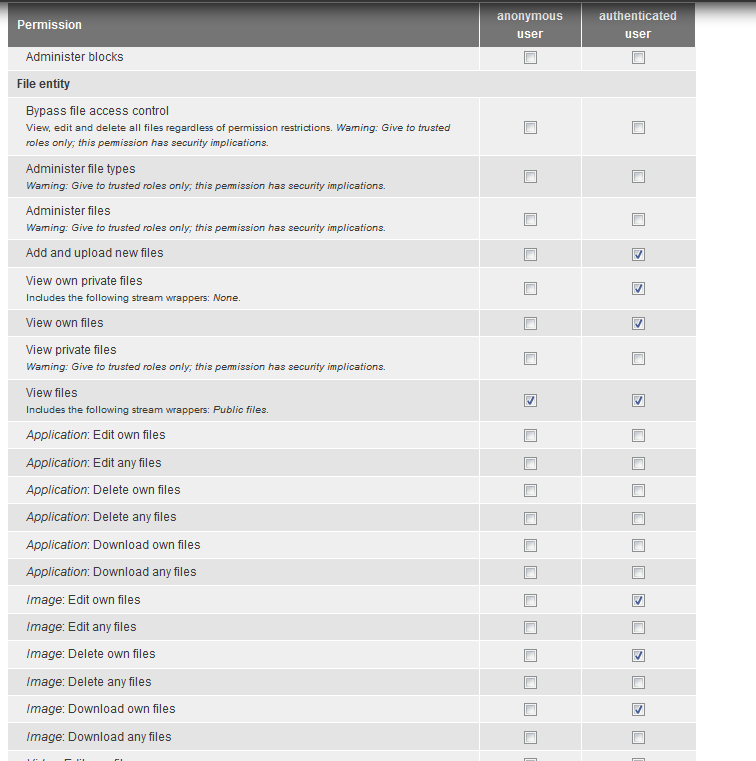
Image in attachment shows my file entity permission.
(cropping features are not shown also if I assign "bypass file access control" or "administer files" to authenticated users too)
what's wrong? is this a bug?
thank you very much
| Comment | File | Size | Author |
|---|---|---|---|
| #8 | Media permissions.png | 39.23 KB | matthijs |
| Field-entity-permission.gif | 13.68 KB | mxt |



Comments
Comment #1
phm commentedI'm having the same issue. Same versions of Manual Crop and Media modules.
Comment #2
botrisSetting to duplicate of Permissions to use Manual Crop.
I know this issue was created first, but the maintainer made a reply in the other, so hoping to get a fix there.
Comment #3
mxtThis is not a duplicate of that thread.
Comment #4
mxtComment #5
matthijsAs you stated in #1980660: Permissions to use Manual Crop, the "administer manual crop" permission is only used for the global configuration page, so there's no need to give it to your authenticated users.
Your permissions look okay, so 'll do some debugging to fix it... Stand-by for an update ;-)
Comment #6
mxtI have the following hypothesis: when the user does the upload in the media widget, the file itself is not already saved (file entity and its fid is not already created in database), so it cannot be "assigned" as "own" to the user at this time, and he cannot crop it due to permission restriction (file does not have a "owner" at this time).
After saving the file (media widget popup is closed), saving the node e re-edit the node, cropping options are now showed, probably because NOW the file entity is actually created, so permission "edit own files" can be triggered.
Can be this plausible?
Comment #7
mxt@Matthijs can you please give an opinion on #6 ?
Comment #8
matthijsHi MXT,
First of all sorry for the delay... I don't think this problem/bug is a permission related, because the "bypass file access control" should allow the user to do anything.
I just did a small test (as a regular user) with the latest dev version of Manual Crop and the Media 7.x-2.0-unstable7+64-dev version. It all seems to work fine for me, my user could crop the images after uploading.
Could you please try again with the latest version of both modules? A screenshot of my permission settings is attached. I hope it works!
Matthijs
Comment #9
mxtI've just updated all media suite modules to latest 7.x-2.0-alpha2 and NOW all works right!!!
Thank you for your suggestion!
Comment #11
sumitmadan commentedIt didn't work for me. I setup latest media version and manual crop 7.x-1.4 version. It only works for administrator only not for other users. I also set the permission said in #8.
Comment #12
sumitmadan commentedApplied this patch in media latest version and solved the issue.
Comment #13
mxtThank you sumitmadan, can you please also post a link to the patch thread?
Comment #14
sumitmadan commentedAlready linked the text to patch.
Comment #15
mxtI meant a link to the discussion in the issue queue where the patch has been posted
Comment #16
sumitmadan commentedOhk, this is the link https://drupal.org/node/1947388#comment-7759919.