

Closed (fixed)
Project:
Search API ranges
Version:
7.x-1.x-dev
Component:
Code
Priority:
Normal
Category:
Bug report
Assigned:
Unassigned
Reporter:
Created:
8 May 2013 at 08:00 UTC
Updated:
23 Jan 2015 at 11:51 UTC
Jump to comment: Most recent, Most recent file


Comments
Comment #1
FreeAndEasy commentedIt seems it was originally planed to work like the way you want it to, but the code that make the slider "remember" the old position doesn't work.
The culprit in search_api_ranges.module:
The foreach loop tries to unset the filter that restricts the slider, but it cannot do so because the object it tries to manipulate (the query object) is protected.
There is currently no way to unset a filter in the query object.Here are temporary workaround to make it work:
in search_api_ranges.module:
and in search_api/includes/query.incpaste the new unsetFilter function after the getFilter function.. in the class SearchApiQuery class.
Comment #2
FreeAndEasy commentedApparently its possible to unset the Filter by reference.
So everything that needs to be done is replace
with:
Comment #3
Anonymous (not verified) commentedThis doesn't make sense. If you filter 2000-7500, then no other filters can make it <2000 or >7500. So it's just a visual trick to show the full range.
Comment #4
FreeAndEasy commentedHow?
What I posted just restores the original functionality.
Without this it is impossible to restore/increase the range, because everytime you make the range smaller you can't go back!
Comment #5
FreeAndEasy commentedComment #6
Anonymous (not verified) commentedIt's not the point of this module to do this. You have to make this behavior optional, as an extra feature. Many people want to keep it the way it is: only show ranges that you can filter on.
My behavior:
- filter adapts to possible values only;
- benefit: you can never choose empty ranges;
Your behavior:
- filter adapts to lowest-highest value, never changes
- disadvantage: you can choose values that don't have content (empty ranges)
If you can make a patch to make this an optional setting, I might commit that.
Comment #7
FreeAndEasy commentedThe difference is that the filter does not restrict itself to its currently selected range.
It shows the possible min/max values for the current search, had itself not been restricted (not other filters). This way one can only change the range to other possible values!
Its still limited to possible values only.
I send you a link where you can see this behaviour in action.
Comment #8
Anonymous (not verified) commentedOk, makes sense. I'll commit #2 after some testing.
Comment #9
FreeAndEasy commentedCool!
Comment #10
Anonymous (not verified) commentedOk, committed to dev-x,
http://drupalcode.org/project/search_api_ranges.git/commit/433bbcd
Comment #12
hanoiiSorry to open this up, but I think this still needs work. I am too in the need of this feature: being able to go back to a wider range by using the slider instead of using ONLY the breadcrumb trail so I was happy to try dev with this patch, however, I found the following behavior:
Once I set up a filter by range (price in my case) I get the proper filter, now the slider allows me to wider the range again, say back to its original value, however what I end up is:
Breadcrumbs: XXXX » 24 – 40 » 22 – 40
And slider got stuck in 24, never got back to 22, which makes considering the first filter is also applied first.
What I would expect is for it to remove the previous range facet and replace itself by a new one. Is that possible? Makes sense?
Comment #13
FreeAndEasy commentedHi hanoii,
are you using other search-api modules with it, for example search-api-ajax?
The range gets replaced correctly on my site, I don't have any ajax running.
Comment #14
hanoiiNo, no ajax, strange though, any particular configuration of the facet that I need to be aware, tried both AND and OR, and a copule of other settings but none changes the behavior I am noticing.
Do you have a link to your site to check?
Any help will be appreciated.
EDIT: Of course the URL also has the range facets appended as well following the breadcrumbs.
Comment #15
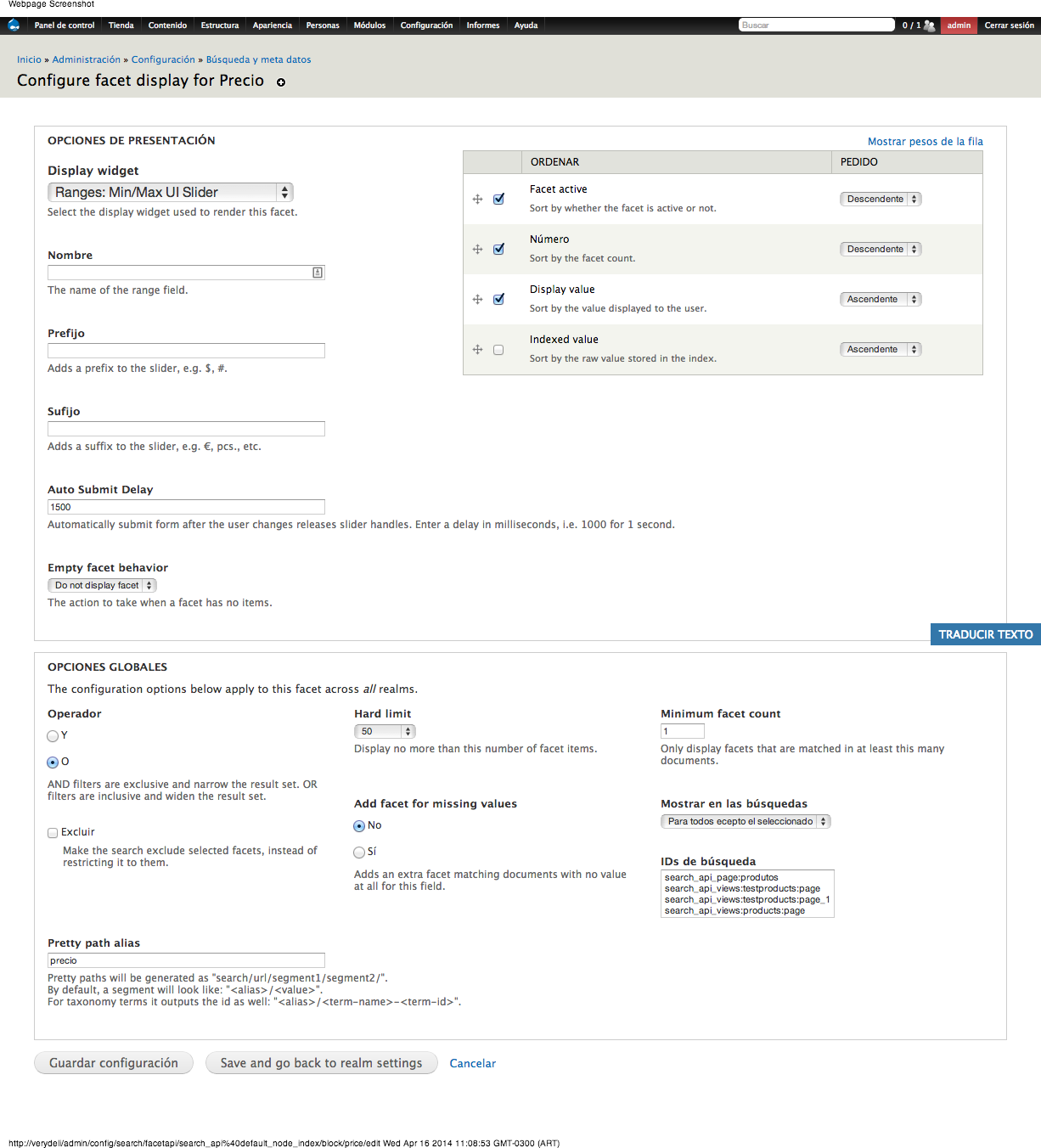
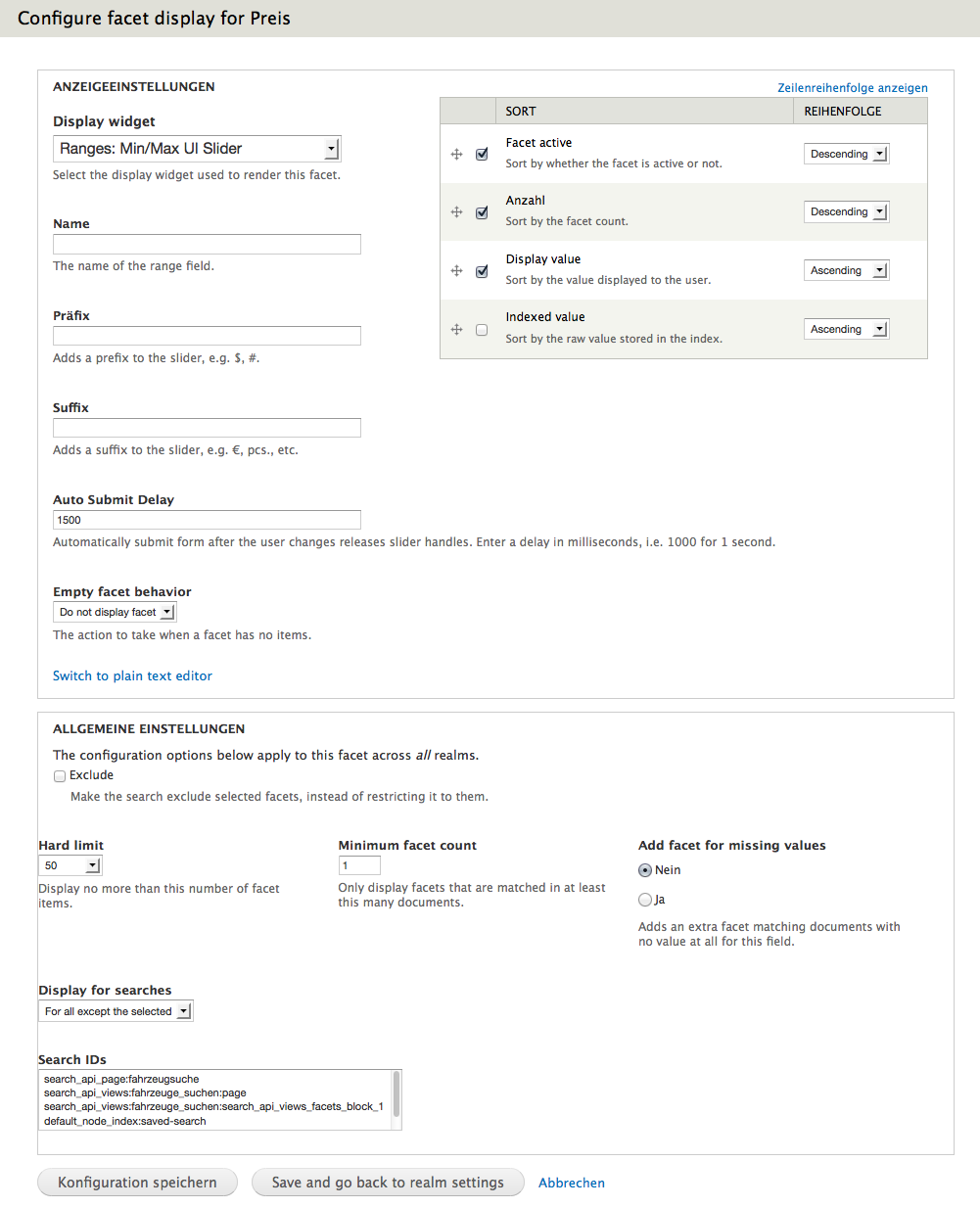
FreeAndEasy commentedI attached a screenshot of my facet configuration.
Please provide more information regarding your setup. Could you post a URL with the duplicated ranges?
Comment #16
hanoiiThe only difference I see in your settings with mine, is that I have an AND/OR operator, see image.
I am using the latest version of search api all of the search_api modules, also using search_api_solr. And of course, dev version of ranges, what about you?
Latest version of facetapi as well, stable though.
And the URL is like:
http://site/views/precio/%255B100%2520TO%2520410%255D/precio/%255B51%252...
Comment #17
FreeAndEasy commentedI'm using
dev version of Search API Ranges (not from Repository, I use the zipped one attached to the project) 7.x-1.5+5-dev
Facet API 7.x-1.3 (stable)
Search API 7.x-1.11 (stable)
Solr search (search_api_solr) 7.x-1.4 (stable)
What I'm not using:
Search Ajax
Facet API Pretty Paths
Comment #18
FreeAndEasy commentedYour URL looks like a Facet API Pretty Paths URL, I think this is the cause of your problem.
The Facet API Pretty Paths Module doesn't know how to replace Ranges.
Comment #19
hanoiiJust a bit before your post I disabled pretty paths and it did work... hmmm,, I really like/need to use that module, will follow it up a bit more.
Comment #20
FreeAndEasy commentedI suggest you open an issue in the Facet API Pretty Paths project.
I think they already have a ticket with this problem: https://drupal.org/node/2236705
Comment #21
hanoiiNot sure if it's the same though, I did find #1511148: Please make compatible with Search API Ranges which points to #1511144: Please make compatible with Facet API Pretty Paths on this module but I think those were different issues.
Might re-open that issue and see where it goes, will try to crack it in the code though to see if I can find the route. I'd assume is more a work into pretty paths that something else.
Comment #22
FreeAndEasy commentedYes, I think the issue is in this part in search_api_ranges.module
Line: 379
Comment #23
hanoiiWow, it was indeed, thanks!
Attached patch
Comment #24
Anonymous (not verified) commentedThanks, committed to dev-x.
http://cgit.drupalcode.org/search_api_ranges/commit/?id=bcc17c1
Comment #26
NIKS_Artreaktor commentedGuys.
I didn't understand - Facet API Pretty Paths - Needed ???
I don't use pretty path module.
Don't see changes, when using views taxonomy/term/% page and facets.
for example
http://svit-rybalki.com.ua/katushki
Can somebody show
final settings of block/facet
I'm tried this patch, but it didn;t work for me.
Using Commerce, min max price.
Comment #27
FreeAndEasy commentedUse the latest dev version
Comment #28
NIKS_Artreaktor commentedI using
latest dev version
+ patch hanoii
https://drupal.org/files/issues/1989776-23-slider-prettypaths.patch
Maybe it is because non standart using - views, commerce and apachesolr cached prices and so on.
Slider working - but not remember number before using slider....
======
It would be great - to see settings of facet block of slider (OR/AND... Active items and so on).
======
Screenshots...
Thanks.
Comment #29
jantoine commentedI did notice a problem as well. It seems the dev build on d.o did not pick up the last commit to the repository, which was the commit in #24 and #25. If I download the dev release from the project, the last commit is not included. If, however, I clone the repository using git, the commit is there. I've never seen this before and I'm not sure if there is a way to force a rebuild of the dev release. Perhaps contacting the infrastructure team?
Comment #31
dr.osd commentedBase theme of this issue is: Remember min/max values after apply facet, but latest dev release does not provide a solution.
Patch #10 did't work.
Comment #32
dr.osd commentedSolution https://www.drupal.org/node/2294807
Comment #33
maxplus commentedThanks, https://www.drupal.org/node/2294807 indeed solved this issue for me
Comment #34
sja1 commentedApplying patch in https://www.drupal.org/node/2294807 to latest dev solved this for me too.