This one has totally got me stumped, and it's an enormously bad problem.
Some users are placing orders, and their payment goes through PayPal WPP just fine, all in tact, and they get a clean front end checkout experience. Payment is submitted, the customer and admins get emails with correct order details, and all is well, except half (or sometimes all) of the order information gets dropped and there is no "customer profile" data saved to the site's database.
I've tested the site personally hundreds of times. I never have problems. The site gets a lot of traffic, and there have been about 4000 orders. About 95% of them process without incident.
But the 5% with this problem are really not cool.
People submit payment, get order confirmation, emails are sent out, but then when an admin views the order after the customer leaves the site, the data is all whacky.
Some orders show an order total that is without the shipping charge, and a negative balance because the user paid the shipping charge at checkout.
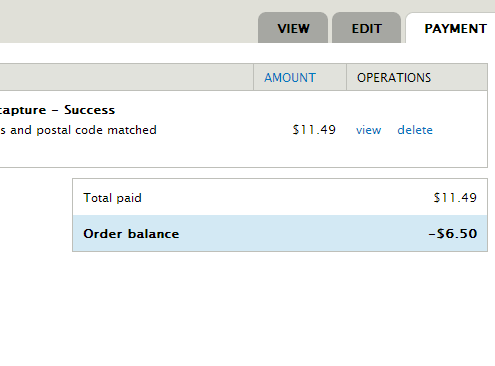
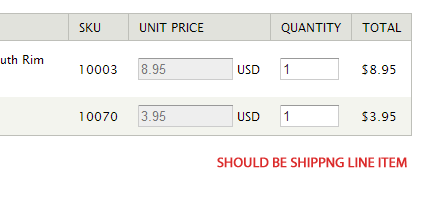
These orders are missing the shipping line item in the order details.
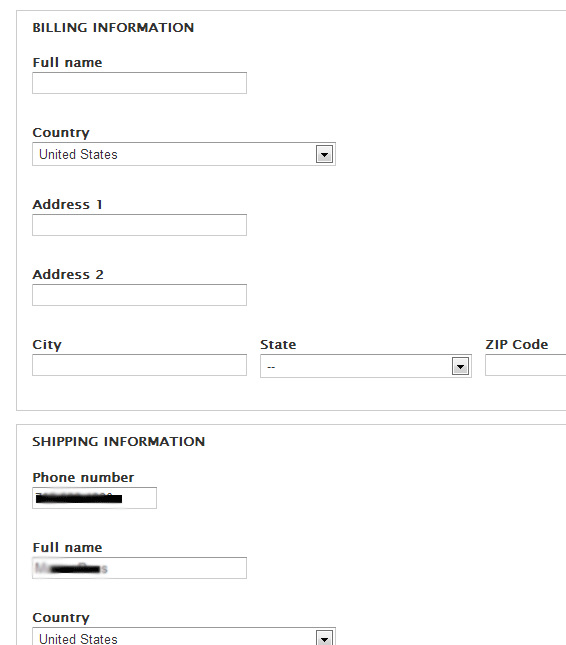
They are also missing the billing customer profile.
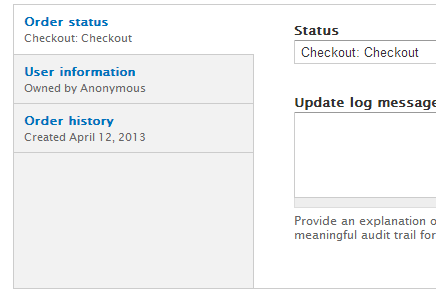
These orders are also "owned by Anonymous"
I was able to search the customer profiles and find the billing profiles that got dropped. They are owned by the account that was created during checkout, but the order remains owned by anonymous. The shipping profile is owned by anonymous.
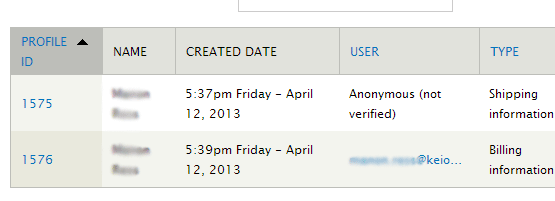
So the order+shipping are both owned by anonymous, but the billing profile, which is not referenced by the order, and not connected in any way to the order after checkout, is owned by the new user account.
As I write this, I do wonder if this is related to my checkout pane configuration, but I'm not sure.
Here's what i've got for my pane config:
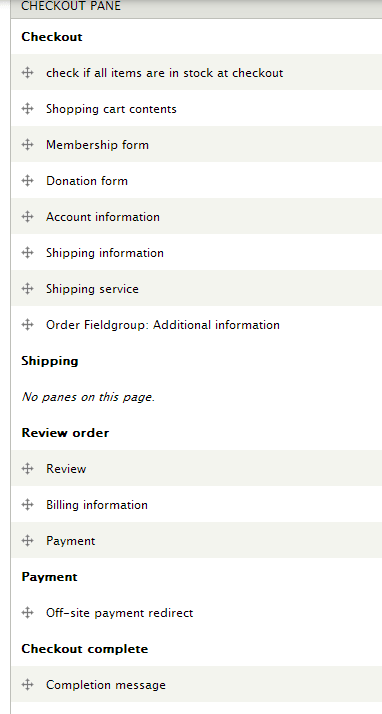
Can anyone offer any explanation as to what might cause this?


Comments
Comment #1
rszrama commentedI've never seen anything like this. Can you confirm this is PayPal WPP and not a redirected PayPal payment method? And is there anything fishy in the order revision page or watchdog?
Comment #2
tmsimont commentedit is in fact PayPal WPP, and unfortunately these incidents go unnoticed for a few days at a time. The logs get overloaded and dumped with other events by the time I can review them (it's a pretty high traffic website)
Do you think it could be the checkout pane config?
Comment #3
rszrama commentedCould be. Only thing to do would be move "Billing information" to the first page and see what happens I suppose.
Comment #4
tmsimont commentedcould you quickly answer these 2 questions, or point me to some docs on these:
which pane submission leads to the creation of a new account?
where is the code that assigns pane ownership and order ownership to the newly created account?
Comment #5
rszrama commentedIt has nothing to do with checkout panes - it's a checkout completion rule, and it could be that you've added some required field to user accounts that the default checkout completion rule hasn't been updated to accommodate.
Comment #6
tmsimont commentedThis issue came back up and is continuing to cause problems.
I did some digging and found an interesting problem in the commerce_order_revisions table.
It seems that the order process worked just fine, but somehow, the timestamp of one of the revisions is off by 1 hour.
The result is that subsequent "commerce_order_load" calls will load an outdated revision of the order.
The initial payment processing works, because the order is in tact and the proper amount is charged.
When the order is then loaded at later dates, an outdated revision is loaded and the shipping and billing relationships are no longer correct.
Here's a sample of the table data:
The payment, complete and completed status updates occurred after the checkout update. You can see this because the revision id's have incremented between checkout and completed.
However, for some reason the "checkout_checkout" status timestamp is 1 hour ahead of all the subsequent updates. As a result, when the order is loaded from the database, and not from the cache, the wrong revision is loaded.
The default timezone on the server is Arizona time, which doesn't recognize Daylight Savings.. I wonder if that's not messing with this somehow. As far as I can tell the timestamp here is controlled by the REQUEST_TIME constant...
Do you know of any way that REQUEST_TIME is getting bumped an hour ahead on the checkout_checkout page?
Comment #7
tmsimont commentedcrap it's not always an hour off.. sometimes just a few minutes. I was hoping I was onto something with timezone but no.. these 2 orders have the same issue and are only a few minutes ahead with the "checkout_checkout" status revision:
Comment #8
tmsimont commentedI think I'm not the only one having this problem:
#2052755: Prevent orders from reversion to out-of-date revision, which causes loss of data after payment is made.
That sounds very similar.. Orders are mysteriously reverting back to out-of-date revisions.
Unfortunately this is extremely difficult to troubleshoot. It only happens on about 1% of the orders that come through the site. It unfortunately disrupts the order fulfillment process which is a gigantic problem since people are making payments, but the system is not firing rules properly...
Is it possible that the user completes checkout, and the goes back to a certain pane with the back button? Would that cause this issue to occur?
Comment #9
tmsimont commentedclosing as duplicate of #2052755: Prevent orders from reversion to out-of-date revision, which causes loss of data after payment is made.
Comment #10
tmsimont commentedOK I figured it out.
To reproduce:
Configuration: Put shipping on the "checkout" page, Put payment on a subsequent checkout page
1) Add items to cart
2) Checkout
3) Open a new tab (in my case, I have a link to shipping policy with
target="_blank"on the shipping pane)4) Go back to checkout in the new tab, leaving the original tab open on the shipping entry page.
5) Complete checkout in the new tab.
Your order is complete, and a payment is made, you can't navigate back to the "checkout" page that has the shipping pane, but if you opened a new tab in step 3, then your old tab is still open with that page.
6) Now click "Recalculate shipping" on the old tab that still shows the checkout page
The order state will revert to "Checkout" and the revision number rolls back to the revision that was active when the "Checkout" page was originally loaded.
This is an unlikely series of events, but it has happened to me about 5 times now. Removing my link with the
target="_blank"attribute would probably further decrease the likelihood of these events, but the fact that people are clicking it says to me it serves a purpose, and users are likely to want to navigate the site to review policies in a new tab. Even without that link, it's possible that users will still open a new tab and end up doing the same thing.The really tricky thing about this is that the user doesn't even have to click "Continue to next step"
Because the "Recalculate shipping" is fired on several DOM events (like onChange of ZIP code) -- you could easily accidentally trigger the update without even clicking on any buttons.
Comment #11
tmsimont commentedI think a key part of this is the fact that the ajax submission handler for the pane, as defined in
commerce_shipping_recalculate_services_submit(), uses the$form_state['order']order object, which can be out of date if the order was manipulated elsewhere.By contrast,
commerce_checkout_form_validate()will load "a fresh copy of the order stored in the form":Shouldn't Commerce Shipping also use a "fresh copy" of the order?
Comment #12
googletorp commentedIs this issue for 1.x?
Comment #13
tmsimont commentedno sorry i forgot to update the version after moving from Drupal Commerce to Commerce Shipping
Comment #14
tmsimont commentedpatch attached. this prevents the recalculation from occurring when the user makes changes in a shipping pane on an expired checkout page
Comment #15
tmsimont commentedComment #16
googletorp commentedRyan, you made all of this related to the recalculate functionality - could you take a look at this patch?
Comment #16.0
googletorp commentedfixed img src
Comment #17
andyg5000Is it possible that loading the order from form state and then saving that object is the culprit? The patch in #14 makes sure the order object is fresh, but nothing in that function writes to that object. It seems the success of that patch is setting $form_state['rebuild'] to FALSE which prevents the order save below.
$order = $form_state['order'];
http://cgit.drupalcode.org/commerce_shipping/tree/includes/commerce_ship...
commerce_order_save($order);
http://cgit.drupalcode.org/commerce_shipping/tree/includes/commerce_ship...
Comment #18
andyg5000It seems that this was fixed with https://drupal.org/node/2026321#comment-7570617
Before that commit, I was able to reproduce this issue by completing checkout, pressing the back button to get to the shipping page and then initiating the recalculate callback by changing the shipping form elements.
After that patch is applied (now packaged with commmerce_shipping-7.x-2.1) the issue can no longer be reproduced.
Comment #19
keerthithavas commentedI have facing issue on order information page ,recalculate shipping action perform after the continue to review button is clicked.so that i got error error like please recalculate your shipping.How do i overcome this by enable the continue to review button after the recalculate shipping is performed.