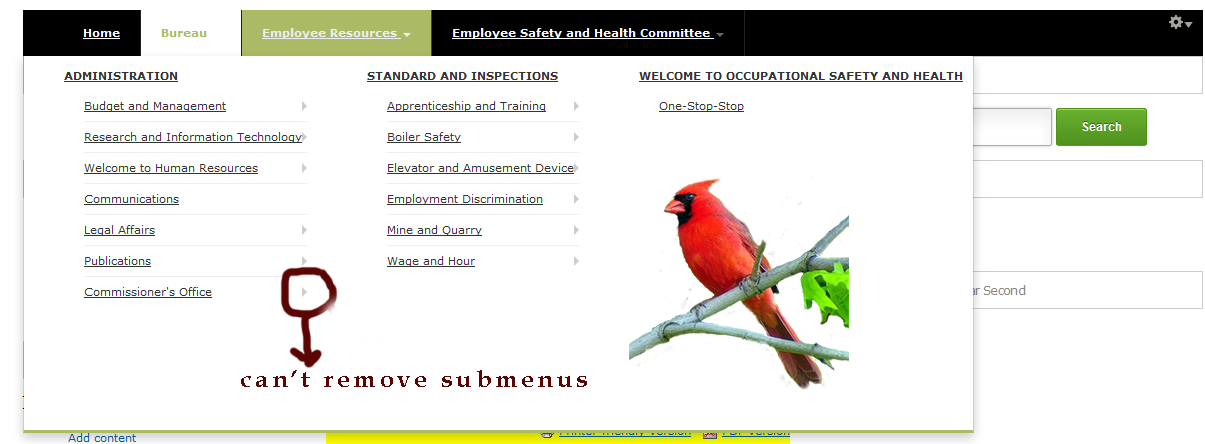
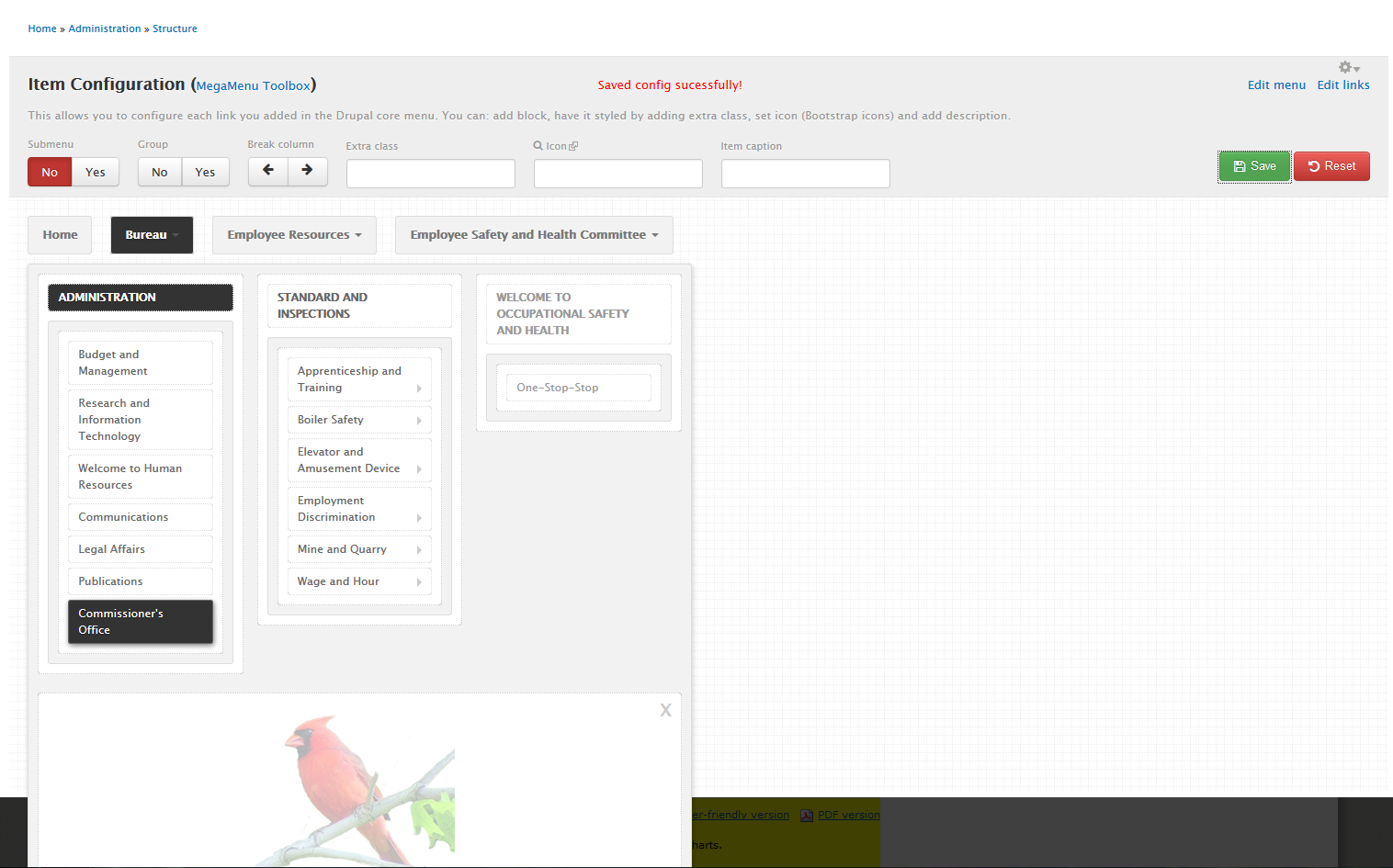
My goal is to use the main navigation that includes all of the links for the site to create a megamenu. I am experiencing a problem with removing the submenus from the list. I only need the first level to appear. I go to the TB MegaMenu config page and make the changes to remove the submenus but the submenus with the arrows still appear on the site.
I have flushed all the caches and run Cron, but the issue still presents itself.
Any ideas as to why? I have included two images to describe my experience.
Here is my site configuration:
Drupal 7.21
Omega theme (using context and Delta)
TB Megamenu - 7.x-1.0-alpha1
Hope to use it on my current project. Thank you in advance for any assistance you can provide.


Comments
Comment #1
B'TI commentedI have a similar problem since I removed the "top level" link and moved the sublinks one position up. The other items were not affected. Theme: Bartik responsive subtheme.
Comment #2
barakgalili commentedI have similar problem on dev version
Comment #3
themebrain commentedHi all,
Sorry for late replying, we are investigating this issue, will get back to you all asap.
Comment #4
hai nguyen commentedComment #5
justluvgod commentedI will give it a go again over the next few days. Will let you know.
Comment #6
justluvgod commentedI am still experiencing the same problem. I make the needed changes in the mega menu to include only the top-level menus. When I view the menus it shows the submenus as well as previously noted.
Comment #7
justluvgod commentedAfter more testing I do not think anything is being saved. I checked the issues que and seems I may be on the right track after reading issue 2034031.
https://drupal.org/node/2034031
I will keep an eye on that issue as well.
Comment #9
robinmarshall commentedI've recreated this bug on 7.x-1.0-beta2 and resolved it locally. It seems the JavaScript that updates the data-hidesub attribute was using an invalid selector to check if the li had any child elements.
This patch should do the job.
Comment #10
justluvgod commentedFinally!!!!
I can now hide all submenus in my main navigation.
Minor thing: None of the animation works, but that was very low on my priority of features.
Thank you totally, once again :)
Comment #11
toddtomlinson commentedPatch listed in #9 worked perfectly. Thank you from saving me hours of frustration!
Comment #12
ShaunB commentedI tried the patch mentioned in post #9 which didn't work so im still having the same problem with changes not being saved when I click the save button - specifically not having a submenu on secondary nav.
I'm running Drupal 7.22, a subtheme of ZEN 7.x-5.1 and TB Mega Menu 7.x-1.0-beta2.
I have tried using jQuery versions 1.5, 1.7 & 1.8 and running through all the necessary steps when trying to disable submenus on secondary navigation items but the changes never save no matter what version of jQuery I use.
The patch says that line 109 needs changed but within my tb-megamenu-object.js file the line that the patch refers too is line 124? Is this correct or am I doing something wrong?
Anybody tried anything else to get this working? This is a great module so far but not having the submenu showing is a key feature that I need to get working otherwise I will have to look elsewhere for another module.
Comment #13
emcdaniel commentedI was having this issue as well. Applying the patch above, though for me it was specifically changing line 124 from:
if (liitem.find('ul.level'+liitem.attr('data-level')).length > 0) {to:
if (liitem.find('ul.level-'+liitem.attr('data-level')).length > 0) {(yes, it's just adding a hyphen after level).
Comment #14
cabplan commentedYes changing this 124 line to include a dash worked for me, thank you!!!
Comment #15
Anonymous (not verified) commentedAnother confirmation that the fix in #9 works perfectly.
Many thanks to robinmarshall!
Comment #16
kekko1 commentedooook #13
work for me on drupal 7
thanks :D
Comment #17
jmuzz commented#13 worked for me. Thanks.
Comment #18
jmking commentedRe-rolled patch against beta5. This is a really trivial fix. Surprised it's slipped through the cracks this long!
Comment #19
PastisD commented#18 worked perfectly.
Thx :)
Comment #20
bohemier commented#18 works for me too. Thanks for the patch. I think this should be committed?
Comment #21
joelpittetRTBC based on #19 and #20
Comment #22
luthien commented#18 fixed the problem, can the patch be committed?
Comment #23
circuscowboy commentedWith out this little fix I almost got rid of this module. I fact I now have 3 patches to make if fully functional. Can we please get these reviewed patches committed.
Comment #24
circuscowboy commentedComment #25
joelpittetComment #26
joelpittetFrom the docs
Comment #27
circuscowboy commentedThanks for the correction and documentation. I saw the status a couple of times and it made sense to me that things were ready to be ported. I made the change in hopes to get a look at here from the maintainer as the new maintainer has been committing things but has seemed to miss this simple patch that fixes a major bug for my usage.
I appreciate you taking the time to add the explanation.
Comment #28
joelpittetNo worries, some of them are not as clear as they could be.
Comment #29
jmking commentedRe-rolled against dev
Comment #30
vellines commentedConfirmed solution from @emcdaniel in #13 appears to work against 7.x-1.0-beta5 w/ jQuery 1.9.1.
Comment #31
ashutoshr commentedThanks robinmarshall (#9). Patch is working fine. It was a small bug but big headache :)
Comment #32
caw67 commentedpatch works, but is not in the new module version 7.x-1.0-rc2 or in the dev. Version!!
Comment #33
azinck commented#29 is working well. Confirmed RTBC
Comment #34
jacquelynfisher commented#9 worked for version 7.x-1.0-beta5. Thanks!!
Comment #35
programeta commented#9 worked for me too in version 7.x-1.0-beta5. Thanks!!
Comment #36
jpsalter commented#29 worked for us too. Flush your caches to see the change. Please commit the patch ASAP.
Comment #37
wylbur commented#29 also applied cleanly for us, using the 7.x-1.0-rc2 release. Users are able to delete submenus using admin menus.
Comment #38
ryanjbonnell commentedPatch #29 worked with TB Mega Menu 7.x-1.0-beta5 and Drupal 7.44.
Comment #39
unsettlingtrendPlease commit this patch. It's been a problem for over 3 years now.
Comment #40
Ajrahul commentedPlease Commit Patch #29 its been more than 3 years and not included in Version 7.x-1.0-rc2 and 7.x-1.x-dev . Its important part of TB Mega Menu where user will get more flexibility on Menu structure to delete submenus using admin menus.
Comment #41
antims commentedPlease commit this patch soon.
Comment #42
karlkablisk commentedLatest Drupal 7 update August 23 2015
Latest Drupal 8 update Oct 9 2017
Please show Drupal 7 some love. ;(
Some people can't convert their sites to Drupal 7 yet. In my case I don't feel Drupal 8 as a whole is ready yet there were a lot of issues with the site I tried in Drupal 8 overall. So 7 is still the Go-to option for many people I think.
So far for me even with this patch the TB megamenu issue has not been resolved but it worked for a lot of people. Overall if this could get a full release instead of staying in "rc" before going to Drupal 8 makes the most sense to me.
This module looks amazing but if I can't save my changes the whole thing becomes unusable...
Comment #44
cgmonroe commented