

Closed (fixed)
Project:
Panels
Version:
7.x-3.x-dev
Component:
Plugins - layouts
Priority:
Normal
Category:
Feature request
Assigned:
Unassigned
Issue tags:
Reporter:
Created:
21 Jun 2013 at 11:47 UTC
Updated:
7 Mar 2017 at 15:13 UTC
Jump to comment: Most recent, Most recent file


Comments
Comment #1
andreymaximov commentedComment #2
andypostNice improvement! BC implemented so should be RTBC
The only check for emptiness questionable here
Comment #3
maximpodorov commentedThe patch is useful and working.
Comment #4
Sinan Erdem commentedWhat if we don't use flexible layouts? For example I generally use custom layouts for reusability.
Comment #5
Sinan Erdem commentedI applied the patch and it even works for custom layouts since they are also of "Flexible" type.
Thanks!
Comment #6
chris burge commentedI have successfully applied this patch, and it works as advertised.
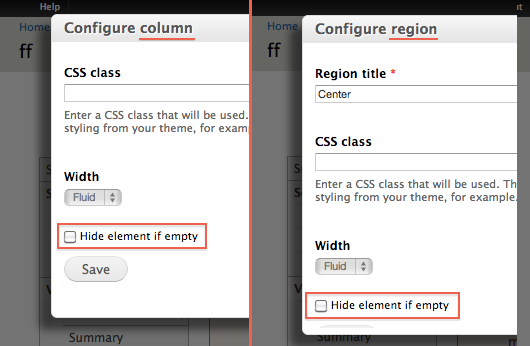
There is a minor bug, however. The 'Hide element if empty' checkbox doesn't appear when initially creating a region (or column); rather, the user must create a region and then edit it in order to check the 'Hide element if empty' checkbox.
Comment #7
japerryMarking needs work per #6
Comment #8
andreymaximov commentedChris Burge, thanks.
Added 'Hide element if empty' checkbox to region (or column) adding form.
Comment #9
chris burge commentedThe #8 patch resolves the issue described by #6.
Comment #10
maximpodorov commentedThe obvious addition. But maybe it's better to use the more descriptive label for the checkbox or add a description text which explains what will happen.
Comment #11
Anonymous (not verified) commentedPatch is working. Would be awesome if this gets included in Panels.
Comment #12
khuongkd commented8: panels-flexible_layout_hide_empty-2025043-8.patch queued for re-testing.
Comment #13
mxr576It is just what I need right now. Thanks for this. I hope it will be the part of the panels soon.
Comment #14
malbone commentedWould this work against the latest stable release 7.x-3.4 ?
Comment #15
liquidcms commentednot sure if i am having the same issue; but sounds like it.
- i have a mini panel def inside a quicktab.
- i have Panels 7.x-3.4
- i applied the patch here and it seems to have applied cleanly - i now get hide if empty checkboxes at all levels of panels layout (canvas, column, row, region).
- i have set qtabs to hide if empty
- i have checked all the new hide if empty checkboxes for layout of my mini panel
- i have NO content in my mini-panel (i removed all the content panes to test).
the qtab still shows.
looking at the html for this qtab i see:
and i see the issue why qtabs does not think it is empty, the most inner div still has a space.
as far as i can tell there is nothing that should be creating that space; there are no content panes.
not sure if this is related to this issue or not.
Comment #16
japerryPer #9 and #8 I believe we're fixed. It appears #15 is referring to visibility issues with quicktabs, which is another issue. Marking this one fixed and committed. feel free to comment and mark needs work if I'm wrong.
Comment #19
jvieille commentedFor this to work, I had to change trim($content) by trim(strip_tags($content)).
As trim did not remove all the html code which is generated regardless the actual content, the panes always showed up.
I am using D6, but the code is identical.
Comment #20
arruk commentedCan the code in this patch be applied to other layouts?