We are using the BeautyTips module to display the accessibility issues, and noticed that if criterion of multiple severe or suggested rules are met for a single entity, there does not seem to be an effective way to show them.
For example, if an image wrapped in a link is missing its alt attribute, I'll get the message that "An image within a link cannot have an empty 'alt' attribute if there is no other text within the link". However if I move the mouse over the image a few more times, the message will change and it will say "Image elements must have an 'alt' attribute". This seems to show up sometimes when viewing a node, but happens even more frequently when editing a node and using the accessibility_wysiwyg module (we're using the CKEditor module, not WYSIWYG).
Obviously both of these rules apply in the situation where an image with no alt tag is wrapped in an <a> tag, Probably the better approach would to be to loop through all the offending rules when there is more than one, and display them in an unordered list. I'd also recommend sorting them based on severity of test (with severe at the top and suggestions at the bottom), and place in text next to each item the severity level to avoid the color blindness issues. So something like this within the BeautyTip:
<ul>
<li><span>Severe</span>: An image within a link cannot have an empty 'alt' attribute if there is no other text within the link<li>
<li><span>Severe</span>: Image elements must have an 'alt' attribute</li>
</ul>
(Added a <span> tag in case a themer wants to style the severity level.) Thanks!



Comments
Comment #1
Anonymous (not verified) commentedPlease check the latest version, we have ditched beautytips for this reason and a few others (positioning issues, wysiwyg compatability). I agree, we should merge them together and will work on a commit for that this week.
Comment #2
sgdev commentedAh okay, thanks for letting me know. I haven't checked out the new version yet, so is it just a list at the bottom of the page? We showed the earlier version at a demo this past week, and seemed like the client was really intrigued by the BeautyTips (or at least the idea of placing messages close to the offending item). It was a bit of a "wow, I haven't seen that before" moment.
Comment #3
Anonymous (not verified) commentedThe update uses it's own popover, but you could override the default error handling by overloading several Drupal.accessibility methods.
Comment #4
sgdev commentedOk great, thanks. We'll certainly take a look and I'll let you know if we have any further questions!
Comment #5
Anonymous (not verified) commentedI was just playing with solving this, I think the problem is that just merging content together within the popover might be one solution (maybe change the title to say "there are x errors:" However, this will cause issues if there's over three or four errors, as they will make the popover really big.
One solution might be to change from a popover to a modal box. I like this solution from a pure laziness perspective: popovers are hard, especially when in a WYSIWYG editor. However, they make the UI difficult as the user would see the error, click, then get a message that might cover up the error on the page.
Another solution would be to place an indicator over the element, or provide some sort of branching/pagination in the popover itself. That would be a difficult UI challenge as pagers within popovers is not a common thing.
Thoughts?
Comment #6
Anonymous (not verified) commentedI've opened a discussion on g.d.o: https://groups.drupal.org/node/310248
Comment #7
jessebeach commentedWhat about a console-like region fixed to the bottom of the screen? Ditch positioning all together and just make sure that the highlighted element is scrolled into view/ demarked visually / indicated semantically with an appropriate ARIA/focus state.
We could make the console/messages region an ARIA-live region as well.
Comment #8
Anonymous (not verified) commentedI like the idea of a fixed content area, especially if it's the entire width of the page it would solve other problems like mobile interfaces, plus could scroll to accommodate any number of simultaneous issues with the same element. I'll put a few mockups together.
Comment #9
btopro commentedI think that'd be good too so you could do a reverse look up of sorts. I love the outline and hover concept but right now I'm having all kind of issues w/ hover (+ as you mention this doesn't work on mobile then I'd assume). An area that's static could contain all of the items potentially that were found as errors / warnings in the document. From there you could click an item based on the order it was located and jump to that part of the wysiwyg based on the anchor.
Even if not doing that I think a static area would be better purely from a stand point of reporting any accessibility message.
Comment #10
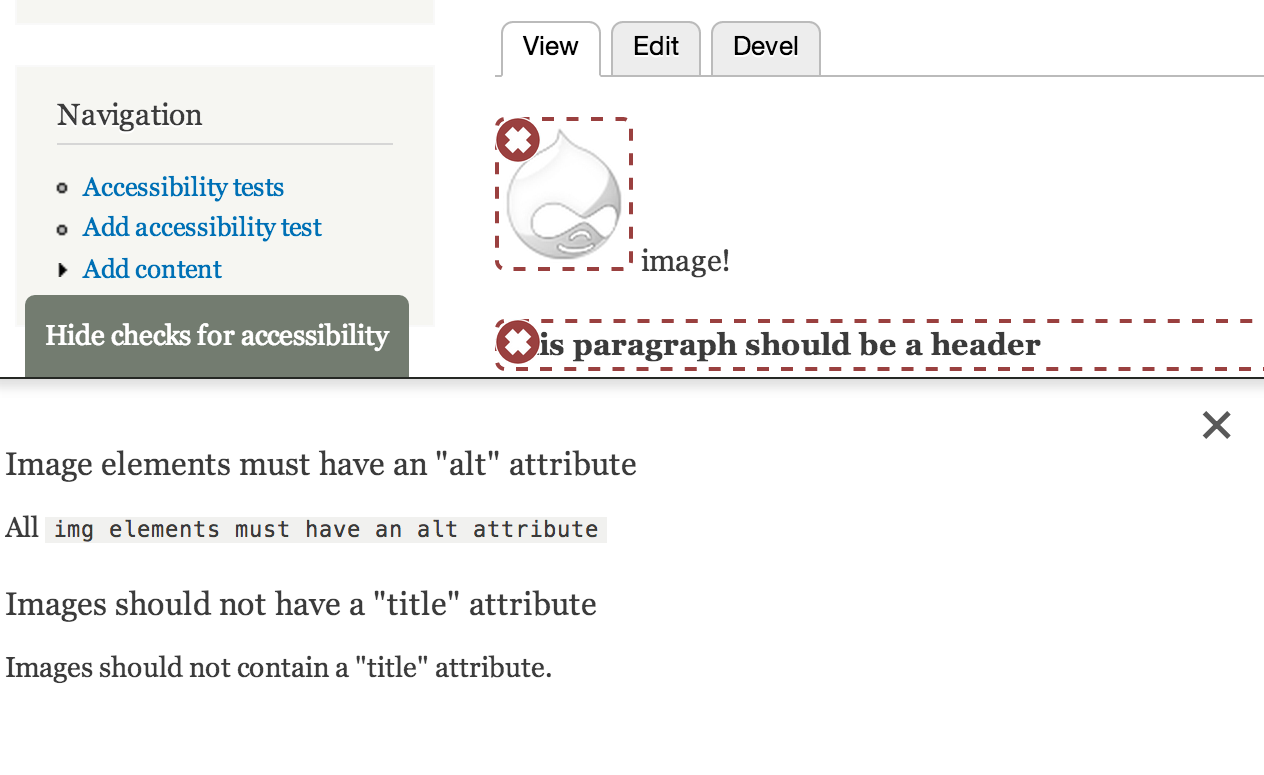
Anonymous (not verified) commentedHere's a start. This console would work like this:
The only problem with this console is that it won't work very well with WYSIWYG editors. We could just use the default modal box API editors provide.
Comment #11
btopro commentedLooks solid. Are items anchored in a unique way or just based on type of error detected? Either way I think this is a much better approach to handling the issue.
Comment #12
Anonymous (not verified) commentedThe anchors should be on an item-by-item basis, I'm working through those kinks right now since we need to give some sort of internal test navigation to find each one of them.
Comment #13
Anonymous (not verified) commentedHere's the first pass at this, along with a screen shot. I also updated the accessibility content module in this patch so we could have a working prototype. Things that still need resolution are:
Comment #14
Anonymous (not verified) commentedBecause of all the changes, I'm making a separate feature branch to track this. It's 7.x-1.x-console
Comment #15
btopro commentedbranch as it exists is doing funky things w/ content in editor (see screenshot). The bottom panel w/ feedback I think is clean and a much better way of handling these messages but its currently doing odd things to the editor itself.
Comment #16
Anonymous (not verified) commentedI'm currently reworking the handing to be more in control of the plugin itself, I don't think the console is a good fit for WYSIWYG editors and should use a UI consistent with whichever editing environment the user is in.
Comment #17
Anonymous (not verified) commentedThe latest commit to the 7.x-1.x-console branch includes a plugin for CKEditor4 that uses it's native modal box API, I'm working on using this as a basis for the other editors.
Comment #18
sgdev commentedAwesome, kevee, that's a great idea. I think that will be a much cleaner implementation.
One comment that's related to this issue. If I use the Accessibility icon on CKEditor 4, all items with issues are tagged with the class of
class="accessibility-popover-active". I understand the need to use this, however if I perform the following steps it causes a problem:class="accessibility-popover-active"has been added to the problem tag.class="accessibility-popover-active"has been saved with the HTML.So, after toggling back-and-forth, the CSS class has been saved with the post. The accessibility popover should merely be a display tool, and should not be added within the HTML content.
Comment #19
Anonymous (not verified) commentedI'm closing since the console is now in both 7 and 8 branches, and the ckeditor issue is opened here #2085847: Accessibility Demo shows bug