

 The 2026 Drupal Business Survey is open. Your response will help shape the future of the Drupal business ecosystem.
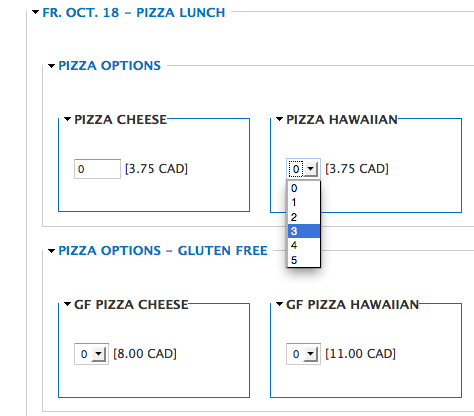
For the school project a 'select' list with #options works a lot better than an open textfield for e.g. pizza quantity (attached) and code (below) - (productfield.inc):
     foreach ($options as $product_id => $product_name) {
        $element[$product_id] = array(
          // KG
          //'#type' => 'textfield',
          '#type' => 'select',
          '#options' => array(0,1,2,3),
          '#title' => $product_name,
          '#title_display' => 'after',
          // KG
          //'#size' => 2,
          '#default_value' => isset($default_quantities[$product_id]) ? $default_quantities[$product_id] : 0,
          '#element_validate' => array('_webform_productfield_quantity_validate'),
          '#weight' => $component['weight'] + ('0.' . $i),
        );
        $i++;
      }
If you think this may be a useful feature benefiting more projects I can (if you like) look into making this a configurable settings. Perhaps letting the admin choose between a textfield and a select - and if admin chooses a select perhaps setting the min and max values for the #options.
| Comment | File | Size | Author |
|---|---|---|---|
| #41 | commerce_webform-2073513-41.patch | 9.95 KB | johnennew |
| #39 | commerce_webform-2073513-39.patch | 5.89 KB | johnennew |
| #28 | commerce_webform-select_for_quantity-2073513-28.patch | 3.29 KB | karing |
| #25 | commerce_webform-select_for_quantity-2073513-25.patch | 3.29 KB | karing |
| #24 | pizza01.png | 5.97 KB | karing |



Comments
Comment #1
karingOops forgot to attach screenshot of select for quantity.
Comment #2
johnennew commentedI'd be happy to review a patch for this if you can provide one - I'd prefer it to be an optional choice. How many quantities are offered by the drop down?
Comment #3
karingYes definitively a choice for admin between textfield and select. If select - then we can either do a standard 0,1,2,3 or perhaps a min value, a max value and an interval? So then admin could make:
min value = 0
interval = 1
max value = 3
(would give you a select 0,1,2,3 #options)
Perhaps eg for pizza slices)
but equally possible to then configure:
min value = 0
interval = 10
max value = 100
(would give you a select 0,10,20,30...100)
Perhaps eg for raffle tickets
Or if admin wants more flexibility use the open ended textfield.
What do you think?
-- Karin
Comment #4
lurkingbeast commentedHi,
First of all thanks for the maintainer for creating this module, it's a life saver!
I have a ticket selling use case where I also would prefer a select list for the quantity.
I'm using 7.x-2.x-dev, I didn't look into it yet properly but I just did a quick test changing the type to select and giving an options array. From somewhere comes +1 to the select list quantity, have to actually dig in to check what's happening there.
Comment #5
karingYou mean there is a +1 added to your option values? Would you please attach a screen shot?
For your specific purpose do you think a config with a min, a max and an interval would work well?
Comment #6
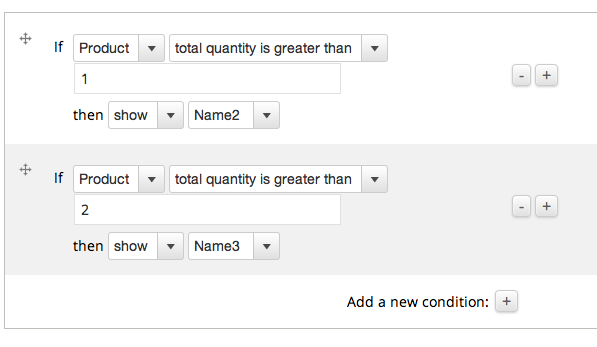
lurkingbeast commentedThe quantity actually works correctly, it's the conditional that needs some change. Feels like it's probably an indexing thing.
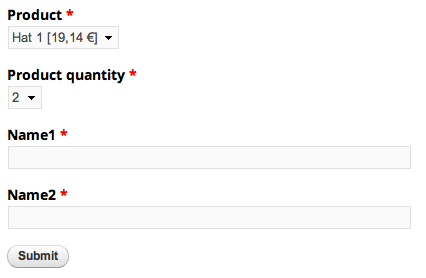
So in the picture there I should have only 'Name1' visible, not 'Name2'. This works correctly when the quantity is a textfield.
(the select list option is set to array(0,1,2,3), default quantity 1.) If I set the select list product quantity to 2 and submit, it correctly adds 2 products to cart. But it displays and ignores the 'Name3' textfield.
In my purpose a min max config would suit well, interval I wouldn't need.
Thanks
Comment #7
karingThe product is required - I believe that's why the user has to purchase at least 1. So 'unrequire' it - and check to see if you can select 0.
Comment #8
karingThe product is required - I believe that's why the user has to purchase at least 1. So 'unrequire' it - and check to see if you can select 0.
Comment #9
lurkingbeast commentedNo, this wasn't about required products, it's about the difference how the value is interpreted. (Anyway I don't actually even want to allow the user to select 0 quantity on this one)
If I set the select list options to be
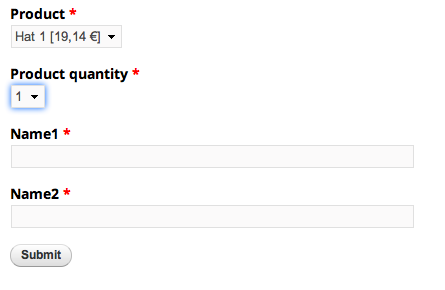
'#options' => array(1,2,3),, then the conditionals javascript displays and behaves correctly. But then the quantity in php is not treated as wanted, meaning if you select 1 on the select list, in php it's 0 quantity. 2 on the select list is 1 in php (which is default). etc.The attached screenshot shows a reloaded form, the default quantity is 1, so the select list displays 2 (so I guess it just displays the index [1] in the options array).
I'm sure the fix for this is pretty trivial, it's about how the quantity value is taken from the form. Just couldn't get my head around it yet.
Comment #10
lurkingbeast commentedNever mind my previous description about the problem, I found what went wrong after changing the quantity field to a select list.
Sorry no patch, here's what I changed in commerce_webform.js, original:
And with the fix, which I have only tested on my use case very briefly, and maybe there's a smarter way to fix it but this is what helped me:
So what happened was that the javascript was going through each 'select' inside a webform product field thus adding the selected quantity value twice to the total quantity. Now it works correctly.
Comment #11
karingAh - I think John would appreciate it if you would file a new issue - re: js for 7.x-2.x branch. I'm going to stay focused on getting the select options to work for the 7.x-1.x
Comment #12
karingOk, I've got things working.
The $form elements are:
and the foreach to render the webform elements changes to:
In WEBFORM -> Form components:
So if you checkbox: Allow the user to set the quantity - the admin chooses a Min/Max (attached):
WEBFORM -> View:
And the user who orders will see either an open ended box or a limited number of select options (attached):
Questions: not sure about the "leave max at 0 to get a textfield rendering option" - but can't think of another way - at the moment. What do you think?
Comment #13
karingHere's a patch agains 7.x-1.0-beta6
Comment #14
karingComment #15
karingMy patch above needs to be amended - to ensure that options that don't start at minimum quantity = 0 will work properly.
If you like I can submit a new patch?
Comment #16
stevechai commentedHi KarinG, the link to the patch is broken, can u reupload the patch? Thanks.
Comment #17
karingSure - here it is. New patch against 7.x-1.x-dev - if you could review it that would be great.
Comment #18
karingHere's the patch.
Comment #19
karingTrying to trigger test bot visit.
Comment #20
karingPerhaps automated testing is not enabled for this project?
Comment #21
johnennew commentedThanks for the patch submission. I've made some amendments as applying the patch to a site with existing commerce webform nodes causes PHP notification errors due to the missing elements.
This project does not have automated tests at present.
Comment #22
karingThank you! I'll test this as well - likely over the weekend [together w/ the rewrite that will stop webform csv from producing notices to the dblog].
Comment #23
kyleheney commentedI see this has been sitting for about a year... any update on the patches given above? I think a select list would look and work much better for my Webforms. Currently the textfield doesn't seem to be editable (very long field for something that just needs a number) and it also can't be placed inline with the product SKU, making the form look a bit unprofessional. It would be great if the Quantity was a select list AND also separated from the SKU so that it could be placed inline with the SKU.
Comment #24
karingHi - I've taken the patch from #21 and have applied it manually to version = "7.x-2.0-alpha3+11-dev"; Things have changed a bit (both line numbers and code wise) - but I got it working: producing a configurable min max option in the Webform element config and creating the select elements - for the end user. Will create/upload a new patch.
Comment #25
karingIf you can give that patch a try and let me know if that works for you - that would be great. You may also need some CSS to help make things look nice.
Comment #26
datawais commentedI applied #25, it offers a min/max quantity, adds quantity options to conditions, but it doesn't convert the quantity to a select box in the webform.
Comment #27
karingLet me double check my patch.
Comment #28
karingTry this one - this is a diff -u with commerce_webform-7.x-2.x-dev/productfield.inc
Comment #29
datawais commentedIt's still showing as a textfield on the webform page. I'm setting the min at 1 and the max at 10 (also tried 11 in case the "10" was parsing as "0")
Also this error: Notice: Undefined offset: 1 in _commerce_webform_get_selected_products_from_input_values() (line 1018 of /sites/all/modules/commerce_webform/productfield.inc).
Comment #30
karingWhat's your exact version - my diff is against:
version = "7.x-2.0-alpha3+11-dev"
Comment #31
datawais commentedThe same one. 7.x-2.0-alpha3+11-dev
From here. https://www.drupal.org/node/1850148
To this result: http://creativemarketingsales2.com/alliance/node/34
Selecting "single ticket" results in a textfield for the item quantity.
Comment #32
karingAh - try take the conditional out of play [for testing] - so that we can take this apart.
Comment #33
datawais commentedI found the issue.The select box shows up if I check "multiple", so consider changing the title and description in the patch?
Comment #34
karingAh good. But this is multiple is it not? In your case people can purchase multiple tickets (1 -> 10).
Comment #35
karingComment #36
datawais commentedStill have this notice:
Notice: Undefined offset: 0 in _commerce_webform_get_selected_products_from_input_values() (line 1018 of /home/cmsi/public_html/alliance/sites/all/modules/commerce_webform/productfield.inc).
Notice: Undefined offset: 1 in _commerce_webform_get_selected_products_from_input_values() (line 1018 of /home/cmsi/public_html/alliance/sites/all/modules/commerce_webform/productfield.inc).
Also, the greater than/less than total appears in conditionals, but doesn't react to conditionals. Are these related?
The end goal is for registrants to pick # of tickets, and register names addresses, etc for each.
Comment #37
karingYes I think the notices are related to the fact that you're using conditionals - as I don't see them when I order 2 slices of pizza.
I've done what you want to do - but without conditionals for the commerce product skus - in a nutshell:
- make a select element -> 1,2,3 etc (just integers)
- add the commerce product sku(s) of the products you want to sell to your webform
- add some javascript to your webform: it needs to do two things:
hide the commerce sku(s) from displaying (they will pop up in the cart)
for each commerce sku - set the quantity for your commerce sku to the value the user selected in the select element
- you can use conditionals for the address - etc (pop up as many address fieldsets as you need based on your select element value
Conditionals have not played well yet with commerce product skus - so I'm still doing it this way. For things like # adults, # students, make it a dinner theater yes/no; populate tickets -> for adult sku, student sku, dinner skus with the js -> and they all show up in the cart. With js you can react to when the user makes changes to the #
Example:
Comment #38
johnennew commentedLatest patch for this is for the 7.x-2.x branch - switching issue to match and I'll take a look at this now.
Comment #39
johnennew commentedThanks for this patch - it appears to work really well.
I have made some slight alterations as recent changes on other issues meant that the min and max quantity fields had other fields between them so just need some different weights - patch attached.
@datawais - I think the errors you were getting with conditionals was a result of a different problem which is now fixed in the development branch.
Comment #40
johnennew commentedActually - going to set it back to active after further testing as it only works when the multiple checkbox is checked.
I think there is a deeper issue with conditionals once this is applied but just working through it now.
Comment #41
johnennew commentedOK, I'm going to push this patch into dev now.
Comment #43
johnennew commentedComment #44
karingThanks for pushing this in John!
Comment #46
diriy commentedcan you convert into into a module?
or explain how to install it without drush or another console?...
Comment #47
johnennew commentedWhen the latest version of the module is 7.x-2.0-beta2 then it will include this feature. This should be within the next few hours.