

Closed (fixed)
Project:
Views Contact Form
Version:
7.x-1.7
Component:
Documentation
Priority:
Major
Category:
Support request
Assigned:
Reporter:
Created:
2 Sep 2013 at 02:09 UTC
Updated:
30 Oct 2021 at 15:44 UTC
Jump to comment: Most recent



Comments
Comment #1
polHi ultrabob,
Everything you did seems perfectly fine, but it looks like there's a bug in the module, I just tested.
I will work on it and publish a new version soon.
Comment #2
polHey Ultrabob,
I checked further and actually, there's no bug.
You have two ways to display the contact form in the block
Here's the first method:
Now the second method:
The problem with your configuration is that you did a melting pot of both settings.
If you set the formatter of the email field as a "Contact Form", there's no need to set the Views format to "Views Contact Form".
Change one or the other and you'll be good to go.
Keep me updated!
Comment #3
ultrabob commentedHi Pol,
The second option didn't work for me, but the first did.
Thank you.
Comment #4
polah cool !
But are you sure that the first option is not working ? It might be a bug maybe, could try it again please ?
Thank you very much !
Comment #5
ultrabob commentedThe first option IS working, it is the second:
* Edit the block views
* Change the format to "Views Contact Form"
* Edit the email field and set formatter to "Email Plain Text"
* Edit the settings of the Views Format and check the mapping.
The problem with your configuration is that you did a melting pot of
both settings.
thst isn't working. If I understood your instructions correctly it still isn't working when I do the steps above
Comment #6
polThis is weird.
Could you tell me if the email field is set to 1 or multiple ? (in the email field configuration)
Thanks!
Comment #7
ultrabob commentedTo make sure I'm answering the right question for you, please walk me through the steps to get to the page where I can check the answer to your question. The content type field accepts more than one value just in case that was the question.
Comment #8
polI checked again and there's no bug.
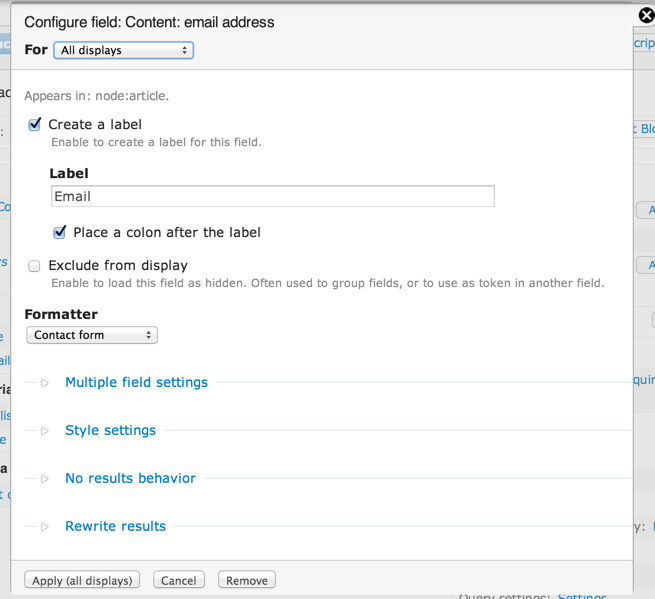
I forgot to tell you that you have to disable a checkbox in the email field settings:
See the screenshot: https://docs.google.com/file/d/0B7ugUjBv1lqHWDlhUGJzUG9tRnc/edit?usp=dri...
I hope it's fine now :)
Comment #9
ultrabob commentedThanks, that did the trick!
Comment #11
System Lord commentedI can get the form to display in my sidebar but it doesn't send an email. It also doesn't show a confirmation that an email was sent. It just redirects to Home page after "send." I tried both methods above. Three things i have a question about. In both methods it seems that you are saying to add field "(author) User: E-mail", but then what is the purpose of the custom email field? This could be where I'm messing up. I create the email field in my user profile and populate it but it doesn't seem that its never called on. Second, when creating the block what do i select to "show"? I'm assuming i select the content that i want the block to be present. in my case its classified ads which are nodes. Third, contextual filter. Properties of Content: NID...do i just use what is default?
Backgroud of what I'm trying to do. I have a view that displays a list of ads. Users click on an ad which takes them to the main full ad/node. From here i want users to be able to contact the seller referencing the ad they are viewing. I like your module because it appears that if i can get it to work none of the users will have to leave the page/ad/node to send the seller a message.
Thank you so much for any assistance. This is the final leg of my project and it's your module that i need.
Mark
Comment #12
marty.true commentedNot working for me either...
I've tried all 3 methods - method 1, method 2 and "melting pot" and all 3 ways will display the form in the block however none will send the email.
Comment #13
marty.true commentedComment #14
balajidharmaAn email sent issue fixed in #2877126: Notice: Undefined index: emails in views_contact_form_contact_form_submit().