
 The 2026 Drupal Business Survey is open. Your response will help shape the future of the Drupal business ecosystem.
On this page
Settings page
You are browsing documentation for an older version of Drupal, which is not supported any longer, and the information may not be correct. See current documentation for Contributed modules
PB settings page: admin/structure/path-breadcrumbs/settings
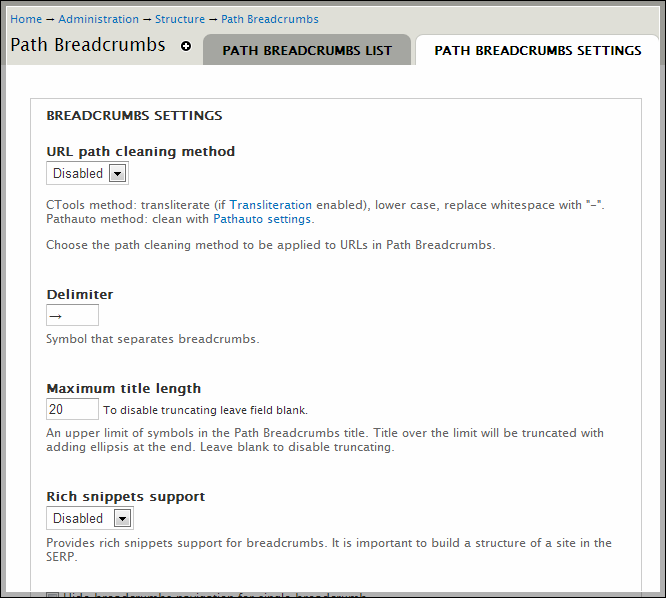
Path Breadcrumbs module can be used out of the box without additional configuration.
However, it has a list of useful settings which listed below:
URL path cleaning method
Why: To clear, lower case, transliterate URLs, generated by PB.
Available values:
- Disabled (most common)
- Ctools (uses ctools_cleanstring())
- Pathauto (uses Pathauto settings)
Default: Disabled
Delimiter
Why: Symbol that separates breadcrumbs.
Available values: String (translatable)
Default: »
Maximum title length
Why: If you want to truncate long breadcrumb titles.
Available values:
- Empty (disabled)
- Positive integer (enabled)
Default: Disabled
Rich snippets support
Why: Markup your breadcrumbs with microdata for better SEO. More info.
Available values:
- Disabled
- RDFa
- Microdata
Default: Disabled
Hide breadcrumbs navigation for single breadcrumb
Why: To hide breadcrumbs with only one item. Works for all site breadcrumbs.
Available values:
- Disabled
- Enabled
Default: Disabled
Decode HTML entities
Why: ?
Available values:
Default: Enabled
Use module breadcrumbs render function
Why: You have to enable it to use some PB features:
- Delimiter
- Rich snippets
- Hide breadcrumbs navigation for single breadcrumb
If you don't need any of these features, you can safely disable this option.
Available values:
- Disabled
- Enabled
Default: Enabled
Enable cache for the breadcrumbs
Why: To cache heavy PB search and build operations.
Available values:
- Disabled
- Enabled
Default: Disabled
Cache lifetime
Why: For how long cache will be valid.
Cache is automatically cleared for PB item when saving or updating it.
Available values:
- Permanent
- Temporary
- From 5 min to 7 days.
Default: Permanent
Prepend breadcrumbs with a home link by default
Why: To select default value for option “Prepend Home link to the breadcrumb” in Path Breadcrumbs edit form.
This option doesn’t really changes any breadcrumbs output (historically).
Available values:
- Disabled
- Enabled
Default: Enabled
Home link title
Why: Text used for prepended Home link (only for breadcrumbs built by PB).
Available values: String (translatable)
Default: Home
You can translate almost all settings with i18n_variable module from i18n project.
Help improve this page
You can:
- Log in, click Edit, and edit this page
- Log in, click Discuss, update the Page status value, and suggest an improvement
- Log in and create a Documentation issue with your suggestion
