

Closed (outdated)
Project:
Commerce PayPal
Version:
7.x-2.x-dev
Component:
PayPal WPS
Priority:
Normal
Category:
Support request
Assigned:
Unassigned
Reporter:
Created:
8 Nov 2013 at 13:29 UTC
Updated:
18 Aug 2025 at 21:17 UTC
Jump to comment: Most recent



Comments
Comment #1
kostajh commentedI'm running into the same problem on 7.x-2.2 (and there aren't any change in 7.x-2.x-dev that would fix this).
Comment #2
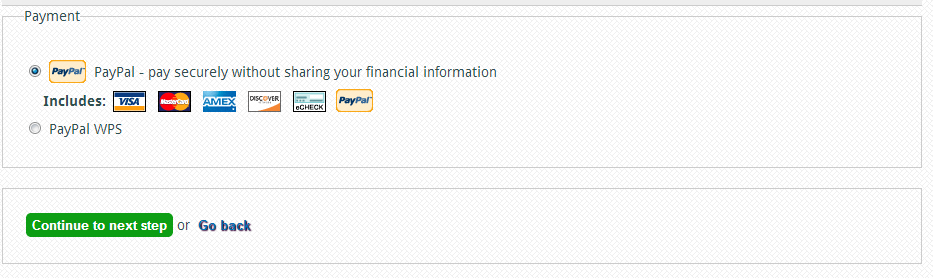
kostajh commentedIf you go to admin/commerce/config/payment-methods and disable the Paypal payment method, then only one Paypal method displays on the payment form.
But this fails, because you've disabled the Paypal payment method.
Comment #3
er_d0s commentedGrrr I've used this module heaps without a problem, this sucks.
Anyway, looking in the code, there appears to be two payment rules defined when the form is built:
- paypal_wps|commerce_payment_paypal_wps
- paypal_wps|rules_paypal
paypal_wps|commerce_payment_paypal_wps doesn't seem to have the settings attached to it that you define in the edit paypal details page. So I unset paypal_wps|commerce_payment_paypal_wps from the $form variable and made the #default_value paypal_wps|rules_paypal
I don't have enough time to look deeper into this but but here's my crappy hacky work around inside commerce_paypal_wps.module
http://pastebin.com/ipeN2d22
Comment #4
rszrama commentedSorry guys, I'm not seeing this issue. It has something to do with commerce_paypal_wps_form_commerce_checkout_form_alter(), but I don't know how you'd end up with two different options based on that code since it is editing an existing option value by reference. Could it have been related to the various problems introduced in Rules 2.4 / 2.5? Are you still seeing the issue in Rules 2.6?
Comment #5
BenPoe commentedUpgraded to Rules 2.6 and the most recent version of commerce_paypal. Still seeing this issue as well. When you disable all payment methods, it still shows one paypal option, but throws an error when you select it.
Edit: After looking through the database, we found that there are two rules in the rules_config table: commerce_payment_paypal_ec and rules_paypal_express_checkout. (We are using express checkout). We disabled the commerce_payment_paypal_ec by setting active to 0 and it seemed to have solved our issues.
Comment #6
MickC commentedI've got an even crappier workaround - hide the select button for the first option - at least it still shows the credit card icons...
Comment #7
smd_ksu commentedSame issue.
Comment #8
smd_ksu commentedFigured out how to reproduce this issue. When you first go into configure the PayPal payment method there is a disabled payment method rule, "PayPal WPS". If you enable the rule it just disappears forcing you to add a new payment method rule (actually just saving the rule causes it to disappear, even if disabled). Then both show up as options on checkout.
Comment #9
tomtech commentedAutomatically closed because Drupal 7 security and bugfix support has ended as of 5 January 2025. If the issue verifiably applies to later versions, please reopen with details and update the version.