Hi there,
I love this module and it works really well! It meets just about all of my requirements except for one:
I'm trying to show a webform node in the splash screen (as a pop-up lightbox), and it seems that the module's default behavior is to display literally the whole page: header, footer, side blocks, etc in the lightbox.
I'm trying to see if there is a setting or a way to instruct it to just show a certain portion of the page, such as what's in the .region-content div, which would only pop up the node's actual main content (or whatever else the user chooses)?
Has anyone else needed that feature so far? Might it be in the works or should we figure our own way to get there?
Thanks!
Boriana



Comments
Comment #1
bharata commentedGo to:
admin/config/system/splashify/whatSelect: "Display entered text/HTML full screen" from the menu.
In the space provided, enter HTML code that will open your content in a lightbox.
Good luck!
Comment #2
ditcheva commentedThanks, @bharata, I did see that option, but I'm actually trying to display a webform node, so just entering in the html isn't an option for me.
So should I understand that there is no way to display just a portion (the content portion) of an existing page any other way?
Comment #3
chrisroane commentedditcheva: This feature is not a part of Splashify. You could create a simple module that does this. You could just create a page callback that echos out the webform and doesn't return the full html for the page. Then use that url in Splashify.
Comment #4
ditcheva commentedOK, thanks, @chrisroane. I can do that as a solution for me - no problem. If you feel that this is something others may need and if it would make sense to incorporate something like that into the module for the long-term, I would be happy to help.
Thanks..
Comment #5
chrisroane commentedMaybe for the Drupal 8 version. But I don't want to add any additional features to the D7 module, since hopefully D8 will be launching next year.
Comment #6
ditcheva commentedComment #7
ditcheva commentedHey again @chrisroane, I really did want this feature - I'm going to need to use this module just for a month or so for a survey, and decided to patch it up with the two features that really make it useful to me for my own purposes. Since I actually think displaying a part of a page (such as an internal webform) may be a common use case, I decided to show you the before and after screenshots of my customizations and let you decide if you'd like to include this new functions in a commit.
I tried several modules before choosing your splashify. It really is excellent, which is why I wanted to put my energy on improving any part of it I could.
In any case, here is a BEFORE screenshot of the current Splashify functionality:

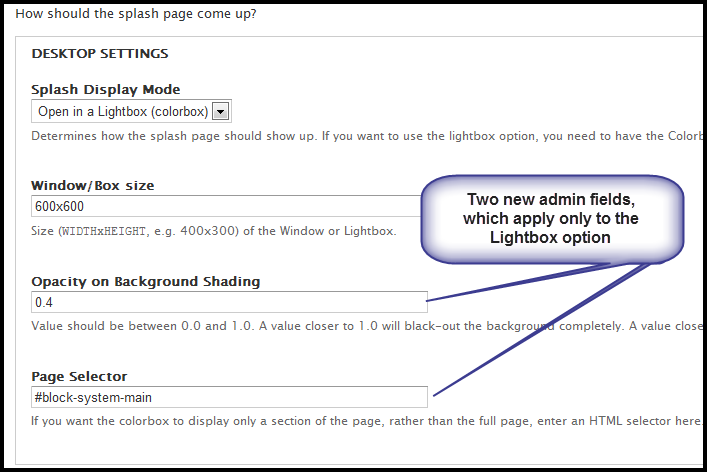
I really wanted the following two features
Here is the addition of my two options in the admin interface: they appear ONLY if you select Lightbox as the display, because they are not relevant otherwise:
And finally here is the resulting splash page, the AFTER screenshot:
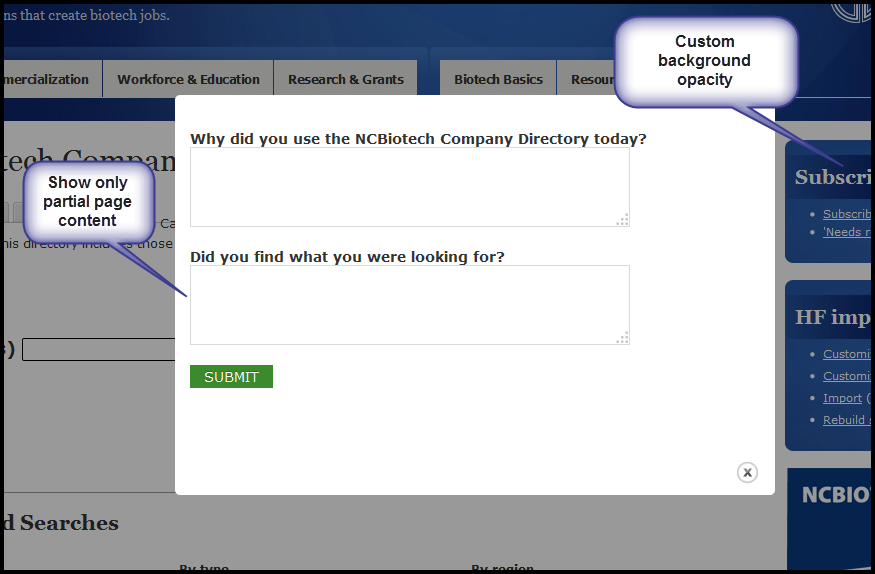
Let me know your thoughts on the features and the patch and whether you'd be interested in applying it. Thanks again for the module. I'm really enjoying using it, albeit with these small additions.
Comment #8
ditcheva commentedActual patch
Comment #9
bharata commentedWow!! That's AWESOME!! Great work!
Comment #10
chrisroane commentedThis is really useful! I am going to make a note to add this feature to the 8.x branch. And people who need it with the 7.x branch can see this thread. Thanks for sharing this code.
I'm marking this issue as Postponed. But again, thanks for sharing this code and letting me know about this feature.
Comment #11
ditcheva commentedChris,
Thanks so much for responding. Listen, I totally understand where you're coming from, and I just read more on your module page, where you say that you no longer want to add features to the Drupal 7 version of the module. You're the maintainer and have contributed more than 95 commits to this very useful module, for which all of us who use it are so grateful. So it's your call, of course.
However, I'd just like to press the issue one last time, and I do understand if it isn't where you want to go. Drupal 8 is by far not widely used yet. Folks are still testing, reading about it and just trying to wrap their heads around the new changes and ways of thinking. In fact, the Drupal 6 and 7 versions of modules are still the ones listed for core and modules. Even when Drupal 8 is fully out, Drupal 7 is still supposed to be a supported version (we support the latest TWO versions at all times, right?). Even I, as a knowledgeable developer who have followed Drupal 8 initiatives since the beginning, will not be moving my sites to Drupal 8 until a year or so from now (most likely). So isn't it QUITE early to stop Drupal 7 support already? I would be so alarmed if all module maintainers took this attitude this early on. It really seems too early for that, especially considering that just about all folks are on either Drupal 6 or 7. Should we really no longer be supporting the later of the two Drupal versions folks are currently using?
I was just wondering whether you'd consider still adding to the Drupal 7 version if someone offered to co-maintain or in the instances when the community both 1) wrote and 2) tested the patches provided to minimize work on your part. I do understand that folks don't want to bother with working on two such highly different versions of modules as Drupal 7 and Drupal 8 require, but am trying to make a point because I would be concerned if this is a stance that all module maintainers start taking so, so early in the process. Where would that leave users?
Again, thank you for your work so far. The module really is so useful and from my perspective the best in its category (I tested 2 others). The above is just a thought (and perhaps plea) that I voice as a personal opinion...
Thanks, Chris.
Boriana
p.s. The opacity feature I added was so that folks who visit your site and are presented with a pop-up would SEE that it is your site behind the pop-up and not a strange unknown place they've landed on. In the current version the background is almost BLACK, and folks may not realize where they are out of that context.
Comment #12
chrisroane commentedThere is a difference between not supporting a module and not implementing new features. Adding a feature not only increases the amount of code that needs to be maintained and supported, but it also makes the interface more complex. It is not smart to add every new feature people suggest.
Last year I added quite a few new features to the module, at the request of the community. I don't think it would be wise to continually add new features all the time, mainly for stability reasons. This is not to say that I am not 100% dedicated to the 7.x branch. I'm just at the point where right now adding a feature where a small percentage of the users would use that feature, is not worth it. Now if this turns out to a be a big need from the community, than I'm all for considering adding it in.
With the 8.x branch, I think we need to decide on the core purpose of the module in the beginning, so that we include the main features people would need and have a perspective in deciding when new features should or should not be added. Being able to extend the module for more advanced and custom use cases might be a top priority, for example.
In other words, I do appreciate your passion and what you've done here, but I am only interested in adding new features to the 7.x branch when it is clear it is a big need from the community.
Comment #13
ditcheva commentedCool. I do understand all your points. I also agree that adding features willy-nilly isn't a good idea. ;-) I just really liked the ones above, but I understand your reasons.
In any case, thanks again for responding!
Comment #14
anssary commentedgood job
Comment #15
Farreres commentedOk, so my vote is for incorporating this patch into 7.x. Whenever I want to add a splash page, basically as a initial warning of the website, I don't want it to repeat the header again, it looks horrible. I only want the body of the content in the splash. I think this addition is a must, really.
Comment #16
Farreres commentedBy the way, ditcheva, I got the patch and executed against stable which returned an error. Does it run against stable or dev?
Comment #17
Farreres commentedMaybe my problems come from this patching error, but I can't make the selector work and I am still watching the header within the splash. Any help? Maybe first correcting the error would be a good line.
Comment #18
Farreres commentedOk, I have tried against dev and patch is failing again when patching js/splashify_init_min.js.rej maybe u can have a look at it
Comment #19
Farreres commentedHehe, correction. The selector works well, I had installed an older stable version. It works perfectly with 7.2. But still there is an error when patching, I had to manually apply js/splashify_init_min.js
Comment #20
chrisroane commentedFarreres: You can already do this in the config. What this patch does is allows you to use a node for the page instead of entering the html.
Comment #21
Farreres commentedYes, I understand I could add a html code. But in my case, I am displaying as splash a node with panels (or display suite, not sure) but it has a complex content, impossible to use plain html.
I would vote for including this patch into the module, it works nicely!
Comment #22
gsquirrelI would also like to use this feature
Can try the patch but does not look like normal patch file format so I guess it has to be done manually?
+1
Comment #23
gsquirrelIn case it helps someone else for now I have decided to use a special page template (e.g. page--node--454.tpl.php) for the node that I am using as the splash page, this allows me to hide the regions I don't want.
Comment #24
chrisroane commentedgsquirrel: That is a great solution! That is probably the best option for the 7.x branch.
Comment #25
alamp commented@chrisroane, Thanks.
I followed #3 in order to display an image. Here is an example to save time for someone.
Comment #26
jtjones23 commentedDoes this patch work with 7.x-1.3? I can't get the opacity to change or the colorbox window to just show the content.
I tried locally and on a pantheon server with the same outcome.
Drupal 7.31
PHP 5.3
Comment #27
ditcheva commentedSo are you saying that you did try the patch and couldn't get the color to change or you haven't tried the patch yet?
Comment #28
jtjones23 commentedThe patch has been added to 7.x-1.3 and I tried it twice. I can see the opacity and page selector fields but the opacity is not changing. And the header/footer is still displaying in the window.
Comment #29
ditcheva commentedOh wow. I actually didn't think it was added! I was not tagged as a committer/contributor, or I would have noticed. :-) Well, at least I'm happy the functionality is in. I'll have a look and see if I can figure out what's going on...
Comment #30
jtjones23 commentedI add the patch to 7.x-1.3 just on my computer:)
Comment #31
ditcheva commentedAh ok, that makes more sense. I'm really interested in having this functionality committed, so I was surprised - I thought I would have found out if it had been.
If you're just applying it just locally, then I think you're having javascript issues. At a minimum, the compressed js file doesn't patch properly anymore. Also, the thing is, if you use a separately patched version of the module (which is what I'm doing now myself, *sigh*), you won't be able to update the module properly when it comes out with new releases, as it just did in April 30th...
The best bet would be if these changes are incorporated properly. Otherwise, if you're desperate, you could see if the changes to the splashify_init.js seem to be applied properly as you peer into my patch and compress the file yourself and save it with the _min.js extension and see if that makes it work. There are lots of online tools that can help you with that, like http://jscompress.com/.
Good luck,
Boriana
Comment #32
jtjones23 commentedBoriana,
Thank you so much. The splashify_init_min.js file didn't get patched so I made the change manually and the patch works as advertised!
Thanks, John
Comment #33
visios commentedExcellent work on this essential feature.
Patching worked on the 1.3 release (except the minified js, which required manual copy/paste).
One note: Make sure to activate the option "Enable Colorbox inline" within the Colorbox "EXTRA FEATURES" setting. I was missing this and reckoned the patch wasn't working.
Now happy. Thanks Boriana!
Comment #34
inky@inky3d.com commentedThank you, Boriana, your patch in #8 works fabulously and is exactly what I needed!
I did have problems patching the min.js, so used the js compress link you gave.
@visios, thanks for the note about Enabling the Colorbox inline - I would also have though it not to be working.
+1 for adding this to the 7x module
Comment #35
chrisroane commentedComment #37
chrisroane commentedAfter re-reading this thread, and seeing the 12 followers, I've changed my mind. I think this is a needed feature.
ditcheva: I think the way you did this is useful, but I think in most cases people will probably want to load a node directly. So instead of grabbing the contents of a div, I created a node ajax page that looks like this ( _splashify_ajax/[nid] ), which has the sole purpose of outputting the html of the full view mode of a node. If that nodes is used on the What tab, we use that url outside of an iframe. This can be used to output a webform or any other kind of node.
Here is a screenshot in what it looks like:

If you want to customize the full view mode, click on the Manage Display tab on the node edit screen (you may need to enable the full view mode). We like to use Display Suite to give us additional control.
I pushed this to the dev branch. If I can get help in testing this code, I can probably get this pushed in a new version in the next week or so. Let me know if this solves the problem you were hoping for.
Comment #38
ditcheva commentedYay! So glad about this.
Yeah, I thought about the node thing too, but decided I'd sometimes want to display a portion of a page (more specifically, may want to not include the title, etc). But that's really not that big of a deal - it's just why I chose to do it via a selector (div or whatever else).
In any case, thanks for moving this forward.
Comment #39
chrisroane commentedditcheva: Displaying the full page view mode would allow you to customize the output, including not displaying the title, etc.... I can't remember if this is in default drupal, but I know display suite provides a lot of functionality on the view mode screen for customizing each view mode.
I'm open to other ways of doing this, but I think the node approach might be the simplest way to handle it for non technical users. Let me know if anyone has any other ideas in how to handle. Thanks!
Comment #40
donkasok commentedThe patch is awesome. Tested with webform to load in splashify
Comment #41
i3laze commentedMind-breaking task : )
To display content only i've just created "page--splashify-splash.tpl.php" with:
<?php print render($page['content']); ?>Comment #42
alfthecat commentedHey guys,
How does this work? I've just installed the latest dev version but I don't see any extra settings to the effect of hiding theme regions when the splash page displays in a colorbox overlay.
I'm also still getting all the theme regions, no matter what I set as the "what" option.
Thanks in advance
Comment #43
i3laze commentedAs I stated earlier..
You should create a ...tpl.php right inside the module's folder.
This way the module will start displaying page content only, without other theme stuff.
Comment #44
Farreres commented@i3laze: but the name of the .tpl.php should match the name of the url in Paths or Url Values? Is the page-- prefix needed?
In my case I have an url named desktop-splash-page which comes from a display suite or panels page. What should I put as file name?
Comment #45
jeromewiley commentedDid this make it to the Drupal 8 version?
I just see a dropdown field that say "plain text" or "use template" but no explanation as to what that means.
Comment #46
alfthecat commentedHi all,
I tackled this by taking a slightly different approach to setting up Splashify (awesome module btw, thank you so much!).
I'm using a custom content type for splash pages and created a barebone tpl for it in my theme. I then use the URL options and colorbox rendering in the Splashify config.
I'd recommend using something like the context module, perhaps combined with the context_respect module to prevent any stubborn blocks from ending up on your splash page, should that be the case.
Also, this makes the module compatible with multi-lingual websites, as is requested here: https://www.drupal.org/node/2417135
The cool thing about this approach is that you can include custom regions inside your splash node tpl and use views (or other means) to, for instance, render advanced_link fields as buttons and place them inside layouts you've coded or are provided by panels/ display suite.
Using this approach opens up a whole new box of opportunities :)
The only thing that would be nice to have is to be able to define a splash node per URL, instead of the two options available now, a random url from a list, or the next url from a list. That would put a cherry on the top :)
Hope this is of some help to some of those struggling with this.
Since I'm at it, I'd like to share another another tip that was of great use to me, I use the latest dev version because it allows to set a delay and auto-close through the admin interface.
Also, I'm setting a percentage for the colorbox width and height (50%x50%). That way I don't even require mobile detect.
Have fun!
Comment #47
bcobin commentedDid anyone ever figure this out? (It seems so.)
I've patched the module and created .tpl files named page--splashify-splash.tpl.php as specified in both the theme and module folder and I'm still getting the full page content no matter what I do.
Also, it doesn't look like I can hide the regions in colorbox using CSS, so I'm stuck. Any ideas? Thanks!
Oh - I'm using a Bootstrap subtheme, if that's relevant. (.tpl files need to go in system/templates to mirror the base Bootstrap installation.)
Comment #48
bcobin commentedI've still not been able to get the display of a specific part of the page to work and I'm at the limit of what I can do with CSS.
Is there any way that someone could post a working version of the patched module? That would be a huge help... thanks in advance!
Comment #49
astonvictor commentedD7 reached its EOL back in January 2025, and there is no active release for D7 for this module anymore.
Development or support is not planned for D7. All D7-related issues are marked as outdated in a bunch.