

 The 2026 Drupal Business Survey is open. Your response will help shape the future of the Drupal business ecosystem.
Our configuration:
- nginx php-fpm
- MariaDB Galera Cluster (3 nodes)
- Drupal 7.23
- Views 7.x-3.7
- Autoslave 7.x-1.6+4-dev
- Memcache 7.x-1.0
- with $conf['cache_class_cache_views'] = 'DrupalDatabaseCache';
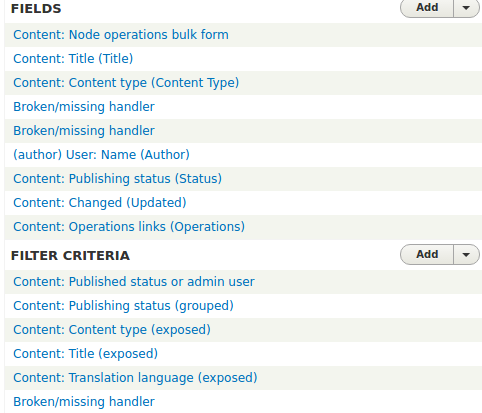
When editing views, we get 'broken/missing handler' very randomly. Sometimes just opening view edit is enough to do this, sometimes adding or editing existing field, sometimes re-ordering displays. No errors in watchdog or Firebug.
Here is a screenshot of one view displays while it is still working: http://i.imgur.com/pGJVf5W.png
After re-ordering displays, it looks like this: http://i.imgur.com/MBaxOHg.png
Sometimes we get this message also: http://i.imgur.com/uSxhvaH.png
This Views 6.x -issue looks like it could be the cause for this with 7.x too. 6.x patch obviously not applicable for 7.x. Anyone else having these issues?
| Comment | File | Size | Author |
|---|---|---|---|
| #59 | broken-missing-handlers.png | 43.61 KB | aamouri |
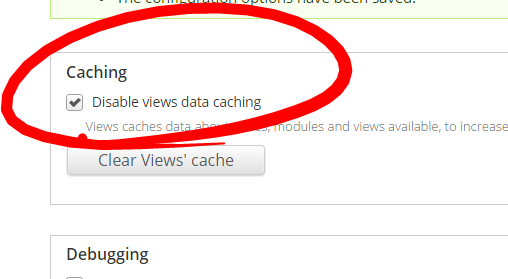
| #37 | disable-views-caching.PNG | 16.68 KB | dxx |
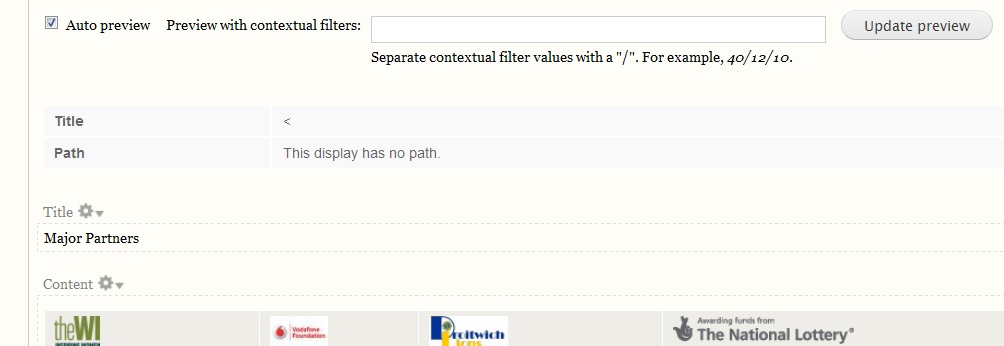
| #20 | DrupalViews.jpg | 49.19 KB | csc4 |
| #18 | views-2153517-fix_broken_handlers.patch | 510 bytes | hansyg |


Comments
Comment #1
Anonymous (not verified) commentedComment #2
Anonymous (not verified) commentedComment #3
Anonymous (not verified) commentedAdded information about modules and config.
Comment #4
bohemier commentedI also have these random breaking apart with views... If I cancel out, and reload the view, sometimes, everything gets back into place. Sometimes clearing the cache gets it back. But eventually, my views start breaking apart again. Very strange... I had this behaviour on two different sites, and can't figure out the common point between the two.
edit: I think it has something to do with i18n and / or adminlanguage and / or i18n_views. I had my site in french and admin language set to english when it started happening. I refreshed all strings (which led to an i18n_views error message). Then I set both default and admin languages back to english and my views were back on track. And so far, if I set both to french, they also seem to be fine...
Comment #5
Anonymous (not verified) commentedI've noticed that if I disable views caching (and views JS, don't know if this is really required) while editing views, everything works as expected.
Comment #6
Leiph commentedI also have this strange behaviour.
Inspired by #5 and the 6.x-issue mentioned in #1 I cleared the cache, and the error was gone. Don't know if this is repeatable.
Comment #7
socialnicheguru commentedI have been getting the same thing happen except it is only og_group_ref field that disappears and reappears. spooky.
Comment #8
bart atlas commentedThanks bohemier for #4. So far have only seen this once and dumping the cache fixed the issue. Happened with user profile fields so the very scary looking symptoms were 1) "who's online" reported someone online who had never logged in, 2) stats didn't work, 3) user/people list didn't populate. If I gain any insight I'll post it here. This site uses lots of custom modules including OG but the specific Views/cache issues seemed to all relate to user accounts and profile fields, which are all stored in a separate database.
Comment #9
rocbrook commentedEvery time I saved a view I would get broken handlers and pages with blank content. Turning off Views Cache fixed the issue for me.
Comment #10
jibize commentedI am also seing this with Views 3.8. Clearing the cache brings back the handlers for me (until next time), so I would also say this is cache related. I have seen this with Views content cache and Views cache bully enabled, I'm not using the default views cache so I can't tell if this is related to these modules. Are you all using one of these modules?
Comment #11
bohemier commentedNot using those modules in my case
Comment #12
bart atlas commentedI tried rocbrook's suggestion (#9) and this also worked for me.
Comment #13
jibize commentedLooking at the original post from pikku-h, I am on a BOA box, which is also nginx php-fpm (+Redis). I have no idea if this could cause this type of problem here, just trying to find out what we all have in common in this issue... ;-)
Comment #14
markusa commented+1 on this issue, our team has spent several hours trying to determine the cause of this.
To restate the issue, saving any existing view, even without actually modifying any settings, causes views around the site to degrade and eventually break.
Editing a view after saving one will show broken handlers, the query for the view will be incomplete or malformed
We've found a one-liner change that seems to fix the problem, its probably a remedy and not a solution but
if you edit line 49 in /includes/cache.inc (views 3.8)
from:
else {
// If there is still no information about that table, it is missing.
// Write an empty array to avoid repeated rebuilds.
views_cache_set($cid, array(), TRUE);
}
to
else {
// If there is still no information about that table, it is missing.
// Write an empty array to avoid repeated rebuilds.
views_cache_set($cid, array(), FALSE);
}
This tells views_cache_set not to add the language code to the cid value for the cache entry....
Don't know why, but this is working as a temp solution for us....
Comment #15
flapsjack commentedThis issue is definitely related to a caching issue. I've been having the issue randomly as well, and clearing the class registry cache temporarily fixes the missing/broken handlers.
Another thing to add to this that could be related, I noticed some similar inconsistent behavior with panels. I would build up a panels page, everything would look right, and work as expected. A little later, after a cache got cleared, the panel page would completely break. Trying to edit the panel page would show a completely empty variant. Luckily in the case of the panels issue, I had an exported copy of the variant that I would restore.
Since views and panels seem to share some code, or at least have similar styles due to the original author, maybe ctools could be involved. Regardless, there's definitely an issue that get triggered when certain caches are cleared or expired, and it affects both panels and views.
In case anyone wants to read more about the panels issue, here's a thread that started a LONG time ago, but has recently gotten new life:
https://www.drupal.org/node/1334574
Comment #16
jibize commentedmarkusa's "remedy" worked for me, It has been more than 2 weeks without any Views broken handler issues. Thank you for looking into this.
Comment #17
Slovak commentedDowngrade to Views-3.7 "fixes" the issue as well.
Comment #18
hansyg commented@markusa's code change worked for me. Thank you. Patch attached, maybe this will escalate the issue to the maintainers.
fyi my setup is very similar to the original posters.
nginx, php-fpm, Drupal 7.23, Views 7.x-3.8
Autoslave, Memcache 7.x-1.0
Comment #19
csc4 commentedI've been chasing a weird problem with broken View Block titles rendering as <
</<Confirm @markusa's fix as in https://www.drupal.org/node/2153517#comment-9052103 fixed this for me too.
Confirming I too have Views 3.8 and l18n
Saved again - and think it's broken again? Trying to attach screen shot - but can't?
Comment #20
csc4 commentedViews preview screenshot of Title issues. Couldn't find option to add when editing comment
Comment #22
star-szrI wonder if this could be related to #1944674: Improve performance of ViewsDataCache, that was one of the changes between 7.x-3.7 and 7.x-3.8.
Comment #23
Sneakyvv commentedCottser, don't know if this problem has to do with the issue you mentioned. I kinda doubt it since pikku-h originally reported this issue for 7.x-3.7, but I just wanted to say that I'm only experiencing this problem since we updated to 7.x-3.8 about a week ago, and only on our production environment. So perhaps the problem originates indeed from the change that was introduced in 7.x-3.8.
Comment #24
Sneakyvv commentedWith the patch from #18, I haven't had the issue since yesterday, while we had the problems multiple times a day before I patched our code.
Comment #25
markusa commenteddowngrading to views 3.7 also resolved the problem as well across multiple sites.
Comment #26
tzt20 commented@Sneakyvv, since you've applied the patch now 12 days ago, has the issue crept back up?
I'm seeing this issue on a live production site after upgrading too. The latest Views updated to 3.8 was a security one, so I'm wondering if a patch would be a better solution.
Anyone else have experience with the patch finally resolving the issue?
Comment #27
Sneakyvv commented@tracyt10 yes, the broken/missing handlers issue seems to be solved by applying this patch. However I still experience a whole lot of other problems concerning views, like a seemingly random missing pager in a views slideshow after clearing the cache. And today a lot of fields are missing in the list where you add fields to a view. So I think I wil now try @markusa's other solution, i.e. downgrading to 3.7, hoping this will solve all the weirdness going on since the update.
Comment #28
joshuautley commented#6 - Clearing the cache worked for us. Today was our first experience with this issue.
I will be doing a site audit today based on our watchdog log, these comments and other information.
If I find anything useful to post which has not already been posted I will do so.
Thank you everyone for all the solutions posted.
Comment #29
noman_297 commentedI have also this error, I tried #markusa approach but it did not work for me.In My case i have made a custom drop down list in expose filter in view.
issue fixed it was due to class handler in inc file.give same class name in handler.inc file as use in view.inc file.
Comment #30
Infillion commentedSame here: #markusa fix had no effect. Nor did downgrading do any good.
I was making some views for data export and import between 2 sites and the error started to occur with date and entity reference, but also with some very simple text fields. It is also not possible to just remove and add these fields again as they won´t appear on the list.
Disabling views caching altogether as of #9 did solve this, but we can´t take the performance hit though. So help is needed...
I have Views 3.8 and l18n as well.
Comment #31
baysaa commentedJust had this issue crop up only on our production server. Random Broken/Missing handlers, and fields going missing intermittently, only clearing Class Registry cache helps alleviate the problem for a few short moments but the problem comes back again.
Not really sure why this only happened on our production server, seems like the only difference is Memcached is running on the production server.
I haven't tried the other solutions yet but can confirm that disabling views data caching does solve the issue temporarily. But we want to cache the views data ideally so bumping up the priority to Major as this is a pretty serious flaw. I looked at all the Major tickets before upgrading to Views 3.8, so hopefully this priority bump helps someone else too.
Comment #32
bob.hinrichs commentedI am also having these issues and have not been able to find what is causing them, or how to resolve them. The view in question does not have caching turned on. I am experiencing this on multiple sites, though their codebases are similar. The issues are occurring, oddly, on our development instances (mac laptops) but not on our hosted servers. I wish I had more information on this and will chime in if I discover more.
Comment #33
bob.hinrichs commentedOn my machine, this was a basic issue of resources. I had upgraded my OS to Yosemite. Firstly, I had installed memcached for php 5.5, but I think I also needed memcache. Secondly, my opcode cache (different in php5.5 - is built-in) was not properly configured. Here are the settings that are working really well for me now. Note, this is for a development environment.
opcache.revalidate_freq=0
opcache.max_accelerated_files=7963
opcache.memory_consumption=192
opcache.interned_strings_buffer=16
opcache.fast_shutdown=1
Comment #34
baysaa commented@bob.hinrichs just FYI, the caching we're talking about here is the "Views data caching" option in the Views module Advanced settings screen, and not caching options for individual views.
Comment #35
thommyboy commentedSome problems here too. I upgraded D6 ->D7 and worked on all my views to get them working again (e.g. Image Fields get lost when
using Imagecache and so on). After fixing this I save the View and IT WORKS WELL (e.g. showing the images). Whenever I EDIT the view
it displays broken handler and the image-fields are gone. This is an admin/edit issue as the View itself works well.
I'm not sure if this is a clue- one of my Views is fine- the only one where I changed everything in the Master-Display. All other views
have Fields and Filters in overridden Page-Displays
Comment #36
thommyboy commentedfields visible in admin, save another view, fields broken.
applying #14, clearing cache, fields visible again. weird :(
Comment #37
dxxSame issue with Drupal 7.x current stable version. I use Memcache 7.x-1.3 but I tested to disable it but that not resolve this issue.

I confirm that works fine when I turn off Caching Views (admin/structure/views/settings/advanced), time to edit my views... (not a solution!)
Comment #38
baysaa commentedPeople reporting that clearing the cache, or applying #14 then clearing the cache solves the issue are a bit misleading imho.
Applying #14 didn't make a difference at all. And to fix this issue temporarily, all you need to do is clear all cache (Or Class registry cache to be specific). But the problem will come back in 1-5minutes. Your views will randomly have things missing. So clearing cache is not a solution!
Nor is #14.
We are getting heavy performance hits on our production server with "Views data caching" disabled. PHP memory use is going through the roof, and load average is shooting up towards 10+ :(
I'd happily look at what's causing this, but I'm not familiar with the code of Views or CTools.
Comment #39
baysaa commentedI think I've found the little code that will restore the views cache functionality.
I've basically backtracked the diff of 3.7->3.8 and found a piece of code that was deleted from cache.inc in _views_fetch_data_build():
I'm not sure exactly why, but putting this code back into _views_fetch_data_build() and then unchecking the "Disable views data caching" has solved my issue. The server is now back to a stable and sane performance, and nothing's gone wrong for the last 30 minutes.
Hopefully this will give the maintainers a bit of a clue.
We're running on:
Ubuntu 11.04
PHP 5.3.5
Memcached
mysql 5.1.54
Apache 2.2.17
varnish 2.1.4
And drupal has the memcache-7.x-1.0 module running. (Memcache or varnish is not active on our development servers, and having memcache seems to be the condition for this bug).
Comment #40
nicholasruunu commented@Baysaa, Thank you, seems to work for us too but need more testing.
I pinged the maintainers: https://www.drupal.org/node/1944674#comment-9347651
Comment #41
Sneakyvv commented@Baysaa: Not sure if this is related, but I've recently had an issue with that piece of code in combination with memcache. (https://www.drupal.org/node/435694)
The problem wasn't that there was anything particular wrong with the code, but that memcache was not storing the information correctly (or even at all) because it was over 1MB large.
Seeing your diff makes me think that the problems this issue addresses might occur because if all data is saved into one cache entry, and thus into one memcache-key, it would be too large. However it still baffles me why a cache clear would solve it temporarily...
Comment #42
deanochips commentedI am thinking its a memcache/views problem and is related to this
https://www.drupal.org/node/1954348
Comment #43
thommyboy commentedno memcache here but the same problems...
Comment #46
nicholasruunu commented@thommyboy Can you see if #39 helps you?
I have removed #39 for now and testing the patch in https://www.drupal.org/node/435694 as I believe it's probably the problem for us.
But maybe it's some kind of weird combination of the two?
Comment #47
deanochips commentedi have memcache and adding
to settings.php fixed it for me
Comment #48
Sneakyvv commented@deanochips: That's not letting memcache do the caching for views. Which would imply that this is due to the data chunk limitations of memcache, as I said before. But since people are claiming they have the same issue without using memcache, that's not the (real) solution, or is it? I'm really confused...
Comment #49
baysaa commented@Sneakyvv the post you linked is indeed the real problem. The full Views Data cache bin exceeds the maximum allowed size and gets silently truncated, and adding the code I mentioned in #39 simply fixed the issue because it saves a cache entry for each individual module and these individual cache entries are checked first to see if they exist, before Views uses the "full" (now truncated) cache to find the data for a certain table.
There's a piece of code that saves an entry for individual modules that seems to have replaced the code I pasted in #39, but there's a flaw there, as only when _views_fetch_data() is passed a $table parameter the individual cache for $table is only saved. In cases where a certain module/table hasn't called this, the full views cache is used (which is too large and truncated), and that's how we're all getting broken/missing handlers.
Hope this was clear.
This post should probably be marked as a duplicate of https://www.drupal.org/node/1954348
Comment #50
baysaa commentedComment #51
thommyboy commentedI just got some new Broken Handlers. No Memcache. Applying #39 doesn't help I thought it did but looked at the wrong Display. The Master Display is fine but overriden Fields in a Block Display are broken....
Comment #52
mschudders commentedI can confirm that with memcache #47 is working until now.
I had the same problem broken view handlers , no data sudenly in views, duplicate data , ...
Comment #53
mxwright commentedI submitted Baysaa's solution as a patch against 7.x-3.x-dev on this issue, since this is where the problem seems to come from: #1944674: Improve performance of ViewsDataCache
Comment #54
mxwright commentedComment #55
nategasser commentedEvery view on my site suddenly showed "Broken Handler" at the same time. Disabling "views decorator" module solved it.
Comment #56
matt bHad the same problem on upgrade to 3.8
Clearing the cache and disabling views caching works for me, but might cause me performance issues down the line.
Comment #57
petarb commentedIm experiencing this issue.
Turning off views cache seems to 'fix' it but it's not a long-term solution.
Is Baysaa's solution going to put into the non-dev version?
Comment #58
kevster commentedThx @deanochips - #47 fixed it for me - slideshows were not working when not logged in but do now
Comment #59
aamouri commentedHi,
I have the same problem with views module of Drupal 8.
When i add a new field into a content type or a taxonomy, it not wil be detected into a new or an existant view.
Some fields, contextuals filters or exposed filters are "Broken/missing Handlers"
It works correctly in local server but not in dev & prod servers.
Can you help me please ?
Thx
Comment #60
albertski commented@aamouri Were you able to solve this in Drupal 8? We are experiencing the same issue with a custom views filter we created. It works perfectly on multiple local machines but not on Pantheon.
Comment #61
aamouri commentedHello @albertski,
Yes I fixed the bug :)
I imported exported data from key_value table from my local database on all other environments.
It is the only solution found to resolve the problem.
Comment #62
albertski commentedThanks @aamouri
I was able to figure out my issue. I had a capital letter in my views.inc file.
I had: Interactions_exposed_filters.views.inc
It should have been: interactions_exposed_filters.views.inc
I guess locally my set up allows Uppercase but Pantheon doesn't.
Comment #63
pratikshad commentedI had same issue with one of my site, after few hours debug i found that this was happing due to delete field which was still existed in view.
I simply removed that field from seach field and then from view and its working now.