Report by: Vijay Nandwani
Mentor: kreynen
I was assigned a task a install and review the CiviCRM distribution. I haven’t used a CRM earlier and this was my first time working with it. I got a Pantheon site to work with.
Initial setup was simple but then things started to get little bit confusing. The first screen I saw was Configuration checklist. I had no idea what about most of the options. I reached for help at CiviCRM forums and here is the link to it: http://forum.civicrm.org/index.php/topic,30739.0.html
(Suggestion: A simple tour at this stage could be very helpful. By tour I mean the one which is done by Tour Module in D8.)
After I finished glancing over all options I had no idea what to do next. There was no instruction on what should I do now. I went to the dashboard after that and then slowly and steadily things started to make sense. I started to use the options in the menu above one by one.
Some Issues:
In the contacts section, while registering a new individual I didn’t find the red stars on any of the fields. As there are necessary fields in this page, thus those symbols can be added here. There were some more trivial issues like add another links were being shown even when the first one wasn’t filled. As there are a lot a fields which have the option to add more, I think a small check can be made as it is being done in Honoree information fields. Also those add fields weren’t aligned. Here is a screenshot:

Similar issue was with add email:
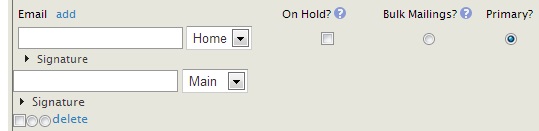
In add individual page only, when I tried to upload a php file in add image, it gave me an error but on the next page. Why that error wasn’t shown on the same page as other errors do? Another small improvement can be to automatically close the errors after we click anywhere outside the error box. One more thing that could be improved is that load the menus when we hover the mouse over them. I saw that menus did roll themselves once we had selected a menu. I think it can be done that menus roll whenever we hover the mouse and there is no need to click anywhere on the menus.
I would also like to draw the attention to certain issues I observed while trying to create New Activity. At first I wanted to add a new activity type, but couldn’t find a option. I made a Google Search and found the answer on the first result. There were a button in New Activity called “swap target and assignee contacts”. It was working very strangely. It would add something with a cross and a textbox. If one tries to type in that textbox, the text ‘Searching...’ would overlap the below text. When I click on cross above the textbox, the textbox is still present. Here is an image of what I mean -
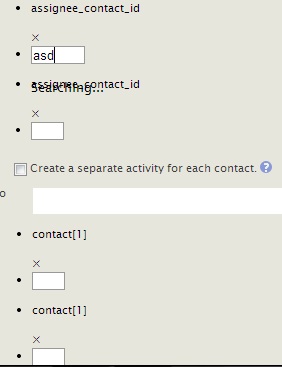
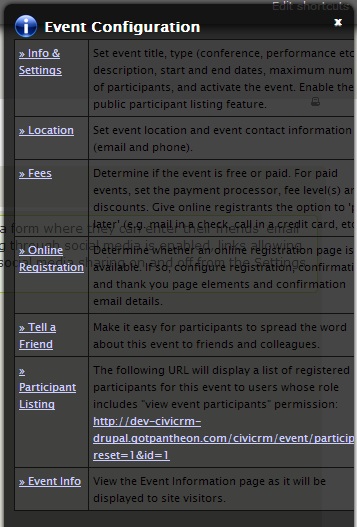
Other than that I didn’t face any problem while adding new activity. It had everything I needed. Very thoughtful. I didn’t know for what tags are used for. CiviCRM had a great page (http://book.civicrm.org/user/current/organising-your-data/groups-and-tags/) from where I learnt about groups too. Lastly another trivial issue was with the help text on events configuration page. Here is an image of it:
What I liked:
Those were some of the issues I saw, but I would say that I did like CiviCRM for many reasons. I observed that CiviCRM is comprehensive, it is detailed, it is thorough. I mean in any of the options(like Add Individual, new Event) I saw, I found all the fields I can possibly imagine. I wanted to import/export the list of individuals I found that. I wanted a map or something like that for latitudes/longitudes and it had a configuration setting for geocoding. It had help icon on almost all of the fields and the help boxes were of great help.I made an event and it had options like fees..online registration..etc. Honestly it impressed me a lot. The ‘Actions’ in all the options and particularly on the page of viewing contacts is so good. In find and merge duplicate contacts, I wanted to use that but didn’t know how to do it. The help there proved of great use to me. I would say though CiviCRM looks complicated at first it is actually simple to use. The book available contains great deal of information. What I can make out is that CiviCRM is made after thinking a lot. It covers almost everything.
Finally @kreynen had told me to suggest some improvements in documentation. He said
What can we do to make this process easier for new users to understand?
As I recently worked on a task related to Disqus, I had to use their documentation(http://help.disqus.com). I would say that I liked the way they presented their documentation. So might be that kind of documentation would help new users.
So that’s it for this report. I think that it would provide at least a bit of help to CiviCRM community. Please keep the suggestions coming :)
Google Drive link of this page: https://docs.google.com/document/d/1gp0KiBNzdILo87JmKFN6emwlT3uRK52CRvjW...


Comments
Comment #1
royal121 commentedComment #2
kreynen commentedA tour is a great idea. There are a number of ways to add the tour functionality in D7 including http://walkthrough.it/ and https://drupal.org/project/joyride. The Joyride module implements the Zurb JQuery Joyride library (https://github.com/zurb/joyride) and was the foundation for the D8 tour module (http://drupalcode.org/project/drupal.git/blob/refs/heads/8.x:/core/modul...).
The configuration checklist is very thorough... to the point is can be overwhelming. You only need to configure a few of the checklist items to really get started. A number of those never need to be configured if you aren't using the feature, but it's unclear which items are important to do and which ones can wait until you need them. Example are things like Email and Payment Processors.
So if instead of just sending the user directly to the checklist, we created a tour that walks them through configuring the most important items, tells them they can come back and configure the rest later, and points them to what to do next... we are then at the real question this task was trying to address.
Now that you've explored CiviCRM a bit more by clicking around, what is the first thing you would introduce a new users to after completing the first steps in the configuration?
Comment #3
kreynen commentedIt looks like Disqus is using http://www.desk.com/ for http://help.disqus.com/. Looking at other sites using that platform like...
http://myfitnesspal.desk.com/
http://jazzheaven.desk.com/
http://mybigcampus.desk.com/
http://vidyard.desk.com/
...they don't seem any more intuitive or easy to navigate than http://book.civicrm.org/
Is what you like about http://help.disqus.com/ the fact that it's broken up into Search and 3 use cases (Commentator, Publisher, and Developer)?
Comment #4
royal121 commented@kreynen: Where to send the user after configuration is indeed a big question. I think different users would want to do different things. For example, someone might want to import contacts, someone might to edit some settings etc. So I would say to bring the user to the center that the Dashboard. Then some tour tips can be created where would one find the things they might need.
A tip can be made pointing to the contacts menu saying click here to import contacts, add contacts and some more description.
Next tip would have the beginner description for Contributions. What can one do here.
Then what might want to do in Events page, like making an event. Similarly can be done for others.
Finally a tip can be shown telling user to use documentation/forum in case they are stuck.
I tell this because think sending a user directly to an individual page could still be confusing just like Configuration checklist is to the new user. Let user decide this.
Another option might be to see what other CRM's are doing. I mean what is the first step they do.
Regarding the documentation, CiviCRM book is just great! I just wanted to make an example of what kind of documentation can be understood easily by beginners. I think as of now there is no need to make any changes to the documentation.
I hope I was able to make my point clear. :)
Comment #5
royal121 commentedComment #6
royal121 commentedComment #7
royal121 commentedComment #8
kreynen commented