

 Come together with the global Drupal community in Rotterdam, 28 Sept – 1 Oct 2026. Sessions, contribution, connection, and Early Bird savings until 8 June.
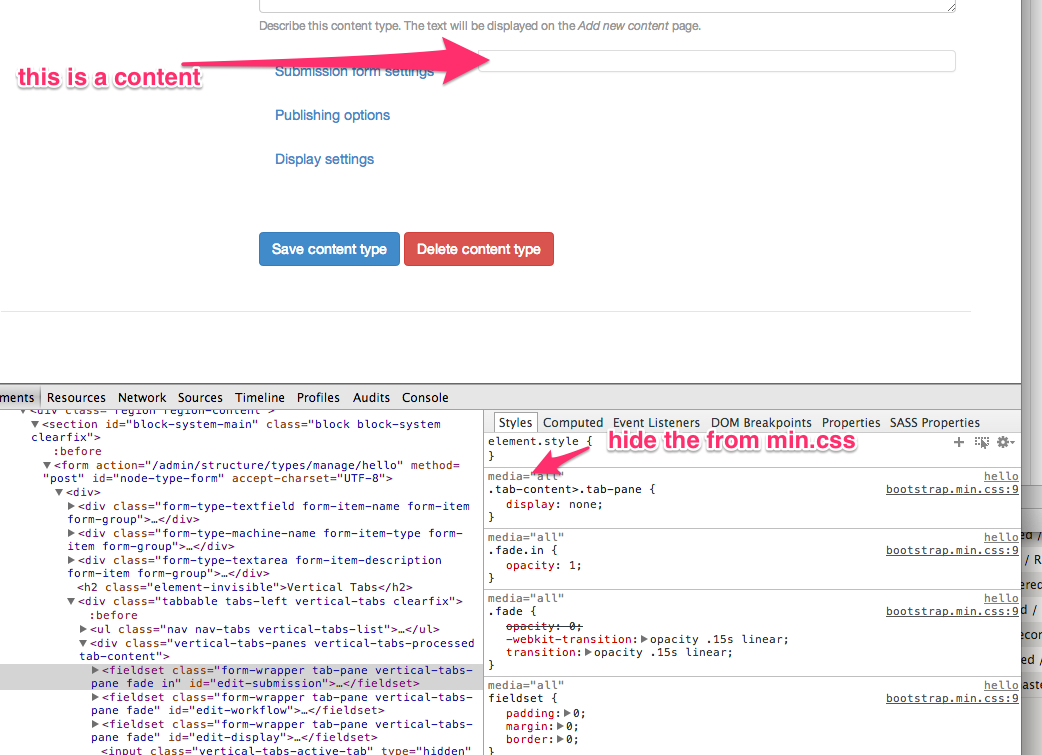
I download default bootstrap to minimal drupal, enable, and I add new content type, but I dont see the vertical tab content's.
I don't know what is a solution, but it is a huge problem.
| Comment | File | Size | Author |
|---|---|---|---|
| #14 | vertical_tabs_missing-bootstrap-2158197-14.patch | 4.07 KB | markhalliwell |

Comments
Comment #1
andregriffin commentedSeems to be related to duplicated ids and classes on a div in bootstrap-panel.tpl.php, line 30. Haven't looked into where the collapsible variable is applicable, but simply removing that div on line 30 will fix your problem, though may break another use of collapsible fieldsets.
Comment #2
trunghaiy commentedHi csakiistvan,
I got your problem and cause by _vertical-tab.js don't work with Collapse Fieldset.
I created a patch file resolve this bug.
Comment #3
trunghaiy commentedSorry, my previous patch file affect to nested collapsible fieldset, I updated new patch file.
Comment #4
bdanin commentedThis helped restore most of the missing functionality to my missing tabs (using display_suite), still not showing "Custom classes" in display suite, but now "Fieldgroups" and "Layout ..." both work when they didn't before.
edit: I was able to fix the Custom Classes with this patch and a little css:
Comment #5
markhalliwellWe should not be trying to fix this via JS (unless it's actually necessary to do so, which this isn't). It should be fixed in the template/preprocess function.
Comment #6
ryan.armstrong commentedOk so I've done some work on this and it looks like there are several issues. I've attached a patch, but I wanted to get some feedback from Mark since it did involve some JS changes, but I think ones that are needed. So the issues were:
Vertical tabs now work as expected and this has no effect on other fieldsets nor does it require any "hacking" via JS like in the above patches.
Comment #7
ryan.armstrong commentedOk I should have done this first, but I went back to see how Bootstrap handles tabs, and it uses the tab-pane class but then adds an .active class to the tab being brought into focus which triggers a display:block. I'm going to refactor the patch to go along with this instead.
Comment #8
markhalliwellWhat are these CSS changes? If there are changes made, it should be to the source overrides in the sub-theme.
We don't accept patches that have compiled CSS. This is mainly due to merge conflicts and the inability to determine the differences on a single line.
I'll have to take a look at this in more detail after I've had a chance to review the issue and apply the new patch (make sure it's against the latest dev branch and not 3.0).
Comment #9
ryan.armstrong commentedYea nevermind the CSS changes anyways, they're unneeded (per my post above). The actual issue is that the .active class isn't being added, which is what would switch the pane from display:none to display:block. Working on a better patch now.
Comment #10
ryan.armstrong commentedHere's a better patch. No CSS changes, only two small JS changes. However the tabs should be fading and they do not appear to be, perhaps because of how the classes are being added and removed?
Comment #11
ryan.armstrong commentedOk, I don't think there actually is a problem with Bootstrap. This is pretty boneheaded of me. After installing Bootstrap (3.0) on a clean Drupal instance the vertical tabs were working just fine. A dev had pushed code that forced a settings change that changed which version of jQuery was being used via the jQuery Update module, which of course broke Bootstrap. Setting it to a compatible version fixed things.
Stupid, stupid mistake on my part. The others having this issue should confirm that they are using the jQuery Update module, and that it is set to 1.7 or higher. Since everyone as complaining about admin-related pages, make sure that if you set a separate admin jQuery version, that that one is 1.7 or higher as well.
*smacks head* embarrassing :(
Comment #12
bdanin commentedI just tested the patch in comment #10. It certainly helps. However, it doesn't seem to fully fix the problem .
Using display suite, "custom display settings" and "custom classes" are still blank on the vertical tabs. I also double checked, and jquery_update was still loading 1.7
Comment #13
bdanin commented(a bit unrelated, but this is my current workaround)
For now, I'm using the page_theme module and setting seven as my theme for display_suite. It's not ideal, but this way the client (who doesn't use display suite) still has a seamless experience, and me as the developer can keep working quickly.
I set page_theme to show seven at:
admin/structure/types/manage/*/display*Comment #14
markhalliwellOk finally got a chance to look at this. There was a lot of things at play here (between how Drupal works and also Bootstrap).
Committed e62d7b2 to 7.x-3.x:
I'm also uploading the patch for this.
Comment #15
bdanin commentedapplied patch, everything appears to work, thanks!
Comment #16
Anonymous (not verified) commentedWhen creating a new node, the menu tab is empty.
Reverted back to 3.0 and everything is fine.
Cheers, Joep
Comment #17
markhalliwell@joep.hendrix, the menu tab being empty is a regression that I just fixed in this related issue.
Comment #18
Anonymous (not verified) commentedThanks Mark, works like a charm now!
Comment #19
markhalliwellComment #22
markhalliwellI'm just moving this back to 7.x. If this needs re-evaluation in 8.x, create a new issue.
Comment #23
erwindeclerck commentedHi Mark
Just applying your latest patch
Seems like the test on line 19
17 $(this).addClass('tab-content');
18 var focusID = $(':hidden.vertical-tabs-active-tab', this).val();
19 if (!focusID.length) {
20 focusID = false;
21 }
22 var tab_focus;
...should perhaps better check on 'typeof==='undefined' because I get an error trown when focusID doesn' exist.
like so:
17 $(this).addClass('tab-content');
18 var focusID = $(':hidden.vertical-tabs-active-tab', this).val();
19 if(typeof focusID === 'undefined') focusID = false;
20 var tab_focus;
I didn't examine why the focusID gets no value, but this way things work fine with me.
versions used
jquery 1.9.1
bootstrap-theme
; Information added by packaging script on 2013-11-17
version = "7.x-3.0"
core = "7.x"
project = "bootstrap"
datestamp = "1384678107"
Kind regards,
Erwin De Clerck