Extracted from #1679194: Allow user to fix Latitude/Longitude by entering address as text
Originally Posted by vlooivlerke on December 8, 2013 at 8:42pm
Hi Rik
I really like this filter and has made a plan to use it with blocks and panels.
I was just wondering, cant this filter not be included as a filter handler in views.
Another impressive thing is the fact that it pre-populates the field with your address and using it as a search filter for other locations is just as impressive.
I would like to use it as both a location tracking search function and a global location search.
It works perfect as it is now, and if i open up my front page "with map view" it is zoomed in on my location and if i enter a different street address in a different town it goes there. perfect!
But as a user friendly option, how about changing the fix my location check box into a radio button options
1. Search your current location (the gps icon)
2. Search a different location (map marker icon)
On option 1 it refresh your location and you can adjust fine tune the address but it will loose its location if you move around on a mobile device
Option 2 enable you to search other locations and stay fixed on them
If you could add a proximity filter it would be even more awesome.
I am trying to create a filter that work like this using the proximity filter but the "from" field does not populate the HTML5 location


Comments
Comment #1
rdeboerComment #2
vlooivlerke commentedHi Rik
Just a short thank you for Rik in Afrikaans. He should get it as he has an array of languages under his belt :)
Back to this feature request:
I have noticed that there is also some work done using the global filter and this module. It has HTML5 and proximity capabilities and you can extend the filter with other search filters.
The "Refine Location" block is sort of a global filter too, but only effects IP_geoloc views if I am correct.
What would this "refine location" block be appropriate for to use?
Meaning in my previous comment I want to make use of it as a location search. Maybe I am using it in the wrong way.
Could you please put me in the right direction if I want to setup a location search filter that use HTML5 location to pre fill the location text field and optionally select a proximity.
Things I like about this filter is
Things I would like to be able to do with this filter.
I am rebuilding my D6 website and your module is going to do the bulk of the work.
To give you an idea you can look at my frontpage and here is a town page
Thanks
Paul
Comment #3
rdeboerHi Paul,
Thank you so much for your thoughts! I need some time to suggest this -- but great you started the ball rolling. Maybe others can chip in also.
And nice site too!
Will get back.
RIk
Comment #4
rdeboer@vlooiverke, Paul
This may solve some of your questions: #2011340: Geofield plugin to extend proximity filtering based on postal address with option to use HTML5 location.
"select a proximity, not enter a value but select from a list" -- use the "Grouped filter" option in Views?
Rik
Comment #5
vlooivlerke commentedHi, thanks Rik
I will work on this and send you a link to my test site when done, Then you can have a look at how it works.
Thanks
Comment #6
vlooivlerke commentedA very interesting outcome.
The proximity filter works perfect, but when you enable the grouping of the proximity filter the "address field" part of the proximity filter dissapear. So in order to search another location you need to enter the address in the "refine your location" block. You also need to check, "Fix my location at this address" otherwise when you change the proximity dropdown to a different distance it reverts back to the html5 location. Disabling the grouping shows a distance value and a address field. But this address field does not get populated with the address like your block does. It looks like this:
Comment #7
rdeboerYep it's all a bit clunky isn't it?
I wish I had spare time to work on this.
Maybe those interested can pool together and commission the work?
See also #2117397: Map centering option in searched location of geofield proximity exposed filter.
Comment #8
vlooivlerke commentedHi Rik
I am willing to pull in and commission you to make us the best proximity search filter.
Should I start a new page for this or change the title or something?
I am willing to put down R500 that is 4 days minimum pay in south afrika.
To work out the amount in $ simply divide it by 10,.. no 11,... well maybe 12 by the time you read this.
:) Paul
Comment #9
rdeboer@Paul, #8
Haha... I know what I can do! I'll take a plane to SA then using your money I can live and do the commissioned work for 4 days, then take the plane back to Oz!
Rik
Comment #10
vlooivlerke commentedVery interesting. I live in one of the most popular tourism attractions. If you come you can stay free for 2 weeks (hope you don't have a big family) And I will even pay the $45, no wait $43.. well a few bucks when you arrive.
Actually you are talking about a concept me and another Drupler were discussing a few years ago, Travel for free and in turn Drupalize
your holiday. It would be loads of fun, you get the couch and I will pull my sleeping bag close and we can just lay there and discuss all drupal related stuff. Except if you would rather sleep in a tent among lions and elephants, it might bring us to drupal consents never thought off before.
Coming back to this thread, I am willing to put down $50 no matter what the currency. (Except if they sack our president in the next few days for stealing from the people, I might have to revise that amount!)
I know a fair price for you would be to charge $75-$150 per hour.
That is why my contribution is only a drop in the bucket
So if there are any other Druplers who want to need this, please help.
Otherwise, I pick you up at Cape Town Airport and we can start with a seance drive to my home town, stopping at every pub on the way - you will then experience my need for a great proximity filter, first hand.
I cant wait until SA play another game of rugby or cricket against Newzeland, but that would have given you a good excuse to come over here.
Comment #11
rdeboerHaha -- laughed out loud when I read this!
And you know what? I'm tempted. It is almost achievable....
I do love and try to practise the concept of working while playing...
And I've never been to South Africa.
I have no kids and the girlfriend will manage fine for a while back at home in Melbourne ;-)
As for the pubs... can we do a few wineries on the way too? Nothing like contemplating the future of Drupal over a great glass of South African wine (the country has many) and a beautiful sunny view over the vines.... haha....
Rik
Comment #12
rdeboerIt is a bit like hhttp://www.airbrb.com/?utm_content=buffereba20 isn't it?
Comment #13
vlooivlerke commentedHi Rik
My desk does not look that great, anyway we will be using the wine barrel on the vineyard to work on while we wait for the wine to breathe.
This trip can really become a reality. Only thing is you will need to buy your plain ticket and bring wine money. I will pick you up drive you around and give you accommodation and a meal (home cooking style). You can bring your girlfriend with, she can keep my girlfriend company. But with the girls there we might need to rewrite paypal to cover expenses. As my website is tourism based I can get some nice deals and we can stay in a few places, so you will see allot. I will take the time to also have a holiday. SA offers Award winning 750ml beer only $1.20 and great wine $3. You can jump off the tallest bridge jump in the world for $50 - but that is expensive.
If we don't get all the work done while you are here, you can always give me an i.o.u when you go back home.
Paul
Comment #14
rdeboerHaha -- you're hilarious, Paul.
What's the weather like in May?
Rik
Comment #15
vlooivlerke commentedMay is when all the Gay festivals are. It will be winter then so temperatures can drop to 15 degrees (very cold compared to summer). At the coast it does not rain much, but it will still be winter. We can visit one of those hot springs on the way back from Capetown to my house. Nothing like drinking red wine in a hot spring. My aim is to finish my D7 version of my website before you come. It will have a beta sign until you arrive. Your module plays a very big part of my site and I make use of Shushu (Mobile4Social) drupal android app to receive Google cloud messages via an app when approaching nodes via your proximity. Your IP view module tells rules whats up and that's how the messages gets send. So how much do you think I should spend on you? R5000 its about $500 nope $486.. well $450 will be save. What to calculate how long you can stay.
If any other druplers are reading this and also want a great proximity filter pleas contribute some spending money to Riks SA trip
Comment #16
rdeboerHey... I don't think I said "yes" yet!
I like the idea, though.
And your relentless persistence -- haha.
Rik
Comment #17
rdeboerSo.... something came up that has made me revisit this issue.
See also: https://drupal.org/node/2011340#comment-8728207
Comment #18
rdeboerSo try this:
o latest 7.x-1.x-dev that I just checked in
o remove current Geofield module with any patches you may have applied; download Geofield
7.x-1.x-dev7.x-2.x-dev and then apply this new patch: https://drupal.org/node/2134777#comment-8731227o execute /update.php
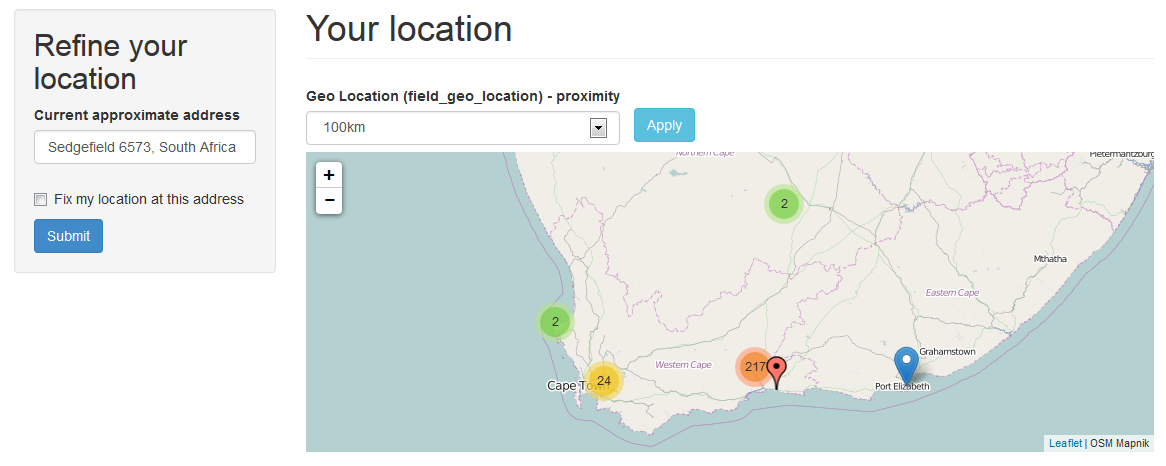
Load and resave your View. Then tweak it to create something like the screenshot, using the new "Refine your location" block, now called "Set location".
I intend to write a little blog post with details on how to set up the View at some point. But I'm sure you Paul will have no problem.
In the image below the black marker corresponds to the visitor location as set by themselves or by their HTML5-enabled browser.
Comment #19
rdeboer@vlooivlerke, Paul:
Once you had a play with it, can you please confirm (or dismiss) that what remains on your wish list for now are your points 2 and 3 from your comment #2:
2. Set a default country in the filter. I want to set the filter to only work if you access my website in my country. If your location is outside of my selected country the View/map must display all values. In this way the map don't open up where there are no markers and outside visitors can then refine their location.
3. Pre-populate the "what I typed" address field from a URL fragment. Let's say you want to show a city page like /city/cape-town with the "Set location" block pre populated with the name "Cape Town, South Africa". In this way you can simply increase the proximity and find info that includes Cape Town as well as surrounding suburbs.
Re 2: if you make -Any- the default for the "Search radius" selector, with "Autobox" as the Leaflet map centering option, then all markers will be shown regardless of the location of the visitor.
Re 3: I'm mulling over this one -- maybe via the Geofield contextual filter that I did way back...
Comment #20
vlooivlerke commentedHi Rik
You must have seen this 2134777#comment-8732083
First, I build a map and markers and tested the set location, all works well.
Then I tryed to add the proximity filter and had an ajax error as explained above.
Then I added the proximity filter and activated the group feature and exposed the filter.
This is what error I get on the map page when loading it. the proximity filter does not expose itself.
Hope it helps
Comment #21
vlooivlerke commenteddid i read you right?
I did the patch against Geofield 7.x-2.x-dev
You sure I must patch it against Geofield 7.x-1.x-dev
Comment #22
rdeboerOuch.... sorry for wasting your time.
Geofield 7.x-2.x-dev....
Comment #23
vlooivlerke commentedNo, Problem
Can you confirm the bug
Or did I make a mistake in setup
Comment #24
rdeboerNo I can't confirm the bug. But if you had any errors during the patch then it's terminal -- game over. Don't continue with a patch that has errors.
I'm attaching the Geofield module as I use it right now in development on my system (it has some additional changed lines compared to the patch, although not in the area of your issue)
See how you go with that and we'll work out later what's wrong with my patch file.
Run /update.php again just in case.
Rik
Comment #25
vlooivlerke commentedHi Rik
Your module (latest dev) works perfect with the supplied geofield.
I have setup a view just like the one in your image and it works perfect.
Will give you a full report soon
Comment #26
rdeboerYay! I thought I might have lost my touch!
Look forward to your comments and stabilising and iron out bugs in this dev for all to enjoy. On behalf of the contrib community, thank you so much for your REALLY quick feedback, Paul !
Drupal site builders and developers should Gittip you!
Rik
Comment #27
vlooivlerke commentedHi Rik
Here is a link, that will melt away to noting by sunrise,
A proximity for South Africa
It is set to Box (default = any)
The map is an attachment
The view is a page
Ajax paging does not work, but auto submit works.
Submitting a street address works, but I have to append (,South Africa)
try my village, Sedgefield
You get the one in UK
Maybe explode a text field in block settings to add country, this will make it country specific but will help lazy users that just enter a postal address or a street address without a country
If I enter "Sedgefield, South Africa, South Africa" the geocode is at least SA
meaning you can add the country twice and geocode will ignore it.
Comment #28
rdeboerLooks great Paul! Nice job.
Yes the Google geocoding service does seem to need some "context" to come up with the correct town in the correct country.
Pre-populating the text area with, say, a blank line followed by the country is a nice idea.
We could make it configurable via the block settings. In that case the site administrator would type in a country and it would be fixed.
Or we could do it automatically, take it from the visitor's location. This second option is probably less suitable for your site, but may be perfect for other sites.
Note: to automatically look up the visitor's country you would probably not need a HTML5/GPS/WiFi lookup. It could be IP-based lookup (i.e. SmartIP or GeoIP). So even if the visitor refuses to share their location when prompted by their HTML5-enabled browser, we would most likely still get the country right, even for mobile users.
Rik
PS: on an unrelated note: if you wanted more flexibility in where the exposed distance filter appears on the page, you could use Views "Expose filter in a block" option. Then you can place the block in any region, i.e. left, right, top, bottom....
Comment #29
vlooivlerke commentedRik, Do you have one of those Google sleeping power-nap pods?
Coz u are up 24 hours.
I have not tried Smart IP, will do (They have changed 90% of our country's names in the last 10 years so the yanks gave up on tracking us, most ip's are outdated, and city names are unknown)
What works well is the mobile network connection, it place the location on the spot, but a land line connection use the ip, and the fallback is the closest server IP. In my case the server is 40km away from my real location, calculated via html geocoding.
But have to go now, looking for some cardboard boxes to build my own power-nap capsule.
Comment #30
rdeboerhaha... nite nite, sweet cardboard... talk to you tomorrow...
Reminder: IPGV&M already has integration with Smart IP for use as a fallback. See the IPGV&M configuration page for config options.
Comment #31
rdeboerJust to say that I've added two new features to the "Set my location" block.
1) default (partial) address may be entered for the block by the site administrator, as per your suggestion
2) allow the visitor to set their location via a "region": a region is a taxonomy term with a Geofield attached to it
See screenshot and try the latest IPGV&M 7.x-1.x-dev (still need that Geofield patch in place as well).
The black marker is placed at the lat/lon defined for the "North" taxonomy term (geocoded from a street address using Geocoder).
Rik
Comment #32
rdeboerImage dropped off...
Comment #33
rdeboerComment #34
rdeboerWrong image...
Comment #35
rdeboerComment #36
vlooivlerke commentedWow, the region is unexpected and a very nice addition.
Just a quick question, how would the user select the region.
Address field has a province selector, and adding a second province selector via taxonomy will look a bit duplicated in the form. or when you say region, we have regions inside province, like "Garden Route" is inside the "Western Cape" Province, so is the "Wine Route"
Adding a region then will make sense, but adding a province would look funny in the form.
I guess you could use rules to add the taxonomy term after node save. Another thing is I have bought a postal address database of SA and is buzzy to load it into address field so you can select a province and the city selection then changes to only city's in that province. I can now add the regions too narrowing down the city selection even more. Like this Province >> Region >> City >> Postal Code
Must I add any thing to the taxonomy fields, like geofield?
Thanks for the partial address part in the block
Will start testing when I come back from the farmers market or (Boere Mark) like your surname suggests :)
Comment #37
vlooivlerke commentedHi Rik
I think I have to wait for the world to turn a bit, so that I can catch up with the latest dev.
It still shows 1May dev here in SA, had this experience before with other modules where the authors live in other country's that is before mine in the world latitude timeline. Its like you live in the future, and I am 1 day behind. :)
Comment #38
rdeboerDate is probably correct. I updated issue image later.
Yes you need to add Geofield to region taxonomy.
It is exactly for the case you mentioned. Not for real postal addresses, but "logical" regions. Whatever you decide makes sense as a region to the visitor.
So if you made a "Tourist regions" vocabulary with these regions as taxonomy terms (each with a Geofield attached, possibly geocoded from a textfield or AddressField via the Geocoder module), then region drop-down for the visitor to locate themselves in a region of interest could look like:
o Garden Route
o Wine Route
o White-water rafting
o Mountains
o Historic town 1 -- Cape Town
o Historic town 2 -- ....
o Beaches 1
o Beaches 2
That way they won't have to know that the Wine Route is in Western Cape.
PS Yep farmer is my name, but in contemporary Dutch we say boeremarkt... with a 't'
Comment #39
vlooivlerke commentedHi Rik
Here is what I have build so far, this time I have added a taxonomy and font icons.
I have not added a region taxonomy yet so that is not tested.
The new updated version has a bug i think. If i enter a "Default partial address" in the block settings it stops working on Fire Fox, but Chrome works
In fire fox:
I enter "South Africa as the Default partial address. then on the view page if I enter an address say "Cape Town, South Africa" nothing happens, I can set it multiple times it will not geocode the address. If I remove the partial address in the block I can set my location to Cape Town.
Also it is as if the first submit does not do anything. Lets say i come to the page for the first time, I change the address to "Cape Town" and set location. Nothing happens and it puts my geocoded address in. The I set the location again, and then it will go to "Cape Town", if I now change the address to some other town, it works immediately.
My thoughts about the "Default partial address" was that it is a hidden string of address you add to what ever the user types in the set location block.
So if I set the "Default partial address" in the block to ",South Africa" and I visit the set location block it should not suggest ",South Africa" but rather let you enter "Cape Town" then when you submit the field looks like this "Cape Town, South Africa"
Another thing.
I have set my marker size to 42 x 52. Now its offset is off by -10 on top and -10 on the left. It looks like the system wants to ajust the marker offset by -32px but that is not enough. Also have a look at the popup, it is way far away from the marker. My font icons is set to align to the center not the baseline of the marker.
Will send you a link when I test the geo-taxonomy
Thanks for everything this far.
Comment #40
rdeboerStarting to look pretty snazzy Paul!
Are the icons from Font-Awesome?
I've had issues with Firefox too, recently. But using Firefox 29.0.1 and yesterday's IPGV&M it seems ok at the moment.
What is the difference between the taxonomy you already have and the region taxonomy that may optionally be attached to the "Set my location" block?
"Also it is as if the first submit does not do anything."
The first submit starts of the HTML5 position retrieval via the browser. But it doesn't block the site waiting for a reply to come in after a few seconds. So the answer is not processed until the next click. Or you can tickk the box "Auto-refresh the page as soon as an HTML5 location update has come in" in the Advanced Options of the IPGV&M configuration page.
I have misunderstood your suggestion about the "Default partial address". I thought the way it is, was the way you wanted it. Thanks for the clarification.
I will have to look deeper into the marker offset and popup.
The latest version of IPGV&M has an autocomplete feature for the region taxonomy, if you wish to use it. Also the textarea to type the address in, is configurable.
The proximities don't show up correctly yet? Is this a result of you using the "Grouped filters" in Views?
Comment #41
vlooivlerke commentedOk, let me test the latest views release and the latest dev of your module.
I use flaticon, manually placed in the theme in a folder called icons.
Bootstrap also come with a set of icons that i use, and the warning in the settings page that states I have not enabled Font awsome makes me feel I am not utilizing all the features :P
The proximity works when a valid address is entred like "Cape Town, South Africa", It also works on my geocoded location. But if you get there the first time the distance shows 0.0km. I am planning to hide 0.0 with css if that happens.
The grouping filters work perfect, I will add more to the select list.
The reason why I want to "force the address to a country" is that we have loads of town names that is also in other country's, like my hometown "Sedgefield" and idiots will enter "Sedgefield" and end up in England
Back shortly with more updates
Comment #42
rdeboerThanks for the tip re http://www.flaticon.com !
I use flaticon, manually placed in the theme in a folder called icons.
How do you then superimpose them on the marker? And use the IPGV&M Location Differentiator?
Comment #43
vlooivlerke commentedThe steps work like this.
I use the bootstrap theme but this should work for any theme
Create a custom icon pack on flaticon
Then download the Font-icon package / not svg
Unpack the zip file in a folder called icons
Edit your theme.info file and add
stylesheets[all][] = icons/flaticon.cssInside the flaticon folder is an html file showing all icons and there css names.
I create a taxonomy and use it as a IPGV&M Location Differentiator
In the Special char CSS class I add the css icon name
Have a look here
You can select sleep to see sleep icon, and eat. like the image suggest
Have a look when you select drink
It want to use "Default location marker special character"
()but looks like the unicode from flaticon is not called<i class="fa"></i>Could you make it so that you can choose to add a special character or css class
I have added a region with 3 terms (parent and 2 children) and it works great
What made me happy is I dont need to give the nodes the terms used in the region to make it work
Have a look when changing the regions, the text area exposes itself for a few milliseconds before hiding (my text area states the words "South Africa")
Switch between "Garden Route" and "Wine Route" to get the effect
Something also changed with the block "well" styling as the radio buttons are out of place. I am not worried about that now
The module "Slide with style" could be used to make the 3 radios a slider so you an slide from "here" "there" and "region"
I am pushing very hard to upgrade my D6 site within the next 10 days and your module will be on my front page
Some very exiting stuff, thanks
Edit: Placed the unicode in code brackets
Comment #44
rdeboerThat's great Paul!
I should generalise the code that pulls in a font-icon library a bit in IPGV&M, as not everyone is as clever as you.
Also, it may be preferable from a UX point of view to select a font-icon library from a list, through the UI, rather than the theme's .info file. That way it doesn't get obliterated when a new version of the theme is downloaded. And the font-icon library will only be included on pages where it is needed, i.e. the map pages.
As most font-icon libraries seem to have the same simple structure, IPGV&M could simply scan the libraries/* directories, search for font-icon folders and populate a multi-select with the libraries found.
This would be especially convenient while there is no standard naming convention for libraries in the libraries folder. See https://drupal.org/node/2168325#comment-8353061
I saw the brief flicker of the textarea popping its ugly head in Chrome. Not sure what to do about that.
The new CSS for the "Set my location" block aims at being more flexible. You could place the block below the map and it should automatically go "slim-line", i.e. one wide horizontal block with all form elements in a single horizontal line.
However that CSS was done under the assumption that the form appears in a true block:
#block-ip-geoloc-geocode-address.You do not appear to have one. What is this "well" thingy? Where did the block and title of the block go? Do you use a panel (as in the Panels module) perhaps?
All in all your site is starting to look pretty good, I'd say.
Rik
PS: I guess you are aware you can untick "Create label" on the field in the Views UI, so that the label does not appear in the marker balloon? Saves bandwidth too!
Comment #45
rdeboerJust to add to the previous comment that I've overhauled and generalised the way IPGV&M deals with font icon libraries including http://flaticon.com
Checked in as the latest 7.x-1.x-dev.
This was tested on the existing /amarkers set of 32x42px marker images. Most of the font icons look fine on retina displays, but they may be too small for older displays.
So I guess I'll have to test this out using "stretched" markers, e.g. your 42 x 52px markers and then figure out where balloon and font icon positioning etc. go wrong.
I'll save that for another day, hopefully not too far away.
Rik
Comment #46
vlooivlerke commentedWhat about the Icon API
This will give you a full user friendly interface. You can create a taxonomy and then add Icons to it, this can then be used by IPGV&M as a select list of available icons
It will also call the icons when needed.
Have a look here
I have placed your block in a dropdown. Top Right, it is also responcive if you slide the browser size, needs somm css work still.
A "well" is a bootstrap theme and my theme placed it around your block, no wonder you had no idea what i was on about
Going to test the new dev now
Comment #47
rdeboerThanks for the ref to Icon API. Had seen it before, but not sure the Icon API will do much for us. The font characters need to be passed to Leaflet and positioned and size via CSS. How will it support us in that?
Love what you're doing with bootstrap! I need to dig deeper into it. So much interesting stuff, so little time!
Rik
Comment #48
vlooivlerke commentedHi Rik, it works.
I have removed the css in my theme and placed it under libraries.
How about specifying the following under font icons or marker options
Enter your own
font-size:
left:
top:
I have discovered a BUG.
If you are loged in and try to change the region it will not work and resets to your location and set the region dropdown to -none-
logging out fix the problem and you can set your region.
libraries is working cool, thanks
Comment #49
rdeboer@vlooivlerke, #48,
I cannot reproduce your bug. Works perfect for me, whether I'm logged in or out.
Can you narrow it down?
Yeah, I've been toying with the idea of letting the user set the font-size and icon character positioning (i.e. left, top), interactively, rather than through editing their CSS file.
Maybe later. Too much on at the moment.
Rik
PS1: I've added CSS support for http://fontello.com and the ".light" class which you can apped to the icon class to use a near white font, rather than the default (which is normally black or very dark grey):
flaticon-car9 light
PS2: I want to tidy up the markers from the /amarkers, make them stand out more. Do 2 styles: flat (a la bootstrap) and textured/shaded. Maybe add a retina version and a few colours. Do you know a good web designer that could help us out here.
Comment #50
vlooivlerke commentedHi Rik,
Send me some examples or colors and retina versions of what you like and I make some custom markers in Photoshop.
I dont know any good web-designers as I cant afford them.
This is the markers I made for my site, I build it as a vector shape in Photoshop, its roughly based on the Dirt Game markers. I can give you those once as a start, maybe you have some gradients you like and i can make them that.
I can also give you the shape file so others can make there own gradients or colors.
My problem with marker color is that some markers is dark and some light, so the icon must be inverse. using a css class is perfect
O, what about the visitor marker? is there gonna be an option to make it a custom icon :)
Edit: here comes the icon marker
Comment #51
vlooivlerke commentedwith this shape you can add tags in the marker
Comment #52
rdeboerNice marker!
But for IPGV&M I'm after something much simpler, at least for now.
Just a refinement of the existing markers in the ip_geoloc/amarkers directory. They look fuzzy around the edges. And they could do with a border line, I think. Like the white one you're using http://wiki2web.co.za/your-location ... it could do with a grey border around it so it stands out more.
It would be great to have more markers in the future but for now, I'd like to stick with the current size and shape as many users of the module will by now rely on these and I have adjusted the CSS that comes with them so they fit exactly (By the way: how come your markers are way off-centre at http://wiki2web.co.za/your-location ?).
So all I'm after for now is having those 13 markers sharpened up. Keeping the 32 x 42 size and .png format.
Although the "flat" bootstrap style (no gradient, no 3D, no light/shade effects) is all the rage at the moment, I do quite like the current set in that its light spot gives a bit of volume to the markers.
If you'd like to have a go, then great !!! Here's a chance for you to steer the look of the markers in IPGV&M!
In the mean time I'm going to find out how Leaflet auto-switches its default marker from the standard to the high-res/retina version. I hope to then apply the same mechanism to the other markers used with IPGV&M.
EDIT: it appears we can solve the high-res/retina issue in two ways:
1) fancy: the code loads the image appropriate for the resolution of the device requesting the page.
Advantage: uses minimum bandwidth.
Disadvantage: we need to supply two versions of each marker and add logic in the code
2) simple: only supply the retina-sized images (aka 2x, even though they're really 2x2) -- they'll be auto-scaled down to the size configured on the IPGV&M config page.
Advantage: works out-of-the-box for any screen resolution. No logic required in the code, no patches to be submitted to the Leaflet module etc.
Disadvantage: on disk a retina-sized version (64 x84) of a standard image (32 x 43) is about 2.5 times the size (e.g. 8k rather than 3.3k). Big deal. If you look at the amount of (invisible) marker data that is sent with the page it is often hundreds of kBytes. So that extra 80k (for 10 different coloured markers) as opposed to 33k is not something I am worried about. Plus, after the first load of the map, those markers will be cached by the browser.
My money is on simple, i.e. convert the current 32 x 42 markers to 64 x 84 retina versions and use these for all screens.
PS: I've added the option to add a font icon to the visitor marker as well. Latest check-in.
Comment #53
vlooivlerke commentedHi Rik
Here is some markers I build. I made both 32 and 64 pix icons. I can improve on it.
I have pushed the markers to the edge, leaving no transparent border. This makes the markers a bit bigger.
The shape is also a bit different but I tried to stick to the exact shape.
I added a border but it could be a bit broader.
I sticked with your colors. Wanted to add "Wine Red", "Golden Beer" and "Dark Brandy" but that might just distract us.
About my marker icons out of place. It is your css that puts it there. Disabling your css part in the marker centers it. I will relook at this when you put the new icons in.
Thanks for the visitor icon.
Comment #54
rdeboerThis is great! I'll have a closer look at it this weekend.
Thanks in advance.
Worried about the CSS...
On a standard install I need it to put those icons exactly where they should be...
Rik
Comment #55
rdeboerSo I downloaded the zip and dropped your icons in the /amarkers directory... Wow! What a difference. These are great! Love you've gone the extra mile, I mean pixel and broadened them a little. Love the border and love how the 64 pixel versions look on a Retina display. Great, great job!
So I'm going to check these into IPGV&M as the new /amarkers (they're certainly no B-markers!). I've done some more reading on dealing with std-res and hi-res images on the same site and my suspicions were right: in our use-case it's just not worth it having two images for each marker. For those that do wish to deal with it there are generic solutions that do not require any changes to IPGV&M. It already has the option to put images in an alternative directory and that's where 2 copies per image could be kept, if so required. But your images are small already (4k), even the 64 px ones, so why bother. Some commenters have noted that it's the number of HTTP connections more than the size that matters...
So 11 out of 10 for these new icons. Exactly what I wanted. I tried them all.
Only a couple of minor, minor tweaks if I may... The borders you added do not only make the markers stand out more against the map background, but also against neighbouring markers when they overlap (and the marker cluster radius is very short, like 10 or 20 px). The yellow markers with border and colour gradient/light-spot demonstrate this beautifully and look very attractive (see screenshot)
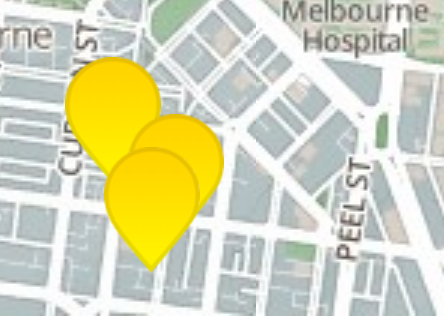
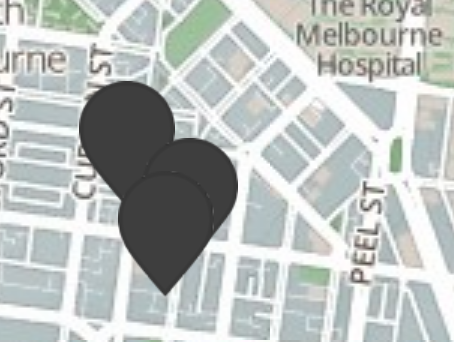
I found 3 markers that do not have such a pronounced border and therefore result in a less attractive "blob" when packed together: black, purple and red-brick. Any chance of giving these colours the same treatment as the yellow? That would be awesome.
What a difference a marker maketh!
Comment #56
rdeboer@vlooivlerke
PS: I think we should close this issue. It was originally about the "Refine/Set my location" block but has become a bit of a hotch potch...
Let's start new issues for new topics...
PS2: I want to get to the bottom of the CSS top/left and font-size tweaks.... whether these are necessary or not. Let's raise a new issue if either of us spots a problem...
Comment #57
vlooivlerke commentedGlad u like it.
The problem really sets in with dark markers, I am going to try and set more of a gradient.
I made a Photoshop shape file of the marker and I can basically make limitless combinations of colors. They all use the same format but the darker the color the more problems
Or are you talking about the faint little white spots on the border of the black (dark) markers
Yes I will start some new issues. This thread only features us and it has all our Africa Holiday Plans stuck in to it too. Hope you still coming
Like I stated, my 500 Rands ($50 a couple of months ago) is now around $39, due to the rate our currency is falling. Meaning if you come over whine will be nearly half price.
About your css. I think you made it to accommodate fontawsome. In its css file it gives spacing and padding to make it look nice next to words (in case you forget to put a space after your text) I also make use of Glyphicons that come bundled with bootstrap have a look here. There is icons everywere and I have noticed that each set of icons come with its own css spacing at default. Maybe reset all possible padding and margins to a default using
padding:0px !importantBut let me play with the new markers. I will go fishing this weekend and slap some fish-eye on my old laptop to see how does this retina display work. South Africa is rated the 23rd slowest internet country in the world, and the last time i checked there is quite a few countries, putting us very far behind.
Comment #58
rdeboerNo I'm not talking about faint white spots. I don't see any white spots. The markers are near-perfect.
I just mean that the marker border line could contrast more with the center, i.e. in the case of the black marker make the border a light grey? And a little more gradient or a light spot on the internal?
I'll look deeper into the CSS issue.
Enjoy the fishing and your fish-eye experiment!
Comment #59
vlooivlerke commentedThe css problem is fixed. I have modified the original flaticon css file months ago. I have replaced it with the default flaticon css as it comes out of the box. Now it is placed center.
So, no need to worry about it.
It is simple to increase the font size in css now.
Comment #60
rdeboerYay!
Thank you for saving me the time scratching my head.
Comment #62
donquixote commentedI am confused. What is the status of the original request? Where are the other issues where this is continued?
Maybe someone who did follow this should update the issue summary with a conclusion and links.