

Closed (fixed)
Project:
AmazonS3
Version:
7.x-2.x-dev
Component:
Code
Priority:
Normal
Category:
Feature request
Assigned:
Reporter:
Created:
19 Jan 2014 at 04:23 UTC
Updated:
26 May 2015 at 13:52 UTC
Jump to comment: Most recent, Most recent file


Comments
Comment #1
paulbeaney commentedHi keithyau,
Just trying out your module, but I haven't managed to get it working yet. The AWS SDK module can't find the library. It seems to look for a file sdk.class.php in /libraries/awssdk, but this file does not exist in the V2 SDK. I downloaded the SDK as a ZIP from the github site linked to from the official Amazon SDK home page: https://github.com/aws/aws-sdk-php.
Any ideas?
Regards,
- Paul
Comment #2
cloudbull commentedso did u install the awssdk v2 support module ?
You may find support here ~ https://drupal.org/node/1865568
thanks
Keith
Comment #3
paulbeaney commentedHi Keith,
I did indeed install that module, but as it is I ended up getting round the problem altogether by using the S3fs module instead. This is working fine for me.
Regards,
- Paul
Comment #4
paulbeaney commentedComment #5
justafish@keithyau Could you make a patch or link me to a pull request please?
Comment #6
cloudbull commentedPatch attached and thanks :)
Comment #7
kim.pepperThis patch looks like it has a number of unrelated formatting issues, and may actually not be a patch against the latest dev version.
On another note, the 2.7.x version of AWS SDK for PHP includes its own stream wrapper. I recommend we just subclass this and implement DrupalStreamWrapperInterface.
Comment #8
kim.pepperAlso, the SDK now uses composer, and requires guzzle. Maybe work on this should be a 2.x branch?
Comment #9
kim.pepperHere's the link to the AWS stream wrapper implementation http://docs.aws.amazon.com/aws-sdk-php/latest/class-Aws.S3.StreamWrapper...
Comment #10
deviantintegral commentedComment #11
deviantintegral commentedThe last patch has a ton of style and code changes that look like they were automatically applied by an editor. At least some of them go against d.o code standards, so it's pretty difficult to review.
Rather than using Libraries, we should use composer (and yes, a new branch too). I'll be working on this today.
Comment #12
deviantintegral commentedHere's my WIP as a format-patch, which:
Still TODO:
Comment #13
deviantintegral commentedHere's a patch that lets you upload, delete, and view files from S3, as long as the file field is configured to use the S3 bucket name as it's subdirectory. I think this is enough to commit just to keep things reviewable.
Here's a snipped summary of changes since the last patch:
I've filed a ton of new followup issues as well that I won't list here.
Comment #14
deviantintegral commentedComment #15
deviantintegral commentedUpdate that fixes a missing $this on a variable.
Comment #17
deviantintegral commentedMerged at 082169e.
Comment #19
cloudbull commentedSo this module is using as the SDK support ?
https://www.drupal.org/project/awssdk2
Comment #20
deviantintegral commentedI looked at that, but ended up going with composer manager instead. Composer is used for phpunit support and also for the Drupal doctrine cache adapter, so I figured we may as wall reduce the dependencies.
If the awssdk2 module switches to composer, then it will easily coexist with this module. It might be fine, but I haven't tested it myself.
Comment #21
cloudbull commentedhi Devianintegral
I had uploaded an image from new amazons3 (aws sdk v2) module which is successful.
https://d3lxutzccbonnd.cloudfront.net/field/image/screen_shot_2015-01-12...
But all this images' images style cannot be generated. (NoSuchKey)
https://d3lxutzccbonnd.cloudfront.net/thumbnail/s3/coconuts4-testing/fie...
Before i upgrade the module from awssdk v1 to awssdk v2, the image path should looks like
xxxxxxxxxxxxx/styles/thumbnail/s3/field/image/xxxxxxxxxxxx
E.g.
http://cdn1.coconutsmedia.com/styles/thumbnail/s3/field/image/derka_0.pn...
If i manually change the url patten of my uploaded image path like
https://d3lxutzccbonnd.cloudfront.net/styles/thumbnail/s3/field/image/sc...
The image still not exists.
Isn't it /styles/thumbnail/s3/ -> /thumbnail/s3/coconuts4-testing/ cause the image style generation not functioning ?
** coconuts4-testing is my s3 bucket name
Please kindly advice and thanks :)
Comment #22
deviantintegral commentedThe first time you go to an image style, it has to be returned by Drupal. If you load a page with an image style, the initial URL should be
http://my-drupal-site/amazons3/image-derivative/..... Once the style is uploaded, it should then use the S3 URL.Also, did you patch image.module using the patch linked in README.md?
Comment #23
cloudbull commentedO... I did not patch the image.module, may be this is why ~
thanks, will try again.
Keith
Comment #24
cloudbull commentedremove ..
Comment #25
cloudbull commentedOne more thing:
do the amazons3 v2 compatible with v1 ? I have a running site using v1, after upgrading to v2, for the old image fields,
the image path changed from cdn-yourdomain.cloudfront.com/field/image/xxxxx.jpg to cdn-yourdomain.cloudfront.com/image/xxxxx.jpg
while in the test, v1 and v2 using the same drupal db and s3 bucket. Just amazons3 and required patches are updated.
For new created nodes, I can see the images uploaded and displayed and images styles can be generated
Attached the uri in DB and the field display in node for better illustration.

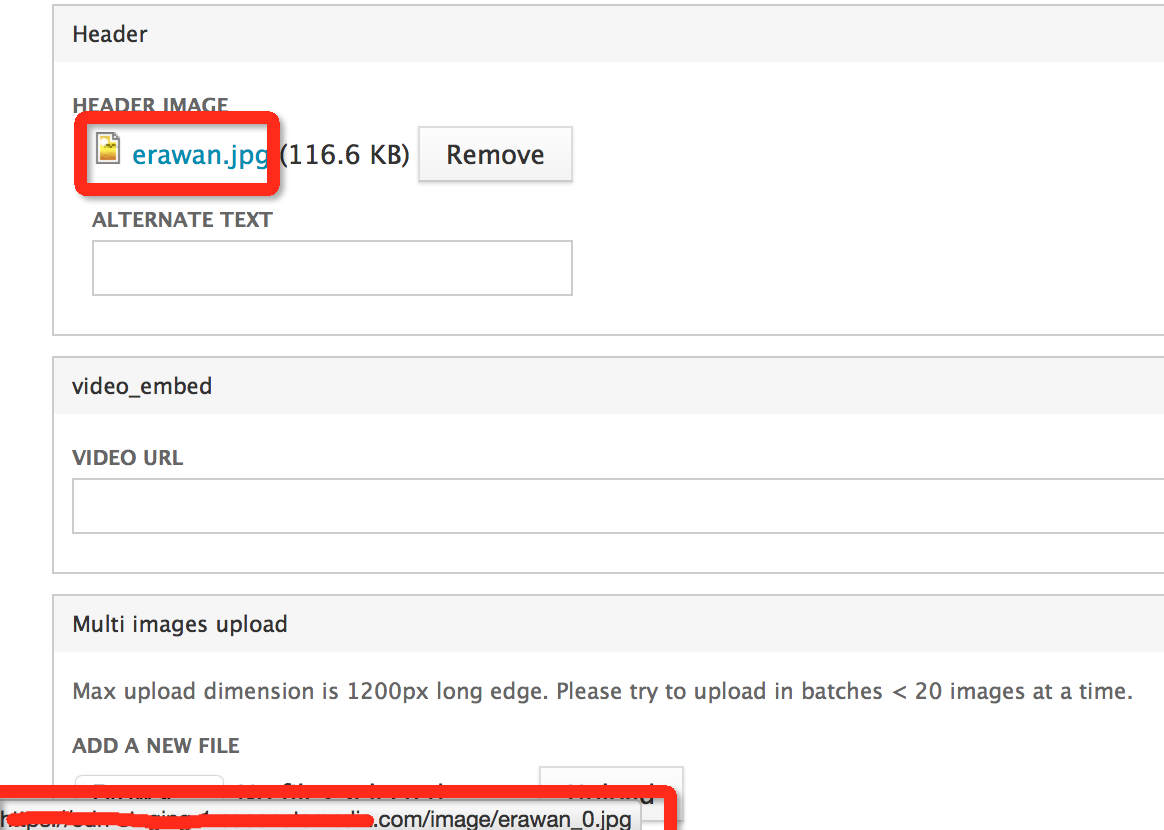
please kindly advice.
Access denied log for existing images
access warning amazons3/image-derivative/field/styles/teasers_menu_v2/image/ghosthead.png
denied
While in settings.php i already do
$conf['image_allow_insecure_derivatives'] = TRUE;
Keith
Comment #26
cloudbull commentedComment #27
deviantintegral commentedYou shouldn't need to flip the insecure derivatives setting - we do token validation when a derivative needs to be generated. Of course, you might need it for other reasons.
I just tested an upgrade with cloudfront, and I'm not seeing the same path issues. Is it possible that drush updatedb wasn't completely run? Update hook 7200 was modified in the beta3 release to add the bucket to all URLs, which would explain what you're seeing if 'field' is being used as the bucket name.
Comment #28
cloudbull commentedAfter copy 7200 code and run by drush scr, things work ! thanks a lot !
So, if i change to a new bucket name, i need to rerun 7200 ?
For the existing images, now 50% can be regenerate image styles, but the other 50% got this error:
Exception: Amazon S3 was unable to create an image style derivative. Check the temporary directory configuration and permissions. in amazons3_image_deliver() (line 139 of /var/www/html/sites/all/modules/contrib/amazons3/amazons3.module).
And looks like above cause by
The selected image handling toolkit gd can not correctly process image_gd_get_info.
Isnt it actually from PHP 5.5 ?
Do you have any idea ?
thanks
Keith
Comment #29
cloudbull commentedthe new .install file will create variable like amazons3_presigned_urls = ''; which cause below error.
Warning: Invalid argument supplied for foreach() in Drupal\amazons3\StreamWrapperConfiguration::fromDrupalVariables() (line 391 of /var/www/html/sites/all/modules/contrib/amazons3/src/StreamWrapperConfiguration.php).
Recoverable fatal error: Argument 1 passed to Drupal\amazons3\Matchable\BasicPath::factory() must be of the type array, string given, called in /var/www/html/sites/all/modules/contrib/amazons3/src/StreamWrapperConfiguration.php on line 400 and defined in Drupal\amazons3\Matchable\BasicPath::factory() (line 31 of /var/www/html/sites/all/modules/contrib/amazons3/src/Matchable/BasicPath.php).
It require to drush vdel amazons3_presigned_urls to fix the error
Comment #30
deviantintegral commentedSort of? We now support multiple buckets, so nothing prevents you from keeping the old bucket around (saving you having to move the files) while uploading new files to the new bucket. But if for some reason you have to change buckets entirely, you'd have to write a (small) update hook in your custom code to update the files_managed table.
Yeah... this turns out to be related to EXIF data dependent on the camera that took the image. It's a combination of a PHP issue and an AWS SDK issue. There's an issue over at Github and a pull request that could use some more testing.
I'm going to open a new issue for the amazons3_presigned_urls bug.