After partially following the setup instructions, visiting ./admin/reports/status/memcache results in a WSOD. Drupal's log reports:
Warning: require_once(/var/www/drupal/sites/all/libraries/memcache/etc/config.php): failed to open stream: No such file or directory in require_once() (line 35 of /var/www/drupal/sites/all/libraries/memcache/memcache.php.inc).
Line 35 actually references to config.php file that does not exist:
if (true === file_exists($localConfig)) {
    require_once $localConfig;
} else {
    require_once __DIR__ . '/etc/config.php';
}
The part I skipped during the setup of this module is "…you will also want to remove the $MEMCACHE_SERVERS variable in your memcache.php.inc file." It's not clear to me what occurence of $MEMCACHE_SERVERS should be removed (there are multiple).
Also, the URL referenced in README.txt isn't valid anymore:
# wget http://svn.php.net/viewvc/pecl/memcache/trunk/memcache.php?view=co
--2014-02-21 14:50:00--  http://svn.php.net/viewvc/pecl/memcache/trunk/memcache.php?view=co
Auflösen des Hostnamen svn.php.net... 213.189.17.212
Verbindungsaufbau zu svn.php.net|213.189.17.212|:80... verbunden.
HTTP-Anforderung gesendet, warte auf Antwort... 404 Not Found
2014-02-21 14:50:00 FEHLER 404: Not Found.
I downloaded the file from https://github.com/lagged/memcache.php/blob/master/memcache.php, which might be different.
Also it might be relevent which file permissions are required for the libraries' folder and the renamed file.
Thanks!



Comments
Comment #1
iamEAP commentedHi @asb, thanks for the report.
That the svn.php.net file / location is missing is definitely a problem. The file to which you've linked is sorely outdated (2008), the version that was previously linked was from 2010. I'm guessing that's the cause of the whitescreen. Could you try using this file?
http://git.php.net/?p=pecl/caching/memcache.git;a=blob;f=memcache.php;h=...
If it works properly for you, I'd be happy to update documentation with a proper link.
I think it's fairly obvious in that version of the file which instances of $MEMCACHE_SERVERS to delete. File permissions, unless specifically modified by the user, are unlikely to be an issue.
Comment #2
asb commentedThanks for the reply!
> Could you try using this file?
> http://git.php.net/?p=pecl/caching/memcache.git;a=blob;f=memcache.php;h=...
Yes, that one works better.
> If it works properly for you, I'd be happy to update documentation with a proper link.
A download link would be nice; I was unable to download a proper file with wget (tried the HEAD and RAW links). However, download locally and copy/paste into memcache.php.inc on the server works.
> I think it's fairly obvious in that version of the file which instances of $MEMCACHE_SERVERS to delete.
If you refer to the two lines above "END OF DEFAULT CONFIG AREA", yes that's pretty obvious.
OK, after removing these two lines I'm getting a memcache.php overview without data (attached screenshot "memcache-status_drupal.jpg") and without any integration into Drupal (even Admin Menu disappears). Is this module supposed to work this way?
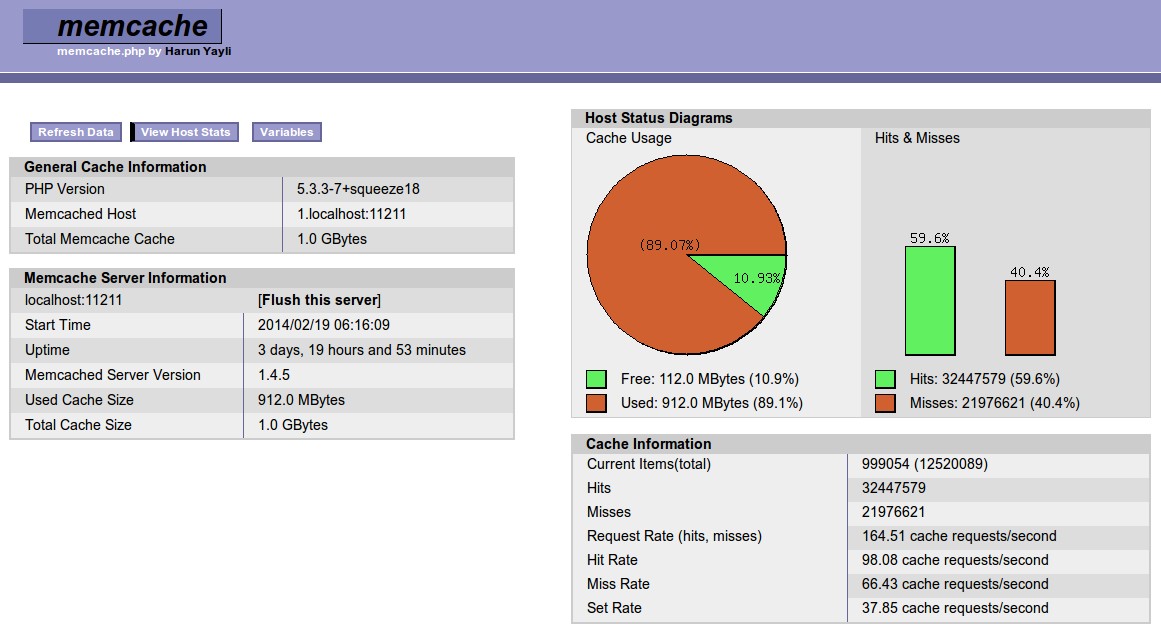
For comparison: Live data from a separate installation of memcache.php on the same server which does not use the Drupal module (attached screenshot "memcache-php-separate.jpg").
Comment #3
iamEAP commentedYes. It behaves similarly to /admin/reports/status/php and, if you have it installed, /admin/reports/status/apc.
Have you properly configured the memcache module in settings.php? E.g. $conf['memcache_servers']
Comment #4
asb commented> Have you properly configured the memcache module in settings.php? E.g. $conf['memcache_servers']
Yes, of course; why else would the stand-alone script harvest statistics?
However, the initial issue (WSOD) has been resolved, and I have no use for the module as it is, anyway. Thus closing the issue.
Comment #5
asb commented