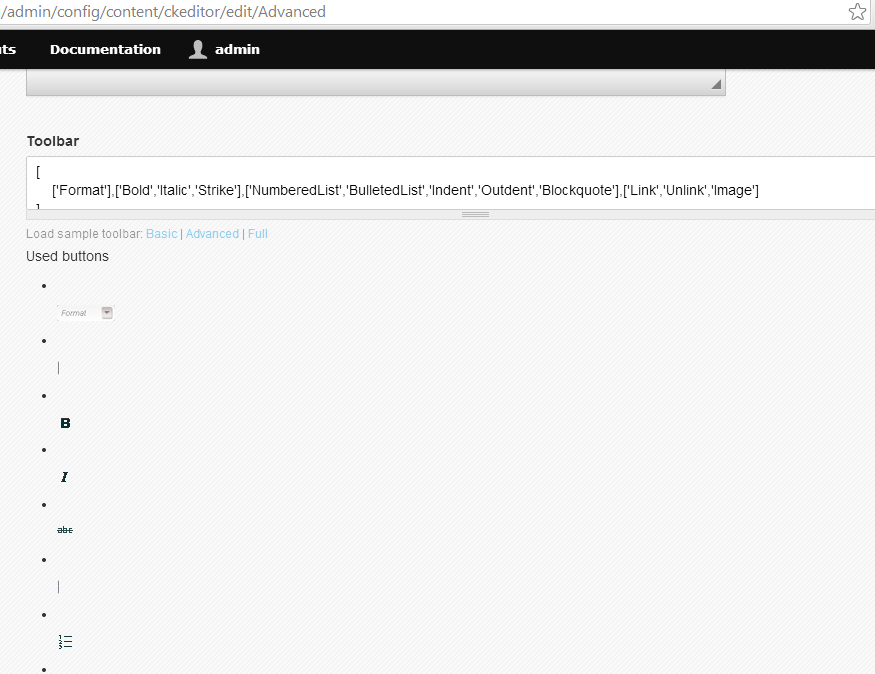
Since upgrading to 3.9, now the GUI for adding buttons and plugins to my ckeditor has broken.
This is on out-of-the-box commons 3.9 as well
- admin/config/content/ckeditor
- select one of your profiles
- select 'editor appearance'
- scroll down to where you can configure the tool bar
Used to be a nice drag and drop visual interface. Now the toolbar shows up as a text list of buttons (rather than a visual, drag-n-drop that displays the same as it does when using ckeditor to add content). And the display of all the buttons that could be added just show up in a long unformatted html list.
The ckeditor itself when i'm creating content is still fine, but the interface to edit its appearance is the part that is broken.


Comments
Comment #1
FunkMonkey commentedI can verify this behavior on my install of 3.9. I would add that it appears to be theme independent. I tried switching from Ember to AT Admin and 'Editor appearance' had the same issue.
Comment #2
WebSinPat commentedDitto that changing themes had no effect.
Also not sure if this part is user error or i'm just having a hard time finding buttons with the "new" layout, but enabling plugins seems to have no effect either. I'm trying to enable the media plugins (embedded media and inserting images via media) but after I have enabled them (checkmark next to them. and save the settings and clear caches for good measure.) I still don't see buttons for them nor do they alter the existing behavior of my image insert functionality (currently via imce).
Comment #3
FunkMonkey commentedIn regards to #2, I just discovered that the Media WYSIWYG sub-module was not enabled by default on my install. After enabling that, I now see an 'Add Media' button at the end of the list. I tried manually adding 'AddMedia' to the toolbar list but the button must be called something else internally. If I figure it out I will post it here.
Edit: It is just called 'Media'. Adding it to the toolbar list works and I see it, and it opens, on my WYSIWYG text boxes.
Comment #4
WebSinPat commentedGood catch @FunkMonkey!
So now with media_wysiwyg enabled, the media button is there.
And the weird 'editor appearance' interface still allows drag-n-drop between the unformatted lists, so I was able to drag the media button up to active buttons, which then eventually gave me
'Media'as the button name in the text toolbar config area.
Note that you then also have to enable 'Convert Media tags to markup' in your corresponding text filter. I also enabled the oEmbed filter. (But I can't test that because of the unrelated issue where I get logged out whenever I try to embed media, but that's a different matter going far afield of the OP.... )
Comment #5
WebSinPat commentedGoing even a bit further afield of the OP, now that I have the media button in the ckeditor, it makes me wonder why is the default in DC3.9 to have images attached to content, rather than in the body? Aside from technical reasons I don't know about, I suppose it has to do with being able to add media from the mini-browser without having to go to the full node/add form. For myself and my users though I think I might prefer to have only the option to add media to the body, in case i want to style it to fit with my text, but to do so from the mini-browser. (I can see this going either way though) But really I think the most detrimental part of the media attachment thing is how big and clunky the interface is, every time you want to make a quick post whether you want to add media or not, compared to having a nice sleek ckeditor button that is just a few px big and does the same functionality of getting you to the media browser dialog box.
/end of off topic musings.
Comment #6
devin carlson commentedA patch to update one of the patches to CKEditor.
Hopefully we can get some of the current patches into CKEditor as they can be a challenge to maintain.
If you have any suggestions for the media integration, I'd suggest filing them as separate issues so we don't lose any valuable discussion and can work on getting them into Commons. :)
Comment #7
devin carlson commentedTested #6 with an existing Commons site and verified that the CSS issues were resolved.
Committed #6 to Commons 7.x-3.x.
http://drupalcode.org/project/commons.git/commit/434c259
Comment #8
WebSinPat commentedThanks @Devin Carlson!
I do not know how to use the make file, so I wasn't sure how to apply the patch in #6 directly.
Instead I went to the file referenced in #6 :
https://drupal.org/files/issues/attach-ckeditor-css-1370894-8.patchand tried to apply that. But that did not apply because the code I have from the commons3.9 distribution is different from what the patch expects. So I modified the patch file to remove everything except creating the new css files in
profiles/commons/modules/contrib/ckeditor/css. (Meaning, I did not have any preexisting css files in ckeditor/. to delete, and the code changes to ckeditor.module and includes/*.inc were already done in the code in the distribution and did not need to be patched.)I was able to apply that, and now my UI is looking good! Thanks.
ymmv
Comment #9
WebSinPat commentedPer the comment in #6 #2205043: include Media button in ckeditor and consider removing media attachment field on all content types
;) (wink)