

 The 2026 Drupal Business Survey is open. Your response will help shape the future of the Drupal business ecosystem.
I had some problems with getting the "Entity Reference View Widget" propperly setup, so that why I wanted to share my steps to help other people struggling to get this very pratical module up-and-running.
In my example, I wanted to add "Related items" to my Product Displays, below are my steps how to this.
At the time of writing I'm using the 7.x-2.0-alpha2 version. And I added some screenshots to visually help.
1) Create a new view
Administration >> Structure >> Views >> "+ Add new view"
admin/structure/views/add
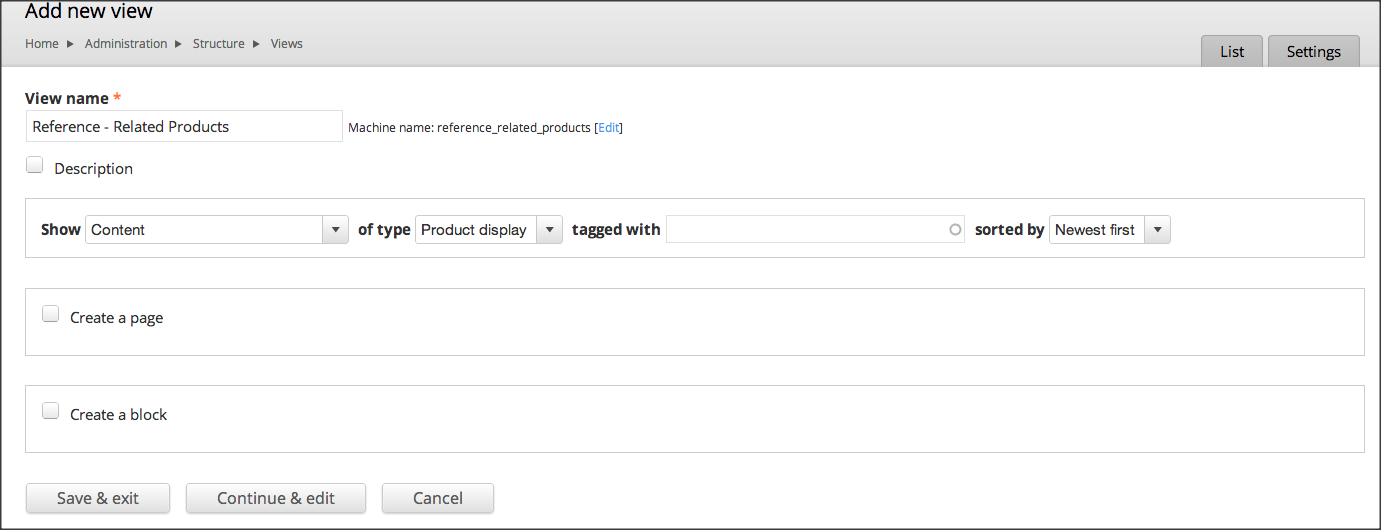
Give the view an unique name and select which "Entity/content" / "Type" you want to display.
Unselect "Create a page" and "Create a block"
Press "Continue & Edit"
In my case I wanted create view for just as selection option for "Content" / "ProductDisplay" as references, so there is no need for a Page or Block
2) Add "Entity Reference View Widget" as a Display type
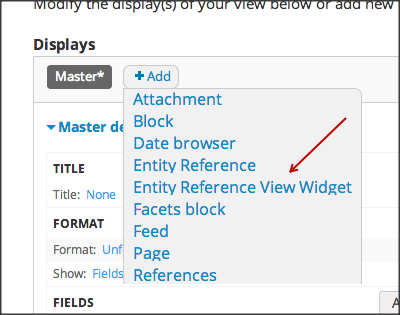
The next steps can vary depending on you personnal needs.
I wanted to show a simple list and not the "Rendered Entity"

View "Format" >> select "Table"
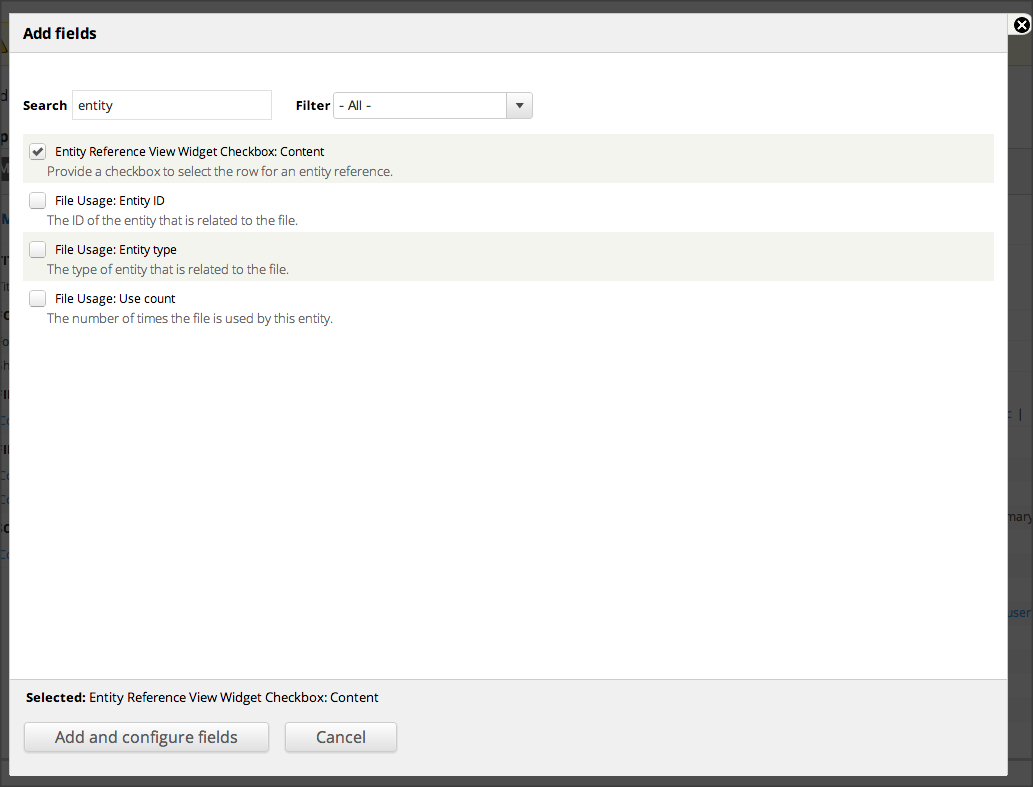
View "Fields" >> I added the following
- Entity Reference View Widget Checkbox: Content (Important since, this will add the checkboxes of the items you want to select as references)
- Title
Check that "Use Ajax" is set to "Yes", otherwise your view will behave strangly when trying to page, filter, ...
Next press "Save" to save the changes for the view
3) Edit your Content Type or Entity
Add or Edit the field with "Entity Reference"
Administration >> Structure >> Content types >> Product display >> Manage fields (in my example)

Check for the following "field" settings in your content type field:
- "View": make sure you select your "Entity Reference View Widget"
- Pass selected entity ids to view
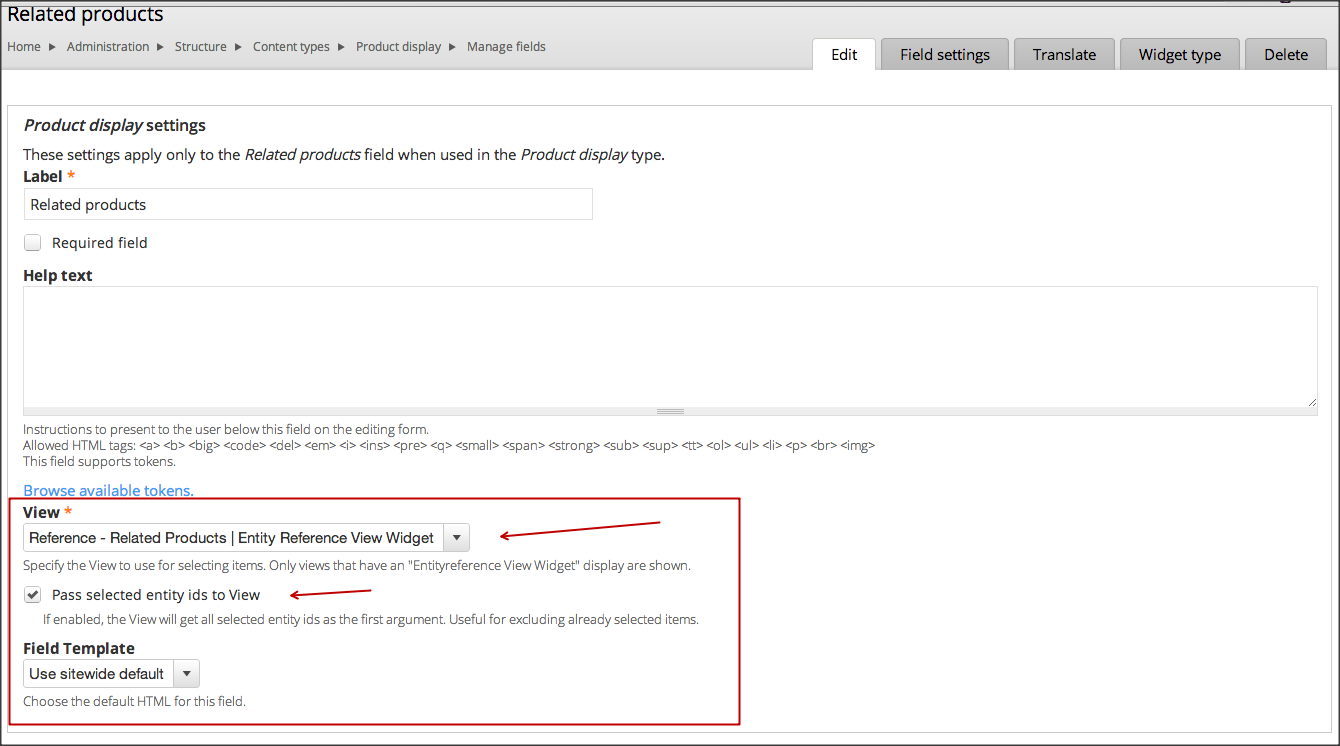
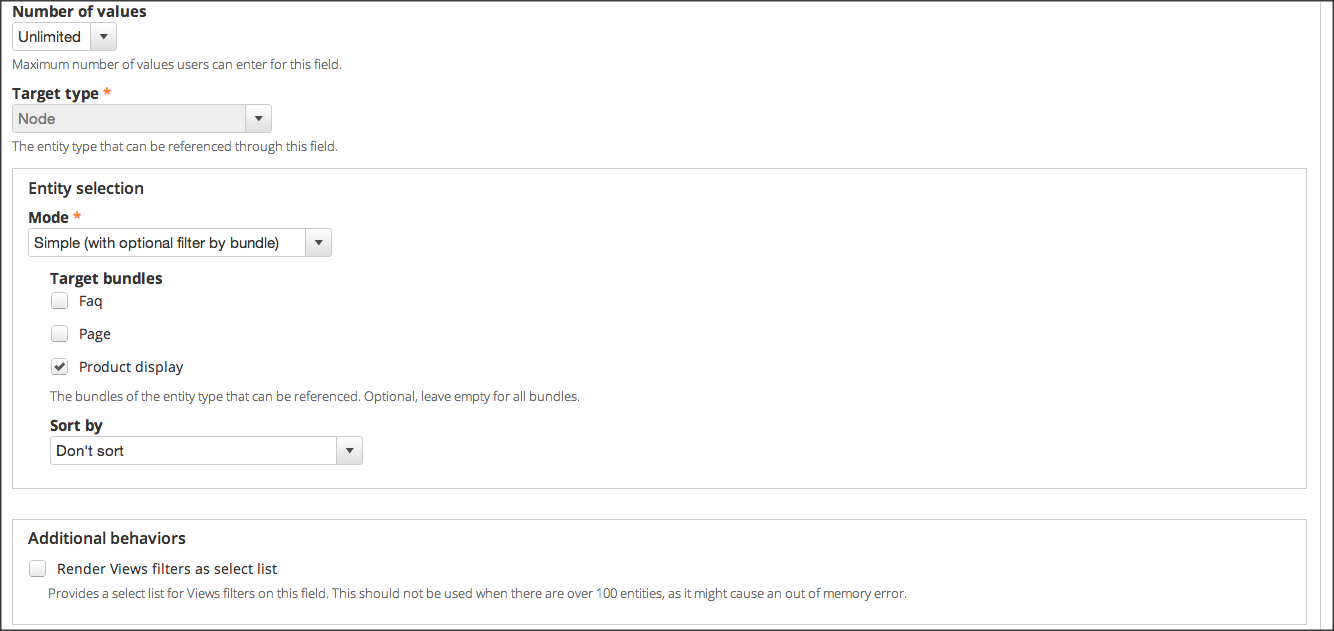
Press "Save settings"
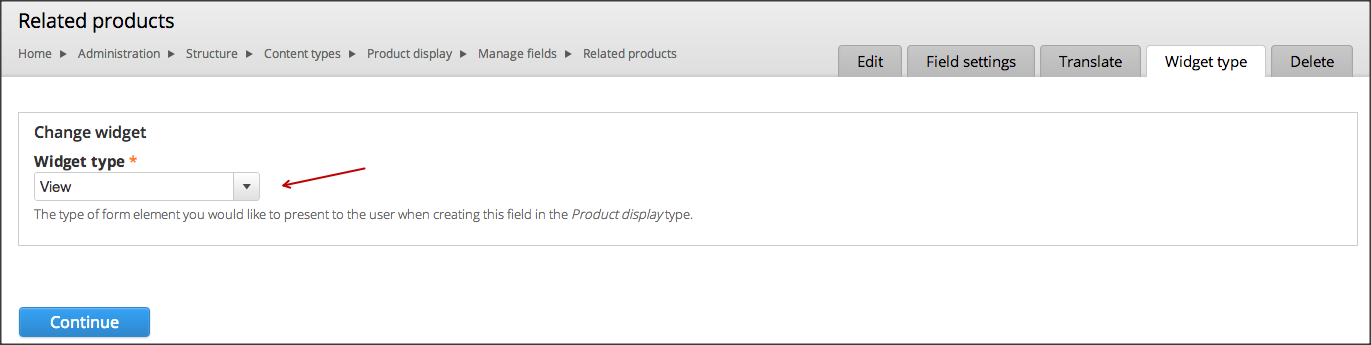
Next make sure your "field" - "widget type" is set to "View"

And now you are done.
-----------
Go to existing Node / Entity to "add items" (References) to it.
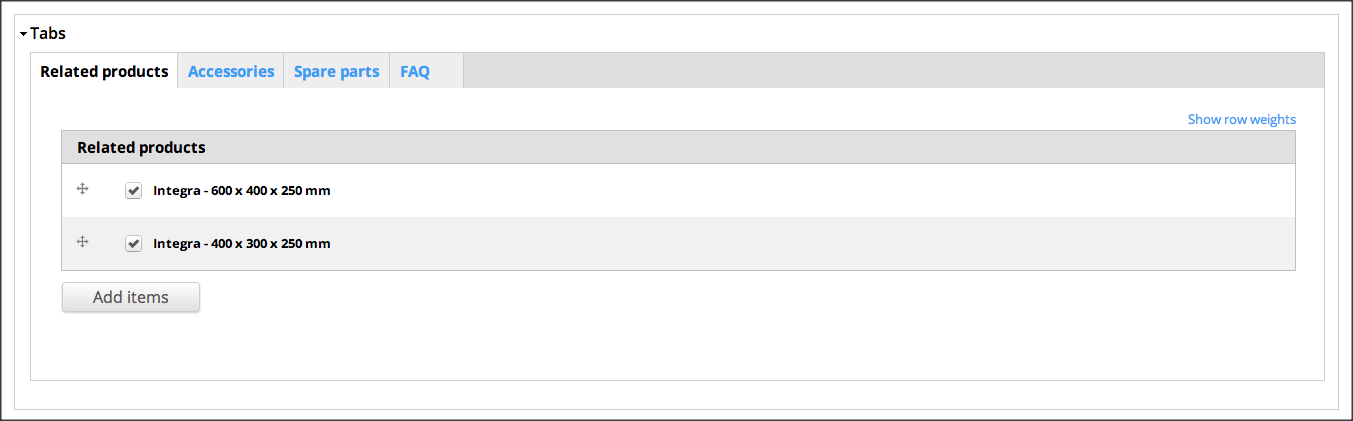
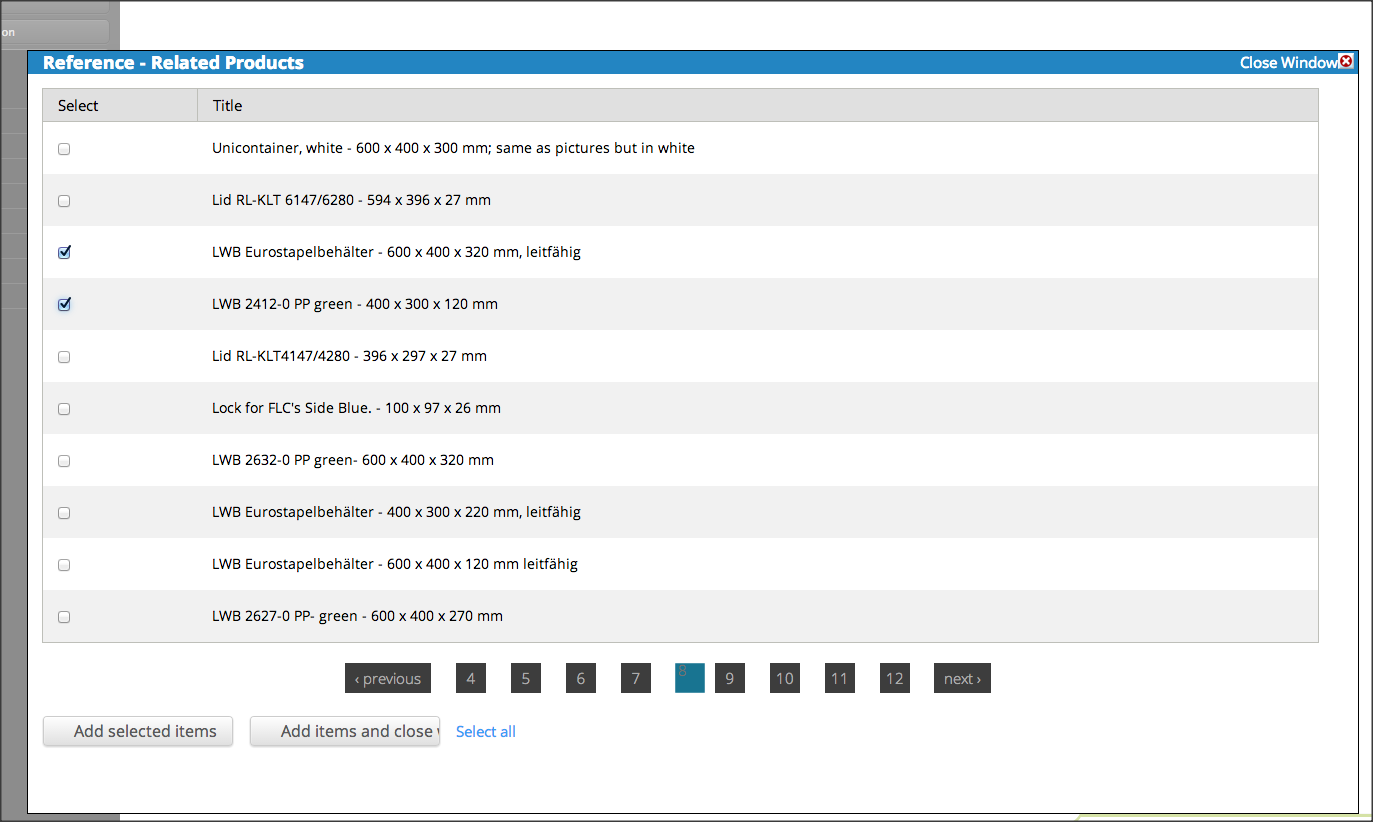
Add items triggers the Overlay with the view in it
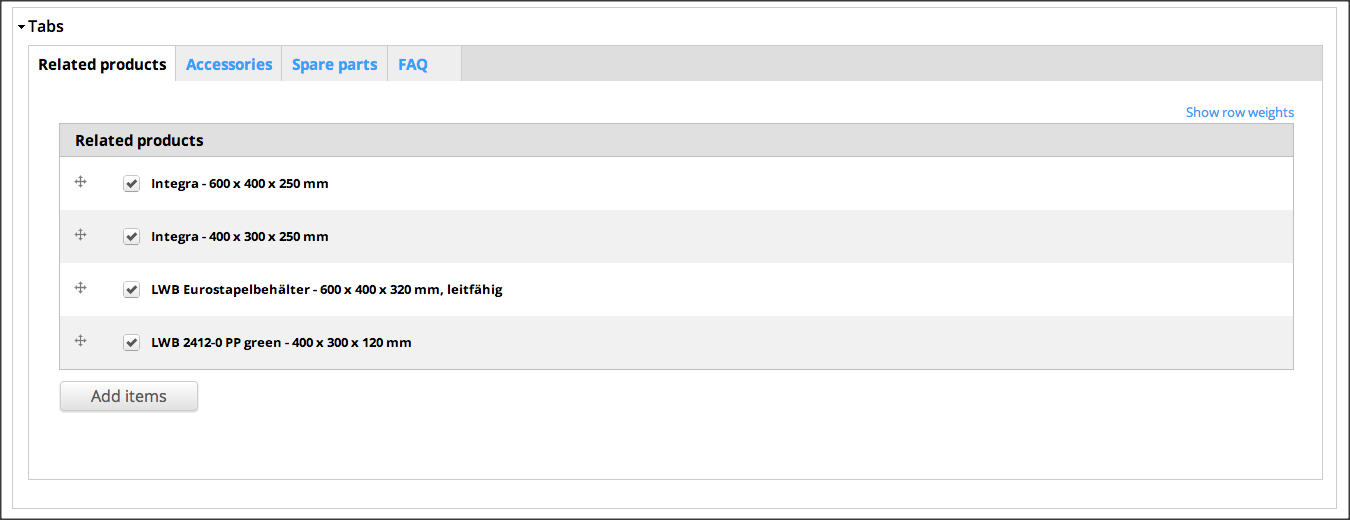
After selection
EXTRA
-----------
Add filter options (which is like adding a filter to any view)
1) Edit your view and "Entity Reference View Widget" as a Display type
2) Add a "FILTER CRITERIA" to the view
Select the desired field you want to filter on, next press "Apply"

Select the desired operator
Make sure you expose your field to the visitors, next press "Apply"
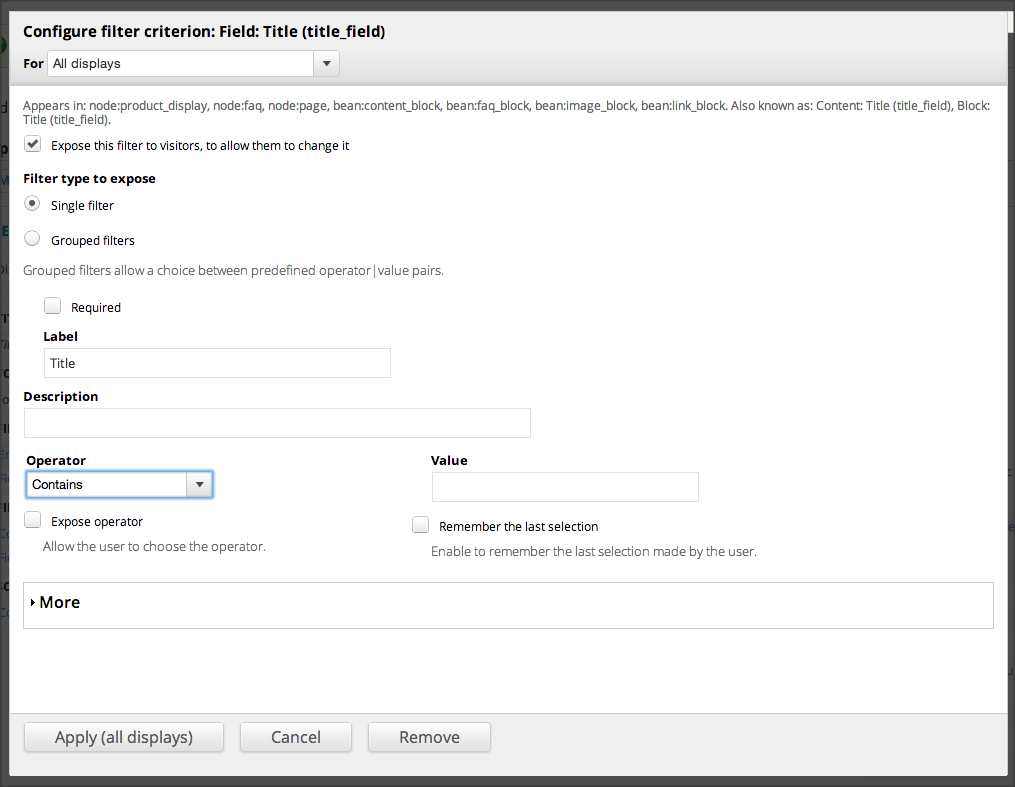
Let assume we want to add our "Title" field as a filter
And use the operator "Contains"
Next press "Save" to save the changes for the view
And now you are done.
-----------
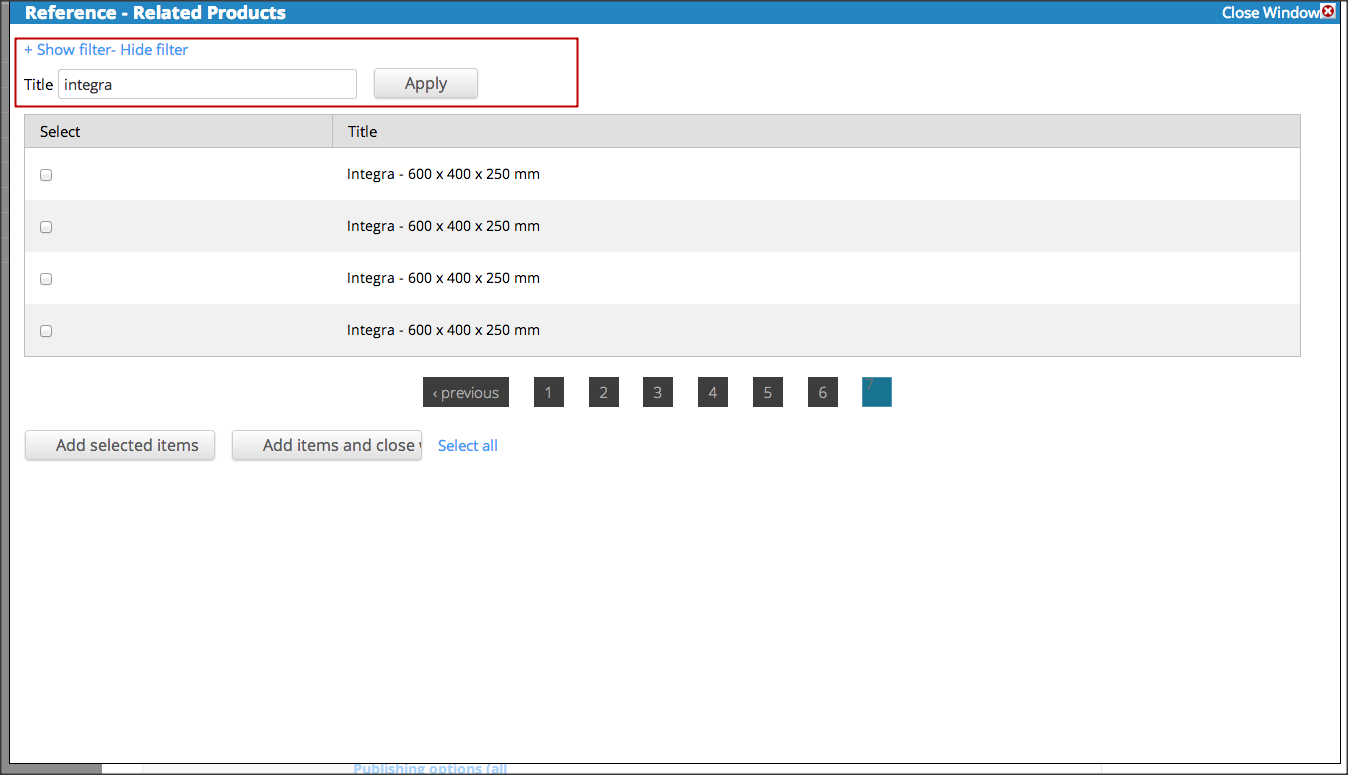
Go to existing Node / Entity to "add items" (References) to it.
On top of the overlay, you now the filter options.
| Comment | File | Size | Author |
|---|---|---|---|
| #1 | Snap 2014-04-07 at 11.55.18.png | 117.69 KB | thim |
| #1 | Snap 2014-04-07 at 11.46.46.png | 42.06 KB | thim |
| #1 | Snap 2014-04-07 at 11.42.11.png | 45.1 KB | thim |
| #1 | Snap 2014-04-07 at 11.41.39.png | 57.17 KB | thim |
| Snap 2014-04-07 at 11.35.11.png | 22.71 KB | thim |




Comments
Comment #1
thim commentedAdded some more screenshots
Comment #2
thim commentedInserted screenshots in text
Comment #3
thim commentedComment #4
thim commentedComment #5
thim commentedHow the hell can I show my screenshots inside my topic?
Comment #6
thim commentedComment #7
jsacksick commentedThank you for this, I created a documentation page (https://www.drupal.org/node/2305545), feel free to reedit it if you're up to :).
Comment #9
Graham Brown commentedI get this everytime I try to open the entity view widget field:
An AJAX HTTP error occurred.
HTTP Result Code: 404
Debugging information follows.
Path: /system/ajax
StatusText: Not Found
ResponseText:
Page not found | Boardplan
jQuery.extend(Drupal.settings, {"basePath":"\/","pathPrefix":"","ajaxPageState":{"theme":"at_magazine","theme_token":"PfEBPczP6jcQ34OpUfzBXNMFKwpwTHwWrfcgd16JDnM","js":{"misc\/jquery.js":1,"misc\/jquery.once.js":1,"misc\/drupal.js":1,"modules\/contextual\/contextual.js":1,"sites\/all\/modules\/fitvids\/fitvids.js":1,"sites\/all\/modules\/admin_menu\/admin_menu.js":1,"sites\/all\/libraries\/colorbox\/jquery.colorbox-min.js":1,"sites\/all\/modules\/colorbox\/js\/colorbox.js":1,"sites\/all\/modules\/colorbox\/styles\/default\/colorbox_style.js":1,"sites\/all\/modules\/colorbox\/js\/colorbox_load.js":1,"sites\/all\/libraries\/superfish\/jquery.hoverIntent.minified.js":1,"sites\/all\/libraries\/superfish\/sftouchscreen.js":1,"sites\/all\/libraries\/superfish\/supposition.js":1,"sites\/all\/libraries\/superfish\/jquery.bgiframe.min.js":1,"sites\/all\/libraries\/superfish\/superfish.js":1,"sites\/all\/libraries\/superfish\/supersubs.js":1,"sites\/all\/modules\/superfish\/superfish.js":1,"sites\/all\/themes\/at_magazine\/js\/eq.js":1,"sites\/all\/themes\/at_magazine\/js\/eq-gp.js":1,"sites\/all\/themes\/adaptivetheme\/at_core\/scripts\/scalefix.js":1,"sites\/all\/themes\/adaptivetheme\/at_core\/scripts\/matchMedia.js":1,"sites\/all\/themes\/adaptivetheme\/at_core\/scripts\/matchMedia.addListener.js":1,"sites\/all\/themes\/adaptivetheme\/at_core\/scripts\/outside-events.js":1,"sites\/all\/themes\/adaptivetheme\/at_core\/scripts\/menu-toggle.js":1},"css":{"modules\/system\/system.base.css":1,"modules\/system\/system.menus.css":1,"modules\/system\/system.messages.css":1,"modules\/system\/system.theme.css":1,"modules\/contextual\/contextual.css":1,"modules\/aggregator\/aggregator.css":1,"modules\/comment\/comment.css":1,"modules\/field\/theme\/field.css":1,"sites\/all\/modules\/fitvids\/fitvids.css":1,"modules\/node\/node.css":1,"modules\/poll\/poll.css":1,"modules\/search\/search.css":1,"modules\/user\/user.css":1,"sites\/all\/modules\/youtube\/css\/youtube.css":1,"modules\/forum\/forum.css":1,"sites\/all\/modules\/views\/css\/views.css":1,"sites\/all\/modules\/ckeditor\/css\/ckeditor.css":1,"sites\/all\/modules\/admin_menu\/admin_menu.css":1,"sites\/all\/modules\/admin_menu\/admin_menu.uid1.css":1,"sites\/all\/modules\/colorbox\/styles\/default\/colorbox_style.css":1,"sites\/all\/modules\/ctools\/css\/ctools.css":1,"sites\/all\/libraries\/superfish\/css\/superfish.css":1,"sites\/all\/themes\/adaptivetheme\/at_core\/css\/at.settings.style.headings.css":1,"sites\/all\/themes\/adaptivetheme\/at_core\/css\/at.settings.style.image.css":1,"sites\/all\/themes\/adaptivetheme\/at_core\/css\/at.layout.css":1,"sites\/all\/themes\/at_magazine\/css\/styles.base.css":1,"sites\/all\/themes\/at_magazine\/css\/styles.settings.css":1,"sites\/all\/themes\/at_magazine\/css\/styles.modules.css":1,"sites\/all\/themes\/at_magazine\/color\/colors.css":1,"public:\/\/adaptivetheme\/at_magazine_files\/at_magazine.default.layout.css":1,"public:\/\/adaptivetheme\/at_magazine_files\/at_magazine.responsive.layout.css":1,"public:\/\/adaptivetheme\/at_magazine_files\/at_magazine.fonts.css":1,"public:\/\/adaptivetheme\/at_magazine_files\/at_magazine.menutoggle.css":1,"public:\/\/adaptivetheme\/at_magazine_files\/at_magazine.responsive.styles.css":1,"public:\/\/adaptivetheme\/at_magazine_files\/at_magazine.custom.css":1,"sites\/all\/themes\/at_magazine\/css\/ie-6.css":1,"sites\/all\/themes\/at_magazine\/css\/ie-lte-7.css":1,"sites\/all\/themes\/at_magazine\/css\/ie-8.css":1,"sites\/all\/themes\/at_magazine\/css\/ie-lte-9.css":1}},"colorbox":{"opacity":"0.85","current":"{current} of {total}","previous":"\u00ab Prev","next":"Next \u00bb","close":"Close","maxWidth":"98%","maxHeight":"98%","fixed":true,"mobiledetect":true,"mobiledevicewidth":"480px"},"superfish":{"1":{"id":"1","sf":{"animation":{"opacity":"show"},"speed":"\u0027fast\u0027","autoArrows":false,"dropShadows":false,"disableHI":false},"plugins":{"touchscreen":{"mode":"always_active"},"supposition":true,"bgiframe":true,"supersubs":{"minWidth":"18","maxWidth":"27","extraWidth":1}}}},"adaptivetheme":{"at_magazine":{"layout_settings":{"bigscreen":"two-sidebars-right","tablet_landscape":"two-sidebars-right-stack","tablet_portrait":"one-col-vert","smalltouch_landscape":"one-col-stack","smalltouch_portrait":"one-col-stack"},"media_query_settings":{"bigscreen":"only screen and (min-width:1024px)","tablet_landscape":"only screen and (min-width:768px) and (max-width:1024px)","tablet_portrait":"only screen and (min-width:581px) and (max-width:768px)","smalltouch_landscape":"only screen and (min-width:321px) and (max-width:580px)","smalltouch_portrait":"only screen and (max-width:320px)"},"menu_toggle_settings":{"menu_toggle_tablet_portrait":"true","menu_toggle_tablet_landscape":"false"}}},"tableHeaderOffset":"Drupal.admin.height","admin_menu":{"destination":"destination=500.shtml","hash":"18673c69d6e58d9dfdae7cf16adc1215","basePath":"\/admin_menu","margin_top":1,"position_fixed":1}});
etc - any help would be greatly appreciated.