

Closed (fixed)
Project:
Focal Point
Version:
8.x-1.x-dev
Component:
Miscellaneous
Priority:
Normal
Category:
Bug report
Assigned:
Reporter:
Created:
10 Jan 2017 at 01:26 UTC
Updated:
28 Mar 2019 at 10:05 UTC
Jump to comment: Most recent, Most recent file


Comments
Comment #2
segovia94 commentedI tried this in simplytest.me to make sure that it wasn't my system, and everything worked fine there. This puzzled me since even a fresh install on my local had issues. This makes me think this is an issue with server setup. I'm using MAMP. I used chrome to take a look at headers for images
Local MAMP
-- General --
Request URL:http://d8/sites/default/files/styles/test/public/2017-01/horse.jpg?itok=-Bx0bT1N
Request Method:GET
Status Code:200 OK (from memory cache)
Remote Address:[::1]:80
-- Response Headers --
Accept-Ranges:bytes
Cache-Control:max-age=1209600
Content-Length:25473
Content-Type:image/jpeg
Date:Tue, 10 Jan 2017 02:03:26 GMT
ETag:"25c02bb-6381-545b3e3270100"
Expires:Tue, 24 Jan 2017 02:03:26 GMT
Last-Modified:Tue, 10 Jan 2017 02:03:16 GMT
Server:Apache
X-Content-Type-Options:nosniff
-- Request Headers --
Provisional headers are shown
-- Query String Parameters --
itok:-Bx0bT1N
SimplyTest.me
-- General --
Request URL:https://dg14w.ply.st/sites/default/files/styles/test/public/2017-01/bill...
Request Method:GET
Status Code:200 OK
Remote Address:138.201.254.28:443
-- Response Headers --
Accept-Ranges:bytes
Content-Length:12836
Content-Type:image/jpeg
Date:Tue, 10 Jan 2017 02:13:30 GMT
ETag:"3224-545b4071b36fb"
Last-Modified:Tue, 10 Jan 2017 02:13:19 GMT
Server:Apache/2.4.7 (Ubuntu)
Strict-Transport-Security:max-age=31536000; includeSubDomains
-- Request Headers --
Accept:image/webp,image/*,*/*;q=0.8
Accept-Encoding:gzip, deflate, sdch, br
Accept-Language:en-US,en;q=0.8
Connection:keep-alive
Host:dg14w.ply.st
If-Modified-Since:Tue, 10 Jan 2017 02:10:34 GMT
If-None-Match:"357d-545b3fd46ab51"
Referer:https://dg14w.ply.st/node/3
User-Agent:Mozilla/5.0 (Macintosh; Intel Mac OS X 10_11_6) AppleWebKit/537.36 (KHTML, like Gecko) Chrome/55.0.2883.95 Safari/537.36
-- Query String Parameters --
itok:6BtfRqqS
It appears that my local is passing a Cache-Control which makes the browser load the cached image instead of fetching the new one. I believe issues like this are the whole reason for a itok query string correct?
Comment #3
bleen commentedThe real reason for the itok is to prevent a denial of service attack caused by someone nefarious bringing down your server by requesting images...
Comment #4
segovia94 commentedGotcha. I thought it was like the css an js aggregator cache query string. Ok, is there a way forward with this? How do we force the browser to accept the new image instead of pulling from its cache? I can't imagine I'm an isolated case.
Comment #5
bleen commentedI think you need to configure your server to not use cache-control for images, no?
Comment #6
moshe weitzman commentedDisabling image caching by CDN/Varnish is not reasonable for many sites. Image caching is one of the most basic benefits of a CDN. This came up before at #2590061: Change focal point position doesn't effect CDN/Varnish cached images. I can work on enhancing the various Purge modules to react to a focal point change once we figure out what event to listen for.
Comment #7
bleen commentedI'm a bit confused. I thought that by flushing the image derivatives the (relevant) internal drupal caches would be invalided and that would propagate all the way out to the headers that a CDN typically uses, no? Based on this it sounds like I've been making a wrong assumption all this time ... maybe?
That said...
The triggering event should be an update to the crop entity that stores the focal point position. I'm happy to work with you on getting images to be invalidated properly but this is definitely not my area of expertise.
Comment #8
moshe weitzman commentedYeah, I think that assumption was incorrect. Nothing reaches out to Varnish/CDN to tell them that a derivative has been flushed in Drupal. The would be the job of a Purge plugin ... Thanks for highlighting the crop entity update.
I poked around crop module earlier this morning and found #2658268: Cache persistence after derivative creation. That bypasses the problem entirely by changing a derivative's url when a crop entity updates. Once that patch is merged, we won't need to do any purging. I 'll post support there after using the patch for a bit.
All in all, I think this issue can be closed as duplicate of above issue.
Comment #9
bleen commentedSounds good
Comment #10
aaronbaumanThe solution in #2658268 has been merged, and focal point image styles still exhibit this issue.
The problem is that #2658268 is specific based on crop module's settings.
The key bit is here:
Focal point image styles don't have any "crop_type" data config, so this test fails and the cache-busting url query string param doesn't get added to the derivative's URL.
I can think of a couple ways to move this forward:
1. Take advantage of crop module's solution by adding a dummy "crop_type" index to focal point's config data.
2. Re-implement a similar hook_file_url_alter for focal point
I'm gonna work on a patch for #1
Comment #11
aaronbaumanAdds a default "crop_type" configuration to FocalPointScaleAndCropImageEffect to take advantage of crop_file_url_alter()'s cache invalidation strategy.
Comment #13
aaronbaumannow with correct file path.
derp.
Comment #15
aaronbaumanone more try tonight... oy
Comment #16
bleen commentedCan you give me exact steps to reproduce? I've never seen a situation where a crop entity created by focal point is missing a crop type (though I haven't ever been specifically looking).
If it turns out that your solution is correct it needs a better comment, but the code seems sound.
Comment #17
aaronbaumanit's not that the focal point doesn't have an associated crop, it's that the focal point image effect doesn't define a "crop_type" key in its configuration. so, when crop_file_url_alter fires, crop doesn't interpret the focal point image effect as a cropping effect.
CropEffect uses a "crop_type" to track the admin-configurable crop type assigned to an image effect.
FocalPointScaleAndCropImageEffect doesn't *need* a crop_type, because it always uses the "focal_point" crop that comes packaged with this module.
We're adding it only to take advantage of the crop_file_url_alter cache-invalidation mechanism.
I've altered the patch slightly, so that it replicates CropEffect::defaultConfiguration
In terms of reproducing, we're dealing with edge caching, which makes it tricky to see the caching action, but it's easy to observe the conditions that lead to it:
1. create a focal-point cropped image
2. load the image, and note the image URL
3. change the focal point, and re-save the image
4. reload the image, and note the image URL again
if the URLs from 2 and 4 are the same, then the edge cache will see them as the same image.
Comment #18
dkosbob commented#15 is working great for me and fixed a problem that was a bit a of a headache for a while. I assume the patch in #17 is just as effective.
Comment #19
ironsizide commentedI've tested the patch n #17 and it's working reliably for me.
Comment #20
bleen commentedDid the three of you really test this independently or just look at one person's screen? :D
Ill look into the steps you mentioned in #17 and see what I can see
Comment #21
bleen commentedYou're referring to the itok value, right?
Comment #22
aaronbaumanNeither the query string (including itok value) nor the path changes when a focal point is updated for an image.
The entire URL is identical.
The solution in crop_file_url_alter is to add an additional url param, which gets updated based on crop->anchor() and crop->position().
From crop.module:
ie. a unique URL for every possible unique crop.
Comment #23
bleen commentedCan we change this to "Include a `crop_type` so that the crop object can act on images generated using this effect."
@see https://www.drupal.org/node/2842260
Comment #24
aaronbaumanUpdate comment block to:
Comment #25
badrange commentedI added this patch to my local environment and started getting new
itoksfor the images after moving the focal point and saving the images. BUT the images do not get recreated until I then select the preview button. I created https://www.drupal.org/node/2906631 for this and stupidly forgot to add a comment here.Comment #26
bleen commented@badrange ... I'm confused that you are getting new itoks. They should not be changing. Do you have any other image and/or caching related modules installed?
Also, just to be clear can you post your exact steps to reproduce so we can try to get to the bottom of this
Comment #27
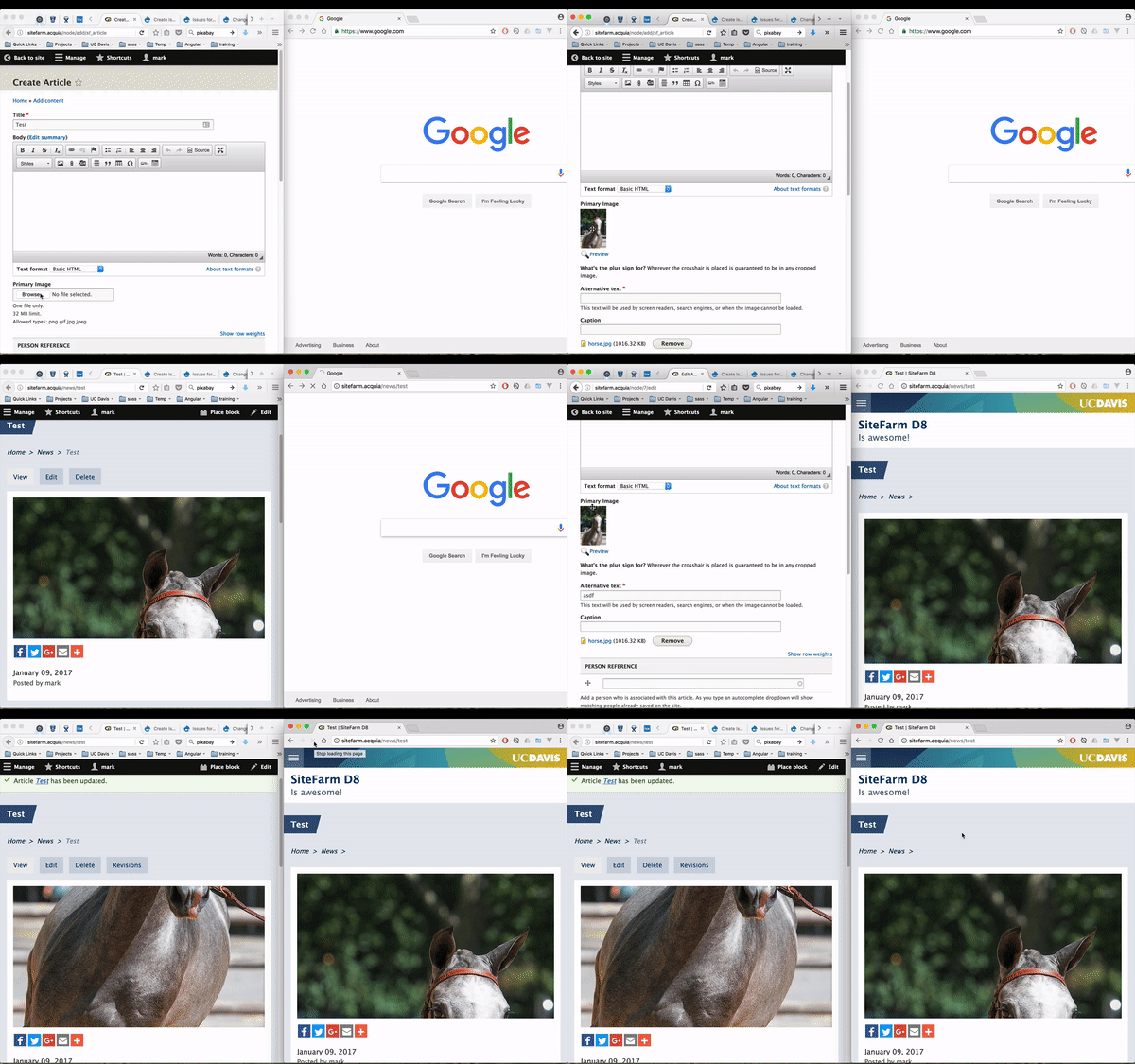
badrange commentedHere is a video showing what I'm doing:
https://photos.google.com/share/AF1QipOOkbmC1bVhppAfhUInT9SS7994a1wO0JqL...
Basically:
1. Upload image, set focal point in bottom right corner
2. Save node, see how it looks, be unhappy about result
3. Edit node, edit image entity, set focal point in top right corner
4. Save image entity - verify that focal point is moved by opening the media entity in a new tab
5. Save node (or don't save node, makes no difference)
6. See that the image stays the same. Refresh the page. Nothing changes. Refresh again. Nothing.
7. Edit image entity, click preview
8. Open node again, see that image has ben updated, finally
Project uses crop 1.2, latest git revision of focal_point with the patch in this issue. My Drupal instance runs in a Ubuntu Vagrant box with nginx, php-fpm, php 7.0, image library is gd (of all things) and we have set up redis as a cache backend.
Comment #28
aaronbaumanSounds like your issue is similar but not related, badrange.
This issue is about cache expiration for anonymous users or for front-end proxy cache like varnish.
Comment #29
badrange commentedThat's why I created https://www.drupal.org/node/2906631 - I just changed it's status from being duplicate to active again. [Note: Comment edited to point to the correct issue]
Comment #31
bleen commentedtested and committed #24
Comment #32
badrange commentedGood news, Thank you!
And I just realised that I referenced the wrong issue in my comment above; this is the one I meant to refer to:
https://www.drupal.org/node/2906631
Comment #34
RaisinBranCrunch commentedIs there a reason this was added to FocalPointScaleAndCropImageEffect but not FocalPointCropImageEffect or FocalPointEffectBase? Seems like it should be on all of them, or at least the base, right?
And, just to confirm based on what I read in the comments from these issues, the solution was not to change the itok but rather to change Drupal's response from 304 to 200, causing CDNs to update? Is that right?
Comment #35
berdirThis adds a second argument to the image style URL, a hash based on the crop configuration, so if that changes, it will generate a new URL, and it will be cached separately by the CDN. See crop_file_url_alter().
But yes, that it is not on all relelvant classes might be a bug, I suggest you open a new issue.
Comment #36
aaronbauman@RaisinBranCrunch i think you're right, FocalPointCropImageEffect should have the same default config, but actually not FocalPointEffectBase.
Conceivably, FocalPointEffectBase could be extended with a non-cropping image effect, so shouldn't make that assumption.
Agree with Berdir, please open a new issue and link it here.
Comment #37
RaisinBranCrunch commentedOkay, I created and linked the issue. This feature we're using was added in Crop API version 8.x-1.3, right? That's what it looks like. We're still using 1.2, which is another reason I was confused.
Comment #38
aaronbaumanThe Crop API patch was committed on March 22, and Crop 1.2 was released in April, so it should be in there.
https://www.drupal.org/commitlog/commit/72175/0b9a1051934032cb4f799615c6...
https://www.drupal.org/project/crop/releases/8.x-1.2
Comment #39
RaisinBranCrunch commentedOh, I see.
PublicStream::basePath() evaluates to sites/default/files... so the crop module (1.2) is looking for sites/default/files/styles/ in the $uri, when the $uri is coming in as the string:
public:://styles/thumbnail/public/image.jpg
And, also, we're using S3FS so urls will never come in as sites/default/files. It looks like 1.3 crop will fix this for us, though.
Thanks for the info.
Comment #40
nvakenFYI, if you had focal_point-cache_buster-2842260-24.patch setup in your composer.json as a patch, be aware that this patch will still apply cleanly when you update focal point. This will result in a fatal error and tear down your website.
Fatal error: Cannot redeclare Drupal\\focal_point\\Plugin\\ImageEffect\\FocalPointScaleAndCropImageEffect::defaultConfiguration()