Hi there,
I've run into the following bug. When using a view with exposed filters in a modal (ajax enabled for the view), the exposed form stops working when closing and opening the modal again. Hitting the apply button has no effect and a js error about scrolltotop is thrown.
The drupal and views ajax are complex, and I'm not completely sure what happens. As far as I can see, settings coming from the view page are added to the parent page and a list of ajax views is built up there each time the modal with the view is opened.
Some tests / observations:
Inside Drupal.views.ajaxView this.$exposed_form.once('exposed-form').each($.proxy(this.attachExposedFormAjax, this)); is called. When the once is removed, the form submits again.
The js error inside Drupal.AjaxCommands.prototype.viewsScrollTop can be fixed by checking for the existence of the response.selector element first.
A similar issue is reported on entity reference browser: https://www.drupal.org/node/2844659.


Comments
Comment #2
cilefen commentedCould you share with us the error messages?
Comment #5
mogio_hh commentedComment #6
cilefen commentedComment #8
daniel korteI had this same problem, but I think it is because the
drupalSettings.views.ajaxViewsandDrupal.views.instancesobjects become stale and Views attempts to perform actions on a removed View. The attached patch fixed my exposed filter View inside a dialog when opening the dialog multiple times.Comment #9
shaunlaws commentedI am looking at this in the DrupalCon 2018 Nashville sprint. Anyone have a exported view that I can import to try this out?
Comment #10
shaunlaws commentedI started looking at this but I realize that I don't have enough information to proceed. If anyone can give me full information on how to reproduce the issue I'd really appreciate it. Thanks!
Comment #11
samuel.mortensonI saw the same bug when working on #2962525: Create a field widget for the Media library module, and #8 fixed it for me.
To replicate:
1. Install the Standard profile.
2. Apply latest combined patch from #2962110: Add the Media Library module to Drupal core.
3. Create some Media.
4. Add a Media field to the Article content type, and choose the "Media library" field widget in the form display tab.
5. Visit /node/add/article and open the Media library. Use the exposed form to filter results.
6. Close and re-open the Media library modal, then try to use the exposed form again.
7. See an error in your browser's console.
Comment #12
GrandmaGlassesRopeMan- es6 cleanup.
Comment #13
samuel.mortensonFrom testing this patch I noticed that "context" is sometimes the top level
.js-view-dom-id-*element. Should we change this check to$(selector, context).length || $(context).is(selector)?Comment #14
phenaproximaThis is a hard blocker for the Media Library being shippable in 8.6 (specifically #2962525: Create a field widget for the Media library module), so I'm escalating it.
Comment #15
phenaproximaThis needs a test. However, I think we can leverage the existing Media Library view for this purpose (it has AJAX-ey exposed filters), plus a test module which can open it in a modal.
Comment #16
phenaproximaI wrote a test leveraging the existing test infrastructure for the Media Library module, which confirms the failure. The patch in #12 doesn't seem to fix it, though. That said...at least we have a test now.
Comment #17
phenaproximaWhoops; forgot to remove the Selenium stuff from MediaLibraryTest.
Comment #21
samuel.mortensonI did some test coverage tweaks and this seems to be working now. Uploading test only (FAIL) patch as well as interdiff.
The main problem was that dialogs have a feature that hides buttons within the dialog, then clone them to a statically positioned button pane. That means there were two "Apply Filters" buttons on pages, and the hidden was being clicked, which caused GastonJS to throw an error. Targeting the filter button in the buttonpane fixed the bug.
Comment #23
samuel.mortensonComment #24
dawehnerThis looks sane overall! The views-view.html.twig always add the necessary css class.
Comment #25
dawehnerComment #27
phenaproximaNeeds a reroll.
Comment #28
samuel.mortensonRe-roll.
Comment #29
phenaproximaRestoring RTBC once green.
Comment #31
phenaproximaHere we go again...
Comment #32
samuel.mortensonRe-roll, putting back to RTBC because no code changed.
Comment #33
alexpottIt seems odd to add important views testing to the media library module. I think we should be testing this from the views module.
Comment #34
phenaproximaDiscussed with @alexpott on Slack and it was decided that it's best for the test to be in Views now (rather than move/copy it in a follow-up) since that is a critical (and stable) module -- therefore, tests for it should not live or depend on an experimental module. Kicking back for that.
EDIT: Alex had this advice, as far as what the test view should be listing (i.e., what entity type):
Comment #35
samuel.mortensonI moved the test coverage to the Views module, in the existing exposed filter test.
Comment #38
samuel.mortensonAh, left debug code in yet again.
Comment #40
samuel.mortensonComment #41
tim.plunkettComment #42
tim.plunkettLost me review when adding that tag, whoops.
Is this how you're supposed to get at this value these days? Not using settings from the function params?
Would be good to have a JS expert sign-off on this part.
This part I'm good with, +1 :)
Comment #43
samuel.mortensonFor #42.1: Normally
settingswould be used, but this logic is mimicking the logic inDrupal.behaviors.ViewsAjaxView.attachand using the globaldrupalSettings. We would need to change both functions to usesettings, and I'm not sure what the impact of that would be.Comment #44
GrandmaGlassesRopeMan➡ #42.1 - You really should be using the settings passed when the detach function is called. If you look in
Drupal.detachBehaviors, you'll seesettings = settings || drupalSettings;. You can see you're already usingdrupalSettingsalready.➡ #42.2/3 - See additional comments below.
Since we've updated our eslint version, there are some new rules. This should be destructred by default.
const { views: { ajaxViews } } = drupalSettings;If ajaxViews is ever not a thing, use an empty object so we don't blow up the rest of the page. 👍
This really only works if no more references to the same property are held. You might consider setting this to null or something else.
Comment #45
samuel.mortensonAddressing #44:
1. Fixed.
2. :)
3. We discussed this in chat and will keep
deletefor now.Comment #46
phenaproximaInterdiff looks right to me and addresses all feedback from @tim.plunkett and @drpal. RTBC once green on all backends.
Comment #47
larowlanwhat if someone overrides the template that provides this class? I realise we're mostly concerned with media library, which would use an admin theme with known templates, but I think this could also impact front-end views, with unknown templates. In those cases is it kind of like contextual links - you accept that your stuff will break? We already store a reference to the element at the time of instantiation (in Drupal.views.instances[i]) can we use that instead?
Comment #48
samuel.mortenson@larowlan This class is also used in
Drupal.views.ajaxView, so if a theme overrides it AJAX views will already break. As I understand it, classes prefixed with "js-" should not be modified or removed by themes, which is why (almost) all classes used in JS selectors are prefixed.Comment #49
larowlanok, thanks
adding review credits for reviews that shaped the patch
Comment #52
larowlanFixed on commit
Committed as ac310db and pushed to 8.7.x.
Cheerily picked as ab1b9a6 and pushed to 8.6.x
Comment #54
nicothezulu commentedHi there!
After updating a Drupal core, I faced an issue with the ajax exposed forms at views.
All the views are ok, after first ajax form submit but the second submit looses ajax.
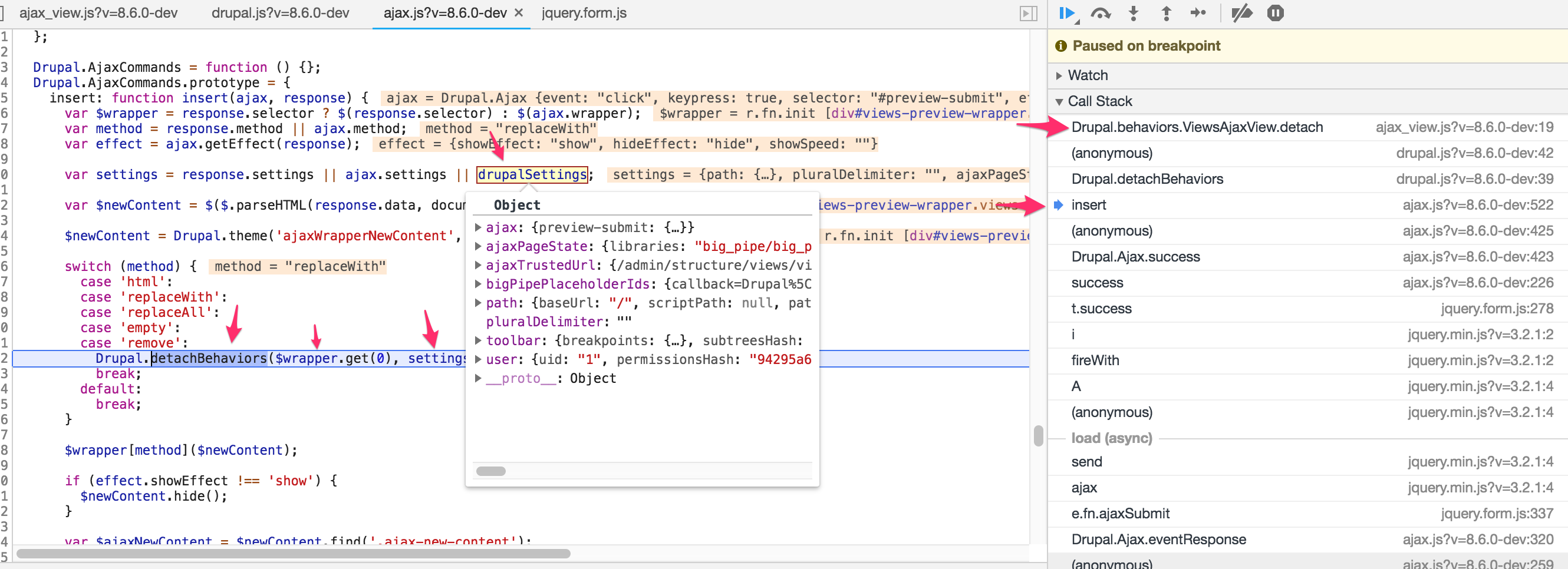
Narrowed down the issue, the root cause is that the Drupal.behaviors.ViewsAjaxView.detach
function clears the view instance from Drupal.views.instances.
As a workaround I added a function nuller at the top of my theme's js attach...
Comment #55
daniel korte@nicothezulu I also ran into this issue. See my patch here: #2968207: Allow multiple instances of the same exposed filter form on a single page