I am using the module, latest version 2.0.5, and have attached a GTM code. The script is loaded both in the header and in the body - with the tag.
Although I can see the script is loaded, when I attempt to run Google Search Console, I receive the following error: " Verification method:
Google Tag Manager
Failure reason:
The Google Tag Manager snippet on your site is in the wrong location on the page. Find out more".
Is there an issue with the way the JS script is loaded?
Before the upgrade, when I was using version 1.x, I was able to use Google Search Console without any issues. What could be causing this problem in the new version?
The GTM code implementation has not changed.
The problem started occurring immediately after upgrading to version 2.0.5.
Thank you!


 Show commands
 changes


Comments
Comment #2
ioana apetri commentedComment #3
jmester13 commentedI'm running 2.0.4 and also getting this in Search Console.
tag is being places inside the
Comment #4
hommesreponse commentedSame problem here. Running version 2.04
Comment #5
jmester13 commentedUpdate here, be sure to check you GA account settings.
Admin > Account > Account Details. Be sure that Data Processing Terms is unchecked. My website is US based and doesn't have GDPR requirements.
Comment #6
ioana apetri commentedCan you provide me more details, how to set up this option? I can't find any 'Data Processing Terms'.
Thank you!
Comment #7
leen.diab commentedHi all! Our team has started receiving the following error on Google Analaytics: Your Google Tag code isn’t configured correctly, which may soon prevent your property from measuring automatic events. To fix this, place your Google Tag configuration code in the correct location on all pages that measure events.
We presume this is because of the new GTM updates that require script tags to be placed in the head tag, rather than the body tag. Currently, this module only places a script tag in the body of our site.
How have people configured the tags to show up in the head? And has anyone else encountered this GTM error before?
Thank you :)
Comment #8
marcusx commentedI can confirm that Google complains about the placement of the gtag.js script.
See:
https://support.google.com/tagmanager/answer/14847097?sjid=4908559106955...
I patched the
google_tag.libraries.ymlfile. Can someone confirm that this creates not a problem elsewhere?I also had to switch off consent mode (on the Google_tag settings page, at the bottom) (which switches on the default gtag settings) and put the default values manually in the head tag at the very first line. I was unable to alter the module logic to achieve this goal through an alter API call. But I had not enough time to dig deep into that. Considering that, putting the settings into
html.html.twiga hack. Better ideas are appreciated.Comment #9
marcusx commentedComment #13
japerryComment #14
newaytech commentedThanks for all the work on the GTM module - sorry I didn't see this issue earlier to chime in...
We use CookieBot to set consent - so need opportunity for that to load - provide consent signals to the dataLayer - for us to then utilise those within the framework of GTM. At the moment with this addition - the placement of all the Google Tag code in the header is causing the dataLayer events to be pushed prior to consent being delivered by CookieBot. The other side effect here is that we pull a heap more Javascript up into the head - slowing the perceived page rendering speed by Google.
Is it possible for me to retrospectively apply a dependency on my CookieBot cookie library such that the cookie code always runs first - at the moment it is being called after the gtag / ajax & gtm javascript files...
Comment #16
adixon commentedThis patch should be reverted asap, it causes issues with Olivero. See below:
https://www.drupal.org/project/drupal/issues/3474666
https://www.drupal.org/project/google_tag/issues/3468036#comment-15811949
Comment #17
andyg5000Adding the items to header is causing ajax to break on my site unless there's a session present. I'm not sure why, but let's discuss in #3468036: On 2.0.6, Uncaught TypeError: Cannot read properties of undefined (reading 'apply')
Comment #18
anybodyAnother follow-up: #3549374: Synchronous JS in <head> blocks the critical render path
Comment #19
nitesh624yes putting the complete drupalSettings data in head section may cause serious performance impact.
Comment #20
nitesh624I am still getting below error when using Google Tag Manager verification method on the search console.
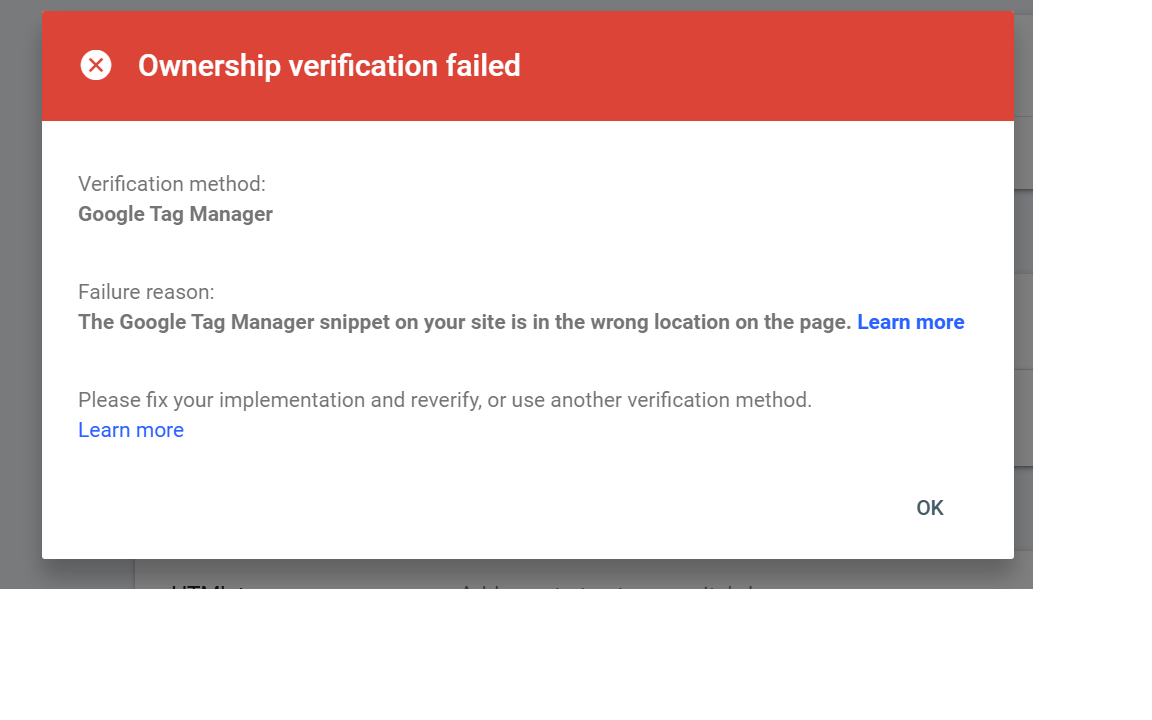
its not due to the placement of
gtm.jsandgtag.jsscript at body section.its due to the placement of tag
tag is not coming immediately after body tag
It is coming as below order
< body>><a href="#main-content">><noscript>now after changing the order is below order through preprocess hook I am not getting the issue.
<body>><noscript>><a href="#main-content">Comment #21
nitesh624So i guess we need to revert this change and work on fix the actual issue which causing this error
Comment #22
coulton commentedHas thre been any update or changes on this as the error is still persisting now so would be good to know if a fix is incoming or any changes being made to the module