

Needs work
Project:
Date
Version:
7.x-2.x-dev
Component:
Code
Priority:
Normal
Category:
Bug report
Assigned:
Unassigned
Reporter:
Created:
6 Jan 2009 at 15:45 UTC
Updated:
17 Sep 2016 at 13:34 UTC
Jump to comment: Most recent, Most recent file


Comments
Comment #1
thepanz commentedIs this issue still active? I've got the same problem (with latest 2.x-dev Calendar and Date modules)
Regards
Comment #2
thepanz commentedI've done further investigations..
I found that "function theme_date_nav_title()" (inside date/theme/theme.inc file) hard-coded the outputed date format for day/week/month titles.
Maybe the right way to retrieve the right format is to have an option in the calendar view, or something that can be used with i18n (I mean different day title for different country conventions).
For now I re-hardcoded my setting and solved my issue, but I know that it's the worst way to go.. :)
Comment #3
karens commentedNow that we have our new locale-friendly system for managing date formats we probably should use them in the titles, so I agree this is needed.
Unfortunately I don't really have time to work on it right now, but maybe some will make a patch to let you identify which format should be used for the titles (our new date format system will then automatically handle the locale-switching).
Comment #4
thepanz commentedKarenS: if you can point me to the "new locale-friendly system for managing date formats" I can try to provide a patch. I only managed to get the "long" format (that should be locale-safe), but I can't remove the "hour:minutes" parts.
Is in Date_API something usefull to remove a format sub-part?
Thank you
Regards
Comment #5
marcushenningsen commentedsubscribing
Comment #6
gagarine commentedtracking
Comment #7
harrrrrrr commented@ thePanz:
You can copy the code in your template.php & change the beginning of the function name: "theme_..." into "YOUR_THEME_NAME_...".
Drupal will use the function in template.php, so no changing needed in the module.
Comment #8
cledman commentedhi,... it didn´t work to me.
my template´s name is CES, as you can see here:
; $Id: ces.info,v 1.5 2007/07/01 23:27:32 goba Exp $
name = CES
so, I copy the theme_date_nav_title from date module and past that into /themes/ces/template.php and renamed that to
CES_date_nav_title.
nothing happens. I try just to put some ECHO to display anything, but nothing happens. Could you help me?
My callendar displays a wrong month, so I want to fix that in that function.
thanks
Comment #9
harrrrrrr commenteddid you clear cache ?
Comment #10
cyberwolf commentedSubscribing
Comment #11
carolalind commentedcledman
(My themes name: xxx)
I copied the function theme_date_nav_title from the date/theme/theme.inc into sites/default/themes/xxx/template.php. I changed the name of the funtion to xxx_date_nav_title and modified the formats on the differant dates and saved. Worked like a charm!!!
I have been strugeling with this for a long time and this was so easy when you know what to do! Now I'm going to change the date strings from other modules like this as well, hope it works as easily!
Comment #12
DanilaD commentedSubscribing - I have the same problem in Russian language.
Comment #13
Vincent Groen commentedAlso subscribing - same problem for Dutch language
Comment #14
s427 commentedSubscribing.
I've applied a patch to template.php to get a french format for the date (as explained in #411828: Bad date format in Week and Day Calendar view in French ), but my problem is that my site is available in five languages (fr/en/de/it/es), so this solution only works for languages that share the same date format as french...
Comment #15
asiby commentedHi folks,
Just in case you are still having trouble using the theme override function, here is how to do it ... simple name the function phptemplate_date_nav_title instead of your_theme_name_date_nav_title.
Personally, I have hard-coded two if..else conditions and it did the trick.
Comment #16
dhendriks commentedsubscribing
Comment #17
nlambert commentedsubscribing
Comment #18
megachrizInstead of override the theme function theme_date_nav_title() you can also add a preprocess function in your module or template. An example for the date_navigation preprocess function:
Comment #19
madmanmax commentedNice one, I knew there had to be an easier way :)
Comment #20
mediameriquat commentedSubscribing.
I would like to apply this solution to the new "Date pager" functionality... This is more a Views 3.x issue than a Date issue now. Not sure if I should move this thread.
See webchick comment here:
http://www.drupalgardens.com/content/date-browser-format-views
I know code in #18 is pretty close, but I can't make it work in Drupal 7.
Comment #21
kristoferaberg commentedThanks #11 worked for me, but the file has changed location now (Drupal 7.12, Date 7.x-2.2, Calendar 7.x-3.0, Views 7.x-3.3), as far as I can see, to:
sites/all/modules/date/date_views/theme/theme.incComment #22
mediameriquat commentedThank you so much, #11 works like a charm in Drupal 7.
As long as a site is unilingual, this hack is fine. But what should we do in multilingual sites ?
Should this issue become a feature request rather than a bug report ?
Comment #23
alexanderpas commentedI suggest we split off a feature request to add a couple of date types (Year, Month, Week, Day) and use these date types in those area's where currently a hardcoded date type is used.
The benefit of this system is that we can customize the date format for those date types and can localize those date types where applicable.
Comment #24
hodota commentedI agree, many Japanese Drupal users are waiting localize functions at Calendar date display correctly.
We hope those functions will be fixed in future version, soon. thanks.
Cheers,
Kazu hodota
Comment #25
grimreaperHello,
Here is a patch for the 7.x version.
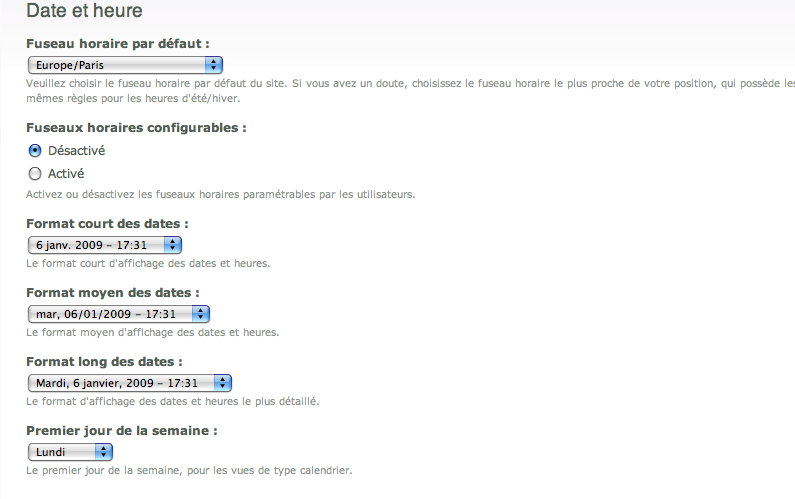
It adds two variable for the week format. Settable in admin/config/regional/date-time/date-views.
Thanks for the review.
Comment #27
grimreaperComment #28
grimreaperComment #30
izus commentedsystem_settings_form already saves the variables. So, you shouldn't need the Submit handler at all
i suggest to have two variables at teh begining of the switch and use them form more redability.
Alsowe shouldn't only focus on the 'week' case
about the patch it self, i think it doesn't apply because of a missing black line at the end
Comment #31
grimreaperThanks for the suggestions.
I am wondering if I should not implement a hook install and a hook update N to initialize the variables, to prevent the default value of the variable_get in the theme.inc ?
Comment #32
podarok#31 should provide hook_uninstall for removing all the variables from system_settings_form() https://api.drupal.org/api/drupal/modules!system!system.api.php/function...
Comment #33
grimreaperHello,
Now there is a hook_install and a hook_uninstall.
I wonder if the default values should be in a t() function or not ?
Thanks for the review.
Comment #35
grimreaperComment #37
podaroknope, without t()
Comment #38
grimreaperOk, thanks for your response.
The test failed, but I think the problem is not due to the patch because date views seems not to be tested and the patch don't affect the elements in error.
Comment #39
podarok35: date_views_week_format_355058-35.patch queued for re-testing.
Comment #42
podarok31: date_views_week_format_355058-31.patch queued for re-testing.
Comment #44
podarokwe should fix tests before commiting this
Comment #45
podarokpossibly there is a bug due to 2013->2014 year on testing bot )))
#31 was green on 2013, but red on 2014
anyway - unrelated bug and should be fixed in folowup
postponing this
Comment #46
podarokComment #47
vijaycs8535: date_views_week_format_355058-35.patch queued for re-testing.
Comment #48
podarokComment #49
vijaycs8535: date_views_week_format_355058-35.patch queued for re-testing.
Comment #50
vijaycs85Thanks, Committed c756e07 and pushed to 7.x-2.x.
Comment #52
elioshthere's a typo in theme_date_nav_title.
It must be:
Actually, the variable name is wrong, because without "_" after $granularity.
Thanks a lot.
Comment #55
prezaeis commentedhi everyone, on the month calendar i want to move the date of the current month from where it currently sits to somewhere else on the page. i want to place it as the main title of the page, i have been pulling my hair out for 2 days and cannot for the life of me figure this out.
anyone able to help me?
Comment #56
nasi commentedAs pointed out in #52, there is an error in theme_date_nav_title, where the underscores are missing between $granularity and 'format_…". So the default format (l, F j, Y or l, Fj is being returned in all cases, regardless of the granularity required or the user specified settings.
So, for example, month view calendars have a l, F j, Y title rather than F Y.
#671068: Calendar title is always in day format
Comment #57
nasi commentedComment #58
nasi commentedApologies, just check the latest dev release and this bug has already been fixed.
Comment #59
Road Kill commentedUnfortunately even in the latest dev this problem is still around :(