

 Come together with the global Drupal community in Rotterdam, 28 Sept – 1 Oct 2026. Sessions, contribution, connection, and Early Bird savings until 8 June.
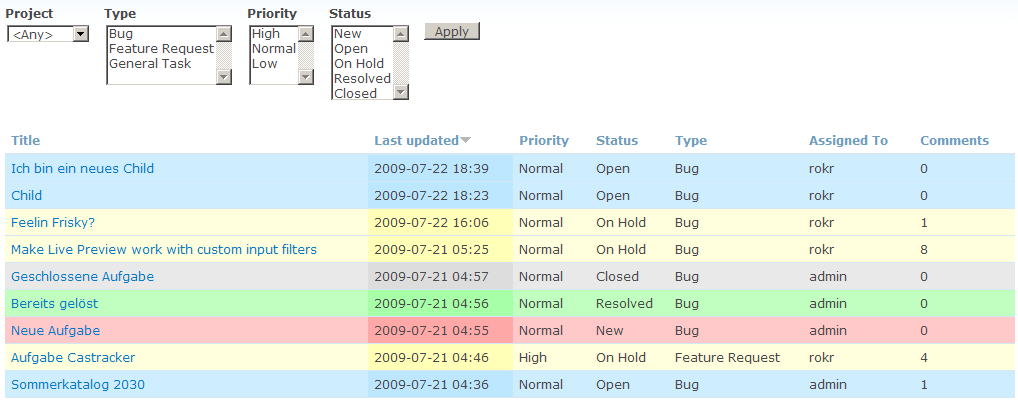
I think that this cant be done yet, but I was just wondering what would be the best way to colour each row in the casetracker table by status.
Would it be to store a hex code in the db. Or via external css. Or some other method?
| Comment | File | Size | Author |
|---|---|---|---|
| #5 | views-view-table--casetracker-project-cases.tpl_.php_.zip | 930 bytes | scottrigby |
| #1 | 2009-07-23_0201.png | 37.68 KB | rokr |

Comments
Comment #1
rokrKeep in mind that CaseTracker uses views for displaying. You can theme views. I did a lot of exploring (since i've never themed a view before - shame on me) and finally i made it with the help of these two fantastic tutorials:
1. Views Row Theming (Mustardseed) - shows the great concept of how to theme a view. wow - that easy!
http://mustardseedmedia.com/podcast/episode30
Since we have to deal with a table view all row data are stored in arrays which makes a little difference in how to display them.
2. I stumbled upon this wonderful comment by merlinofchaos which describes every piece step by step.
http://drupal.org/node/286700#comment-935655
After that i was able to add this little magic to CaseTracker.
I'm using the field 'case_status_id' as a css class for a row. Works like a charme.
Have a look at the screenshot.
cheers, Ronald
Comment #2
Christopher Herberte commentedjQuery solution:
jQuery
CSS
Comment #3
Christopher Herberte commentedFYI. Related active post in the Views issue queue http://drupal.org/node/261171
Comment #4
XerraX commentedthe jquery stuff from #2 may works but it hasnt a good performance, since it has look for every class, trim, lower and replace.
the php thing from #1 should be the first choice
just my 2 cents, greetz from germany
Comment #5
scottrigbyI did a similar thing as suggested in the issue Chris Herberte posted in #3. In case someone else might find this useful, I'm attaching my views template (i came here out of curiosity to see how others have done this). Anyeay, we can mark this 'fixed' since there are a few different ways to do it, can't we?
Here's how to use this template if you want to:
Comment #7
castawaybcn commentedthanks so much for this!!
Comment #8
castawaybcn commentedfyi, using the same tpl.php file you can have the case colours applied also to your translated cases modifying your css with something like this:
Just make sure your translations are consistent with the classes
Comment #9
scottrigby@castawaybcn: I hadn't thought about translations with theming casetracker, but good point. Awesome!
Comment #10
Kristina-2 commentedI used solution #5. I cleared the views cache but the colours are not displaying and in the XHTML it's still just doing even and odd classes and not based on the status. Any ideas?
Comment #11
Wolfke2800 commentedIt doesn't work for me either.
If i track it down in the source code, i get this:
Apparently it uses the css from seed.css but i have no idea why it uses "crayon-3".
Any ideas?
Comment #12
Anonymous (not verified) commented#10
Does the views-view-table--casetracker-project-cases.tpl.php file put on the administration theme directory ?
Comment #13
Anonymous (not verified) commentedIn order to solve problem with accentuated characters let's use the transliteration module function transliteration_get :
<?php $status = strtolower(transliteration_get($row['case_status_id'])); ?>Comment #14
Wolfke2800 commentedI'm using open atrium, so i put the "views-view-table--casetracker-project-cases.tpl.php" file in the directory /profiles/openatrium/themes/ginko because i use only one theme.
Comment #15
foredoc commentedHi,
I am trying to use the solution in #5. However, it does not work.
In my case, I have disabled the view provided by casetracker module, and provided a new view:
casetracker_project_cases_customized, it contains several different page displays.
Then what I did are as following:
1) rename the file to be : views-view-table--casetracker-project-cases-customized.tpl.php
2) copy it into my theme directory
3) replace .view-casetracker-project-cases with .view-casetracker-project-cases-customized
4) copy the css to my theme's style sheet
5) flush all caches
Is there anything I did wrong?
Thanks.
Comment #16
foredoc commentedFind a solution as following:
.view-casetracker-project-cases-customized tr.open, .view-casetracker-project-cases-customized tr.open td /* Open */
{
border-top: 1px solid gray;
border-bottom: 1px solid gray;
background-color: #FFFFDD;
}
......
Comment #17
foredoc commentedCurrently, I am using theme: acquia marina.
It works find when I put the tpl.php file in my theme folder, and add the css to my theme style sheet.
However, I am wondering, if this can be achieved by:
1) create a module
2) keep keep both tpl.php, and the css within the module
3) let the module inform the system that the template and css should be used when theming my views table.
Basically, I want to use a customized module to manage things above, since it looks like a cleaner solution( Not sure if I am right about this )
Any ideas?
Thanks.