

Closed (fixed)
Project:
FileField
Version:
6.x-3.x-dev
Component:
User interface
Priority:
Normal
Category:
Support request
Assigned:
Unassigned
Issue tags:
Reporter:
Created:
16 Nov 2009 at 09:57 UTC
Updated:
11 Dec 2017 at 01:19 UTC
Jump to comment: Most recent, Most recent file


Comments
Comment #1
quicksketchFirst, check your status report at 'admin/status/report' and see if FileField is reporting that upload progress is working. It should provide instructions if there are any missing requirements.
Comment #2
azwildcat commentedI’ve done everything I read about—placed the php_uploadprogress.dll file in C:\xampp\php\ext\ then added the line extension=php_uploadprogress.dll in php.ini and finally restarted the web server. In the report, it shows that PECL is enabled. Yet, I still don’t see the actual “progress.”
Comment #3
vinmassaro commentedI am having this problem as well. Had my shared host (Hostgator) install it, and the Drupal status report page shows it as enabled. Currently, all I see is the "Please wait..." message in the attached image.
Comment #4
vinmassaro commentedJust wanted to post back that this is working for me with Filefield fields. The screenshot I posted was using the default drupal upload field, so it did not display.
Comment #5
azwildcat commentedI have it running from FileFields also, yet I still don't see the "progress."
Comment #6
tirdadc commentedI also have this issue with the core upload "File attachments" field: even though the status report says that upload progress is enabled (PECL uploadprogress), I just get the "Please waiting..." and no actual progress on the bar.
Comment #7
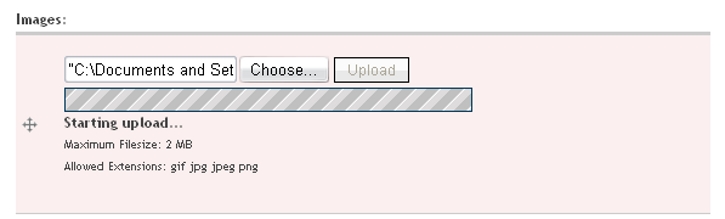
joelstein commentedI have FileFields and PECL uploadprogress installed, and my status report looks okay, but when I upload, all I see is "Starting upload..." with the diagonal lines scrolling, but nothing else. No progress is being reported. See the attached screenshots for more information.
Comment #8
joelstein commentedAfter a little more troubleshooting, it appears that it may be a Safari issue. When I test uploads through this site (which also uses uploadprogress), I have trouble with certain files on Safari. But, if I upload those same files with Firefox, it works fine. On my server, if I upload with Firefox, it works as expected. Must be a Safari issue?
Comment #9
azwildcat commentedRegardless of which browser I use to upload images and videos, I still don’t see the actual “progress.” Clearly, I have Filefield working and PECL enabled as shown in the attachments. However, it doesn’t seem to work no matter what I do. I just can’t figure out what’s wrong.
Comment #10
elijah lynnI have also been having this issue. It is browser agnostic. My status report shows as those above as well as the screenshots of the null status so I don't think I need to upload duplicates. It has been that way ever since I have used Drupal. I have finally had the motivation to investigate but it has been that way for the past year.
Would be awesome to get this working! Especially with Insert, Image Resize Filter & ImageField Crop!! That would be one amazing solution!
Update: I forgot to mention that it works on the bottom left status area of Chrome, but not the actual upload progress bar widget, that just hangs. @azwildcat - Can you look at the Chrome status area and see if it works for you there?
Comment #11
quicksketchJust a note about uploadprogress, check the bug queue for uploadprogress. The most important thing to note is that if you are using FastCGI, IIS, or Lighttpd upload progress simply will not work, even though it shows up in phpinfo(). The status report does its best to determine if Apache is not set up correctly but is not fool-proof and may report a false positive.
Comment #12
ar-jan commentedI'm having this problem as well.
- admin/status/report says UploadProgress is installed
- When I upload something, I get the diagonal scrolling lines
- PHP is running in CGI mode, not FastCGI, so it should be working?
Only caveat is that I haven't installed uploadprogress the regular way. I'm on shared hosting, and the host will not enable uploadprogress via extension_dir and php.ini. So I compiled it, and am now calling it through a custom module in hook_boot with the dl() function. Could dl(../../../path/to/uploadprogress.so) criple the functionality?
Comment #13
quicksketchUpload progress only works if you're running in mod_php mode (as a native Apache extension). As far as I know, you cannot dynamically load this library and have it work.
Comment #14
azwildcat commentedI really want to get this to work because it’s a neat tool and eye-catching—much better than the throbber. What’s going on here and how can I get the upload status bar to function properly?
Comment #15
ManyNancy commentedAre you running php with mod_php?
Comment #16
gpk commentedJust to confirm that I'm also having the same issue as originally reported with identical symptoms, i.e. I get the progress bar and it says "Starting upload..." but that's as far as it gets (the upload itself works fine).
PHP is running as Apache module, uploadprogress shows fine in phpinfo and on the Drupal status report page.
Must be some issue with shared hosting, my host is very responsive but not quite sure which direction to point him in! (BTW I'm actually using filefield 6.x-3.1 but that seems to make no difference .. I suspect the problem is to do with installation/configuration of uploadprogress rather than filefield itself.)
Comment #17
gpk commentedConfirmed that this is an issue with uploadprogress installation.
If you go to http://svn.php.net/viewvc/pecl/uploadprogress/trunk/examples/ you can grab the source of a simple example to test the extension. Save the 3 PHP files somewhere on your server (use the Download link) and point your browser to the index.php file.
Upload a file ... during the upload I got a message that occasionally updated itself saying:
At the end of the upload I got message with red background:
Will set my host on to this!
Comment #18
quicksketchThanks gpk! Yes I'm absolutely positive that the current FileField release does produce an upload progress bar when installed under mod_php as an Apache extension and the uploadprogress PECL extension is installed properly (since I use this on multiple sites). Good to know that uploadprogress can be pseudo-installed where it looks like it might work but yet doesn't operate properly.
Comment #19
gpk commentedMy host has tried the bundled example and it doesn't work for him either. He's tried one or two things but can't see to get it to work at all.
After a big more digging it looks like the culprit is mod_security2, which is enabled on my server. See http://pecl.php.net/bugs/bug.php?id=16954.
Comment #20
anantagati commentedI have/had same problem.
In my case it seems that problem makes our firewall as when I connect before firewall it uploads nicely, but when I am after firewall, it just doesn't do anything.
Comment #21
gpk commentedUpdate to #19: with mod_security2, it's not possible to turn off the SecRequestBodyAccess directive via .htaccess...
Related: #450388: Upload Error : 404 when using swfupload.
[update] Seems this is a common problem with upload progress indicators that rely on monitoring the progress at the server end. See for example http://sourceforge.net/projects/uber-uploader/forums/forum/497768/topic/.... mod_security2 (and mod_security) buffer the POST hence progress info is not available.
Interestingly, Google Chrome browser does give you a % complete indication in the status bar, presumably because it can work out how much of the file has been sent. There are also some Flash file uploaders that appear to do something similar, but I've not found any pure JS uploaders that do this.
I also saw a comment that a future version of mod_security2 might stream the file as well as scan it instead of just buffering it. No idea when this might happen though... update: found it, looks like it's not scheduled till version 3 so may be a while. https://www.modsecurity.org/tracker/browse/MODSEC-17. Also in version 3 there is a proposal to allow more control via .htaccess which could provide another resolution (i.e. ability to easily set SecRequestBodyAccess Off). https://www.modsecurity.org/tracker/browse/MODSEC-58
Sorry to clutter this issue with all this info but I suspect this will affect a large number of shared hosts
Comment #22
gpk commentedA workaround for cPanel-based shared hosts that use mod_security2: my host reports "cPanel makes it pretty easy to include extra directives via Include files in VirtualHosts.", so it's just a matter of setting SecRequestBodyAccess Off using this method. Fortunately my host is very helpful over things like this.
Comment #23
shariharan commentedI have the same issue ..
Comment #24
quicksketchMarked #491228: Progress bar does not make progress as duplicate.
Comment #25
francewhoaI wrote a how-to handbook for Ubuntu at http://drupal.org/node/793262
Other OS at http://drupal.org/node/793264
Comment #26
quicksketchComment #27
robert.redl@easytouch.cc commentedI played too much around and wanted to satisfy all status messages of Drupal.
Now i disabled apc.rfc1867 = 1 in php.ini and the upload progess bar works
even with multiple fields at the same time. (Ubuntu 8.04 server, PHP 5.2.9, Apache2, Drupal 6.19)
Comment #28
dafederI'm getting this problem, but only on certain files. I have an XML file I'm trying to upload that gives me no progress, even if I change the extension to EXE. But a real EXE file works. Any suggestions? Thanks.
Comment #29
David Latapie commentedI read http://drupal.org/comment/reply/491228/3435434.
I have the same "non-issue" and my hosting company (HostGator, great 24/7 chat support, BTW) also uses suPHP.
So I guess something must be done either from suPHP (change identification) or Drupal 7 (properly recognize suPHP) at code level.
Comment #30
Daeluin commentedFWIW, I've always been told suPHP breaks uploadprogress, despite being able to do the PECL install successfully. No, it never worked. But I just found out that when I disable mod_security2 it DOES work. Even with suPHP. Sigh.
http://pecl.php.net/bugs/bug.php?id=16954
As mentioned above, setting SecRequestBodyAccess Off is a workaround, but it's my understanding that one of the largest benefits of mod_security is this buffering of all POST data. Doesn't disabling this basically disable most of modsec?
Also, if you ever wondered why all files get buffered into /tmp despite setting a different php upload_tmp_dir, mod_security again.
Comment #31
dave_______1 commentedHi Everyone,
I've just put a new server together using cPanel/WHM with CSF.
I've moved some of my sites from an old server to the new server and the sites on the new server says the uploadprogress is not installed, even though it is.
After rebuilding apache and php around 10 times and plying with some of the settings I found (as some of the comments above say) to get uploadprogress working I simply set the php handler from suPHP to DSO.
After more testing I found suPHP speeds up some of my sites by a half and after reading around the web I have found suPHP is more secure and faster but uses more memory.
Now, I've read @Daeluin says and there may be a way to get uploadprogress working by disabling mod_security and using suPHP.
Has anyone got suPHP working with uploadprogress by disabling mod_security?
Thanks
Dave
Edit - Sorry about the above tags, I can't seem to delete them once they are in!
Comment #32
Prapot commentedI installed drupal 7.
This is my problem 'Your server is not capable of displaying file upload progress. File upload progress requires an Apache server running PHP with mod_php.', and I can't add logo or any image to my appearance
This is information of my server
System Windows NT PORAR-INET-69 6.0 build 6002
Configure Command cscript /nologo configure.js "--enable-snapshot-build" "--enable-debug-pack" "--with-snapshot-template=d:\php-sdk\snap_5_2\vc6\x86\template" "--with-php-build=d:\php-sdk\snap_5_2\vc6\x86\php_build" "--disable-zts" "--disable-isapi" "--disable-nsapi" "--with-pdo-oci=D:\php-sdk\oracle\instantclient10\sdk,shared" "--with-oci8=D:\php-sdk\oracle\instantclient10\sdk,shared" "--without-pi3web"
Server API CGI/FastCGI
Virtual Directory Support disabled
Scan this dir for additional .ini files (none)
additional .ini files parsed (none)
PHP API 20041225
PHP Extension 20060613
Zend Extension 220060519
Debug Build no
Thread Safety disabled
Zend Memory Manager enabled
IPv6 Support enabled
Registered PHP Streams php, file, data, http, ftp, compress.zlib, https, ftps, zip, compress.bzip2, public, temporary
Registered Stream Socket Transports tcp, udp, ssl, sslv3, sslv2, tls
Registered Stream Filters convert.iconv.*, string.rot13, string.toupper, string.tolower, string.strip_tags, convert.*, consumed, zlib.*, bzip2.*
What do I have to say to my server? Do I must to change Windows NT to Linux?
Please forgive me if my language is not well.
Comment #33
quicksketchIt doesn't matter what platform you use, it just matters that you're using FastCGI instead of mod_php. See my post in #11 and #13.
Comment #34
Prapot commentedThank you very much for your suggestion.
Comment #35
meridiandigital commentedJust as with #27, all I needed to do was manually add the extension to php.ini.
Comment #36
kroimpa commentedI got the progress-bar working somewhat, be sure to test different filetypes and siezes.
The progress bar doest like file sizes above 1GB (as far as i can tell), uploading a 985MB file goes without problems, anything over 1024MB and the bar wont show any progress.
Is there any way to make the bar work for large files also? Or am i looking at configuration problem on my side?
Comment #37
tebb commentedIn general then, are we waiting for UploadProgress to be improved to work under various configurations, or are there fundamental reasons why this will never work in those configurations?
Comment #38
tbogard commentedThe first topic was opened on June 14, 2009 at 9:44am, and this thread was opened on November of 2009, THIS IS THE DUPLICATED CONTENT!
the original thread is here or here : #491228: Progress bar does not make progress
Comment #39
brazorf commentedI had the progress bar showing, with no actual progress info (just the gray lines blinkin), both with APC or PECL implementation (status report stated Drupal was capable for upload progress info).
#21 worked for me.
My server is in housing so i am lucky and allowed to access apache configuration. Setting
SecRequestBodyAccess Offin the mod_security2 configuration solved the whole thing.
Comment #40
yngens commentedquicksketch marked the other thread marking it as a duplicate of this one: http://drupal.org/node/491228#comment-2729492 At the same time tbogard marked this one as a duplicate of the other one and also closed the thread. Now both threads are closed, this one even is marked fixed, whereas the issue is still there and not fixed at all. What about those who don't use mod_security2 and still are getting the error?
This issues is actual only for Ubuntu machines with suPHP, CentOS with uploadprogress and fast-cgi work just fine.
Comment #41
rbrownellA couple of months later... I have successfully installed uploadprogress to my server and have successfully tested it using the test files found at PECL as per the instructions on http://drupal.org/node/1074160 (which yes, I wrote the test instructions). What is left to configure? Is this a Drupal bug or what?
EDIT: Apparently secure servers also have an issue with it https:// won't work with this.
Comment #42
jmagunia@rbrownell, try checking the FileField instance settings. There is an option to set a throbber or progress bar.
I think the default is set to throbber.
Comment #43
wmnnd commentedHello there,
I have created a little module that uses client-side JavaScript instead of server-side code to display the progress. This will finally bring upload progress to more "exotic" server configurations :-)
If you like, you can try and review it here: https://www.drupal.org/node/2402147
Comment #44
nickdickinsonwildeAnyone looking for the PECL example files for testing, they can be found in the PECL git repository (as they switched from SVN to GIT).
Comment #45
pwolanin commentedComment #46
simeclientside_validation module can break pecl upload progress. They say it's only jquery 1.5, but I have just had this with 1.4.4.
Comment #47
francewhoaWe struggled for months trying to display the progress status using PECL uploadprogress. In our case it turns out the source of the challenge was that the server-side versions, packages, and libraries were too old. As a result they do not support PECL upload progress minimum requirements.
Until that server is upgraded, to resolve this challenge we found a fantastic alternative. PECL uploadprogress is great. But in some cases and for newcomers it might be challenging to install and configure. Mostly because it depends on server-side libraries and configuration. If you prefer a client-side upload progress, you might be interested in this File Resumable Upload (file_resup) module. The benefits are:
Thanks to Brad for his discovery