

 The 2026 Drupal Business Survey is open. Your response will help shape the future of the Drupal business ecosystem.
I'm sorry if this is a silly question, but i can't seem to find the answer anywhere. When a user creates content I do not want them to be able to uncheck the Automatic Alias checkbox. This is probably just a setting somewhere and i'm being an idiot but any help (even insults) will help right now. Thanks guys.
| Comment | File | Size | Author |
|---|---|---|---|
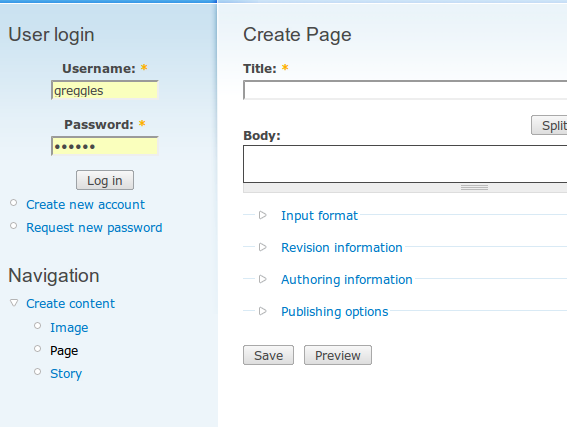
| #3 | screenshot_032.png | 31.51 KB | greggles |
| #3 | screenshot_033.png | 38.25 KB | greggles |


Comments
Comment #1
dave reidIts the 'create url aliases' permission.
Comment #2
rickh commentedhey Dave, thanks for the response but no one has that permission, not even admin. Any idea why this would still show up?
Comment #3
gregglesI tried to repeat the bug. Here are the steps I followed.
1. Install pathauto (and path and token)
2. Allow anonymous users to post page nodes, but do not give them "create url aliases"
3. Log out of site and go to node/add/page
4. Result is I do not see the field you mention - screenshot_032.png
If I log in as uid 1 I see screenshot_033.png
If I grant "create url aliases" to the anonymous user then they see the checkbox and "URL path settings" fieldset on nodes.
Comment #4
rickh commentedI'm assuming there is something wrong somewhere with code, so is there some way that I can override this manually? I'm sorry but i've got no other solutions for this. thanks for the help Dave.
Comment #5
dave reidIts doubtful something is wrong with the code seeing as no one else has reported this issue with pathauto. The best advice I can give you is it is likely some other module interfering with the form, so you'll want to disable groups of modules to see if you can narrow down the offending module.
Comment #6
l0calh0rst commentedI'm having the same problem. I have several content types certain roles should be able to enter/modify. For those i want limited access to the nodes.
Weird enough: when editing one content type, the pathauto setting does not show up while it does for the other. No role is given the permission to set pathauto.
Comment #8
dreadfulcode commentedSorry. Same problem here. No one has permission to set the url alias except superadministrator, and that annoying little checkbox is still showing up on all my node/add forms.
I wonder what the offending module is... maybe Jammer?
Comment #9
roderikCorrect. It's the combination with Jammer.
(Jammer just removes the whole of $form['path'] in its hook_form_alter() implementation.
That's fine if it runs after pathauto. However if it runs before pathauto, $form['path'] is first emptied, and then pathauto puts the checkbox there.)
Fix: #886930: Play nice with Pathauto
Comment #10
Frederic wbase commentedDoes anyone know a sollution for this?
Comment #11
cpotter commentedsubscribe (all module *should* allow to display / not display a field in 'access right')
Comment #12
hermes_costell commentedSomething I've noticed which I think is relevant here, and may help out one or two others out there:
I have noticed that if I
unset($form['path'])via the form_alter hook function, then the "Automatic alias ...An alias will be generated for you. If you wish to create your own alias below, uncheck this option." content shows up - regardless of the fact that the user doesn't have permissions to 'create url aliases'.Kind of interesting ...
Comment #13
chris_dg commentedAs a workaround I was able to hide this with '$form['path']['#access'] = FALSE;' in hook_form_alter().
Comment #14
rogeriodec commented$form['path']['#access'] = FALSEdestroy thepathauto_perform_aliasform element, so new nodes get no alias.how to hide this field while keeping it active?
Comment #15
dave reidI cannot confirm the issue. Please file a new bug report with conditions to reproduce using just Drupal core + Token + Pathauto.
Comment #16
rogeriodec commentedI apologize.
This sentence really works.
Thank you!
Comment #17
Stitchard commentedI had the same problem. I simply went into Jammer settings and unselected the node type being affected under Remove the path options on content types: After saving it I went back in and selected it again. This has got rid of it.