I believe that the front page configuration options would better fit under the Structure section of the admin UI. Structure includes menus, blocks, content types, etc...all places to put content, and the front page is definitely a place to put content, versus a site configuration option (where options currently are). The Configuration section gives the impression that it would deal with advanced or backend options, not the simple task of controlling the front page. Even if users do find their way to Configuration, the front page is stuck under "Site information" which doesn't seem to fit.
Leisa Reichelt found that site builders want to get a basic site running quickly and see progress and add more to the site as they learn, otherwise they become frustrated. This was improved by adding the simple "Add content" link on the empty front page, but setting the front page to be a specific node is still too difficult to find.
What if the site builder wanted to have a mixture of both static content and the content feed? An experienced user would know to make a new block under the Content region above Main page content block and set its page visibility to <front>. However, a new user might not even know what a block is at this point. A solution could be adding an About section right on the Front Page config page. It could be toggled on or off and would allow static content above the default node feed. The other two options in the config page would be setting the front page entirely to a node or choosing the number of nodes to show in the feed (both are currently under Site information).
I can start working on a patch if others agree with the idea(s).




Comments
Comment #1
adam.hastings commentedAdding tags...
Comment #2
adam.hastings commentedHere is a quick patch that simply moves the settings to a new Front Page section under Structure. This seems to make more sense to me, as I said above, but there could definitely be problems with doing this, so let me know!
Here are a few things to think about hough:
Any thoughts?
Comment #3
adam.hastings commentedComment #4
adam.hastings commentedNote that the cache must be cleared for the new menu item to appear.
Comment #5
adam.hastings commentedHere is an updated patch with a few screenshots showing where it's at. Remember, clear cache after applying the patch!
This new patch changes link descriptions, adds help text, uses fieldsets on the config page (although they'll be rearranged), and creates a separation between the default default_nodes_main (number of posts on overview pages like taxonomy) and default_nodes_front (number of posts on front page, uses default_nodes_main as default).
I've decided that this patch, if accepted, will just involve moving the front page settings to Structure and increasing usability with the options that already exist. There are other things that could be added, like mentioned in the original issue, but those could be additional patches.
Any new thoughts or ideas?
Comment #7
adam.hastings commentedI believe the reason that the test failed is because I moved where those settings are made. In system.test, there are the lines:
But that field no longer exists on the Site information page.
What would I do about this? Would the patch also modify system.test? Or would I add a hidden field to Site information that maintains the same functionality on that page?
Comment #8
adam.hastings commentedWell I opted to try changing system.test with the patch to see if it will pass. It doesn't really feel right, almost like changing test questions so that your answers are right. But the path that is used in the test was changed by the patch, so it would of course fail. Would it be better though to just use a hidden field on Site information instead?
Comment #10
adam.hastings commentedWell that didn't work anyway. Let me try this one. I added the hidden field and the validator...
Comment #11
adam.hastings commentedComment #12
dries commentedI'm struggling with this change, so I'd love to get the UX team's take.
Comment #13
adam.hastings commentedHere is a much less drastic patch because it doesn't move the options. I've added fieldsets to the Site information page (Site Information, Front Page, Error Pages, Cron). The front page path textfield isn't required anymore. Instead, leaving it blank now automatically defaults to "node". The other two path-input fields on that page (two error pages) have always said something like "Leave blank to display a generic 'page not found' page." so now the front page path follows the same pattern.
Comment #14
aspilicious commentedIn overlay the string "site Information" gets duplicated.
I also added a better screenshot to see the difference.
Comment #15
adam.hastings commentedOh, that's true. You mean that both the page and fieldset names are Site Information? What about naming the fieldset Site Details?
I do think that fieldsets are a good idea on this page, though, because the page deals with different categories of options. Even the Performance page, which deals with generally the same topic (cache), uses fieldsets, while this page deals with things from the site slogan to running cron.
Comment #16
Bojhan commentedYup looks good, there are some minor details I am not sure about - mostly because I am not fully understanding all the diffrent things going on in the comments. Going from just aspilicious - putting some fieldsets in makes sense here.
Comment #17
adam.hastings commentedThe fieldset "Site Information" is now "Site Details" in this patch.
Comment #18
dries commentedLooking at the screenshot in #14 make me realize that grouping these settings under "Site information" is rather broken. Clearly, "Cron" is not "Site information". Neither is "Error pages". We got it all wrong.
Personally, I think it would make sense to break these 4 fieldsets up in 4 pages. In my opinion, "Cron" should go under System, "Error pages" should go under "User interface", etc.
Comment #19
adam.hastings commentedThe only thing about the Cron page is that there is only one option. In the field's description it mentions the status report page, which shows when cron was last run, gives an option to run it now, and gives a URL to run cron from outside the site. We could move these three things to the Cron page, but they could stay on the status report page as well. What do you think?
Also, if we split up the 4 fieldsets, that would mean that Front Page would have its own page, so where do you think that would fit? Under Structure like the original patch, or somewhere else?
Thanks!
Comment #20
adam.hastings commentedHere is a patch that makes some of the changes Dries explained.
The error pages settings were moved into Error Pages under User Interface. I also added a validator for these two paths because they had never previously been validated. Even if these settings get moved around again, the validator should stay with them.
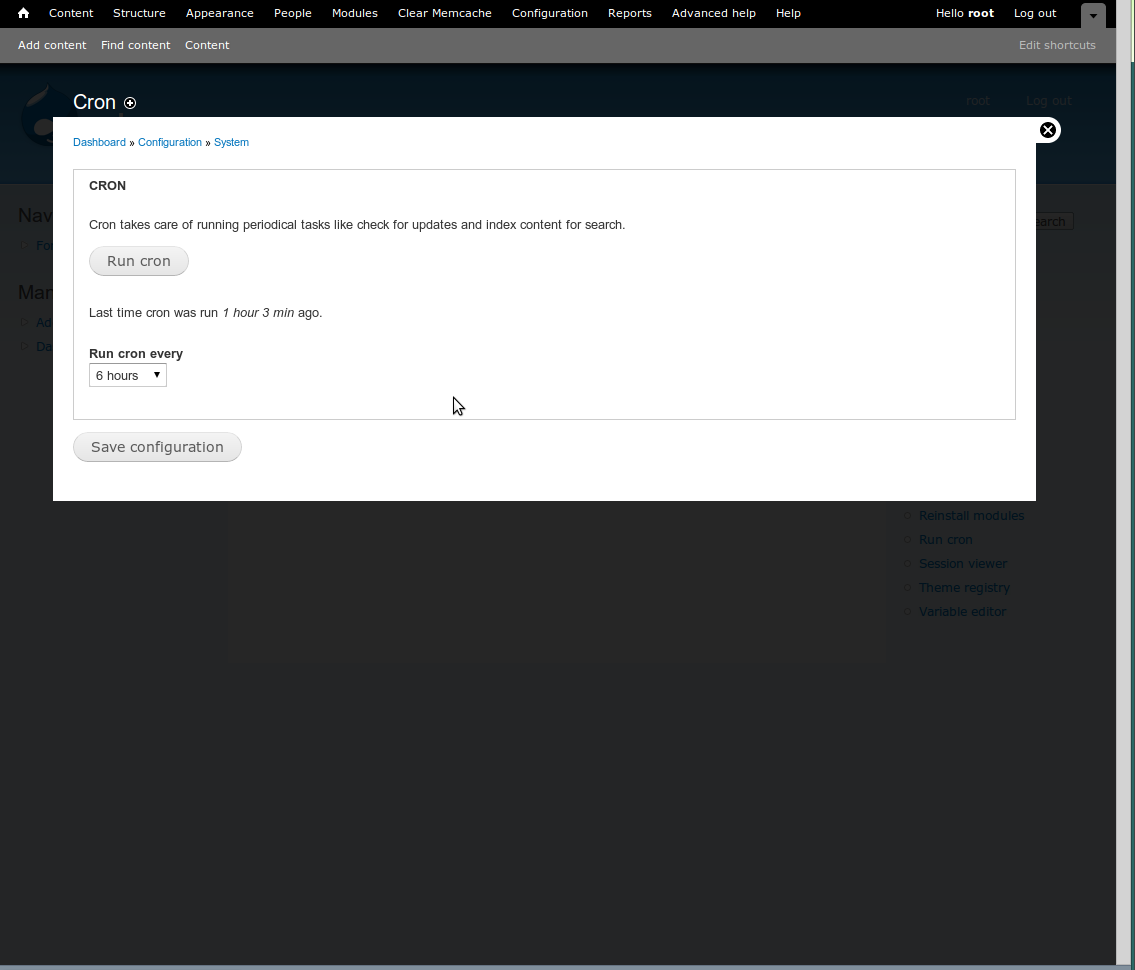
The one cron setting was moved to Cron under System. I also added a "Run cron" button on this page to manually run cron, similar to the "Clear all caches" button on the Performance page. I'd like to add the time cron was last run and possibly the URL to run cron from outside of the site (both are on status report page) but those aren't there yet in this patch.
Not sure where to put Front Page, so I won't move it until others agree where it should go, or possibly stay.
Note: this patch probably will not pass testing because configuration settings were moved, and automatic testing will be looking for them in their old locations. Anyone know what to do about this?
Comment #22
adam.hastings commentedFailed because settings were moved...
Comment #23
dries commentedThanks adam! I think you're on the right track, and I'd work towards making the tests pass at this point.
Let's leave 'Front page' where it is for now, and then we can discuss the location of 'Front page' once we agreed to break up the current page. We could make it a follow-up patch in this very issue.
My personal take is that it could fit under structure once the actual 'Front page' settings have been broken out into its own page (but I'd still like input from more people). Until we break up this settings page in multiple pages, we can't move it. It just doesn't make sense to move 'Cron' and 'Error pages' under 'Structure'.
So let's get these tests pass first ... :)
Comment #24
Bojhan commentedWait, what happened here :) ? I thought we wanted to avoid having single page configuration. And I do not get all this talk about putting stuff in Structure neither. Can we have proper screenshots? Also we might got it all wrong, but please explain me clearly why moving all these settings around will make it more discoverable?
Also Error pages does not belong in User interface, its a system level setting not something that enhances or changes the interface.
Comment #25
adam.hastings commentedWell what Dries pointed out was that "Error Pages" and "Cron" were definitely not "Site information" so they shouldn't belong there anyways. Instead of making two new pages for these, maybe group them under another page under System? I don't really know what you could categorize both Error Pages and Cron as, besides System, but maybe something would work?
Comment #26
dries commentedBojhan: I believe I clearly explained the problem. Have you read this issue carefully? Happy to answer specific questions ...
Comment #27
Bojhan commented@Dries I understand relocating, I just don't see the advantage of breaking this up in 4 separate pages.
Comment #28
adam.hastings commentedThis updated patch moves Error Pages under System like Bojhan suggested, because this does make sense. It also adds the time cron was last run to the Cron page.
Site information is still split into three pages (cron and error pages were pulled out), so should we try to find a category to put cron and error pages into, or is it fine the way it is?
I also tried to get the patch to pass testing. Since testing is trying to change these settings through the user interface at the old URLs, it will not find them there and will give an error. The only two options I see are to leave the options on the old page but as hidden fields (but this feels dirty) or to modify the test file (system.test).
I'm not sure if changes to system.test would even be taken into account, but I changed the old paths to new ones. For example:
We'll see...
Comment #30
adam.hastings commentedLooks like there are no errors on cron, but more with the error messages... I'll look into it.
Comment #31
adam.hastings commentedLet's try this one.
Comment #32
adam.hastings commentedComment #33
adam.hastings commentedWhoot! It passed!
For those who don't want to read the full issue (because the patch has only somewhat to do with the original issue), this patch includes:
Still discussing the location of some of the settings...
Comment #34
yoroy commentedSubscribe, will review soon.
Comment #35
adam.hastings commentedAny other thoughts / reviews on this?
Comment #36
Bojhan commented@adam.hastings None of this belongs in Structure, then again I feel we are discussing the fundamentals of this patch after the fact.
Lets first review, why do we need to split these configurations up? Al right, error pages doesn't really belong under Site information and neither does cron. But do they deserve their own page? What would be the downside to this change, it will create more pages making the functionality more scatted and adding more clutter. To the advantage is that these links should be more discoverable, I am honestly questioning this late in the stage of development we should be making this kind of change - where the actual win will go completely untested and uncertain.
I agree with adding the fieldsets.
Comment #37
adam.hastings commentedRight, adding to Structure was left behind before. There are just 2 new pages under System. Even if we recombine these settings under Site information, the patch would be making 2 validation improvements and adding fieldsets, so I still think this is useful.
Would there be one new page that both Cron and Error Pages would fit under, though? This would be adding less clutter and possibly making it more usable / findable (depending on the new page's name).
Comment #38
Bojhan commentedCron probally Development, and Error pages System? Yhea I am still wondering about error pages, there is few advantages to optimizing such a infrequently access functionality while increasing clutter which will impact all efficiency of the configuration listing./
Comment #39
adam.hastings commentedOr maybe Error Pages could be put into the Logging and Errors page under Development? I know that the errors here are more development errors relating to code problems, etc, but hey, 403 and 404 are still errors. It might even confuse users that there are two sections about errors and would make sense to combine them. Plus, 403 and 404 errors are "logged" seeing as how there's a report page on them ;)
If we move Error Pages out of the way, then I personally think that Cron could remain under System. There would only be 3 System pages, like many of the other categories.
Comment #40
amc commentedsubscribe
Comment #41
cross commentedLast patch looks good.
403 and 404 is errors, but its not development errors. Even if you write "most clean" code in the world you will have this errors.
I add little change to patch, added t() to descriptions and titles.
Comment #42
cross commentedSomething strange happened with tags. Roll back them.
Comment #43
dries commentedShould be 'Site details' with small 'd'.
Should be 'Front page'.
Should end with a point.
'@path' looks incorrect -- why not use %path?
'@path' looks incorrect -- why not use %path?
Should be 'Error pages'.
Powered by Dreditor.
Comment #44
yoroy commentedIs the summary in #33 still correct? This discussion is all over the place, a lot of it sounds like change for change's sake and I'm seeing very little reasoning behind the proposed changes. I can test the patch but have no idea what to look for.
Comment #45
cross commentedSummary:
Corrected all errors mentioned above + some more+remove empty whitespace.
I add screenshots of old and new version of configure page.
Comment #46
aspilicious commentedCan you put the @ingroup behind the @see.
==> Validates
==> submits
why? ==> http://drupal.org/node/1354
Comment #47
cross commentedfixed version.
Comment #48
cross commentedComment #49
dries commentedI think this is a nice improvement. More logical and things are easier to find now. @yoroy -- any thoughts?
Comment #50
yoroy commentedYes, if you put things directly on the configuration page they'll be easier to find. But we can't do that for all links, so we have to ask ourselves if *these* things really need to be easier to find? They are mostly one-time setup things and with this patch they get a very prominent spot on the configuration page, *always*. Especially the error pages one. There's no real problem with never filling these ones out since there's an ok default behavior. Currently they are shown together with the one for front page, no? People go hunting for that one far more often, which makes the ones for error pages quite discoverable, too. Same for cron, it has an ok default out of the box, though it's one you're likely to look for a bit more often. So, could see the case for cron but not really convinced we should do this.
notes on the screens:
Comment #51
cross commentedI agreed that all this options mainly the one time to set(may be cron not). But almost all fields from "Site information" page user fill when running install script first time. At this point user may not know what error page he should use on 403 and 404 errors, he simply not think about it(not developed it yet). The same applyed to cron. User may not know what is it.
So user must find this options when he already done some job about site and decide what he need.
Ok i need to set up custom error page. It is definitly configuration section. Then where it is? If i see the Site information section i personaly never think that error pages is about infomation of site. Especialy if i open page with site information i could imagine situation when user see first field and think that he already filled all parameters here at install time and close it. So we try simplify access to this options. Mainly this will be used by disigners who don't know deep structure of drupal. Besides cron options and error page not actually Site infomation.
Description of "Cron page". What about: Manage scheduled jobs, check for updates, index site content, etc. ?
Scheduled jobs wiil sound familiar for not linux users.
Status report page is mainly the result of cron job. So it may be good to have link to that page here. Any idea what best fit there?
Outer fieldset will be fixed.
Comment #52
amc commentedFor cron, what about: "Manage automatic site maintenance tasks." It's maybe not 100% accurate, and there is some danger of confusion with maintenance mode, but it should be clear enough to get the point across. There probably should be a 1 or 2 sentence explanation at the beginning of the page of what cron does, to help users figure out what they should set the interval to.
Comment #53
yoroy commented"Manage automatic site maintenance tasks" I like this.
Comment #54
cross commentedNext version.
About fieldset for whole form. On similar pages like "Performance" and other with fieldset there is no fieldset for whole form. I think there shouldn't be too.
Comment #55
yoroy commentedConfig page: http://skitch.com/yoroy/d8844/configuration-d7
Site information page: http://skitch.com/yoroy/d885g/site-information-d7
Cron page: http://skitch.com/yoroy/d885x/cron-d7
Error pages page: http://skitch.com/yoroy/d885u/error-pages-d7
Looking at this and clicking around a bit I really don't think this is going to improve things. Especially the error pages on a separate page is unnecessary. Why does this need its own page when even if you never change anything for these pages nothing gets broken? Move these back to their own fieldset on the Site information page.
I'm still undecided about the separate cron page, but in its current state the text still needs work:
Comment #56
yoroy commentedneeds work that is.
Comment #57
cross commentedGood. This patch implements the @yoroy version as described at #55.
Comment #59
cross commented#57: site-information-settings-7.patch queued for re-testing.
Comment #60
tstoecklerI think yoroy's suggestion was to get rid of the first fieldset and leave the seconds, not to put them both in one.
I personally think that the first fieldset should stay and the second one should go, as that would be a bit more consistent with the 'Clear caches' button on the Development page, which is AFAICT the only other action button on a settings page in Drupal.
Either way, only half of the stuff should be in the fieldset.
Comment #61
amc commentedThere's also the site re-indexing button on the search settings page.
Comment #62
tstoeckler...which is also in a fieldset. I guess we have a pattern?!
Comment #63
cross commentedto #60 I tried this too. Pesonaly i don't like both version(use only bottom filedset or only upper one). If you use only one fieldset other part of information looks like fly somewere. It's ugly. Put whole page in one fieldset makes page feel more like in one entity.
Comment #64
yoroy commentedUse only the bottom fieldset.
The guideline is:
No fieldset around the first part of a form if:
1. It is the main interaction on the whole page (80/20 rule): Do people come *mainly* to this page to perform the action in the first part?
2. Subsequent parts of the form are related to the first part ("advanced settings").
Both are the case here. See also Appearance page for example, where the main interaction of choosing a theme is not wrapped in a fieldset and the setting for administration does have a fieldset
(The 'empty cache' button on development page has a fieldset around it because nr. 2. from above doesn't apply. Even if it's the main interaction on the page, all subsequent settings below it are not directly related to it, so 'empty cache' gets a fieldset itself as well)
Comment #65
cross commentedThanks for review. Patch with latest fix #64.
Comment #66
ff1 commented#65: site-information-settings-8.patch queued for re-testing.
Comment #67
dries commentedPatch still applies and seems to work.
Comment #68
Bojhan commented@Dries Guess you can commit then?
Comment #69
dries commentedCommitted to CVS HEAD. Thanks.