Problem/Motivation
This is a minor upgrade issue, but we might as well document it and fix it.
If you are upgrading a Drupal 6 site that had the "Administer" menu item (and tree) moved out of the Navigation menu and into some other menu (like Primary Links, or whatever), then after the upgrade the /admin page will read
You do not have any administrative items.
Navigating to the actual paths works, but they're just not on the /admin page.
Steps to reproduce:
Update a Drupal 6 site which happened to have the Administer menu item somewhere other than the Navigation menu (for example, in a custom menu).
The user might expect a normal upgrade.
Instead, the user will see no entries at /admin after upgrading.
Proposed resolution
Comment #1 offers a workaround:
Before upgrading, use the menu interface at admin/build/menu to reset the "Administer" menu item, which will put it back in the Navigation menu.
Numerous posters confirmed that this solution in comment #19 worked. Run the following code directly against the DB from the command line or using a tool like phpMyAdmin
DELETE FROM menu_links WHERE module = 'system'
Then you need to visit /admin/config/development/performance and clear the cache.
Comment #31 includes a patch with this code. catch wrote that this approach will "destroy people's customized administrative menus on upgrade." sun wrote in response:
Since it would take another one or two years to fix this aspect of the menu system, I'd actually recommend to commit #31. That's our only way to ensure that menu links derived from the menu router are correct when upgrading to D8.
Remaining tasks
Needs an automated test.
Original report by rfay
This is a minor upgrade issue but might as well be documented and perhaps even fixed.
If you are upgrading a Drupal 6 site that had the "Administer" menu item (and tree) moved out of the Navigation menu and into some other menu (like Primary Links, or whatever) then after the upgrade the /admin page will read
You do not have any administrative items.
The actual paths seem to work, they're just not on the /admin page.
What I did: Updated a Drupal 6 site which happened to have the Administer menu item somewhere other than the Navigation menu (it was in a custom menu).
What I expected: A normal upgrade.
What happened instead: I ended up with no entries at /admin.
Note that this was the only recreatable problem in the update of a small D6 site! Yeah!


Comments
Comment #1
rfayI forgot to mention the workaround:
Before upgrading, use the menu interface at admin/build/menu to reset the "Administer" menu item, which will put it back in the Navigation menu.
Comment #2
geerlingguy commentedCrud... how does one restore the links again?
Comment #3
geerlingguy commentedUpgrading to major... I think this is a huge WTF, as the links are even missing from the administration menu when it's enabled, since they're not properly listed on the /admin page either. If someone upgrades his site, and finds that the links have gone missing, it takes time and effort to find a way to actually administer the site again (tip: look for the "Index" tab on the admin page).
Comment #4
rfayThe workaround in #1 worked. In fact, over in #991778: Detect and repair menu corruption it has been debated whether there should be a way to reset all menus before upgrade.
Comment #5
geerlingguy commentedWhat about after upgrading...? I don't want to have to go back again just to get all the menu items to show up - is there a way to manually reset that menu? I already reset the admin links, and they are in the Management menu.
Comment #6
rfayI didn't figure out a way to solve it after the fact. My workflow is always
while upgrade is still not clean
try it again
I think an after-the-fact workaround would be great. We'll need one.
Comment #7
rfayThis one probably does need to be solved.
Comment #8
geerlingguy commented@rfay/#6 - heh... my approach is usually, "Do the upgrade, and push forward, come Hell or high water! (Then fix bugs later)." I don't like resetting my db and everything, unless the site is for a large, paying client :)
Comment #9
geerlingguy commentedI'm checking over the toolbar.module, and it looks like toolbar_get_menu_tree() is not outputting the links properly:
Using devel, I found that the $admin_link variable is valid, but menu_build_tree() is not returning the tree... still investigating.
Comment #10
geerlingguy commentedI went into the menu_links table in my database (I used PHPMyAdmin), and changed the mlid of the 'management' menu to 0, and the depth to 0, and now the menu works correctly. I don't know whether the D7 update process needs to make this particular change, or if the code in
toolbar_get_menu_tree()should be modified to accept different parameters in the management menu...[Edit: After I made a change to the menu and saved it, the depth was again set back to '0', so I had to make the change in the DB again; and again, the menu is working.]
Comment #11
geerlingguy commentedI just updated a page on the site, and after saving that page, it's main menu link was removed, and then I noticed that all the 'Management' menu items were somehow magically transferred over to my main menu (which was primary links). When I went to the list links page, none of them had the 'reset' operation available, so it looks like the menu system thought they all belonged there.
I edited the menu and moved my links back to how they should've been, but upon saving the menu, links were moved around magically again, and my main menu links started mingling with other management links (for instance, my 'Contact' link was under the 'Configuration' link parent all of the sudden.
Something seems to be quite messed up on my site (I haven't had any of this behavior on any of my other sites—but those are all fresh D7 sites, not upgrades from D6 to D7).
Comment #12
idflood commentedsubscribing
Comment #13
geerlingguy commentedAn update: I was able to resolve all my menu-related problems by using the SQL statement in http://drupal.org/node/991778#comment-3818592 (from issue #991778: Detect and repair menu corruption).
Comment #14
idflood commentedThe workarounds posted in #1 and #13 worked for me. I quickly tested without success something like this in menu.install.
edit: It's also not working if I reset the link after upgrading ( from admin/structure/menu/item/*/reset ) . So it's logical that my attempt didn't worked.
Comment #16
idflood commentedSomething looks strange to me in the code highlighted in #9. Why are we doing something like this?If I comment this line the toolbar get filled with too many links, otherwise I get no links at all.
Comment #17
philippejadin commentedHaving the same problem.
Went from Drupal 5 to 6 a few months ago. Now trying to go to 7.
I have the same problem.
Of course I made the mistake of changing the administration menu when I was still a beginner in drupal (like 3 years ago).
So I don't expect the upgrade process to magically fix my beginner mistake. But it would be nice to have the drupal 7 upgrade tell you something like :
"Your Drupal 6 administration menu has been customised. You won't have complete access to the drupal 7 administration menu. It is recomended to fix this issue by visiting this page (+link to this issue or another better explanation of the problem)"
I don't know how many people are concerned by this problem btw.
Comment #18
philippejadin commentedSetting the right component back
Comment #19
fleetcommand commentedI just run into this issue. I could restore the links by executing the following SQL command in phpmyadmin:
DELETE FROM menu_links WHERE module = 'system'Then you need to visit /admin/config/development/performance and clear the cache.
Comment #20
strellman commented@ #19 Wow! That was a big help. Thanks. I am going to reference this cleanup fix on my admin_menu issue.
Comment #21
sunsubscribing, but I won't work on this issue.
Comment #22
mgiffordThanks. That worked well for me too!
Comment #23
uccio commentedI have the same problem occurred when migrating D5-> D6-> D7.
The menu in the D5 version was the default position.
The workarounds #13 and #19 don't resolve my problem.
Comment #24
tamsoftware commented#19: Thanks ! Worked great for me !
Comment #25
Byrone commented#19 Fixed admin toolbar and menus after my D6 to D7 upgrade. I hope this is being incorporated into the next version. Thanks.
Comment #26
bryancasler commented#19 worked
Comment #27
will_in_wi commentedNot sure if you need the extra confirmation, but every site I have upgraded thus far has had this problem.
Comment #28
iaminawe commented#19 Worked after my D6 to D7 upgrade mangled the menus - thanks very much
Comment #29
Solar75 commentedWorked for me! #19
Comment #30
pixelsweatshop commentedExperienced this on a straight up D7 install (i.e. wasn't an upgrade from D6) and #19 fixed it.
Comment #31
catchI see three possible ways to do deal with this:
1. Try to fix the coupling of /admin with menu links. This is a D8 task at this point.
2. Copy #19.
3. Leave it broken since the approach in #2 is going to destroy people's customized administrative menus on upgrade and they might not appreciate that.
For testing purposes (and to see if it passes the bot), I'm uploading a patch for option #2, overall I don't think we should commit this, unless we're fine losing people's menu link data in order to fix this.
Comment #32
sunThe sole fact that this bug exists means that the changes performed in #631550: Stale + improper logic for MENU_VISIBLE_IN_TREE and MENU_VISIBLE_IN_BREADCRUMB and #550254: Menu links are sometimes not properly re-parented did not ultimately fix the issue.
Since it would take another one or two years to fix this aspect of the menu system, I'd actually recommend to commit #31. That's our only way to ensure that menu links derived from the menu router are correct when upgrading to D8.
However, I'd recommend to perform this hard-coded either as the very first step or the very last step in the core upgrade procedure, and delete all corresponding module update code. Not sure which of both makes more sense, but most likely to do it first.
Comment #33
xjmTagging issues not yet using summary template.
Comment #34
franzUgh, that fix is not nice. Had to use, kind of worked, but I had to check the Performance page path as I couldn't remember it and couldn't reach it through interface in the meanwhile.
Comment #35
catchNeeds work per #32, would also be good to get tests for this.
Comment #36
chichio9000 commentedMy problems succsess with #19. Thanks fleetcommand
Comment #37
Cholly commentedThanks! #19 works great. If you are in doubt, export the menu_links table before running the command so you have a copy.
After running the query, I received some errors. I ran the update script and everything was fine.
Comment #38
davemurphy commentedExcellent #19 worked from (upgraded from D6 to D7 and lost admin menu in the toolbar.
rgds Dave
Comment #39
rnexussix commentedUpgrading from 6.2x to & 7.x same "empty bar" problem" . Executing #19 code breaks the installation.
Comment #40
dlampel commentedMany blessings upon you, fleetcommand for this solution. Thank you!
Comment #41
deajan commentedThanks to Fleetcommand for #19 that fixed my missing admin tasks (Vous n'avez accès à aucune page d'administration.) after a D6->D7 upgrade.
Comment #42
betarobot commentedAlso to confirm: #19 worked just fine at a few d6 > d7 upgrades.
Comment #43
madmattus commented1000 times Tanks for this solution!!!
Comment #44
gamgllc commentedNeed help reconstructing menus on web site if available contact gamgllc@earthlink.net
Comment #44.0
jtherkel commentedUpdated issue summary as part of drupalofficehours.org, with advice from xjm.
Comment #45
digibrill commentedI have a similar issue where if I am logged in and viewing any page on the site, only the shortcut bar has links in it. The admin bar is empty. If I am viewing any administrative page, then all the links in the shortcut and admin bar are there. Tried #19 and no change. Any ideas?
Comment #46
jenifertucker commentedI have come across this after upgrading from D6 to D7.
All the right menus items for the administrative toolbar were displayed in the 'Management' menu (.../admin/structure/menu/manage/management), however, the toolbar was empty.
#19 didn't fix for me.
I still had an empty toolbar after updating my database, even after clearing cache as suggested.
What fixed it for me was going back to the 'Management' menu and clicking on 'reset' for all the items and saving the configuration. They remained in the 'Management' menu but this time without the reset link.
After that, I found the 'Administration' menu item under the 'Navigation' menu (.../admin/structure/menu/manage/navigation) and clicked on the reset link alongside. This moved it to the 'Management' menu.
I then used drag/drop to move all the menu items (and their children) to be under 'Administration'
After saving the configuration, my toolbar was no longer empty.
Hope this helps someone else who may still be having problems.
Comment #47
wiredescape commentedI'll confirm that #46 worked without issue on D6.28 to D7.22 upgraded site.
Below is outline of Management menu from a clean install D7 site which was not upgraded from D6.
MANAGEMENT menu
Administration
Dashboard
Content
Add content
Article
Basic page
Calendar event 1
Employee profile
Webform
Reviews
Structure
Blocks
Contact form
Content types
Menus
Home
Main menu
Management
Manager
Navigation
User menu
Pages
Snapshots
Taxonomy
Triggers
Views
Appearance
People
Modules
Configuration
People
Account settings
BOTCHA
Password policies
IP address blocking
System
Site information
Actions
Bad Behavior
Global Redirect
Google Analytics
Cron
Content authoring
CKEditor
Text formats
Webform settings
User interface
Menu block
Shortcuts
Date API
Calendar
Date Popup
Date Tools
Development
Performance
Logging and errors
Maintenance mode
jQuery update
Media
File system
IMCE
Image styles
Image toolkit
Search and metadata
Search settings
URL aliases
Meta tags
URL redirects
Verifications
XML sitemap
Clean URLs
Regional and language
Regional settings
Date and time
Web services
RSS publishing
Workflow
Reports
Status report
Available updates
Recent log messages
Bad Behavior
Field list
Top 'access denied' errors
Top 'page not found' errors
Top search phrases
Views plugins
Advanced Help
Help
Comment #48
jenifertucker commentedI followed #19 as was having the same problem after an upgrade from D6 to D7 and run the DELETE command from the database and then cleared the cache.
Eventually found my 'Administer' menu link on its own in the 'Navigation' menu and moved it to the 'Management' menu and nested the rest of the menu links below. Problem solved.
Thanks for those who posted helpful tips to help others :-)
Comment #49
koschos commented#19 Thanks. It helps for me too
Comment #50
revagomes commentedThere were any evolution related to this issue in addition to the last patch?
I don't think this the the final solution to do that, but if so I suppose the last patch is RTBC...
Comment #50.0
revagomes commentedUpdated issue summary.
Comment #51
janne commented#19 worked like a charm. Thanks! :)
Comment #52
David_Rothstein commentedThis is an annoying bug, but we definitely can't destroy all the customized menu items on the site in order to fix it.
Comment #53
sam mooreLate to the party, but... #19 is the gift that keeps on giving.
Thanks!
Comment #54
jessZ commented#46 worked for me.
After a drupal 5>6>7 upgrade this did seem sort of minor at first (compared to giving up hundreds of fields and reorganizing the entire image system) but once i started administering the site it got on my nerves real fast.
Way back when I had re-organized this sites admin menus for use with a "simple menu" module back in Drupal 5 (to create a toolbar interface.) "Administration" was its own menu. As per #46 I went to the "Administration" menu under menus in the main navigation: admin/structure/menu
hit the only reset visible and that item reappeared in toolbar and in the "management" menu. once i could see one item in the toolbar I could shuffle around the relevant items into the parent Administration and they appeared in the toolbar.
Unfortunately I hit reset on a number of items which i certainly did not intend to delete, most irritating all the non standard content types. beyond book, page, story etc. Be careful on hitting reset--you really do lose all settings.
Also some errant paths seem to be hardwired incorrectly to the old admin structure. /admin/access. When I have more time i might go into the dbase to fix them but meanwhile I am just grouping them together in orphaned links.
Comment #55
brookfield commentedD7 is populating the toolbar with menu children of Management>Administration. Your Administration menu must appear with 'Management' as the 'Parent link', and any items that you want to appear in the toolbar must be set with 'Administration' as the 'Parent link'.
You need to find the menu settings, which may be a little tricky because if you menus have been customized. When I tried following menu trails in other posts, the breadcrumbs were different. The setting for me are under 'Structure>Menus'. When you find it, you will have a table of menu items that can be edited or rearranged. I had trouble finding the 'reset' mentioned in some posts (you will find them when you find the table to edit the menus), but that is not necessary. You do NOT need to follow #19 or 'reset' menu items, though #46 was on the right track. Just edit the menus so that you have the structure 'Management>Administration>(whatever links you want to appear in toolbar).
Comment #56
jrstevens@celluloid-zombie.com commentedI have tried the various workarounds listed in the comments, but all I succeeded in doing was deleting the menu links altogether. I had to restore the database table menu-links from a backup. However, I still receive a "500" error whenever I try to access the "Structure" or "Modules" admin links. All the info appears to be correct in the DB, and my PHP memory is 128 MB. Does anybody know what else could cause this issue?
Drupal 7.50 (Recently "Updated" and ran update script)
Godaddy Plesk 12.0
Shared Hosting
I'll be happy to provide any other info about my system that may help with troubleshooting.
Thanks!
Comment #57
sam moore@jrstevens - a 500 is a generic error, but it often betokens some PHP fatal error. Can you see into your PHP error logs?
PHP errors are often logged into the Apache error log, but ask your host.
It would be great if you could identify what threw the error.
Also can you run drush from the command line at all? If so try 'drush cc all' and see if it throws up.
Comment #58
jrstevens@celluloid-zombie.com commentedSam,
Thank you for your reply and suggestions. Unfortunately, I am on shared hosting with Plesk for Windows so I do not have access to ANY logs of value, nor to Apache, Drush, or some of the critical PHP files. I have been able to check the php settings and they comply with all of the suggestions/solutions I have seen so far. I suspect you are correct that something in php is causing the error, but it is difficult to debug without any access to the log files.
Thanks again,
Jim
Comment #59
sam mooreWell if you can't see the logs I'm guessing you can't write your own php,ini values either...
Sorry you're in this situation; shared hosting is a real bear to work with.
You could try asking your hosting service - see if they can make you your own php.ini for your site so that you can manipulate the variables. I'd start with the resource limits variables.
If that's not possible, perhaps they could at least share the logs with you.
Or just find a better host....
Sorry.
Comment #60
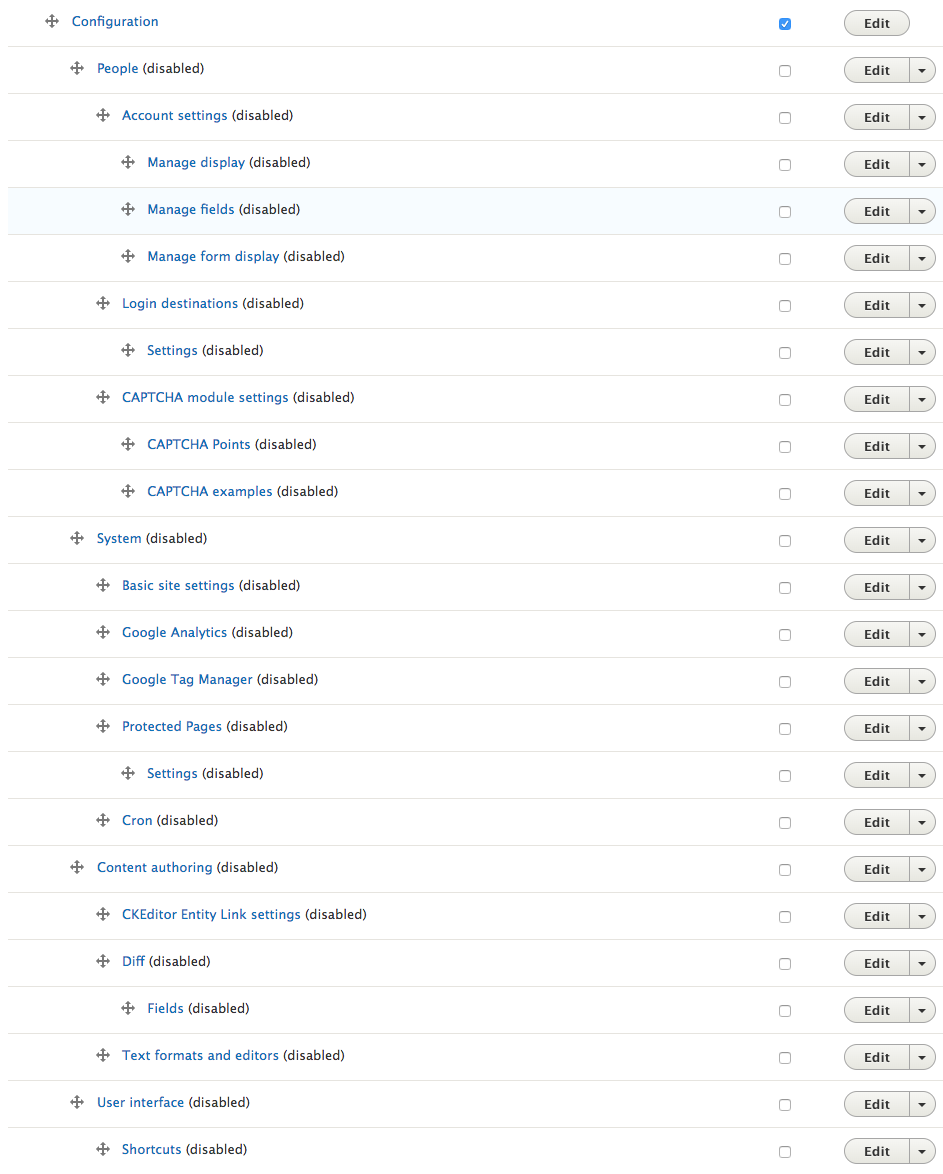
mjchadwickI think I'm experiencing this same issue on Drupal 8.4.x. Somewhere along the line, nearly 75% of the admin links got "disabled". If I go into Structure->Menus->Administration, I see a bunch of "Enabled" checkboxes that are not checked.
Unfortunately, checking their boxes (which requires some minor Javascript to efficiently check all those checkboxes since there is no "check all") and saving the menu doesn't do anything (they revert back).
However, if I click on the operations button and choose "Reset", it fixes it and it becomes enabled and reappears on the admin toolbar above. I'd like to avoid resetting hundreds of links, but don't any other way to do it.
Ideas?